
PrestaShop Odoo Connector for
Automated Data Sync
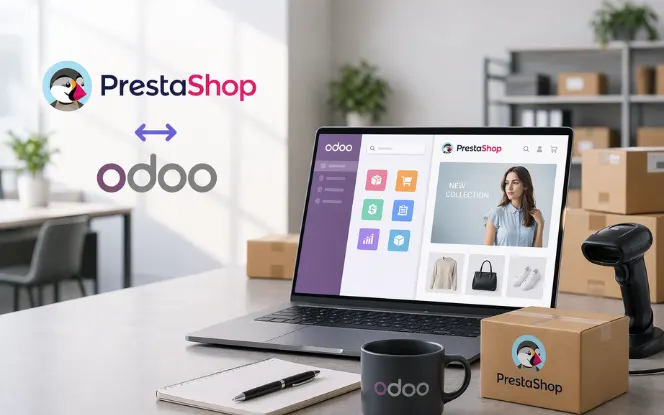
Connect PrestaShop and Odoo with a two-way connector that keeps products, orders, customers, inventory, and store data aligned across ecommerce and ERP workflows.
- Two-Way Product, Order, and Customer Sync
- Automated Cron Sync with Custom Field Mapping
- Live Dashboard, Reports, and Sync Visibility
Data Areas
Bi-Directional
Cron Sync
Dashboard
Built for Reliable PrestaShop and Odoo Data Sync
Keep key ecommerce and ERP records aligned with configurable sync, dashboard visibility, and broader operational coverage.
Book a Free ConsultationTwo-Way Integration
Sync data between PrestaShop and Odoo based on your workflow needs—push or pull, automatic or manual control.
15+ Record Types Synced
Cover products, orders, customers, categories, taxes, inventory, carriers, discounts, and more—not just basic imports.
Auto Sync Scheduling
Run recurring sync jobs through cron to reduce manual effort. Set it once and let the system handle it automatically.
Operational Visibility
Use dashboard and sync reports to track activity, identify issues, and review data flow in real time.
When PrestaShop and Odoo are Disconnected, Teams Spend More Time Fixing Data
Manual updates create delays, stock mismatches, and order handling issues. Teams lose time because records stop matching across systems.
Get a Free ConsultationStock mismatches between store and ERP
Customers place orders for products shown as in stock, but inventory counts do not match Odoo backend.
Repeated manual product updates
Price, stock, and catalog changes take longer because teams update records in multiple places.
Slower order handling
Orders reach Odoo late, which slows fulfillment and reduces response speed for customers.
Customer data inconsistency
Support teams see different customer details across systems and cannot rely on the same records.
Limited sync visibility
Without proper reporting, teams cannot quickly see what synced, what failed, or what needs attention.
Extra pressure during promotions and scale
Manual sync becomes harder to manage during busy periods, product launches, and sales events.
A Practical PrestaShop Odoo Integration for Daily Operations
Real-time synchronization helps reduce manual work, improve inventory accuracy, and give teams better visibility inside Odoo.
Request DemoProducts & Variants
Keep product names, SKUs, variants, prices, and availability aligned between PrestaShop and Odoo. As a result, product data stays consistent.
Customers & Addresses
Update customer profiles, billing details, and shipping addresses. This helps reduce duplicate records and manual corrections.
Orders & Invoices
Move PrestaShop orders and invoice details into Odoo. Therefore, fulfilment and accounting teams can work faster.
Categories & Brands
Organize product categories and brand data automatically across ecommerce and ERP. As a result, store structure stays cleaner.
Inventory Levels
Update stock levels between PrestaShop and Odoo. This helps reduce overselling and improve stock accuracy.
Carriers & Taxes
Manage shipping carriers, tax rules, and charges. Therefore, checkout, invoicing, and order processing stay more accurate.
Discounts & Features
Maintain discount rules, promotions, and feature values across both systems. As a result, offers stay consistent.
Dashboard & Reports
Track sync activity, failed updates, and ecommerce ERP data from one reporting view. This helps teams find issues faster.
Explore PrestaShop Odoo Connector Workflows
Manage products, files, inventory, invoices, customers, orders, shipping, suppliers, mapping, and sync visibility from one connected Odoo workflow.
Product Features Sync
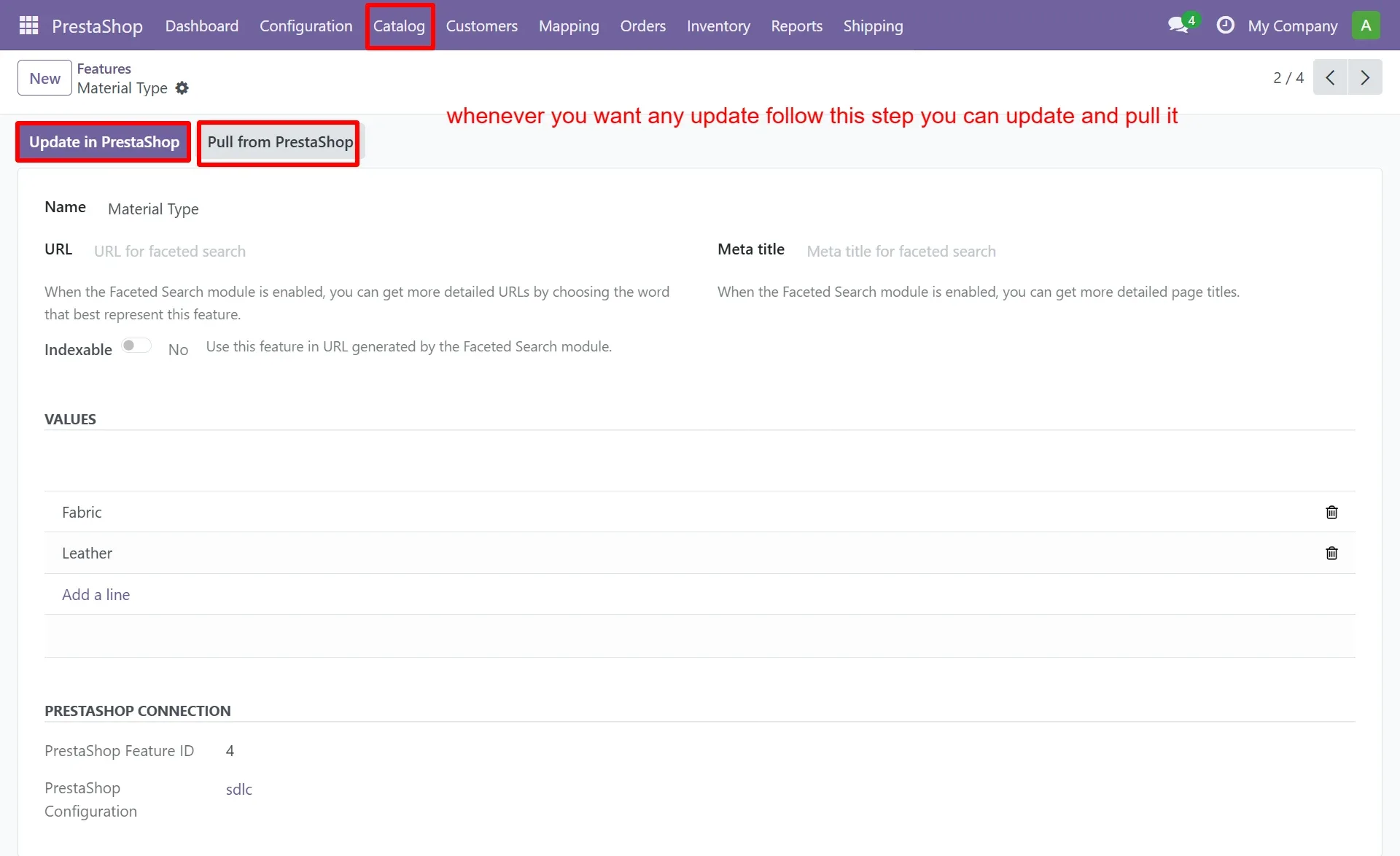
Manage PrestaShop product features from Odoo and keep catalog attributes aligned with update, pull, and create actions.
- Create new feature records directly from Odoo
- Update features to PrestaShop or pull latest changes
- Manage values and faceted search related fields
File Management
Create, upload, and sync file records from Odoo for better control over connected store assets.
- Add new files from the Odoo side
- Upload and create files in PrestaShop quickly
- Pull or update file records when changes are needed
Inventory Sync
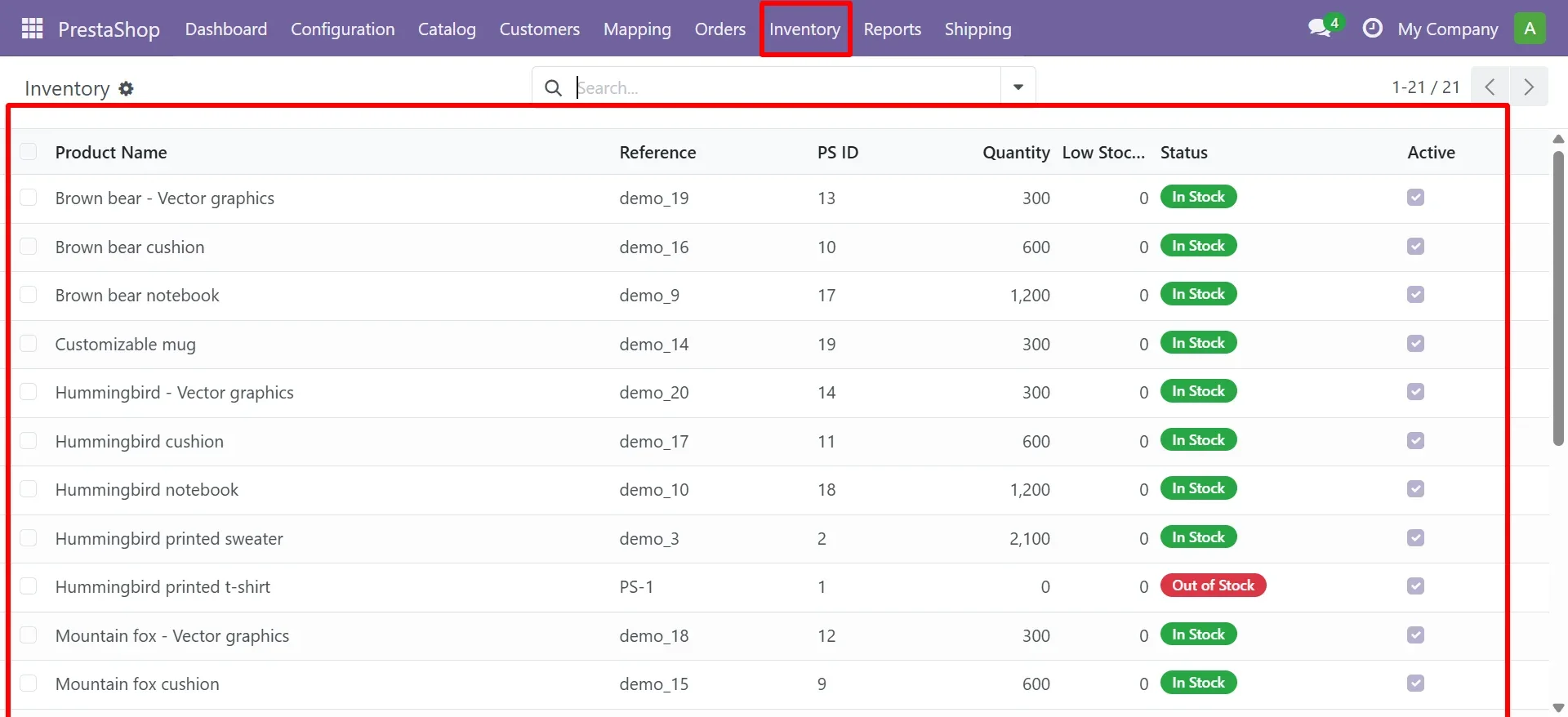
Track stock quantity, product status, and inventory visibility from one connected backend view.
- Review quantity and stock status product wise
- Identify in-stock and out-of-stock items faster
- Support more accurate inventory operations
Invoice Generation
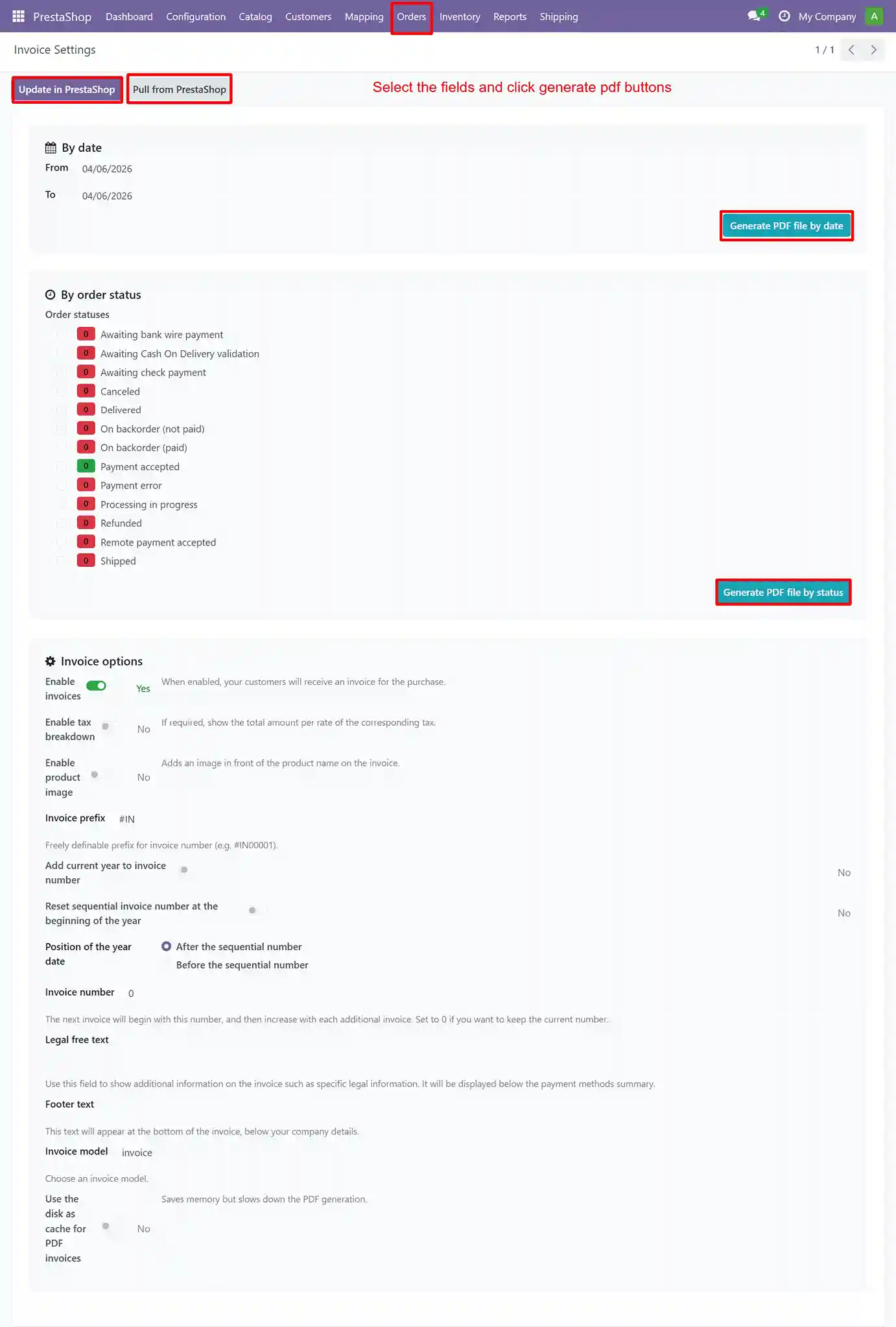
Generate invoice PDFs by date or order status with settings that support routine finance workflows.
- Generate invoices inside Odoo directly from synced PrestaShop orders
- Filter orders by status before creating invoices to ensure accurate billing
- Auto-fill customer, product, tax, and total details from order data
- Download invoices as PDF and export for accounting, audits, and reporting
Product Mapping
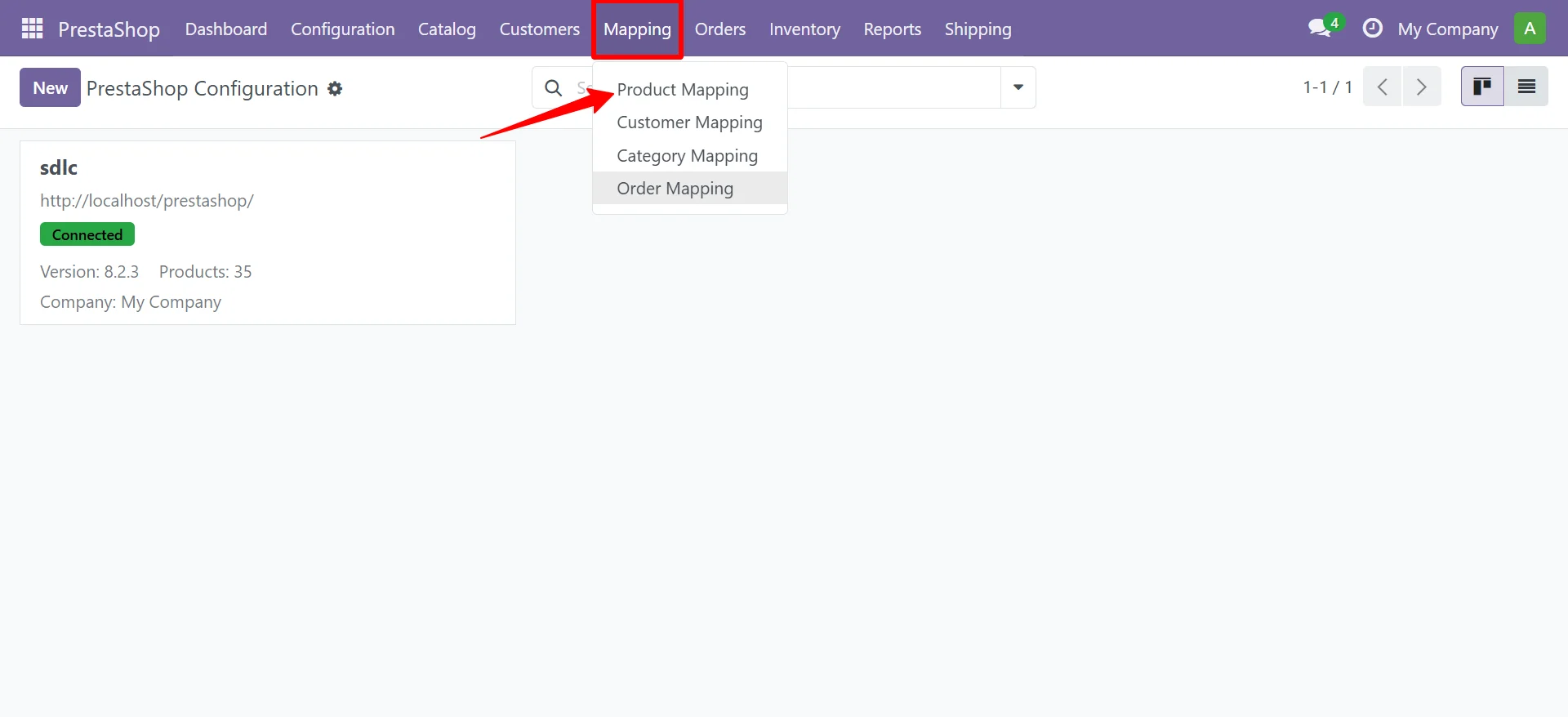
Map PrestaShop and Odoo product fields in a structured way to support cleaner sync behavior.
- Map product fields between PrestaShop and Odoo to keep data aligned across both systems
- Connect key fields like product name, SKU/reference, price, category, and stock status
- Support mapping for attributes and product variants to ensure accurate product structure
- Control how data is created or updated to reduce mismatches and sync errors
Order Management

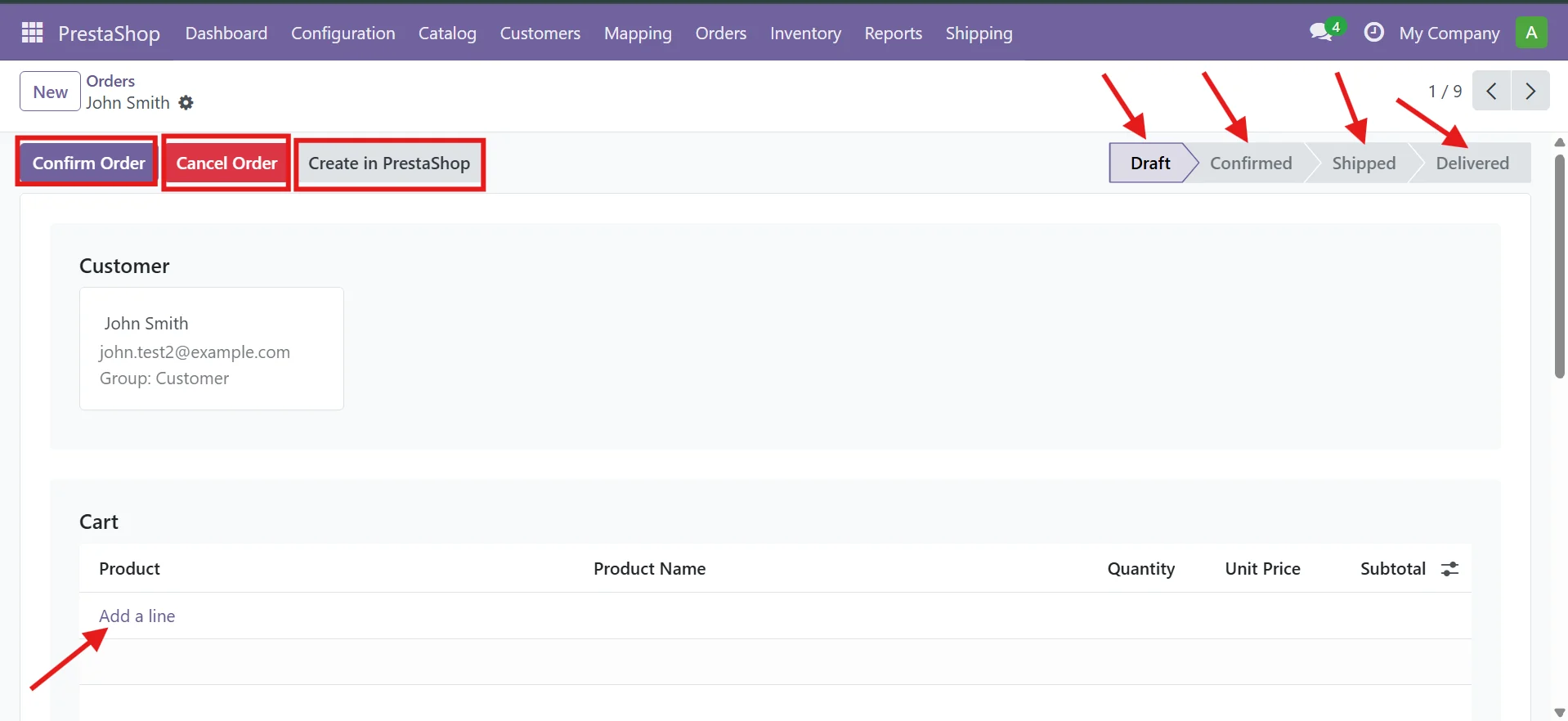
Manage order records, status flow, and connected actions from draft through delivery inside Odoo.
- Import PrestaShop orders into Odoo for centralized order handling
- Manage order stages such as draft, confirmed, shipped and delivered
- Push order status updates from Odoo back to PrestaShop
- Reduce manual order entry, repeated updates and fulfillment errors
Customer Management
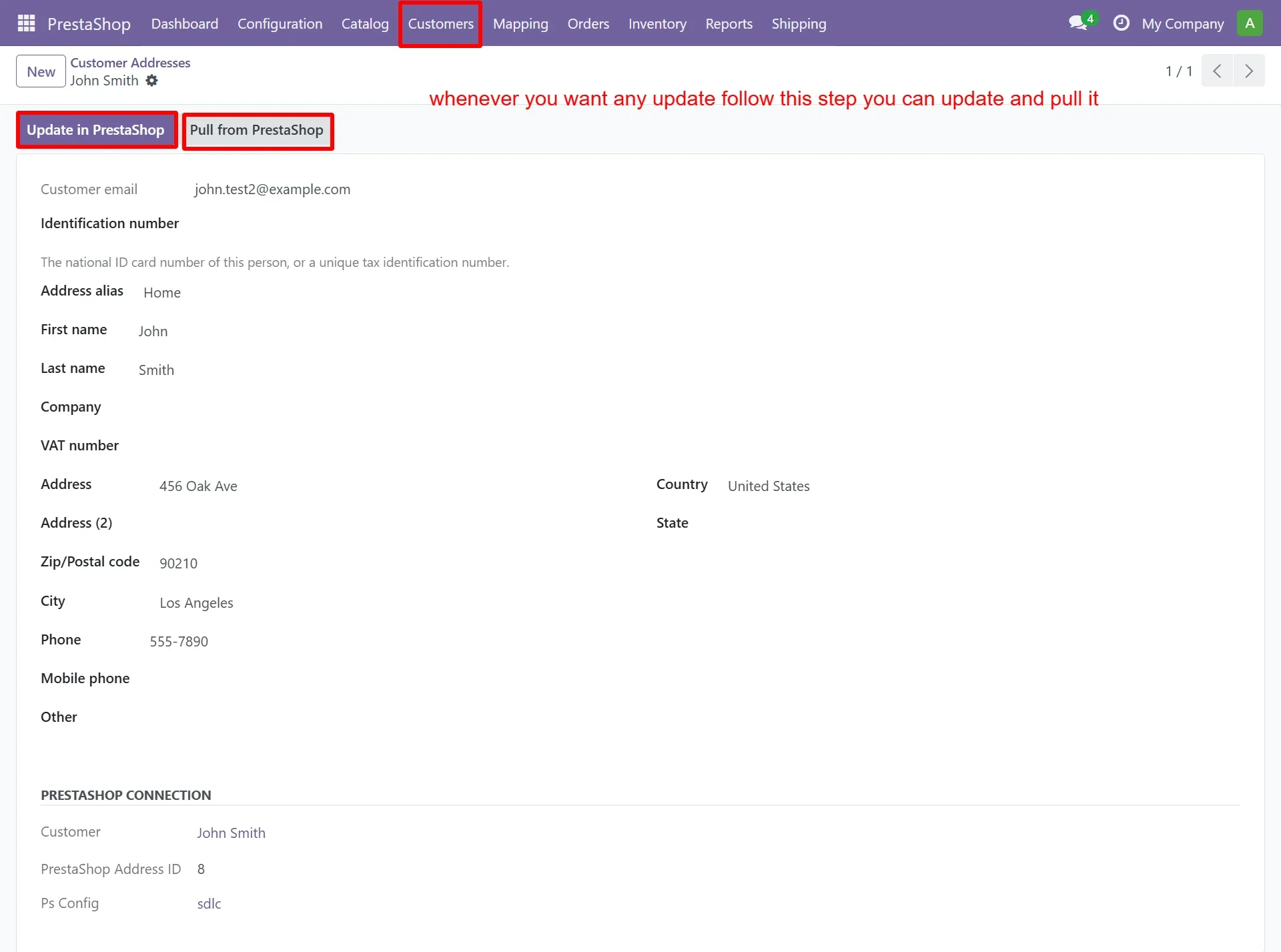
Manage customer records, addresses, and connected details from one unified backend workflow.
- Create customer and customer address records easily
- Keep customer details more aligned between both systems
- Update or pull records whenever changes are required
Shipping Carriers
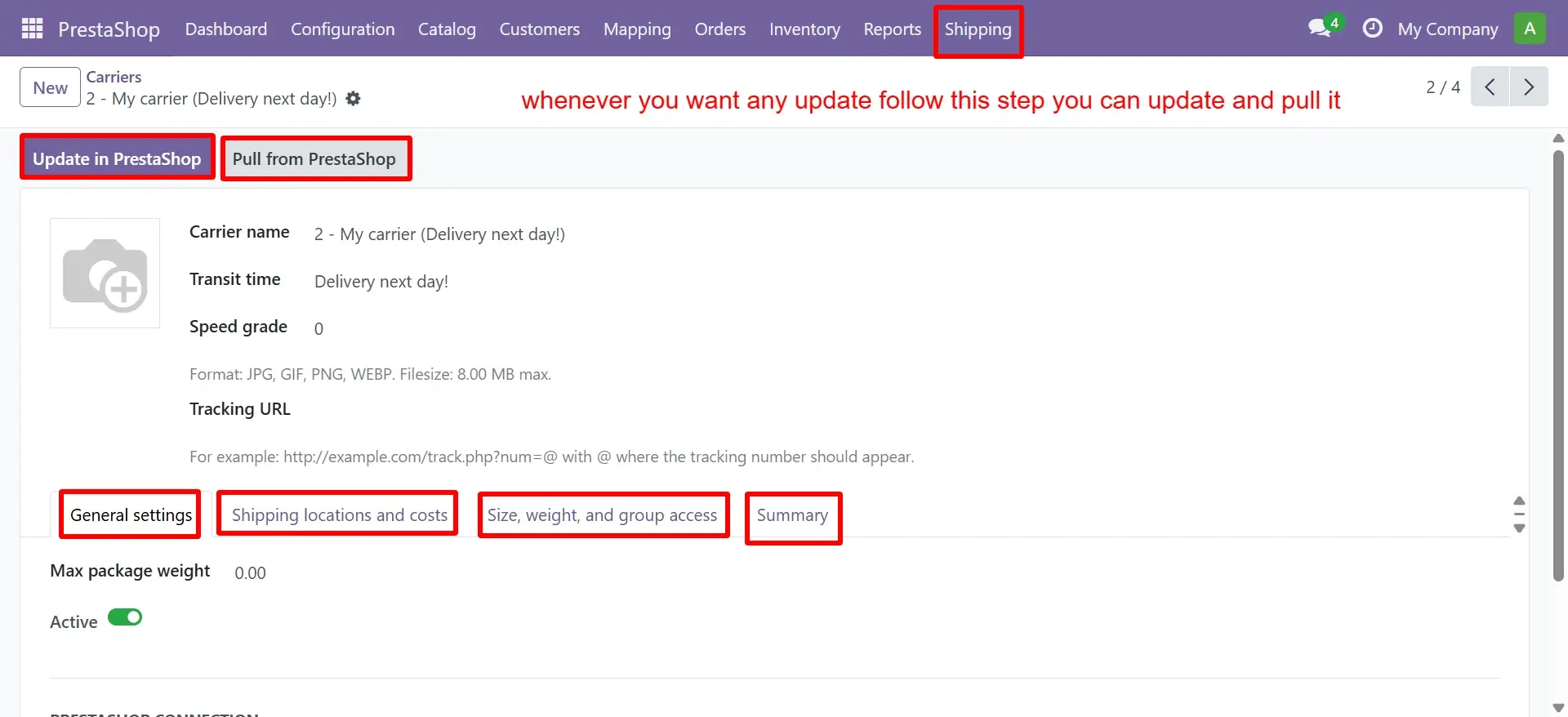
Manage carrier records, shipping preferences, transit settings, and delivery-related actions from Odoo.
- Sync carrier names, delivery methods, and transit details between PrestaShop and Odoo.
- Manage shipping locations, zones, and delivery preferences from Odoo.
- Sync cost, weight, grade, and package rules for accurate shipping setup.
- Add tracking URLs and update carrier data to keep delivery records aligned.
Supplier Management
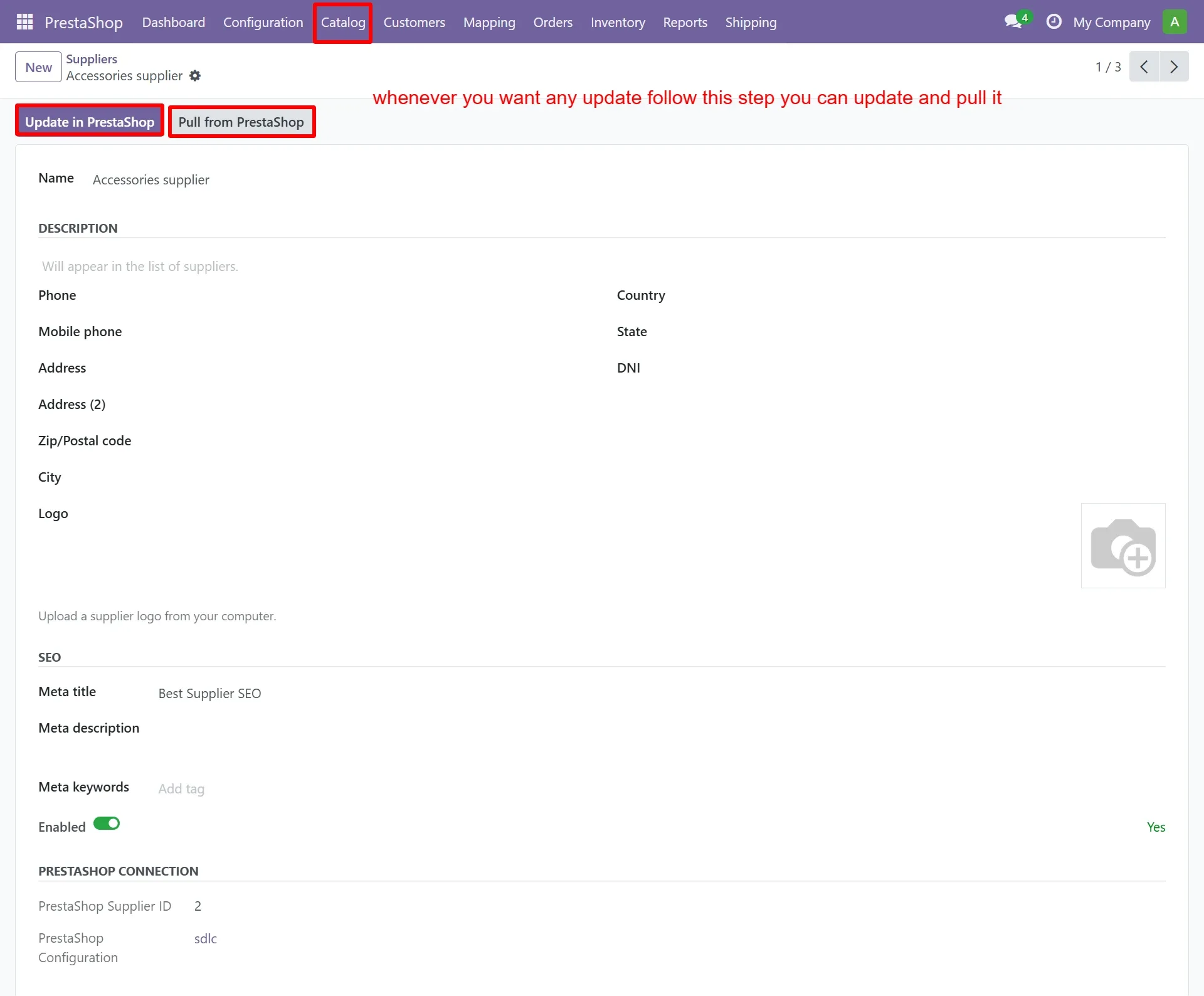
Create and manage supplier records with business details, SEO fields, and PrestaShop connection data.
- Manage supplier names, contact details, and address records inside Odoo.
- Sync SEO fields such as meta title, meta description, and meta keywords.
- Store PrestaShop supplier ID to keep supplier records correctly linked.
- Track connection status and update or pull supplier data when needed.
Sync Reports
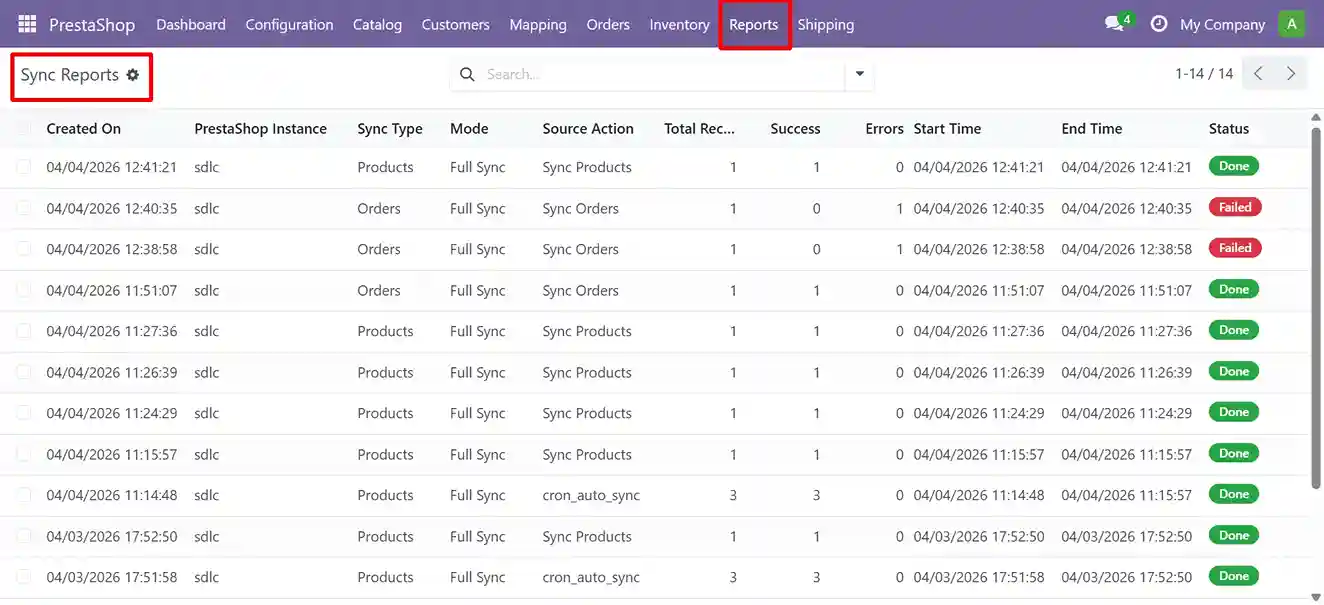
Track sync history, processed records, status, timing, errors, and successful actions from one report table.
- Review product and order sync activity clearly
- Check success, failed records, and errors faster
- Improve operational visibility for sync monitoring

Key Features of the PrestaShop Odoo Connector for Daily Operations
The PrestaShop Odoo Connector helps businesses run ecommerce and ERP workflows with fewer manual updates, cleaner records, and better operational control.
Explore the ConnectorTwo-Way Sync
Sync products, orders, customers, inventory, and other records between PrestaShop and Odoo based on your workflow.
15+ Supported Data Areas
Manage product, order, invoice, customer, supplier, shipping, tax, category, and inventory records from one connected setup.
Cron-Based Automation
Run scheduled automatic syncs daily, weekly, or monthly to reduce manual updates and missed records.
Custom Field Mapping
Map product, customer, order, category, and variant fields to keep data consistent across both systems.
Dashboard and Reports
Review synced records, failed updates, sync logs, and activity reports to identify issues faster.
Multi-Instance Support
Connect and manage multiple PrestaShop stores with Odoo while keeping store data organized.
Benefits of Using PrestaShop Odoo Integration for Operations
This connector helps teams reduce manual data handling, improve sync accuracy, and manage PrestaShop operations with better control inside Odoo.
Reduce Manual Work
Cut repeated imports, exports, and record checks across products, orders, and customers.
Improve Data Consistency
Keep inventory, customer, product, and order data synchronized between PrestaShop and Odoo to reduce mismatches.
Manage Stores More Efficiently
Handle catalog, pricing, and category updates with less rework.
Support Multi-Store Workflows
Manage one or more PrestaShop stores from a more centralized setup.
Get Better Sync Visibility
Track activity through dashboard views and sync reports.
Scale With More Control
Support larger catalogs and growing store activity without relying on manual updates.
Compatible with All Major Odoo Versions
Fully tested and supported across Odoo 16, 17, 18 and 19 for both Community and Enterprise editions, including multi-company and multi-currency environments.
| Odoo Version | Community Edition | Enterprise Edition | Multi-Company | Multi-Currency |
|---|---|---|---|---|
| Odoo 16 | Supported | Supported | Yes | Yes |
| Odoo 17 | Supported | Supported | Yes | Yes |
| Odoo 18 | Supported | Supported | Yes | Yes |
| Odoo 19 | Supported | Supported | Yes | Yes |
How the PrestaShop Odoo Connector Works
Set up the connector in a clear step-by-step flow, from store connection and mapping to automated sync and activity tracking inside Odoo.
Talk to an ExpertConnect the Store Instance
Add your PrestaShop store in Odoo and establish the connection needed for data exchange.
Configure Mapping Rules
Define how product, customer, order, and inventory fields should map between both systems.
Select Data for Sync
Choose the records you want to sync, including products, orders, categories, taxes, and customers.
Run and Automate Sync
Start with manual sync, then schedule cron jobs for routine and repeatable updates.
Track Sync Activity
Review logs, dashboard activity, and synced records to monitor data flow more clearly.
Free Lifetime Support for Your PrestaShop Odoo Connector
Every installation includes lifetime connector support, version compatibility updates, technical help, and setup guidance for smoother PrestaShop Odoo operations.
Ask for DemoFree Bug Fixes
Fix connector issues, sync errors, and performance problems for the lifetime of your installation.
Version Compatibility Updates
Get updates for Odoo versions, including support for major upgrades and API changes.
Technical Support Access
Reach our Odoo experts via email, phone, or WhatsApp with defined response support.
Installation & Setup Help
Get assistance with installation, configuration, and resolving initial integration issues.
Frequently Asked Questions
Common questions about PrestaShop Odoo Connector features, sync flow, automation, custom mapping, and multi-store support.
The connector syncs key ecommerce and ERP records such as products, variants, customers, addresses, orders, invoices, inventory levels, categories, brands, carriers, taxes, discounts, and feature values. This helps teams keep PrestaShop storefront data and Odoo backend records aligned without repeated manual updates.
Yes. The connector can support two-way data movement between PrestaShop and Odoo based on your workflow setup. For example, product and inventory updates can move from Odoo to PrestaShop, while orders and customer details can move from PrestaShop into Odoo for fulfilment, invoicing, and backend processing.
Yes. The connector can support multi-instance or multi-store environments where businesses manage more than one PrestaShop store. This is useful for brands handling different regions, product lines, or storefronts while using Odoo as the central ERP for inventory, orders, and reporting.
Yes. Sync jobs can be automated through scheduled automatic sync operations. This helps teams update products, stock, orders, and other records at defined intervals without starting every sync manually. It also supports smoother daily operations during busy sales periods.
Yes. Custom field mapping can be configured for business-specific requirements. This helps when your PrestaShop store or Odoo setup uses custom product attributes, order fields, customer details, pricing rules, or workflow data that must move correctly between both systems.
Yes. Dashboard and reporting views help teams monitor sync activity, failed updates, and record movement between PrestaShop and Odoo. This makes it easier to identify issues, review sync status, and take action before small data errors affect orders, stock, or customer records.
This connector is best suited for ecommerce businesses using PrestaShop for online selling and Odoo for ERP operations. It is helpful for teams that want cleaner inventory control, faster order processing, fewer manual updates, better customer data accuracy, and stronger visibility across store and backend workflows.
- Contact Us
Let’s Talk About Your Product
Share your PrestaShop Odoo integration needs, sync requirements, store setup, and ERP workflow goals with our team.
What happens next?
- We review your requirements
- Strategy call with experts
- Clear roadmap & estimate
- NDA Protected
- Enterprise Grade Delivery
- Global Clients




