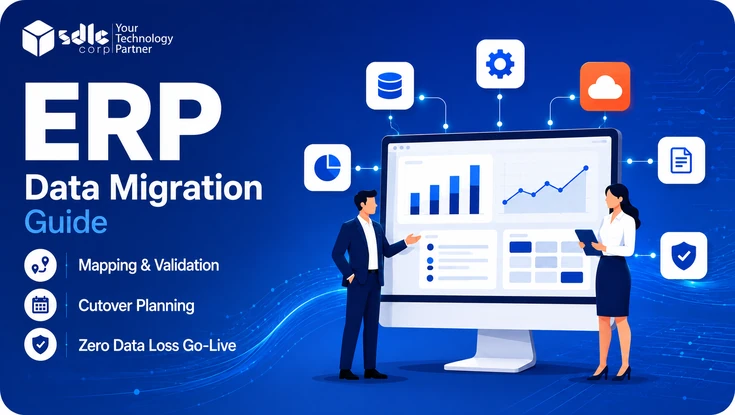
ERP data migration is the controlled process of moving business data from legacy systems into a new ERP and proving that the information still works under the new system's rules.
The transfer itself is rarely the hardest part. Problems usually appear in duplicate records, undocumented business rules, inconsistent formats, incomplete fields, old integrations, and transactions that are still in progress.
This guide covers the full journey: deciding what to move, assigning ownership, profiling and cleaning data, mapping fields, loading and validating records, defining acceptance criteria, planning cutover, and monitoring the new ERP after go-live.
- Most ERP data migrations run 4 to 30 weeks and $15,000 to $350,000, depending on source complexity.
- Decide what to migrate, archive, or retire before detailed mapping begins.
- Assign a named business owner to every important data domain.
- Profile and clean source data before production loading.
- Document mapping and transformation rules so they can be repeated and tested.
- Validate record completeness, control totals, relationships, integrations, and real business workflows.
- Define acceptance criteria, go/no-go rules, backup procedures, and rollback conditions before cutover.
- Protect migration extracts because they may contain sensitive financial, employee, customer, and supplier data.
What Is ERP Data Migration?
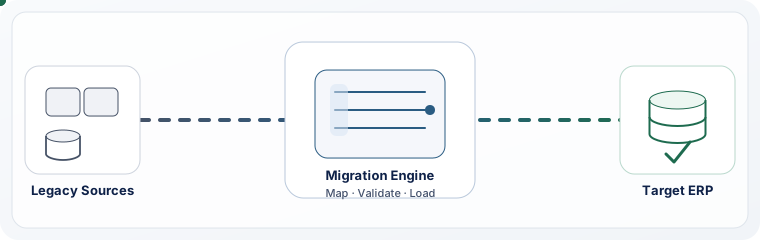
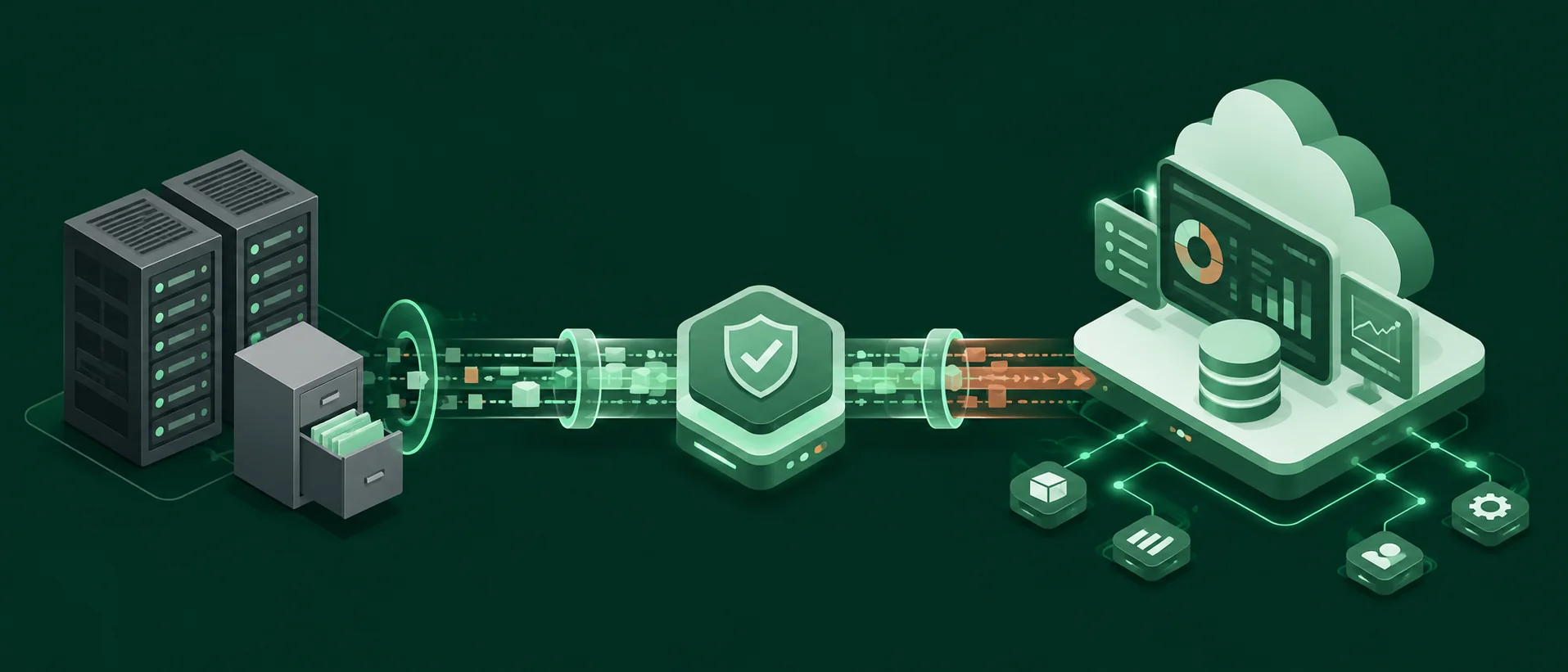
ERP data migration is the process of extracting business data from existing systems, cleaning and transforming it, loading it into a new ERP, and validating that the migrated information is complete, accurate, and usable.
Legacy and target systems rarely organize information in exactly the same way. Field names can change, code lists may differ, account structures can be redesigned, and required fields in the new ERP may not exist in the old system.
A migration therefore has to preserve more than records. It has to preserve the business meaning behind those records. For organizations replacing aging platforms, this work often sits alongside enterprise software development company so data rules, application changes, and target architecture decisions stay aligned.
Organizations replacing or modernizing an ERP can manage data migration within a broader ERP implementation plan so configuration, integrations, testing, user readiness, and cutover stay aligned.
The Four Main Types of ERP Data
| Data type | Examples | Main migration challenge |
|---|---|---|
| Master data | Customers, suppliers, products, employees, chart of accounts | Duplicates, missing fields, inconsistent naming and codes |
| Open transactions | Purchase orders, sales orders, work orders, unpaid invoices | Preserving transaction state and business logic |
| Balances | General ledger, AR, AP, inventory quantities and values | Financial and operational reconciliation |
| Historical data | Closed orders, old invoices, completed transactions | Retention, reporting access, and volume |
Scroll table →
Open transactions need particular care because they can be partway through a business process. A partially received purchase order, for example, cannot be treated like a new order. Balances need defined reconciliation controls, while historical records need a deliberate retention decision.
Decide What to Migrate, Archive, or Retire
One of the most important scope decisions is determining how much legacy data should enter the new ERP. Moving unnecessary records increases cleansing, transformation, storage, testing, and reconciliation work, while removing too much history can create reporting, operational, audit, or regulatory problems.
| Decision | Meaning | Typical examples |
|---|---|---|
| Migrate | Data required in the live ERP | Active customers and suppliers, current products, open orders, current inventory, open AR/AP, opening balances |
| Archive | Data retained outside the live ERP for reference | Older invoices, completed transactions, and records needed for reporting, tax, or audit |
| Retire | Records with no operational or retention requirement | Test records, confirmed duplicates, and obsolete records approved for disposal |
Scroll table →
There is no universal number of years of history that every company should migrate. The right retention window depends on operational requirements, reporting needs, tax rules, audit obligations, legal requirements, storage architecture, and how easily archived information can be accessed. For U.S. organizations, the IRS recordkeeping requirements for businesses are a useful primary reference when deciding which financial records must remain available.
Finance, legal, tax, operations, and IT should agree on the scope before detailed field mapping begins.
Establish Clear Data Ownership
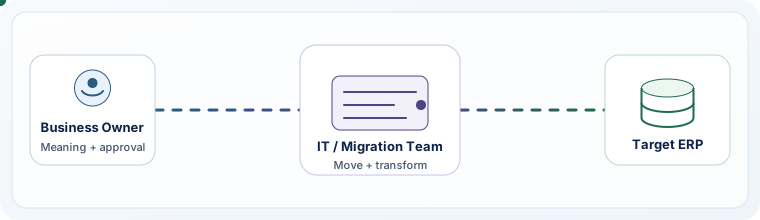
The business owns what the data means. IT or the implementation team owns how it moves.
For every important data domain, assign a named owner who can approve definitions, cleansing decisions, mapping rules, exceptions, and final results.
| Data area | Typical owner | Main responsibilities |
|---|---|---|
| Chart of accounts and balances | Finance | Account structure and financial reconciliation |
| Customers | Sales operations | Duplicates, status, terms, and account rules |
| Suppliers | Procurement | Supplier records, payment terms, and tax information |
| Products and inventory | Supply chain / operations | Item codes, units of measure, and stock information |
| Employees and payroll | HR | Employee information, payroll data, and access requirements |
| Migration pipelines | IT / implementation team | Extraction, transformation, loading, security, and technical controls |
Scroll table →
Frontline users should be involved as well. They often know where documented field definitions differ from day-to-day use, which is exactly where hidden migration rules tend to surface.
ERP Data Migration Process: Step by Step
Data work should begin early enough to run alongside ERP configuration and process design. A practical process has six main stages.
Inventory and Profile the Source Data
Identify every source that contains information required by the new ERP, including legacy ERP databases, CRM platforms, accounting systems, department databases, HR applications, inventory tools, spreadsheets, and custom applications.
For each source, document the data owner, record volume, important fields, known quality problems, dependencies, security requirements, and retention needs. Then profile duplicates, missing required values, invalid codes, obsolete records, broken relationships, unusual values, and conflicts between systems.
Create Field Mapping and Transformation Rules
Mapping defines how each source field will be represented in the target ERP. Record the source field, target field, transformation rule, validation rule, and owner.
Sample source-to-target mapping Source field Target field Transformation rule Owner CUST_NMcustomer_nameTrim spaces and apply target length rules Sales operations PROD_DIM_INproduct_length_cmConvert inches to centimetres Supply chain TERMSpayment_terms_codeMap approved legacy codes to target values Finance STATUScustomer_statusTranslate legacy statuses into target ERP statuses Sales operations Scroll table →
Pay extra attention to fields whose meaning changes between systems, such as customer status, product categories, tax treatment, payment terms, account types, units of measure, currencies, warehouse identifiers, and employee classifications.
Clean and Standardize the Data
Resolve confirmed duplicates, standardize formats, fill required target fields, validate codes, correct broken relationships, identify obsolete records, and reconcile important source balances before extraction.
Document cleansing rules so they can be applied consistently in later migration runs. The objective is not to make every historical record perfect; it is to ensure that data entering the new ERP meets agreed operational and control requirements.
Extract, Transform, and Load
Extract the approved data, transform it according to mapping and cleansing rules, and load it into a non-production environment before production migration.
Load in dependency order so parent records exist before the transactions that reference them. Record source counts, successful loads, rejected records, validation failures, exception reasons, processing time, owners, corrective actions, and retest status for every run.
Non-production loads should run in secure staging and cloud migration environments that are controlled closely enough to make testing meaningful without exposing production data unnecessarily.
Platform-specific migration utilities may also use intermediary storage during import. Microsoft documents staging tables in the Dynamics 365 data management framework for data import and export jobs.
Validate and Reconcile
A technically successful load does not prove that the migration is correct. Validation should answer three questions: are the required records complete, do agreed control totals reconcile, and can users complete the business processes that depend on the migrated data?
Test realistic scenarios such as receiving against an open purchase order, shipping an existing order, applying payments, updating inventory, running financial reports, and completing period-end activities.
Plan and Execute Cutover
Confirm responsibilities, freeze or restrict legacy transactions as planned, take the required backup or recovery point, extract the final data and approved delta changes, run the production load, reconcile critical data, validate integrations and workflows, review exceptions, obtain sign-off, and make the go/no-go decision.
The cutover plan should also define rollback triggers, decision owners, recovery steps, treatment of transactions created during the cutover window, and user communications.
Protect Data During Migration
Migration can create temporary copies of sensitive information outside normal production controls. Exports may contain customer details, supplier banking information, employee records, financial transactions, payroll information, or commercially sensitive data.
- Encrypt migration data in transit and at rest.
- Use role-based access and least-privilege permissions.
- Use controlled test and staging environments.
- Log access and migration activity.
- Define backup and recovery procedures.
- Set retention periods for temporary migration files.
- Securely delete temporary files when they are no longer required.
When temporary migration storage or media is retired, the NIST SP 800-88 media sanitization guidelines provide a recognized reference for clearing, purging, and disposing of data-bearing media.
Security requirements should be agreed before full-volume migration begins, not added immediately before go-live.
Define ERP Migration Acceptance Criteria
A migration should not be declared successful simply because an import job finished without errors. Define measurable acceptance criteria before the final cutover.
| Area | Example acceptance criterion |
|---|---|
| Completeness | Required records within the approved migration scope are loaded |
| Data quality | Critical validation errors are resolved or formally accepted |
| Financial reconciliation | Control totals reconcile within approved tolerances |
| Relationships | Required links between customers, products, orders, and transactions are intact |
| Business testing | Critical end-to-end workflows pass user acceptance testing |
| Integrations | Required inbound and outbound interfaces operate correctly |
| Security | Access and migration controls meet approved requirements |
| Cutover timing | The final migration can complete within the approved business window |
| Exceptions | Remaining exceptions have owners, impact assessments, and agreed actions |
| Sign-off | Required business and technical owners approve go-live |
Scroll table →
These criteria make the go/no-go decision more objective because the team knows what must be true before production release.
Big Bang, Phased, or Parallel ERP Migration?
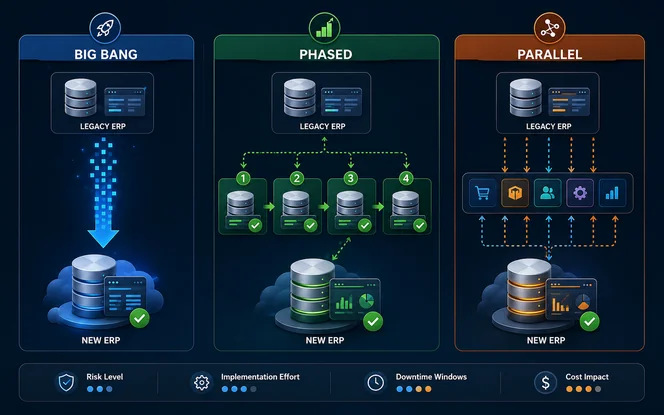
The right migration approach depends on business complexity, risk tolerance, ERP architecture, locations, integrations, and operational constraints.
Few locations, simpler dependencies, strong rehearsal, and a controlled cutover window.
The transition is fast, but rollback pressure and go-live risk are concentrated into one event.
Business units, geographies, modules, or processes can move in logical groups.
Risk is distributed across waves, but mixed-system operations and interim integrations may last longer.
Operational continuity is critical and the organization can support duplicate processing for a period.
It offers the strongest fallback, but requires more coordination, reconciliation, and user effort.
There is no universally safest model. The best approach is the one that matches the organization's dependencies, resources, operational constraints, and tolerance for transition risk. That decision is easier to make after ERP fit-gap analysis and roadmap planning has clarified process gaps, dependencies, and rollout priorities.
What Determines ERP Data Migration Timeline and Cost?
Most ERP data migrations run between 4 and 30 weeks and cost between $15,000 and $350,000, measured as the data-migration workstream rather than the full ERP program. Where a project lands inside that range depends on the condition of the source environment and the amount of transformation, testing, and business validation required. The size bands below give a starting estimate; the nine drivers that follow explain what moves a project up or down.
| Project profile | Typical migration timeline | Typical migration cost |
|---|---|---|
| Small1–2 source systems, single entity, limited history, few integrations | 4–8 weeks | $15,000–$40,000 |
| Mid-market3–5 source systems, several modules, 1–3 legal entities | 8–16 weeks | $40,000–$120,000 |
| Large5+ source systems, multi-country, heavy integration landscape | 16–30 weeks | $120,000–$350,000 |
| Complex / regulatedMany entities, strict audit requirements, tight downtime limits | 30+ weeks | $350,000+ |
Scroll table →
Ranges cover the data-migration workstream only — discovery, profiling, mapping, cleansing, load automation, reconciliation, and cutover rehearsal. Licence fees, ERP configuration, custom development, and change management sit outside these figures.
Number of source systems
ImpactMore sources create additional extraction, mapping, and reconciliation work.
+1–3 weeks per additional source · each system needs its own extraction, field mapping, and reconciliation pass
Data quality
ImpactDuplicates, gaps, and inconsistent values require remediation.
+2–6 weeks when profiling shows heavy defects · above roughly 10% duplicate or incomplete master records, cleansing becomes its own workstream
Historical-data scope
ImpactLarger scope increases processing and validation effort.
+1–2 weeks per extra year loaded into the live ERP · archiving instead of migrating usually removes most of this cost
Entities and countries
ImpactAccounting, tax, currency, and localization rules increase complexity.
+2–4 weeks per additional legal entity · separate chart of accounts, tax codes, and currency handling each need their own validation
Open transactions
ImpactIn-progress records require careful lifecycle mapping.
+1–3 weeks for partially fulfilled documents · part-received POs and part-shipped orders need state-by-state mapping rules
Integrations
ImpactConnected applications must be tested with migrated data.
+3–8 days per critical interface · covers field alignment, test data, and end-to-end verification with migrated records
Testing and remediation
ImpactIssues found in testing need correction and revalidation.
Typically 30–40% of total migration effort · the most frequently underestimated line in a migration budget
Business availability
ImpactOwners and users need time to review mappings and workflows.
Adds calendar time rather than effort · slow mapping approvals commonly stretch a schedule by 2–4 weeks without changing cost
Cutover constraints
ImpactShort downtime windows can require additional automation and rehearsal.
+1–2 extra rehearsal cycles below a 24-hour window · each full rehearsal typically consumes 3–5 days of team time
ERP Data Migration Best Practices
These practices reduce avoidable rework and make migration readiness easier to judge. Treat them as operating rules for the project rather than a checklist to complete at the end.
Start Data Work Early
Begin discovery while processes and configuration are still being designed so quality problems are not pushed into the final weeks.
Reduce Unnecessary Scope
Separate operational requirements from historical reference needs before mapping and transformation work expands.
Document Transformation Rules
Record mapping, cleansing, conversion, defaulting, and exception rules so results stay repeatable across runs.
Validate Target Rules Before Loading
Check required fields, lengths, allowed values, unique identifiers, tax codes, accounts, units, and relationships before import.
Test Realistic Volumes
Use small samples early, then move to realistic volumes to expose performance, dependency, and edge-case problems.
Test Business Processes
Have users complete workflows that depend on migrated records instead of relying only on technical load results.
Rehearse Cutover
Confirm sequence, processing time, validation duration, responsibilities, communications, integration dependencies, and decision points.
Prepare Post-Go-Live Support
Set escalation paths, issue severity levels, owners, and response procedures before users enter production.
Common ERP Data Migration Problems
Most migration failures come from a small group of recurring issues. The goal is to catch each one early enough that it becomes a controlled fix instead of a cutover problem.
Poor Source-Data Quality
Duplicate or incomplete information enters the new ERP.
Weak Field Mapping
Values are lost or interpreted incorrectly.
Format Mismatches
Dates, currencies, or units are transformed incorrectly.
Broken Relationships
Orders cannot find customers, products, or accounts.
Missing Reconciliation
The organization cannot prove that critical data is complete.
Integration Failures
Connected applications stop exchanging information correctly.
Excessive Migration Scope
Testing and validation become unnecessarily difficult.
Weak Cutover Planning
A migration issue becomes an extended business interruption.
ERP Data Migration Tools
Migration tools can automate parts of extraction, transformation, loading, data-quality checking, and reconciliation. They do not replace business ownership or validation.
| Migration need | Tool category | Examples |
|---|---|---|
| Mapping and transformation | ETL / data integration | Informatica, Talend, SAP Data Services |
| Data quality | Data-quality platforms | Ataccama, IBM InfoSphere QualityStage |
| Automation | Integration and workflow platforms | Microsoft SSIS, Boomi |
| Validation | Data-testing platforms | QuerySurge, Datagaps ETL Validator |
| Application integration | Integration platforms | MuleSoft, Boomi |
Scroll table →
ERP platforms may also provide native import, mapping, staging, or migration utilities. For SAP environments, the official SAP S/4HANA migration cockpit documentation is a primary reference for supported migration tooling. Native tooling can simplify supported data loads, but it does not remove the need for data cleansing, reconciliation, security controls, or business testing.
Cross-platform moves add another layer of mapping and validation. Teams migrating from SAP, NetSuite, or QuickBooks into a new ERP should plan for source-specific cleanup, field mapping, validation, and cutover work beyond basic import utilities.
If the new ERP must continue exchanging data with CRM, ecommerce, HR, analytics, banking, or other systems after migration, plan those connections as part of the wider software integration strategy.
ERP Data Migration Deliverables
A controlled migration should produce documentation that remains useful throughout testing, cutover, support, and audit review.
- Source-system inventory and approved migration scope
- Data ownership matrix and data-quality assessment
- Field-mapping specification and transformation rules
- Cleansing rules and migration scripts or workflows
- Validation criteria and reconciliation reports
- Exception log and test results
- Cutover plan and rollback / recovery plan
- Business and technical sign-off records
These artifacts create traceability between what the project planned to migrate and what ultimately entered production.
After ERP Go-Live
Go-live does not end migration validation. The first days and weeks should confirm that migrated data continues to support real operations.
- Monitor migration-related errors and failed integrations.
- Track financial reconciliation and inventory discrepancies.
- Watch for repeated manual corrections and user-reported data problems.
- Log critical transaction failures and support ticket trends.
- Record the business impact, root cause, owner, corrective action, and resolution for migration issues.
For ongoing integration or stabilization needs, ERP consulting and integration support can help assess remaining process, data, and interface issues.
ERP Data Migration Checklist
Planning an ERP Data Migration?
Define migration risks, integrations, validation, and cutover with SDLC Corp’s ERP implementation services.
Talk to an ERP ConsultantNGO migration must retain grant restrictions and reconcile opening fund balances within the country rollout. See NGO ERP implementation.
Final Thoughts
ERP data migration succeeds when the new ERP receives the right data, under the right rules, with evidence that the business can continue operating correctly.
A strong migration plan makes scope decisions early, establishes ownership, documents transformation rules, cleans source data, tests realistic volumes, reconciles critical information, validates real workflows, and rehearses cutover before production.
The objective is not simply to complete a data load. It is to enter go-live knowing what was migrated, how it was validated, which exceptions remain, who approved them, and what happens if the final cutover does not meet the agreed criteria.
Frequently Asked Questions
What Is Data Migration In ERP?
ERP data migration is the process of extracting information from legacy systems, cleaning and transforming it, loading it into a new ERP, and validating that the migrated data is complete, accurate, and usable.
What Are The Main Steps In ERP Data Migration?
The main stages are source inventory and profiling, scope definition, field mapping, data cleansing, extract-transform-load, validation and reconciliation, cutover, and post-go-live monitoring.
How Much Does ERP Data Migration Cost?
Small single-entity migrations typically run $15,000 to $40,000 over 4 to 8 weeks, mid-market projects commonly fall between $40,000 and $120,000 over 8 to 16 weeks, and large multi-country programs with many sources and integrations often reach $120,000 to $350,000 over 16 to 30 weeks. The number of source systems, the condition of the source data, and cutover constraints drive most of the variance.
How Long Does ERP Data Migration Take?
Most ERP data migrations take 4 to 30 weeks. Simple single-entity moves can complete in 4 to 8 weeks, while multi-entity programs with many sources, heavy integrations, and tight downtime windows commonly run 16 to 30 weeks or longer. Timeline depends on source-system complexity, data quality, historical-data scope, business rules, integrations, entities, testing requirements, and cutover constraints.
How Much Historical Data Should Be Migrated?
Migrate the history required for operational use and any information that must remain available in the live ERP. Older records can be archived when they are needed only for reference, reporting, tax, legal, or audit purposes. Each additional year loaded into the live ERP typically adds one to two weeks of processing and validation effort.
Who Is Responsible For ERP Data Migration?
Responsibility is shared. Business owners define what data means and approve business rules, while IT or the implementation team manages extraction, transformation, loading, environments, and technical controls.
What Is ERP Data Reconciliation?
ERP data reconciliation compares migrated information with agreed source records and control totals. It can include record counts, financial balances, inventory quantities, transaction values, and other controls needed to demonstrate completeness and accuracy.
What Is The Difference Between ERP Data Migration And ERP Integration?
Migration moves data from existing systems into the new ERP as part of implementation or modernization. Integration creates ongoing connections so the ERP and other applications can continue exchanging information after deployment.