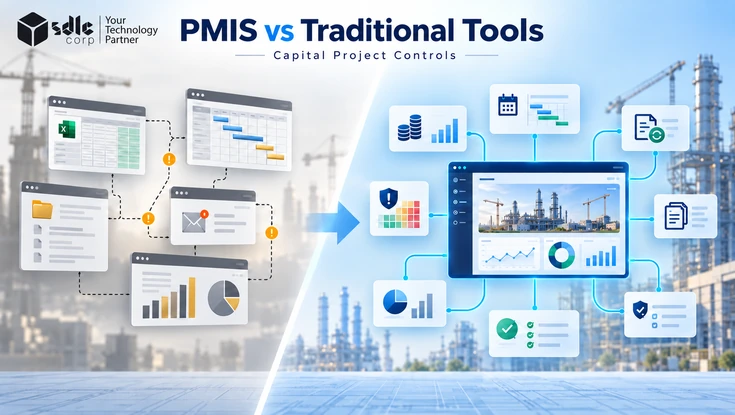
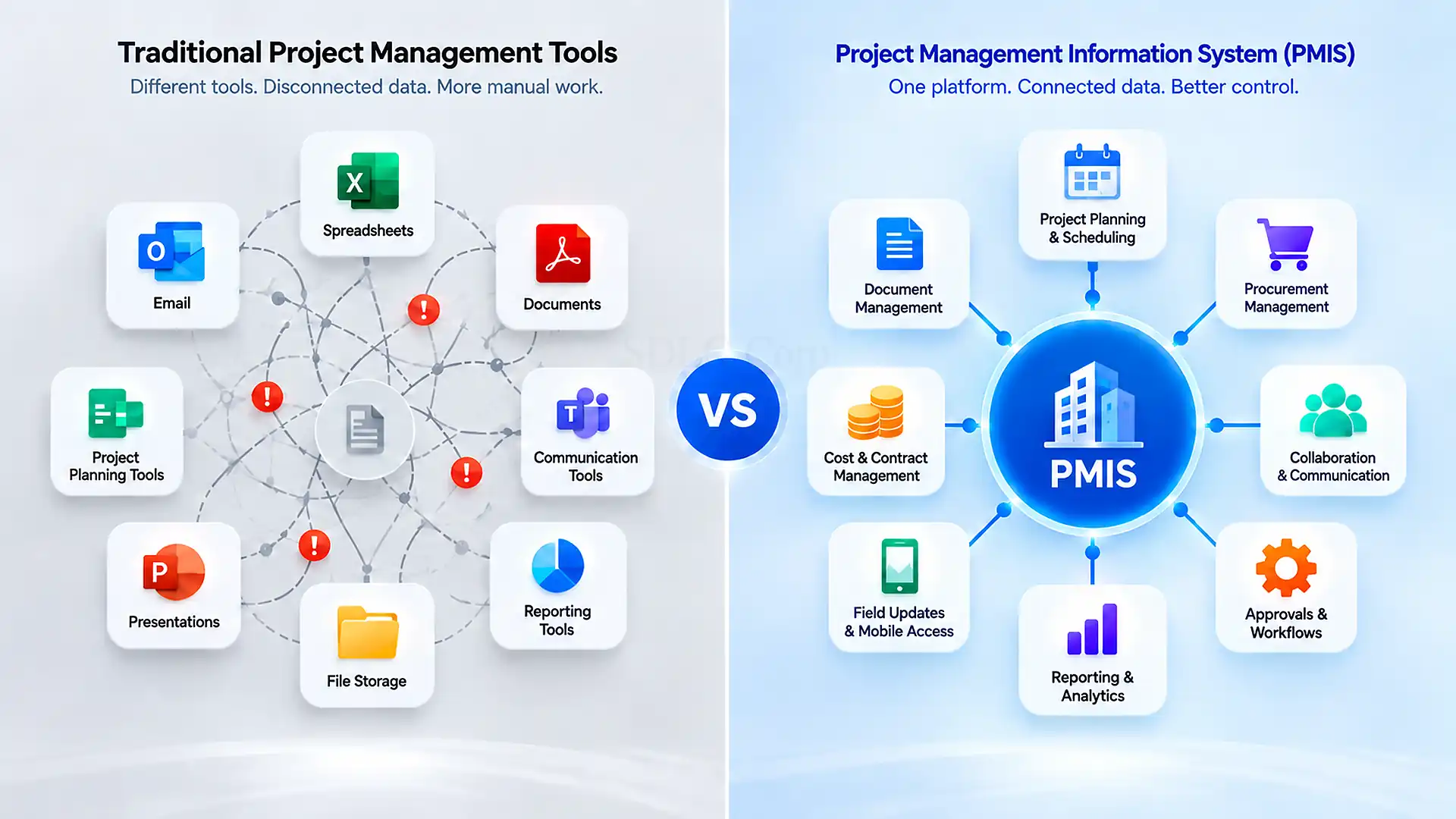
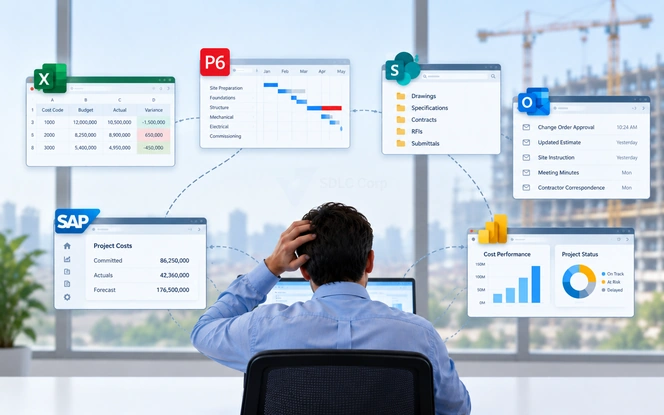
Capital project teams rarely lack software. They usually have too many disconnected tools. Excel tracks budgets and changes. Primavera P6 or Microsoft Project manages the schedule. SharePoint stores documents. Email carries approvals. ERP records financial transactions, while Power BI turns exported data into management reports.
The real question in PMIS vs traditional project management tools is whether that stack still gives the owner one reliable project position. Once cost, schedule, changes, contracts, approvals, and documents require repeated reconciliation, the seams between the tools become a project-control problem.
For this comparison, PMIS means an integrated capital-project Project Management Information System. Traditional tools mean the separate specialist applications, spreadsheets, document repositories, and communication channels used to manage individual functions.
PMIS Vs Traditional Project Management Tools At A Glance
Traditional tools are strongest at individual functions. An integrated PMIS is strongest at connecting and governing those functions.
| Area | Traditional Tool Stack | Integrated PMIS |
|---|---|---|
| Primary Design | Individual functions | Connected project controls |
| Cost And Schedule | Separate specialist systems | Connected or integrated |
| Change Control | Cross-system reconciliation | Governed workflow |
| Portfolio Reporting | Periodic consolidation | Standing portfolio view |
| Audit History | Distributed | Traceable project history |
| Best Fit | Lower coordination complexity | Higher program complexity |
This does not make Primavera, Excel, SharePoint, or BI tools obsolete. It changes their role. When specialist systems remain reliable but the interfaces between them create delays, duplicate entry, or conflicting records, a PMIS provides the governance layer those tools do not provide individually.
What Counts As A Traditional Project Management Tool On A Capital Project
The traditional capital-project stack is a collection of specialist systems, not one generic task-management application.
Spreadsheets And Manual Cost Trackers
Excel remains valuable for budget trackers, change registers, contingency calculations, forecasts, and ad hoc analysis. Its weakness appears when several teams depend on the workbook as a controlled project record. Copies circulate, formulas change, and approval history sits elsewhere. A correct calculation in an outdated workbook still produces the wrong management position.
Scheduling Tools Such As Primavera P6 And Microsoft Project
Primavera P6 and Microsoft Project provide specialist scheduling capabilities including dependencies, milestones, baselines, and critical-path analysis. Problems appear when schedule changes do not reach cost, change, and reporting systems at the same time. The scheduler may hold an accurate schedule while management reporting still reflects the previous position.
Document Repositories Such As SharePoint And Shared Drives
SharePoint and shared drives store drawings, specifications, reports, contracts, and correspondence effectively. Capital-project control requires more than storage. Teams also need to identify which revision was approved, who reviewed it, when its status changed, and which project decision depended on it.
Task And Collaboration Platforms
Task tools work well for responsibilities, deadlines, and internal coordination. A capital-project issue can also affect a contract, cost code, drawing, change request, schedule activity, and approval workflow. Tracking the task without preserving those relationships leaves part of the project-control record elsewhere.
Reporting And BI Layers
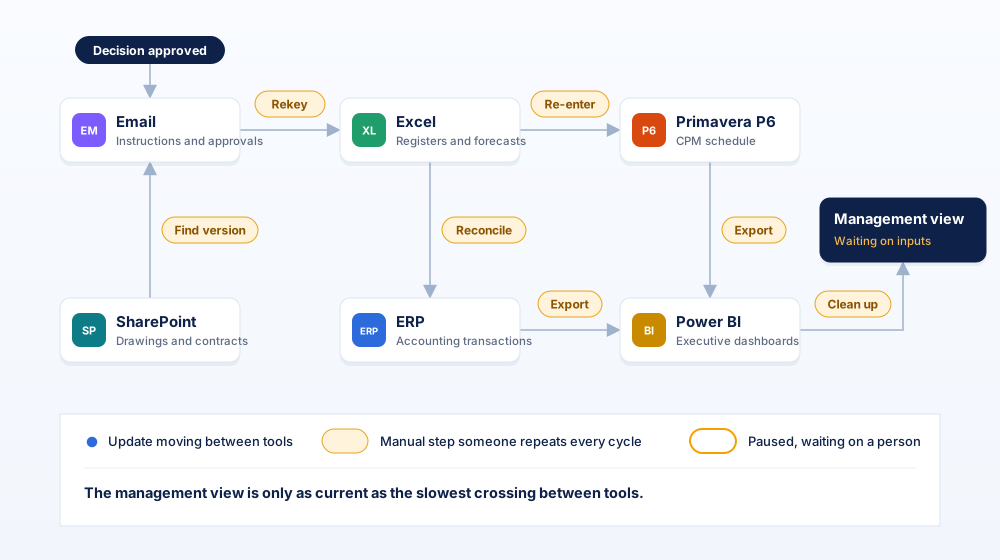
Power BI can provide excellent executive reporting when source data is reliable. It does not remove fragmentation upstream. If several systems must be exported, corrected, and reconciled before every dashboard refresh, reporting remains dependent on manual preparation.
Email And Manual Approval Workflows
Email is convenient for instructions and approvals but weak as a controlled transaction history. A project should be able to identify the approved document, decision, authority, conditions, and date without searching several inboxes.
The tools themselves are not the central problem. The control burden appears at the interfaces between them.
Map The Gaps Before Evaluating Software
Identify where cost, schedule, change, approval, and reporting information requires manual reconciliation before selecting another project platform.
Where Traditional Tools Still Work Well
Traditional tools remain the better economic choice when project information is simple enough to control without a new governance platform.
- A single project has a stable delivery team and straightforward reporting requirements.
- The budget structure and approval hierarchy remain relatively simple.
- Cost, schedule, change, and document information can be reconciled without recurring manual effort.
- Audit and external reporting requirements remain limited.
- Excel remains useful for fast calculations and ad hoc analysis.
- Primavera P6 remains the specialist platform for detailed CPM scheduling.
ERP can remain authoritative for enterprise accounting transactions, while Power BI can remain the preferred analytics layer. The decision is about information architecture rather than eliminating familiar software.
Keep a specialist tool when it performs its function well. Add a governing layer when the organization can no longer maintain the relationships between those functions reliably.
Where Traditional Tools Break Down On Capital Projects
Traditional tools break down when manual coordination becomes necessary to establish the current project position.
The Project Record Splits Across Systems
A single decision can produce six different records: an email instruction, RFI, estimate, spreadsheet entry, schedule update, and ERP transaction. Without a controlled relationship between them, teams must determine which record is current. The effort multiplies across hundreds of transactions and several projects.
Cost And Schedule Data Stop Agreeing
Cost and schedule teams frequently use different systems, structures, and update cycles. A scheduler can incorporate an approved change on Tuesday while the cost forecast remains unchanged until Friday. Management decisions depend on knowing whether both systems describe the same project position.
Change Control Becomes A Reconciliation Exercise
A change crosses scope, contract, contingency, forecast, schedule, risk, approval, and reporting. If an approved change must be manually entered into three or more systems, every handoff becomes another control point.
Document History Becomes Difficult To Prove
A capital project can retain every document and still have weak document control. The harder question is whether the organization can prove which information was approved and valid at a specific decision point.
ISO 19650-1:2018 sets out concepts and principles for managing information across the lifecycle of built assets, including structured approaches to exchanging, recording, versioning, and organizing project information.
Portfolio Reporting Becomes A Monthly Assembly Job
When every project uses different spreadsheets, codes, status definitions, and cut-off dates, portfolio reporting becomes consolidation work. Teams export files, standardize categories, confirm changes, and reconcile totals before executives see the result.
In Imagining Construction's Digital Future, McKinsey reported that large projects across asset classes typically took about 20% longer than scheduled and ran up to 80% over budget. These figures do not prove that implementing a PMIS prevents overruns. They show why reliable cost, schedule, change, and reporting information matters when delivery variance can create material financial consequences.
What A PMIS Changes
A PMIS changes the control model by connecting project records, workflows, and reporting around common structures.
PMI's Lexicon Of Project Management Terms, Version 5.0 describes PMIS around tools and techniques used to collect, integrate, and distribute information produced through project-management processes.
One Governed Project Record
A PMIS establishes consistent structures for projects, organizations, contracts, cost codes, workflows, documents, and reporting periods.
Cost, Commitment And Change In One Chain
The owner can connect authorization, commitments, proposed changes, approved changes, actual costs, contingency, and forecast information.
Standardized Approvals With An Audit Trail
Structured workflows retain supporting documents, comments, status, approver, timestamps, and decision history.
Portfolio Visibility Without Manual Consolidation
Common project structures allow executives to compare forecast exposure, schedule status, changes, and risk using shared definitions.
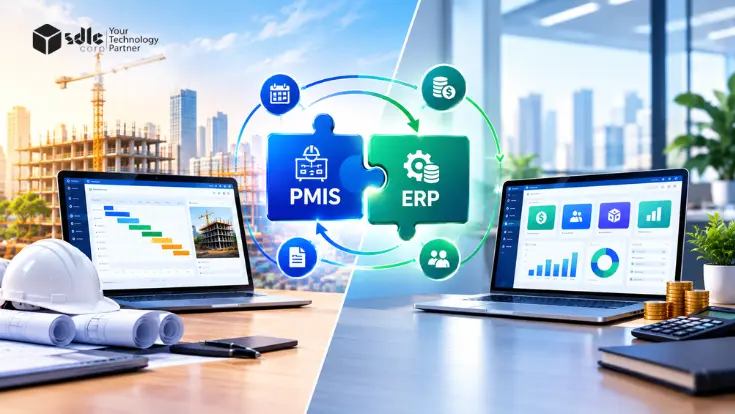
ERP can continue to own accounting transactions while the PMIS retains the project-control context surrounding those transactions.
Capability Comparison Across The Capital Project Lifecycle
An integrated PMIS does not win every capability. Its advantage becomes strongest when information must move across functions without losing context or control.
| Capability | Traditional Tool Stack | Integrated PMIS |
|---|---|---|
| Task Management | Strong in dedicated tools | Usually supported |
| Detailed CPM Scheduling | Strong in P6 or MS Project | Commonly integrated |
| Ad Hoc Calculation | Very flexible | More structured |
| Budget Vs Commitment | Cross-system reconciliation | Connected controls |
| Cost Forecasting | Spreadsheet or system dependent | Structured |
| Change Orders | Several records and workflows | Controlled transaction |
| RFIs And Submittals | Email or document-system dependent | Structured records |
| Document Control | Repository dependent | Governed workflow |
| Approvals | Distributed | Configurable workflow |
| Portfolio Reporting | Periodic consolidation | Centralized |
| ERP Integration | Manual or point-to-point | Defined integration |
| Audit Trail | Distributed | Consolidated |
| External Access | Tool dependent | Role based |
| Data Standards | Project dependent | Standardized |
| Executive Reporting | BI plus preparation | Connected reporting |
| Handover History | Often assembled near closeout | Maintained through delivery |
| Initial Administration | Lower | Higher |
Traditional tools retain clear advantages in specialist scheduling, flexible calculations, and lower initial administration. The PMIS advantage is strongest where several controls intersect.
Organizations moving into formal requirements evaluation should use a PMIS Fit-Gap Analysis to test individual capabilities against documented business, integration, control, and evidence requirements.
One Change Order, Two Systems
The difference becomes clearest when one change has to move through several project controls.
Capital Project Change Order
Consider an illustrative capital project with a $180 million approved budget, $6.5 million in remaining contingency, and a forecast completion date of March 31, 2029. On Monday morning, the contractor submits a proposed $2 million scope change with a three-week critical-path impact.
Management needs three answers before approval: whether enough contingency remains, what becomes the revised financial position, and whether the schedule impact changes the forecast completion date.
Traditional Tool Workflow
The RFI enters the document system. Commercial staff record the potential change in Excel. The contractor's estimate arrives through email, while the scheduler models the impact separately in Primavera P6. Finance checks the corresponding cost and ERP records.
The commercial review confirms a $2 million impact, and scheduling confirms that the additional work adds three weeks to the critical path. Management approves the change on Tuesday afternoon.
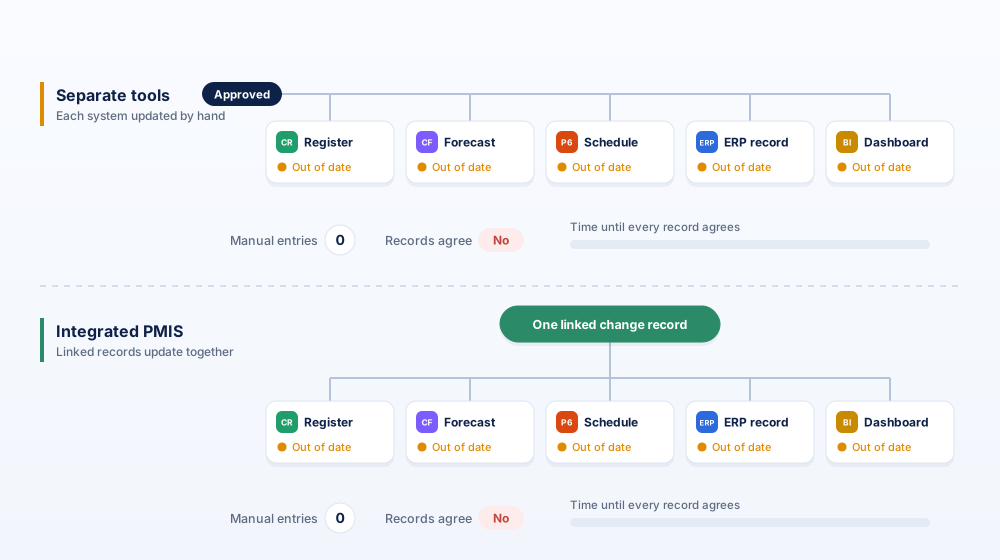
The three-week critical-path movement changes the forecast completion date from March 31, 2029 to April 21, 2029. However, the change register, cost forecast, P6 schedule, ERP record, and management dashboard still require their respective updates.
PMIS Workflow
In an integrated PMIS environment, the same transaction begins as one controlled change record linked to the supporting RFI, commercial estimate, cost code, schedule assessment, contingency position, and approval route.
Before authorization, the decision maker sees the proposed $2 million change against $6.5 million of remaining contingency, together with the three-week schedule impact.
The review, commercial assessment, scheduling, authorization, and financial controls still happen. What changes is the reconciliation interval. The relationship between the approved change, remaining contingency, revised forecast, schedule impact, and approval history stays connected instead of being reconstructed from several systems.
Connect Changes To The Controls They Affect
Design change workflows so cost, schedule, contingency, approvals, ERP transactions, and reporting remain connected throughout the decision lifecycle.
Does A PMIS Replace Excel, Microsoft Project, Primavera P6 And SharePoint?
Usually not. A well-designed PMIS architecture keeps specialist systems where they provide the strongest capability and controls how their information connects.
- Primavera P6 can remain the authoritative detailed CPM scheduling environment.
- Microsoft Project can continue supporting suitable project schedules.
- Excel can remain available for flexible calculations and analysis.
- ERP can remain authoritative for accounting transactions.
- SharePoint or a CDE can retain defined document-management responsibilities.
- BIM, GIS, estimating, and BI platforms can remain part of the wider architecture.
This is why PMIS vs traditional project management tools should not be interpreted as a contest where one platform replaces every application.
The PMIS earns its place by governing the relationships between those tools. A change can reference schedule impact from P6, carry commercial approval in the PMIS, synchronize an approved transaction with ERP, and feed standardized portfolio reporting.
The more useful architecture question is: Which system owns each record, and how does every downstream user receive the approved version?
Signs Your Capital Program Has Outgrown Traditional Tools
Your program has outgrown its current stack when maintaining agreement between systems becomes recurring manual work.
Measure the friction instead of relying on a generic project-value threshold. If the same approved change is manually entered into three or more systems, record those handoffs. If several funding sources carry different approval or reporting conditions, measure the reconciliation effort.
- Executives wait for several teams to assemble the current project position.
- Approved changes appear in one report before another.
- Teams debate which spreadsheet or document version is current.
- Cost, schedule, contract, and change identifiers do not match.
- Contractor or consultant turnover creates gaps in project records.
- Audit requests require searching inboxes for decision evidence.
- Portfolio reports depend on offline consolidation.
- Month-end reporting requires recurring data correction.
These are screening signals rather than universal industry thresholds. A one-time reconciliation problem is an exception. The same problem every reporting cycle indicates a structural gap.
Public owners dealing with grant reporting, funding controls, and long-lived project records can review PMIS For Public Infrastructure And Capital Improvement Programs.
How To Decide Which Approach Fits Your Capital Program
Choose the lowest-complexity architecture that can produce a reliable, auditable project position at the speed management requires.
Test The Current Environment
Start with the questions management needs to answer during delivery.
- What is the current approved budget?
- What value is already committed?
- How much change exposure remains?
- What is the current forecast?
- Which schedule milestone is affected?
- Who approved the latest commercial decision?
If those answers come directly from controlled records without reconciling several competing sources, the existing stack is doing its job.
Account For Implementation, Migration And Adoption
PMIS carries real cost. Implementation requires configuration, data migration, integrations, process standardization, training, governance, administration, and adoption.
Traditional tools also carry costs through duplicate entry, recurring reconciliation, report preparation, spreadsheet maintenance, inconsistent structures, and time spent locating supporting evidence.
The decision should compare total operating complexity, not software licence cost alone.
For organizations that have already crossed the switching threshold, How To Choose The Right PMIS For Capital Construction Projects covers requirements, integrations, vendor testing, implementation risk, and total cost of ownership.
For owners evaluating an owner-focused system of record, Trestle PMIS can be assessed against the same business and project-control requirements.
Final Thoughts
PMIS is the stronger approach when the cost and risk of disconnected project information exceed the effort required to govern that information in an integrated environment.
Excel, Primavera P6, Microsoft Project, SharePoint, ERP, and BI platforms remain valuable specialist systems. Their individual capability is not the problem. The control problem appears when owners cannot connect cost, schedule, change, approval, document, and portfolio information quickly enough to support a defensible decision.
That is the practical answer to PMIS vs traditional project management tools: retain specialist systems where they perform well, but move beyond manual reconciliation once the seams between them become a recurring project-control risk.
Find The Right Control Boundary
Identify which systems should remain authoritative, which workflows need stronger governance, and where integration can remove recurring reconciliation.
Frequently Asked Questions
What Is The Difference Between A PMIS And Project Management Software?
Project management software usually focuses on specific activities such as scheduling, task management, collaboration, or reporting. A PMIS has a broader information-management role. For capital projects, that means connecting controlled information across cost, changes, approvals, documents, reporting, and specialist systems.
Do Capital Projects Really Need A PMIS?
No. A project needs stronger PMIS capabilities when disconnected information creates recurring control, reporting, governance, or audit problems. A simple project with stable stakeholders and reliable existing processes can continue using specialist tools without adding a full PMIS.
Can A PMIS Replace Primavera P6 Or Microsoft Project?
It can provide scheduling functionality, but replacement is not the default objective. Many capital programs integrate specialist scheduling platforms with a broader PMIS so schedule, cost, change, and reporting processes use the same controlled project context.
What Happens To Project Records When A Contractor Leaves?
An owner-controlled information environment preserves project records independently of contractor tenure. Controlled documents, workflows, approvals, status history, correspondence, and transaction evidence remain accessible after project participants change.
When Should A Capital Project Move From Spreadsheets To A PMIS?
Move beyond spreadsheet-led control when reconciliation becomes routine rather than exceptional. Strong signals include repeated data entry across several systems, competing workbook versions, manual portfolio consolidation, approvals stored in email, and changes that do not reach forecasts or reports consistently.
Is A PMIS Worth It For A Single Project?
Yes, when the single project has enough complexity. A large project with several contractors, strict approval controls, complex commercial structures, extensive records, major audit exposure, or several enterprise integrations can justify PMIS capabilities even without a wider portfolio.