





Home / Blogs & Insights / Adding Task In Current Project

Adding Task In Current Project

Table of Contents


Introduction

This guide walks you through the process of adding a task to your project. Follow these steps to ensure that the task is correctly set up and visible on the dashboard. 

Supercharge Growth with Odoo Experts!

Tailored Odoo Solutions for Streamlined Business Efficiency and Growth

smart investment Odoo development


Steps to Add a Task

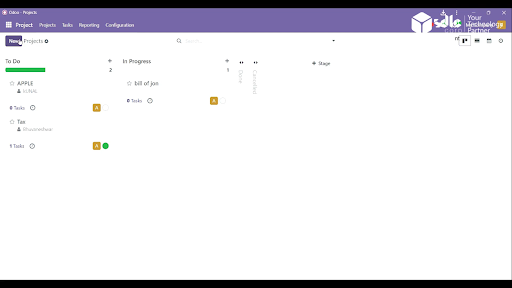
1. Click on the New Project

Begin by navigating to the New Project section, where you can initiate the creation of a new project.

Get a closer look – Here’s the feature at work.

2. Fill in the Details and Click on Create Project

Provide all the required project details and click on the Create Project button to proceed.

fill in the detail and click on create project

Get a closer look – Here’s the feature at work.

3. Add Task in the Project

Once the project is created, click on the Task section to start adding tasks within the project.

add task in the project

Get a closer look – Here’s the feature at work.


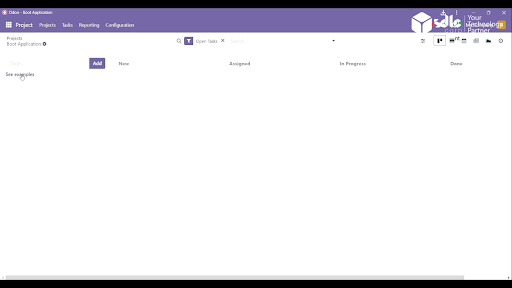
4. Click on See Example

If you want to use predefined templates or examples, click on the See Example option.

Get a closer look – Here’s the feature at work.

Expert Odoo ERP Solutions Tailored

Streamline Operations and Boost Growth with Odoo ERP Solutions

smart investment Odoo development

5. Select an Example and Click on Use This for My Project

Browse through the available examples, select one that fits your needs, and click Use This for My Project to import it.

select an example and click on use this for my project

Get a closer look – Here’s the feature at work.

6. Click on New

In the task section, click on the New button to create a fresh task entry.

click on new

Get a closer look – Here’s the feature at work.

7. Assign the Project and Click on the Add Button

  1. Assign the task to the appropriate project and team members, then click Add to finalize the process.
assign the project and click on the add button

Get a closer look – Here’s the feature at work.

8. Task Added to the Dashboard

Once added, the task will appear on the dashboard, allowing easy tracking and management.

task addad to the dashboard

Get a closer look – Here’s the feature at work.

Expert Odoo ERP Solutions Provider

Hire Expert Odoo Developers for Tailored ERP Solutions Today!

smart-investment Odoo development


Conclusion

By following these steps, you can efficiently add a task to your project. Utilizing templates helps in speeding up the process, and assigning tasks ensures that the project remains organized. This method ensures smooth collaboration and task visibility across the team, making project management more streamlined.

How SDLC CORP Can Help with Odoo Development Services ?

SDLC CORP, a trusted Odoo development company, offers comprehensive Odoo ERP development services to streamline and enhance business operations. As a leading Odoo ERP development company, they bring expertise in custom Odoo solutions, ensuring that each module and feature aligns perfectly with business requirements. Their team of skilled Odoo developers delivers tailored solutions, covering everything from setup to integration, designed to optimize your Odoo environment.

With SDLC CORP’s Odoo customization services, businesses can adapt the ERP to meet specific needs, adding modules for CRM, inventory, HR, or finance with ease. Their experienced Odoo ERP consultants guide clients through every phase, providing strategic advice and best practices. SDLC CORP also offers ongoing support to ensure that your Odoo platform remains efficient, secure, and up-to-date.

As a full-service Odoo development agency, SDLC CORP covers everything from technical support to process automation, allowing clients to focus on growth while they manage the technical details. By choosing SDLC CORP, businesses gain a reliable partner for scalable, high-quality Odoo ERP development solutions.

ABOUT THE AUTHOR

aaron jone

Aaron Jone is an Odoo expert with 12 years of experience in enterprise software. At SDLC Corp, he helps companies improve efficiency by customizing and deploying Odoo solutions that align with core business needs. Aaron focuses on streamlining workflows, integrating systems, and building tools that support real-time visibility and better control across operations.
PLAN YOUR SOLUTION

More Insights
You Might Find Useful

Explore expert perspectives, practical strategies, and real-world solutions related to this topic.

AR vs VR Game Development

AR vs VR Game Development: Which Is Right for Your

Top AR Game Development Companies in India

Top AR Game Development Companies for India SDLC Corp —

Let’s Talk About Your Product

Get expert guidance on scope, architecture, timelines, and delivery approach so you can move forward with confidence.

What happens next?