ERP for small and mid-size businesses becomes necessary when basic tools stop giving a clear view of daily operations. This point depends less on headcount and more on problems across finance, inventory, sales, and reporting.
Before comparing software, review your processes, data, growth plans, budget, and team. This guide shows how to check readiness, compare ERP platforms, estimate the full cost, and choose a partner with less risk.
Quick Answer: What Should a Small and Mid-Size Business Evaluate Before Choosing ERP?
First, confirm that your business is ready to replace disconnected systems with one platform. Review processes, data quality, growth plans, budget, integration needs, and the internal team. Next, compare shortlisted solutions against real workflows instead of long feature lists. Finally, use Gartner ERP research to understand market categories before speaking with vendors.
Key Takeaways
- Disconnected systems and manual work often show that a business has outgrown basic accounting software.
- ERP readiness depends more on operational complexity and growth than on employee count.
- Cloud platforms such as Oracle NetSuite ERP can support business growth without heavy infrastructure costs.
- Delaying ERP can lead to reporting errors, slow work, and more manual tasks.
- ERP for small and mid-size businesses should support future users, locations, products, and processes.
Why ERP for Small and Mid-Size Businesses Is Different
Small and mid-size companies often have lean teams, tight budgets, and little IT support. Therefore, ERP should give a clearer view, automate key work, and support growth without adding complexity.
Before evaluating products, decision-makers should understand what ERP is and how it works. Then they can choose a system that solves current problems and supports more users, locations, products, and business models.
Why Growing Businesses Outgrow Basic Accounting Software
Growth does not create every business problem. Instead, it shows where separate tools fail. As sales and work grow, accounting software alone may not give clear reports, a full view, or steady processes.
Common signs that a business has outgrown basic accounting software include:
- Duplicate data entry across finance, sales, purchasing, and inventory.
- Manual reconciliation between accounting records, inventory, and spreadsheets.
- Delayed reports and limited visibility that slow business decisions.
- More complexity across locations, legal entities, currencies, or sales channels.
- Disconnected workflows across finance, purchasing, inventory, and sales.
- Weak governance, approval delays, spreadsheet-based work, and slow audit preparation.
One problem may not mean you need new software. However, several issues with reports, control, and daily choices often show a need for ERP.

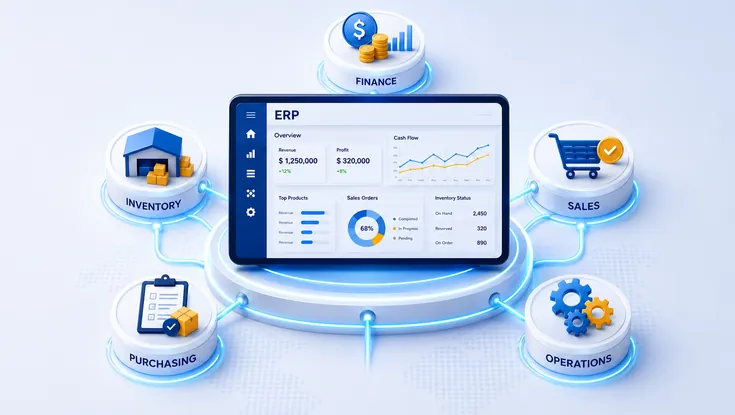
ERP connecting finance, stock, sales, buying, and daily business work.
ERP Configuration, Modular ERP, Composable ERP, or Custom ERP
Growing businesses rarely need heavy customization on day one. First, review the main types of ERP systems. This helps you compare configuration, modular deployment, composable architecture, and custom development. Then choose an approach based on process standards, growth plans, and the flexibility your business needs.
| Approach | Best For | Key Consideration |
|---|---|---|
| Configuration | Businesses with standardized processes | Uses built-in workflows, roles, permissions, and rules without changing the core application. |
| Modular ERP | Growing small and mid-size businesses | Adds modules as business needs grow while keeping one ERP platform. |
| Composable ERP | Organizations with complex business capabilities and technology ecosystems | Connects ERP with specialist apps, APIs, and digital services. |
| Custom ERP | Businesses with strategically differentiated processes | Needs long-term investment in design, security, testing, maintenance, upgrades, and technical ownership. |
Most businesses start with setup to standardize work. Next, they add modules as users, tasks, and locations grow. Composable ERP fits wider tech systems. However, choose custom ERP only when standard platforms cannot support a process that creates real business value.
Industry-Specific ERP Requirements
Companies of the same size may need different ERP tools because they work in different ways. Therefore, industry-focused software can cut custom work, speed up setup, and help users adapt.
| Industry | Important ERP Capabilities |
|---|---|
| Manufacturing ERP | MRP, production planning, quality management, traceability, maintenance, and platforms such as SAP Business One. |
| Distribution | Inventory management, warehousing, landed cost, and order fulfillment |
| Retail & Ecommerce | Omnichannel inventory, purchasing, returns, POS, and e-commerce integrations |
| Professional Services | Project accounting, resource planning, billing, utilization, and time tracking |
| Construction | Job costing, project controls, procurement, subcontractor management, and field visibility |
| Regulated Industries | Access controls, audit trails, reporting, compliance documentation, and data governance |
Important: ERP can help with compliance through controls, reports, and clear rules. However, each business must manage its processes, access, records, checks, and legal duties.
Leading ERP Platforms for Small and Mid-Size Businesses
Brand recognition alone does not identify the right ERP platform. Instead, match each option to your current operations, expected growth, and most important processes.
| Platform | Best Choice If | Deployment | Key Consideration |
|---|---|---|---|
| Microsoft Dynamics 365 Business Central | Your business already relies on Microsoft 365, Power Platform, or other Microsoft applications | Cloud; eligible existing customers may also use on-premises support | Review licensing options, partner expertise, integrations, and customization requirements. |
| Oracle NetSuite | You manage multiple entities or expect rapid business expansion | Cloud | Understand implementation scope, localization, licensing, and long-term support. |
| SAP Business One | Your business focuses on manufacturing or distribution | Partner and region dependent | Evaluate available add-ons, hosting options, and partner experience. |
| Acumatica | You need industry-specific functionality with flexible business growth | Cloud | Compare editions, licensing models, and industry capabilities. |
| Epicor | Manufacturing or distribution drives most business operations | Product dependent | Select the Epicor product that best matches your operational requirements. |
| Infor | Your industry depends on specialized operational functionality | Product dependent | Assess industry depth, implementation ecosystem, and long-term product roadmap. |
| Sage | Finance management is your primary business priority | Product dependent | Identify the Sage product that best fits your operational scope and business size. |
| Odoo | You want a modular platform with flexible deployment options | Cloud or self-hosted | Consider customization requirements, governance, and long-term support. |
Editorial Note: ERP platforms change over time. For example, vendors may change prices, setup choices, editions, and features. Therefore, check current options, local support, and terms in official vendor documents before you decide.

Business leaders comparing ERP platforms, setup needs, and total cost.
ERP for Small and Mid-Size Businesses: Investment, TCO, and Value
Budget errors often happen before ERP setup begins. Software is only one cost of ERP for small and mid-size businesses. In addition, plan for team work, system links, data moves, training, support, and future updates.
Typical ERP Cost Components
Includes software fees, needed systems, app links, and third-party tools.
Includes setup, custom work, data cleanup, ERP migration, tests, and launch services.
Includes team time, process owners, training, updates, and change support.
Covers support, upkeep, updates, release plans, and short-term disruption.
Businesses often miss the cost of internal work. Process owners, finance teams, IT staff, and users must help with design, tests, training, and post-launch updates.
Do not judge ERP success only by a fixed ROI or payback period. Instead, compare results with your current baseline. Track close time, stock costs, order accuracy, cash flow, forecasts, staff output, and control issues.
How ERP for Small and Mid-Size Businesses Can Reduce Risk
ERP risk starts long before deployment. A structured ERP implementation process helps teams define needs, prepare data, assign owners, test the system, and manage change. However, unclear needs, weak ownership, and rushed planning often cause more problems than the technology.
Speaking with vendors before defining needs, choosing mainly on price, and copying old processes.
Too much customization, weak data ownership, missed integration work, and AI without a clear business case.
Leaving out users, limiting tests and training, and ignoring post-launch governance.
Successful projects need both business owners and an expert partner. The partner builds the system. However, the business must set process rules, goals, and user plans.
Why Businesses Choose SDLC Corp for ERP Consulting and Implementation
Businesses that define needs before choosing ERP software often cut risk and rework. SDLC Corp's ERP consulting services support this approach. The team checks readiness, compares platforms, and plans the project.
Key capabilities include:
- Readiness reviews and process analysis before software selection.
- Platform comparisons based on operational needs, growth plans, and long-term fit.
- ERP implementation, custom development, integrations, and legacy data migration.
- Documented delivery work, including the Transworld Logistics implementation and a published Shopify webhook integration.
- Ongoing support through official implementation partner status for its core ERP platform and a structured 30-day hypercare model.
Overall, the goal is to give businesses clearer requirements, stronger governance, and an ERP platform that supports growth.
Conclusion
ERP success starts with understanding the business before comparing software. Therefore, ERP for small and mid-size businesses should match operational needs, future growth, and long-term scale. This approach lowers the chance of replacing the system again.
ERP for Small and Mid-Size Businesses FAQ
ERP for small and mid-size businesses helps when separate tools, manual entry, and spreadsheet reports slow decisions. Therefore, review process needs, data quality, and growth instead of employee count alone.
No single ERP platform fits every business. Instead, compare industry fit, core needs, budget, growth, system links, setup effort, and support.
ERP implementation costs include software, services, system links, data moves, custom work, training, and support. Therefore, plan the full cost instead of the subscription price alone.
Choose a partner with industry work, a clear plan, system-link skills, proven results, and support after launch. In addition, the partner should define needs before suggesting software.
Common mistakes include choosing on price alone, skipping process reviews, underestimating data moves, adding too much custom work, limiting training, and ignoring controls. Address these risks early to help users adapt and reduce delays.