Introduction
Learn how to add custom CSS in WordPress without using a plugin, enabling you to personalize your site’s design efficiently. Follow these simple steps for advanced styling control.
Expert WordPress Development Solutions
Elevate your website with our expertise.

1. Click on the “Appearance” > “Customize” Button
Navigate to the WordPress dashboard, go to the Appearance section, and click on Customize to open the theme customizer.

Get a closer look – Here’s the feature at work.
2. Click on the “Additional CSS” Button
In the customizer menu, locate and click on the Additional CSS option. A text box will appear where you can enter your custom CSS code.

Get a closer look – Here’s the feature at work.
Custom WordPress Development Services
Tailored solutions for your business needs.

3. Click on the “Publish” Button
After entering your CSS code, click the Publish button to save and apply the changes to your website
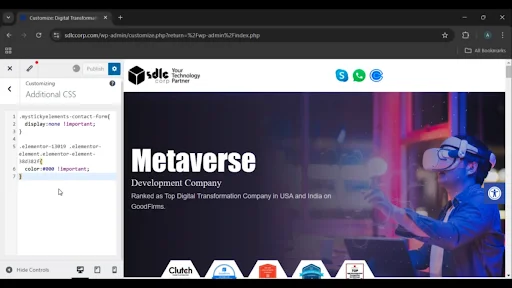
Get a closer look – Here’s the feature at work.

Conclusion
Adding custom CSS without a plugin in WordPress is a simple and effective way to modify your website’s design without altering the core theme files. Using the Additional CSS section in the WordPress customizer ensures that your changes are saved securely and can be previewed before publishing, providing an easy-to-use solution for customization.