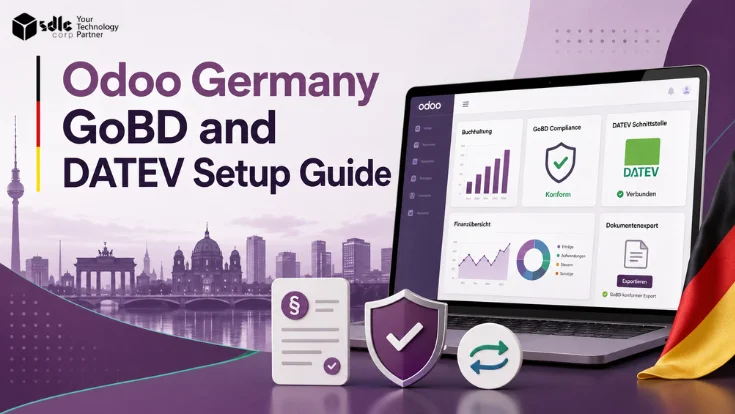
German businesses using Odoo need more than a localised chart of accounts. The setup should connect the German fiscal localization package, the right SKR chart, disciplined posting workflows, document retention, DATEV export readiness, and finance controls that support GoBD expectations and Steuerberater collaboration.
Use this guide to plan Odoo configuration, DATEV export workflows, GoBD-ready controls, and Steuerberater handoff before go-live. Also, it flags the e-invoicing checks that matter for German B2B invoicing, so finance teams can prepare the setup before monthly close pressure starts.
Does Odoo Officially Support Germany GoBD and DATEV?
Yes. In practice, Odoo supports German accounting localization through its fiscal localization packages. Also, Odoo documents DATEV export from the general ledger after teams install German localization.
What Odoo officially provides for Germany
- First, use the German fiscal localization package with SKR03 and SKR04 chart of accounts support.
- Next, review German-specific accounting reports on Odoo Enterprise.
- Also, export DATEV files from the General Ledger after German localization setup.
- Then, follow the DATEV sequence: ATCH first and DATA second.
- Meanwhile, treat GoBD-certified capabilities as a base for company-level controls.
- Finally, review German VAT taxes and tax accounts after localization activation.
Odoo’s official accounting localization guides document German localization and GoBD-certified capabilities. However, implementation scope, internal controls, and audit readiness remain the responsibility of each business and its Steuerberater.
Who This Guide Is For
This guide is relevant to the following roles and contexts. First, use it to spot the setup, export, and review steps your team needs before go-live.
German businesses implementing Odoo Accounting
Finance teams preparing for GoBD-ready accounting processes
Companies exporting accounting data to DATEV for Steuerberater handoff
Odoo admins configuring German localization and user permissions
ERP managers comparing native Odoo DATEV export with third-party add-ons
Businesses working with an external Steuerberater on month-end reporting
Companies preparing for audit readiness or year-end accounting close
What Odoo Germany Localization Covers
First, install the German fiscal localization package. Then, review each accounting area below with finance and the Steuerberater before go-live.
Core localization setup
Localized accounting setup
Odoo activates German accounting rules, tax mapping, and fiscal-year settings. Teams can start this through Odoo implementation services.
SKR03 / SKR04
The chart choice shapes account mapping and reporting. Therefore, confirm it with the Steuerberater before any accounting data enters Odoo.
VAT taxes
Odoo maps sales and purchase taxes, including standard, reduced, and zero-rate flows. Next, test sample invoices before go-live.
DATEV and reporting workflow
General Ledger export
Finance can export accounting entries from the general ledger to DATEV format after localization setup.
Attachment package
DATEV ATCH sends supporting documents, such as bills, invoices, receipts, and PDF scans.
Journal data package
DATEV DATA sends posted accounting entries. Always run it after ATCH to protect the handoff sequence.
Controls and handoff
GoBD-ready workflows
Teams need posting discipline, document retention, period locks, and audit-trail controls. Configuration alone does not complete the process.
Steuerberater collaboration
Finance sends export packages for advisor review and DATEV import. As a result, mapping issues surface before year-end.
Accounting reports
General ledger, tax reports, journal items, and reconciliation checks support monthly review.
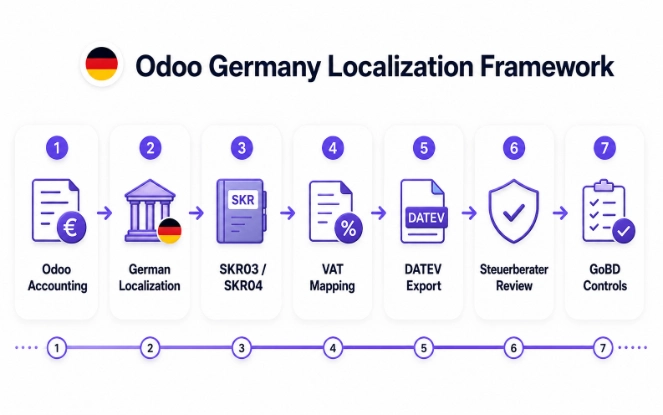
GoBD in Odoo: What It Means Practically
GoBD sets expectations for how teams manage, retain, and audit digital financial records. In an Odoo context, this means practical configuration choices and disciplined processes - not a single software switch.
What Odoo can support
- First, keep complete records with all invoices and bills posted and attached.
- Next, track journal entries through posting history and audit trails.
- Also, restrict who can edit posted accounting entries.
- Then, retain document attachments with the relevant accounting record.
- After close, lock periods to prevent accidental changes.
- In addition, export DATEV files for Steuerberater review and tax filing support.
- Finally, limit accounting functions through user-level access controls.
What depends on process controls
- First, users should add attachments before entries reach close review.
- Next, finance should review and post draft entries before export.
- Also, teams should use reversals instead of deleting posted entries.
- Then, admins should configure access rights beyond the default setup.
- During monthly close, owners should run ATCH before DATA every time.
- In addition, retention schedules may need storage rules outside Odoo.
- Finally, Steuerberater feedback should feed the next period checklist.
SKR03 vs SKR04 in Odoo
The SKR choice is an early German Odoo decision. It affects account mapping, tax reports, and Steuerberater compatibility. Therefore, agree on it before go-live.
SKR03 overview
SKR03
- Process-oriented account structure
- Common in many German SME workflows
- Often familiar to traditional Steuerberater teams
- Impacts accounts, tax tags, and journal setup
SKR04
- Financial-statement-oriented account structure
- Often useful for balance-sheet and P&L review
- May need explicit Steuerberater agreement
- Requires clean mapping before the first posting
Decision rule
Finance and the Steuerberater should choose one SKR structure before the team enters live accounting data. Otherwise, switching later requires an Odoo migration plan.
How Odoo DATEV Export Works
Odoo documentation confirms DATEV export from the general ledger after teams install a German fiscal localization package. First, finance reviews the accounting period. Then, the team exports the attachment package before the journal data package.
Export order
Review Records
Posted entries onlyRun ATCH
Attachments firstRun DATA
Journal data secondAdvisor Review
Import checkPre-export checks
Before any DATEV export
- First, install and activate German fiscal localization.
- Next, post all entries for the period and close draft gaps.
- Also, attach supporting documents to invoices and bills.
- Then, verify account and tax mapping with the Steuerberater.
- Finally, test a sample export before the first monthly close.
Export location in Odoo
- First, open Accounting and then General Ledger.
- Next, check DATEV options after localization activation.
- Also, run DATEV ATCH first for supporting documents.
- Then, run DATEV DATA second for journal entries.
- Finally, send both export files as one package.
ATCH vs DATA: DATEV Export
Odoo uses two separate export steps for DATEV handoff. First, run ATCH. Then, run DATA. Otherwise, the Steuerberater may face import problems in DATEV.
DATEV ATCH
- First, DATEV ATCH sends attachments and supporting documents.
- Next, include vendor bills, customer invoices, receipts, and PDF scans.
- Also, confirm that every posted entry has the right document.
- Finally, run ATCH before DATA.
DATEV DATA
- First, DATEV DATA sends accounting entries and journal data.
- Next, include posted transactions, accounts, taxes, partners, and dates.
- Also, review account mapping, tax codes, and posted status.
- Finally, run DATA after ATCH.
A common DATEV handoff issue is running DATA before ATCH, or sending DATA without the corresponding ATCH package. Therefore, follow the documented sequence and confirm the package with the Steuerberater before first use.
Native Odoo DATEV Export vs Third-Party Modules
Odoo Enterprise includes native DATEV export after teams install German localization. However, some setups still need a third-party module or a custom integration. The choice depends on edition, Steuerberater workflow, accounting complexity, and document-transfer needs.
When native export is enough
Native Odoo usually works when
- Odoo Enterprise runs with German localization active
- The accounting scope covers one standard German entity
- The Steuerberater accepts the standard DATEV export format
- Finance attaches documents before close
- The team confirms SKR mapping before go-live
- A monthly close checklist guides each export
A module may help when
- The project uses Odoo Community
- The advisor needs DATEV Unternehmen Online integration
- The business wants automated document transfer
- Multiple German entities need separate flows
- Custom account mapping or reconciliation checks matter
- Audit requests need special GoBD export packages
Decision guide for finance teams
Start with native export
Best fit: standard Odoo Enterprise accounting. First, test ATCH and DATA exports with a sample period.
Validate with the Steuerberater
Best fit: mixed workflows. Next, confirm import results, field mapping, and document expectations before the first close.
Scope an integration
Best fit: automated transfer, DATEV Unternehmen Online, or custom checks. In this case, review module options before custom development.
For custom DATEV workflows, document capture, or automated Steuerberater handoff, Odoo customization services can extend native Odoo. Also, Odoo integration services can connect external document storage or transfer systems.
Common Odoo GoBD and DATEV Setup Errors
These configuration and process issues appear often in German Odoo projects. However, a focused pre-go-live review can catch most of them before month-end close.
Setup mistakes
Wrong SKR chart
Cause: The project started before the team confirmed SKR03/SKR04.
Fix: Confirm the chart of accounts with the Steuerberater before configuration.
Missing attachments
Cause: Users kept vendor or customer documents outside accounting entries.
Fix: Add attachment review to the monthly close checklist.
Draft entries
Cause: Finance left draft entries open before export.
Fix: Post and verify every period entry before DATEV export.
Tax mapping gaps
Cause: VAT points to the wrong account or tax tag.
Fix: Test sales and purchase invoices against expected VAT amounts.
Close and export mistakes
Partner data gaps
Cause: Customer or vendor tax IDs, names, or address fields contain gaps.
Fix: Clean partner master data before the first invoicing period.
DATEV import issue
Cause: The Steuerberater finds a format or mapping mismatch in DATEV.
Fix: Run a sample export and import test before the first close.
Wrong export sequence
Cause: The team runs DATA before the ATCH package.
Fix: Put ATCH → DATA in the close checklist.
Late corrections
Cause: Users change posted entries after export without a correction workflow.
Fix: Use reversals and restrict edit permissions.
Weak access controls
Cause: Too many users hold broad accounting edit rights.
Fix: Limit posting, export, reversal, and mapping permissions.
Need help validating your Odoo Germany accounting setup? SDLC Corp can review your localization, SKR chart, tax mapping, document attachment workflow, DATEV export sequence, and monthly close process before go-live.
Book a DATEV readiness reviewGoBD-Ready Accounting Process in Odoo
GoBD readiness in Odoo is a workflow - not a setting. Each step below builds on the previous one. As a result, skipping one step creates gaps that are difficult to fix after export.
Core accounting workflow
Document Attached
Before postingEntry Posted
No drafts left openReconciled
Bank & VAT matchedPeriod Locked
No edits after lockDATEV Exported
ATCH then DATAAdvisor Review
Feedback appliedWhat to Avoid After Odoo Posting or DATEV Export
These actions create audit trail gaps, DATEV import errors, or reconciliation problems. Therefore, define correction processes for each one before go-live.
Odoo Germany GoBD / DATEV Readiness Checklist
Work through all five groups before the first DATEV export. Each group supports the next one, so the order matters.
Company and accounting setup
Company Setup
- Install and activate German fiscal localization
- Set the company country to Germany
- Confirm SKR03/SKR04 with the Steuerberater
- Complete VAT ID and tax registration details
- Configure the fiscal year correctly
Accounting Setup
- Review and agree on the chart of accounts
- Test tax mapping on sample invoices
- Configure journals for each transaction type
- Set payment terms and bank accounts
- Test bank reconciliation with real data
Documents, export and controls
Document Setup
- Define the vendor bill attachment process
- Confirm customer invoice PDF storage
- Set receipt and expense document handling
- Agree on attachment naming rules with the Steuerberater
DATEV Setup
- Complete the ATCH test export
- Run the DATA test export after ATCH
- Ask the Steuerberater to review a sample import
- Correct mapping issues from the sample review
- Document the export sequence in the close checklist
GoBD Process Controls
- Review and restrict user permissions
- Document the posting and reversal process
- Define and test the period lock process
- Review audit-trail expectations with the Steuerberater
- Approve the monthly close checklist
Monthly DATEV Handoff Workflow
Run the same sequence each month. Otherwise, skipped or reordered steps can create DATEV import errors, missing attachments, and weak audit traceability.
Monthly close sequence
Attach
DocumentsPost
EntriesReconcile
Bank and VATLock
PeriodExport
ATCH then DATAReview
Advisor feedbackSteps 1-3: Prepare the period
Check posted invoices and bills
First, confirm finance has posted every transaction for the period. Also, resolve draft entries before export.
Attach missing documents
Next, match each bill, invoice, receipt, and support file to the correct accounting record.
Reconcile bank and tax items
Then, match bank statement lines and VAT balances before close. This step reduces correction work later.
Steps 4-6: Export and review
Lock the period
After review, lock the accounting period. As a result, teams prevent accidental edits after close.
Export DATEV packages
Run DATEV ATCH first. Then, run DATEV DATA and send both files together.
Apply Steuerberater feedback
Finally, record feedback from the Steuerberater and add recurring fixes to the next close checklist.
Germany E-Invoicing Readiness for Odoo Users
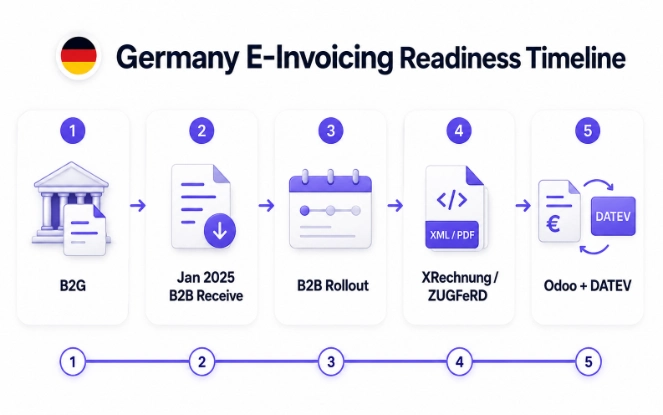
Germany introduced mandatory domestic B2B e-invoicing requirements in phases. Importantly, this obligation sits outside DATEV export and GoBD recordkeeping.
Therefore, Odoo teams should review invoice format support, master data quality, and customer delivery workflows together.
Early milestones
B2G e-invoicing and XRechnung
Electronic invoicing already matters for public-sector invoice flows. XRechnung is Germany's CIUS for e-invoicing and aligns with EN 16931.
Domestic B2B receiving starts
Germany's e-invoicing regime applies to domestic B2B transactions from 1 January 2025. In practice, businesses need receiving readiness from this date.
Transition and issuing milestones
Transition period for issuing
BMF guidance includes transition rules. During this phase, many issuers can still use other invoice formats while they prepare structured e-invoice processes.
Issuing obligation expands
Larger businesses face earlier issuing duties. Meanwhile, broader issuing requirements apply by 2028, so teams should confirm thresholds with a Steuerberater.
Odoo readiness checks
Key points for Odoo users
- Treat e-invoicing as separate from DATEV export
- Review XRechnung and ZUGFeRD for customer delivery
- Clean VAT IDs, buyer references, names, and addresses
- Verify Odoo e-invoicing support against the deployed version
- Remember that DATEV export does not replace e-invoice delivery
What to monitor
- Monitor BMF implementation guidance and transition dates
- Track XRechnung and EN 16931 format requirements
- Identify customers that require structured e-invoices
- Check whether Steuerberater DATEV workflows change
- Review Odoo version support for XRechnung and ZUGFeRD
E-invoicing obligations in Germany continue to evolve. Therefore, review current requirements with the Steuerberater and monitor Odoo release notes for localization updates.
Finance, Odoo Admin and Steuerberater Responsibilities
GoBD-ready accounting and DATEV handoff need clear ownership. Otherwise, gaps between roles can break the monthly close.
Business and accounting owners
Finance team
Post invoices and bills, attach documents, reconcile accounts, run DATEV exports, manage the close checklist, and resolve advisor feedback.
Steuerberater
Confirm the SKR chart, review tax treatment, import DATEV packages, interpret compliance requirements, and flag mapping errors.
Management
Approve process ownership, authorise access changes, sign off go-live readiness, and review close completion.
System and integration owners
Odoo admin
Set up German localization, SKR configuration, tax mapping, journals, user permissions, export access, backups, and system controls. Larger teams can also use Odoo development support for role-based screens and approval flows.
IT / integration
Manage document capture, external storage, access controls, data backups, and any third-party DATEV module connections.
How SDLC Corp Helps with Odoo Germany GoBD and DATEV Setup
SDLC Corp configures Odoo for German accounting localization. In practice, this covers SKR03/SKR04 setup, tax mapping, document attachment workflows, DATEV export readiness, GoBD-aligned process controls, user permissions, integrations, and post-go-live support.
Frequently Asked Questions: Odoo Germany GoBD and DATEV
Use these answers to confirm the main setup choices before implementation. Also, review any tax-facing workflow with your Steuerberater.
Setup questions
Can Odoo export DATEV files in Germany?
Yes. Odoo documentation states that teams can export accounting entries from the general ledger to DATEV after installing a German fiscal localization package. First run DATEV ATCH, then run DATEV DATA.
Does Odoo guarantee GoBD compliance?
No. However, teams should not treat software alone as a guarantee. The business still needs correct configuration, document retention, access controls, posting discipline, period locking, and Steuerberater review.
Which SKR charts does Odoo support?
Odoo German localization supports German chart of accounts setup, including SKR03 and SKR04. Therefore, confirm the SKR choice with the Steuerberater before go-live.
Export questions
When do teams need a third-party DATEV module?
Native Odoo Enterprise DATEV export often works for standard single-company workflows. However, teams may need a module for Odoo Community, DATEV Unternehmen Online, automated transfer, or custom workflows.
What separates DATEV ATCH from DATEV DATA?
DATEV ATCH exports attachments and supporting documents. Next, DATEV DATA exports accounting entries and journal data. Together, both files create the package for the Steuerberater.
How should teams test the first DATEV export?
Before the first export, test posted invoices, vendor bills, attachment completeness, account mapping, tax mapping, partner data, ATCH export, DATA export, and a sample import.
Process questions
What should finance avoid after a DATEV export?
After export, avoid editing postings without a correction process. Also avoid deleting documents, running DATA before ATCH, changing account mappings without review, or sending incomplete packages.
How does DATEV export differ from GoBD readiness?
DATEV export supports the Steuerberater handoff. Meanwhile, GoBD readiness covers digital recordkeeping, audit trails, document retention, access controls, posting discipline, period locks, and traceability.
Planning Odoo accounting in Germany?
Start with the right SKR chart, clean posting workflows, document attachment discipline, tested DATEV exports, and Steuerberater review before go-live.
Plan my Odoo Germany setup