Indian businesses implementing Odoo need more than a standard accounting setup. Correct operation requires GST tax configuration, GSTIN at every level, HSN/SAC codes on all products, IRP and NIC API credentials, IRN generation, signed QR codes, and e-way bill workflows aligned to logistics processes.
Odoo’s India localization supports key Indian GST, e-invoicing, and e-way bill workflows when the required accounting settings, credentials, and transaction data are configured correctly. This guide covers the setup sequence, common errors, readiness checks, and implementation decisions Indian finance and operations teams need before go-live.
GST rules, e-invoice thresholds, and NIC portal behaviour change. Verify current applicability with official GST or NIC sources, or a qualified tax advisor, before implementation.
This guide is useful for
Odoo India Localization
What Odoo India Localization Covers
Odoo’s India localization provides accounting, tax, and compliance configurations that extend Odoo to meet Indian GST requirements. For businesses going through Odoo implementation services, India localization setup, GST tax mapping, master data cleanup, and e-invoice and e-way bill workflow testing should be included in scope.
| Area | What it means in Odoo |
|---|---|
| GST taxes | CGST, SGST, IGST configuration, tax groups, and invoice-level tax mapping based on GST regulations published by CBIC . |
| GSTIN handling | GSTIN stored on company, customer, and vendor records and used during transaction validation. |
| HSN / SAC | Product and service classification codes for GST invoice and reporting requirements. |
| E-invoicing | IRN generation, signed QR code, and acknowledgement data via IRP integration. |
| E-way bill | Transport detail capture and e-way bill number (EBN) generation via NIC API. |
| Accounting reports | GST-related accounting, tax reporting, and audit trail aligned with CBIC compliance requirements within Odoo. |
| Multi-GSTIN | Multi-company and multi-branch configurations where applicable. |
Quick decision guide
| If your business needs | Start with |
|---|---|
| Standard GST invoicing | Native Odoo India localization |
| E-invoice, IRN, and QR code | Native Odoo + correct IRP/NIC API credentials |
| E-way bill generation | Native Odoo + transport data setup and NIC credentials |
| Multi-warehouse logistics | Native Odoo + customisation review before go-live |
| Marketplace, WMS, or POS sync | Integration planning as part of implementation scope |
Setup
GST Setup in Odoo for Indian Businesses
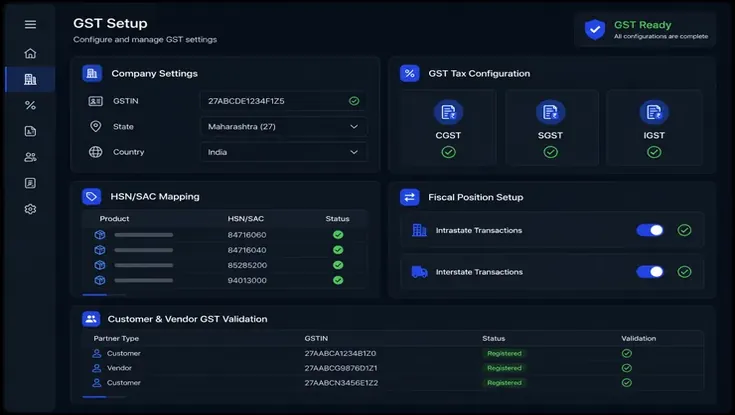
Before generating e-invoices or e-way bills, the GST foundation in Odoo must be correct. This includes installing the India localization, setting the company country to India, adding GSTIN, configuring states, setting up the chart of accounts, mapping GST taxes, configuring fiscal positions, assigning HSN/SAC to products, and setting up customer and vendor GST treatment.
If your GST workflow includes branch-specific tax logic, special approval rules, or non-standard invoice formats, Odoo customization services may be needed beyond the standard India localization.
E-Invoicing
How Odoo Handles Indian E-Invoicing
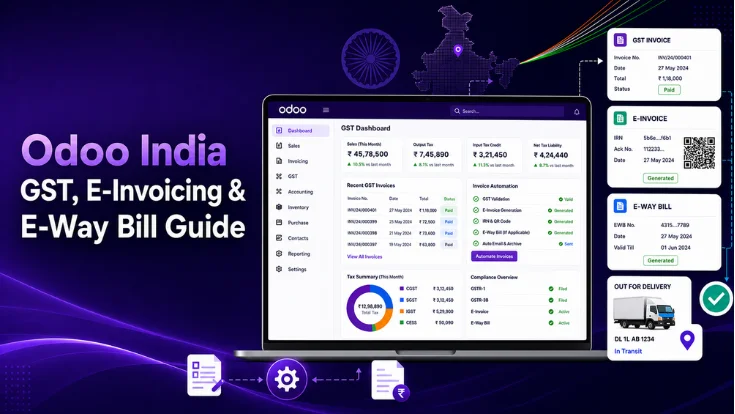
Odoo’s India localization supports Indian GST e-invoice system requirements. When an applicable invoice is confirmed, Odoo generates a JSON payload, submits it to the Invoice Registration Portal (IRP), receives the IRN and acknowledgement data, and updates the invoice PDF with the signed QR code. The workflow requires correct credentials and field configuration throughout.
Invoice fields required
- IRN and acknowledgement number/date
- Seller GSTIN and buyer GSTIN
- HSN/SAC and tax breakdown
- Place of supply
- Document type (invoice, credit note, debit note)
Credential setup required
- IRP/NIC API username and password
- GSTIN used for IRP registration
- GSP / sandbox vs production mode
- Odoo Accounting > Settings > e-Invoice
E-invoicing applicability depends on GST turnover thresholds. As of available NIC notifications, e-invoicing covers taxpayers above ₹5 crore turnover, with phased implementation extending to the ₹5–10 crore range from August 2023. Verify current applicability with official GST/NIC sources or a qualified tax advisor.
What to avoid after IRN generation
- Do not edit GST-critical fields (GSTIN, HSN, tax, amount) after IRN is generated
- Use cancellation or credit note flow for corrections; do not delete and re-create
- Define who has permission to cancel e-invoices in your Odoo user roles
- Log and investigate API failures rather than retrying without diagnosis
- Test the full invoice PDF output, including QR code display, before releasing to teams
E-Way Bill
How Odoo Handles E-Way Bills
Odoo supports Indian GST e-way bill system requirements through the India localization, including NIC API credential registration and Odoo Accounting setup. When goods movement requires an e-way bill, transport details are added to the invoice or delivery, the request is submitted to the NIC system, and the EBN is returned and stored against the transaction.
Required fields for e-way bill generation
The official e-way bill FAQ states that an e-way bill is required when goods are transported with a value exceeding ₹50,000. Intra-state requirements vary by state-specific notifications. Verify applicable thresholds with official e-way bill system sources before configuration.
Comparison
E-Invoice vs E-Way Bill in Odoo
E-invoicing and e-way bills are separate compliance requirements that can apply to the same transaction but serve different purposes. Confusing them during setup causes configuration errors in both systems.
| Item | E-Invoice (IRN) | E-Way Bill (EBN) |
|---|---|---|
| Purpose | Authenticate the invoice for GST reporting | Track physical movement of goods |
| Output | IRN + signed QR code | E-way bill number (EBN) |
| Applies to | B2B and export invoices where applicable | Goods movement above applicable value threshold |
| Key data | Invoice, GSTIN, HSN/SAC, tax breakdown | Goods, transport mode, vehicle, distance |
| Generated from | Customer invoice in Odoo | Invoice, delivery order, or transport record |
| Common issue | GSTIN or HSN/SAC mismatch, duplicate IRN | Missing vehicle number or transporter ID |
Decision Guide
Native Odoo vs Third-Party GST Modules
Native Odoo India localization covers standard GST invoicing, e-invoice, and e-way bill requirements for most businesses. Third-party modules or customisation are needed when your logistics, approval, or reporting workflows fall outside that scope.
- Workflows follow standard Odoo invoices and deliveries
- Odoo Accounting is configured and used correctly
- E-invoice and e-way bill requirements align with native India localization capabilities
- No industry-specific fields or reporting requirements are needed
- Standard approval processes are sufficient for operations
- Complex logistics or multi-warehouse processes are involved
- Transporter-specific integrations are required
- High-volume e-way bill operations exceed native functionality
- Organisation-specific invoice layouts and formats are required
- Multi-GSTIN, multi-branch, or external ERP, WMS, or POS integrations are part of the landscape
If native Odoo India localization does not fully support your workflow, the system can be extended without disrupting standard accounting flows. An Odoo development company in India can scope and deliver customisation aligned to Indian compliance and logistics requirements.
Troubleshooting
Common Odoo GST, E-Invoice and E-Way Bill Errors
Most GST and e-invoice errors in Odoo originate from master data gaps, incorrect tax mapping, or missing API configuration rather than software defects.
| Error Type | Common Cause | How to Prevent |
|---|---|---|
| GSTIN validation error | Wrong or missing GSTIN on customer/vendor records | Validate GSTIN details during master data setup and before invoicing |
| HSN / SAC mismatch | Product codes are missing, outdated, or incorrectly assigned | Map HSN/SAC codes to all applicable products before go-live |
| Tax mapping error | Incorrect CGST, SGST, or IGST configuration within fiscal positions | Review tax mappings against each transaction scenario during testing |
| Place of supply issue | Customer state information or delivery address is incomplete | Ensure state and delivery location details are maintained accurately |
| IRN rejection | Duplicate invoice numbers or invalid JSON payload structure | Test invoice generation against IRP sandbox requirements before production use |
| QR code missing | IRN generation failed or the API response was not received successfully | Verify e-invoice acknowledgement and IRN status before printing invoices |
| E-way bill failure | Vehicle number, transporter ID, or logistics details are incomplete | Configure mandatory logistics fields before e-way bill generation |
| Distance validation error | Incorrect or missing dispatch-to-delivery distance information | Maintain transport distance details on delivery addresses or shipment records |
| API credential error | NIC API credentials are missing, expired, or incorrectly configured | Review and validate credentials regularly, especially after updates or renewals |
Recurring IRN rejections, GST mapping issues, or e-way bill API failures should be addressed through a structured support process with clear escalation paths, rather than one-off manual fixes that leave no audit trail.
SDLC Corp can review your Odoo configuration, identify compliance gaps, and set up the right India localization workflow.
Readiness
Odoo India Compliance Readiness Checklist
Work through all six areas before generating any live GST transactions, e-invoices, or e-way bills. Each item should be confirmed, not assumed.
Implementation
Step-by-Step Implementation Roadmap
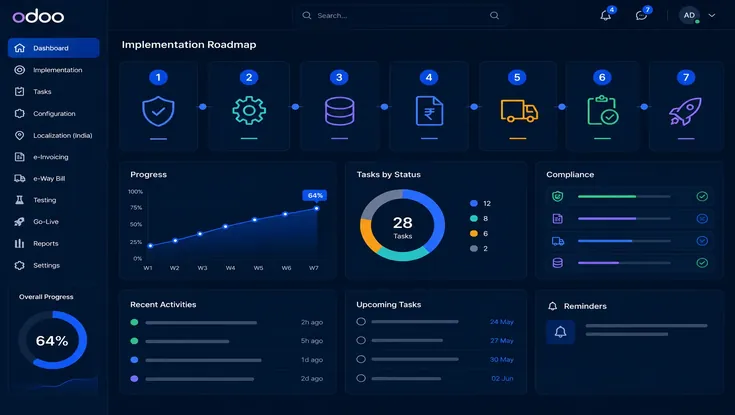
A structured Odoo implementation plan for India should cover India localization, GST validation, e-invoice testing, e-way bill testing, user training, and go-live support in sequence. Skipping or compressing steps increases compliance and data risk after go-live.
Determine GST registration status, e-invoice applicability, e-way bill applicability, number of GSTINs, and branches or warehouses involved.
Install the India localization module, set the chart of accounts, configure tax groups and fiscal positions, and add GSTIN and state details.
Review customers, vendors, products, HSN/SAC codes, tax rates, and shipping addresses before any live transaction.
Set up IRP/NIC API credentials, validate invoice JSON fields, and verify IRN generation and QR code output on the invoice PDF.
Register NIC API credentials, define the transporter data entry process, set vehicle and distance fields, and align with delivery workflows.
Run B2B invoices (intrastate and interstate), export invoices, goods movement, credit notes, cancellations, and API failure handling.
Define who generates IRN, handles e-way bills, resolves API errors, and what must not be edited after IRN generation.
Business Scenarios
Business Scenarios to Test in Odoo
These five scenarios cover the most common GST and goods movement situations Indian businesses encounter in Odoo. Each should be tested before go-live, including edge cases like cancellations and API failure handling.
- CGST + SGST applies
- Customer GSTIN required
- E-invoice where applicable by turnover
- E-way bill if goods value exceeds threshold
- IGST applies
- Place of supply validation required
- E-invoice where applicable by turnover
- E-way bill typically relevant for goods movement
- SAC code required
- E-invoice where applicable
- E-way bill not required unless goods are transported
- E-way bill may be needed depending on movement and state rules
- May require custom configuration in Odoo
- Verify state-specific intra-state requirements
- Credit note with IRN reference where applicable
- Original IRN must be referenced in the credit note
- Verify reconciliation impact in Odoo Accounting
Team Responsibilities
Finance, Logistics and IT Responsibilities
GST compliance in Odoo is not only an accounting task. E-way bills require logistics input; API errors require IT action. Define responsibilities across all three teams before go-live.
| Finance | Logistics | IT / Odoo Admin |
|---|---|---|
| GSTIN accuracy, tax mapping, invoice approval, IRN generation, credit/debit note handling, GST reports | Transporter ID, vehicle number, delivery address, distance, dispatch timing, e-way bill print and sharing | API credentials, user access control, error log monitoring, PDF template updates, module upgrades, audit trail |
How SDLC Corp Helps
How SDLC Corp Helps with Odoo India GST Compliance
SDLC Corp helps Indian businesses configure Odoo for GST, e-invoicing, and e-way bill workflows, including India localization setup, master data cleanup, invoice PDF customisation, API credential configuration, transporter and logistics workflow setup, user training, and post-go-live support. Where native Odoo does not fully match your approval, warehouse, or reporting requirements, the system can be extended without disrupting standard accounting flows.
In Odoo India GST implementations we have supported, the most common cause of IRN failures is an HSN or GSTIN mismatch in master data, typically caught at testing if a structured pre-go-live invoice validation run is included in the implementation plan.
● Frequently Asked Questions
Yes. Odoo’s India localization supports Indian accounting and GST-related workflows. Correct output depends on company GSTIN, tax configuration, HSN/SAC codes, and accounting settings.
Yes. Odoo can support GST e-invoicing workflows when the required localization, tax settings, and integration setup are configured correctly.
Yes. With the right e-invoicing configuration and API integration, Odoo can generate IRN and QR code details for eligible invoices.
Yes. Odoo can support e-way bill workflows through proper GST configuration and integration.
No. E-invoicing applicability depends on turnover limits and current GST rules.
An e-way bill is generally required for the movement of goods above the prescribed value limit, depending on GST rules and transaction type.
It depends on your Odoo version, localization setup, and integration needs.
Test GSTIN, tax mapping, HSN/SAC codes, invoice format, credit notes, e-invoicing, e-way bills, GST reports, and real transaction scenarios before go-live.
Start with clean GST master data, correct tax mapping, e-invoice testing, and e-way bill process validation before go-live.
Talk to an Odoo expert