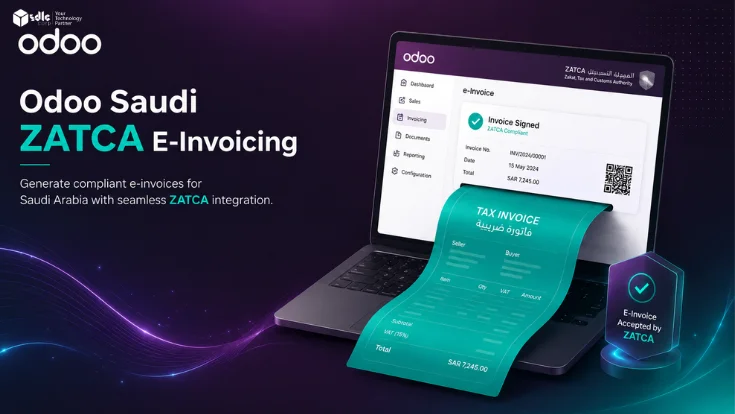
Saudi businesses using Odoo must configure more than standard invoicing to meet ZATCA e invoicing requirements. Correct setup includes Saudi localization, VAT details, company information, XML invoice generation, QR code output, sales journal onboarding, ZATCA API mode selection, sandbox and simulation testing, and production synchronization.
Odoo's Saudi Arabia localization supports ZATCA e invoicing workflows when the required company data, portal credentials, and accounting configuration are in place. Below, you'll find the setup sequence, API modes, journal onboarding steps, common errors, and go live checks Saudi finance and operations teams should review before production.
ZATCA phase applicability, wave deadlines, and technical requirements can change. Review Phase 1 and Phase 2 dates on the official ZATCA portal or confirm with a qualified Saudi VAT advisor before go live.
This guide is useful for
Saudi Arabia Localization
What Odoo Saudi Arabia Localization Covers
Odoo's Saudi Arabia localization extends Odoo Accounting with ZATCA specific settings covering VAT, company information, e invoice XML, QR codes, API modes, and journal onboarding. Review the official ZATCA technical guideline for the required e invoice format. You can review the Odoo Saudi Arabia localization documentation for supported setup details. For businesses going through Odoo implementation services, Saudi localization setup, ZATCA configuration, journal onboarding, and go live testing should be included in scope.
| Area | What it means in Odoo |
|---|---|
| Saudi VAT | VAT setup, tax mapping, and tax reporting configured under Saudi Arabia localization |
| Company information | Legal name, VAT number, address, and CR number stored and verified before ZATCA onboarding |
| ZATCA API mode | Sandbox, Simulation/Pre-Production, or Production selected in Odoo Accounting settings |
| Sales journal onboarding | Each sales journal onboarded with ZATCA using OTP from the Fatoora portal |
| Standard invoices | B2B invoices submitted for clearance where applicable under Phase 2 |
| Simplified invoices | B2C invoices reported to ZATCA where applicable under Phase 2 |
| QR code | QR code included on the invoice PDF or POS receipt as required |
| XML invoice | Structured XML payload generated for ZATCA API submission |
| API response handling | Success, warning, or rejection responses reviewed in the Odoo chatter |
| POS support | Retail receipts and simplified invoice scenarios where configured and tested |
ZATCA Phases
ZATCA Phase 1 vs Phase 2 in Odoo
ZATCA defines Phase 2 as the Integration phase, with Phase 2 rollout waves applied by targeted taxpayer group from 1 January 2023. It introduces technical and business requirements and integrates the e invoicing solution with ZATCA systems. Phase 1 covered invoice generation; Phase 2 adds API integration, XML structure, cryptographic stamp, and ZATCA response handling.
| Item | Phase 1: Generation | Phase 2: Integration |
|---|---|---|
| Main requirement | Generate and store electronic invoices in compliant format | Integrate e-invoicing solution with ZATCA systems |
| Invoice format | Electronic invoice with QR code requirements | XML with UUID, cryptographic stamp, and API integration |
| B2B standard invoices | Generated and stored | Submitted for clearance where applicable |
| B2C simplified invoices | Generated and stored | Reported to ZATCA where applicable |
| Odoo focus | Invoice format and QR code output | API mode, journal onboarding, sync, and response handling |
| Wave rollout | Earlier implementation across taxpayer groups | From 1 January 2023 in waves by targeted taxpayer group |
Wave applicability and compliance deadlines vary by taxpayer group. Confirm your wave status and go live date with ZATCA or a qualified Saudi VAT advisor before starting Phase 2 configuration.
Invoice Types
Standard vs Simplified Tax Invoices in Odoo
Standard and simplified tax invoices follow different ZATCA clearance and reporting flows. Both must be tested separately before production go live. Confusing the two during setup creates separate configuration and API errors in each flow.
| Item | Standard Tax Invoice | Simplified Tax Invoice |
|---|---|---|
| Common use | B2B transactions between registered businesses | B2C and retail transactions |
| Buyer details | More buyer/company fields required | Less buyer detail depending on scenario |
| ZATCA flow | Clearance where applicable | Reporting where applicable |
| Odoo source | Customer invoice | POS receipt or simplified invoice |
| Common issue | Buyer VAT or company fields incomplete | QR or POS configuration incorrect, delayed reporting |
| Testing priority | Test clearance response and XML output | Test reporting response and QR output on receipt |
E Invoice Workflow
How Odoo Handles ZATCA E Invoicing
When an applicable invoice is confirmed in Odoo, the Saudi localization generates the XML invoice payload with QR code and cryptographic data, submits it to ZATCA via the API, and updates the invoice status based on the response. The sales journal must be onboarded, the API mode must be correct, and company and customer data must be complete before this flow produces a valid result.
Fields required for ZATCA submission
- Seller VAT number and legal name
- Buyer VAT number where required
- Invoice UUID and sequence number
- XML invoice with all mandatory fields
- QR code (Phase 1) and cryptographic stamp (Phase 2)
- Tax breakdown and place of supply
API response types in Odoo chatter
- Cleared — standard invoice accepted
- Reported — simplified invoice accepted
- Warning — accepted with noted issue
- Rejected — invoice not accepted by ZATCA
API Modes
ZATCA API Modes: Sandbox, Simulation and Production
Odoo provides three API modes for ZATCA e invoicing. Each must be used in the correct environment with the correct database and Fatoora portal credentials. Moving directly to Production without completing Simulation testing increases the risk of live invoice rejections and compliance issues.
Test VAT number
Duplicated database
Live ZATCA sync
| Mode | Purpose | Database | Invoice validity |
|---|---|---|---|
| Sandbox | Early setup validation with test VAT number | Any test environment | Not legally valid |
| Simulation | Live-like invoice flow testing before production | Duplicated live database | Not legally valid |
| Production | Real invoice synchronization with ZATCA | Live production database only | Legally valid |
Odoo documentation confirms that Simulation/Pre Production invoices are not legally valid. Use a duplicated live database for Simulation not your production database. Switch to Production mode only on the live database.
Journal Onboarding
Odoo ZATCA Journal Onboarding Process
Each sales journal used in your Odoo operation must be onboarded with ZATCA before it can submit invoices. The OTP for onboarding is retrieved from the Fatoora portal and differs by environment: Sandbox uses a pre populated OTP, while Simulation and Production require the correct portal for each. Missing journal onboarding stops invoice synchronization entirely.
Decision Guide
Native Odoo vs Third Party ZATCA Modules
Native Odoo Saudi localization covers standard ZATCA e invoicing workflows for most businesses. Customisation or third party modules are needed when your POS, multi branch structure, approval flows, or external system integrations fall outside the standard localization scope.
- You use standard Odoo Accounting and invoicing flows
- Saudi localization is clean and company data is complete
- Invoice flows match Odoo standard processes
- All sales journals can be onboarded without custom logic
- No custom approval or special integration is needed before ZATCA submission
- Complex POS flows or retail-specific invoice formats are required
- Multi-company or multi-branch journal structures are in use
- Custom approval workflows before ZATCA submission are needed
- Integration with external ERP, WMS, marketplace, or POS systems is required
- Industry-specific invoice data or custom dashboards are needed
If your ZATCA workflow includes custom approvals, POS edge cases, or external system data, Odoo customization services may be needed beyond standard Saudi localization. For businesses connecting Odoo with external ERP, POS, marketplace, or WMS systems, Odoo integration services help ensure invoice data reaches Odoo correctly before ZATCA submission.
Find Your Odoo ZATCA Implementation Path
Answer three questions to receive a recommended ZATCA implementation path with next steps and what to avoid matched to your invoice scope, current stage, and setup complexity.
Saudi Localization Setup
Use this path when your Odoo ZATCA setup has not started yet. Begin with company data, Saudi localization, VAT settings, invoice templates, and sandbox testing.
- Configure Saudi localization and VAT.
- Test XML, QR code, and invoice output.
- Move to Simulation after sandbox passes.
Simulation Ready Configuration
Use this path when sandbox testing is complete and your team needs live like validation before production.
- Duplicate the live database.
- Onboard journals in Simulation mode.
- Test standard, simplified, credit, debit, and POS flows.
Production Readiness Review
Use this path when Simulation testing is complete and the business is preparing to issue live ZATCA invoices.
- Confirm all company and journal data.
- Switch Production mode only on the live database.
- Monitor first live invoice responses in Odoo chatter.
Custom ZATCA Configuration Review
Use this path for complex POS, multi branch, external ERP, WMS, marketplace, or custom approval workflows.
- Map invoice sources and journal structure.
- Define custom scope before testing.
- Run integration tests before Production.
Troubleshooting
Common Odoo ZATCA Errors and Fixes
Most ZATCA errors in Odoo originate from incomplete company data, incorrect journal onboarding, or invalid invoice fields rather than software defects. Each error type has a clear prevention step that should be completed during Simulation testing.
| Error Type | Common Cause | How to Prevent |
|---|---|---|
| Company validation error | Missing legal name, VAT number, or address | Complete company master data before journal onboarding |
| Journal onboarding failure | Wrong OTP or wrong Fatoora portal used | Use the correct portal for the selected API mode |
| Invoice rejection | Invalid buyer VAT, address, or invoice fields | Validate customer and tax data before confirmation |
| QR code issue | Invoice PDF or localization settings incomplete | Test invoice PDF output before production go-live |
| XML validation error | Missing mandatory field or invalid tax mapping | Test multiple invoice types in Simulation mode first |
| API response warning | ZATCA accepts invoice but flags a data issue | Review the warning, correct root cause, and monitor |
| Simplified invoice reporting issue | POS or simplified invoice not configured correctly | Test POS receipts and reporting flow before go-live |
| Production sync failure | Sandbox setup not correctly replicated to production | Use a duplicated live database for Simulation testing |
Recurring API rejections, journal onboarding failures, or QR code issues should be resolved through a structured process with clear escalation not one off fixes. Post go live Odoo support ensures errors are diagnosed, documented, and resolved before they affect production invoices.
Readiness
Odoo ZATCA Readiness Checklist
Work through all four groups before submitting any live ZATCA invoices. Each item should be confirmed in Simulation before switching to Production. Finance teams should also review ZATCA e invoicing controls before final approval.
Company Setup
Invoice Setup
ZATCA API Setup
Testing Scenarios
Implementation
Odoo ZATCA Step by Step Implementation Roadmap
A structured ZATCA implementation covers localization, master data, API setup, journal onboarding, simulation testing, production go live, and team training in sequence. Compressing or skipping stages increases rejection risk on live invoices.
Determine VAT registration status, Phase/wave applicability, invoice types (standard, simplified, or both), POS use, and number of sales journals to onboard.
Install Saudi Arabia localization, configure VAT, complete company information (legal name, VAT number, full address), and set invoice templates.
Review customers, VAT numbers, addresses, products, tax mapping, and journal configuration before any sandbox testing.
Select Sandbox, retrieve the correct OTP from Fatoora portal, onboard each sales journal, run a test invoice, and review the API response in the Odoo chatter.
Duplicate the live database, switch to Simulation mode, onboard journals again using the Simulation portal OTP, and test all invoice types: standard, simplified, credit note, debit note, and POS receipt.
On the live production database only, switch to Production mode, onboard production journals with the Production Fatoora OTP, and monitor the first live invoices and their ZATCA responses closely.
Define who issues invoices, who reviews ZATCA responses, who handles rejections and warnings, and what must not be edited after invoice submission.
Post Go Live
What to Avoid After Odoo ZATCA Go Live
These are the most common post go live mistakes that create ZATCA compliance risk after production invoicing begins. Each is preventable with clear team processes defined before go live.
What to avoid after ZATCA go live
- Editing invoice-critical fields (VAT, buyer data, amounts) after ZATCA submission
- Using Sandbox or Simulation mode in the production database
- Onboarding only one journal when multiple sales journals are in use
- Ignoring accepted-with-warning API responses — investigate and correct root cause
- Bypassing Odoo invoice flow with manual invoices that skip ZATCA submission
- Changing invoice templates without retesting QR code output and API response
- Pushing POS receipts live without completing simplified invoice testing in Simulation
- Treating Simulation invoices as legally valid or sharing them with buyers
Team Responsibilities
Finance, IT and Odoo Admin Responsibilities
ZATCA compliance is not only a finance or IT task. Define ownership across all five roles before go live to prevent gaps in invoice handling, API monitoring, and escalation.
| Finance | Odoo Admin | IT | POS / Retail | Management |
|---|---|---|---|---|
| VAT data accuracy, invoice correctness, credit and debit notes, ZATCA response review, compliance reporting | Saudi localization, journal onboarding, API mode, user permissions, OTP management, invoice template review | External system connections, API monitoring, database backups, logs, ZATCA error escalation | Simplified invoices, receipt QR codes, daily POS reporting checks, ZATCA response awareness | Go-live approval, compliance ownership, escalation process, wave applicability confirmation |
How SDLC Corp Helps
How SDLC Corp Helps with Odoo ZATCA Implementation
SDLC Corp helps Saudi businesses configure Odoo for ZATCA e invoicing, including Saudi localization setup, VAT configuration, sales journal onboarding, invoice template review, QR code validation, sandbox and simulation testing, production readiness, POS and simplified invoice scenarios, external system integrations, and post go live support.
FAQ
Frequently Asked Questions
Yes. Odoo's Saudi Arabia localization supports ZATCA e invoicing workflows including Sandbox, Simulation/Pre Production, and Production modes when company information, sales journals, API modes, and invoice settings are configured correctly.
ZATCA Phase 2 is the Integration phase. ZATCA states it is rolled out in waves and introduces technical and business requirements plus integration between e invoicing solutions and ZATCA systems. Phase 2 began from 1 January 2023 and applies in waves by targeted taxpayer group.
Standard invoices are used for B2B transactions and follow a clearance flow where applicable. Simplified invoices are used for B2C and retail transactions and follow a reporting flow. Both have different ZATCA API responses and must be tested separately before production.
Odoo's Saudi localization supports QR related e invoicing workflows where the invoice template, ZATCA configuration, API mode, and journal onboarding are configured correctly. QR code output should be tested before production go live.
Sandbox is for early setup testing with a test VAT number. Simulation/Pre Production is for live like testing on a duplicated database invoices are not legally valid. Production is for real invoice synchronization with ZATCA on the live database.
Not always. Native Odoo Saudi localization is sufficient for standard invoicing workflows. Customisation or third party modules may be needed for complex POS scenarios, multi branch journal structures, custom approval flows, or external system integrations.
Test standard B2B invoices, simplified B2C invoices, credit notes, debit notes, POS receipts where applicable, QR code display, API responses (cleared, reported, warning, rejected), each sales journal, and the rejected invoice recovery process.
Your finance team, tax advisor, or a qualified Saudi VAT consultant should verify phase/wave applicability, current ZATCA technical requirements, and compliance deadlines before production go live. ZATCA rules and deadlines can change.
Start with correct VAT setup, journal onboarding, sandbox testing, simulation validation, and production readiness before issuing live ZATCA invoices.
Talk to an Odoo expert