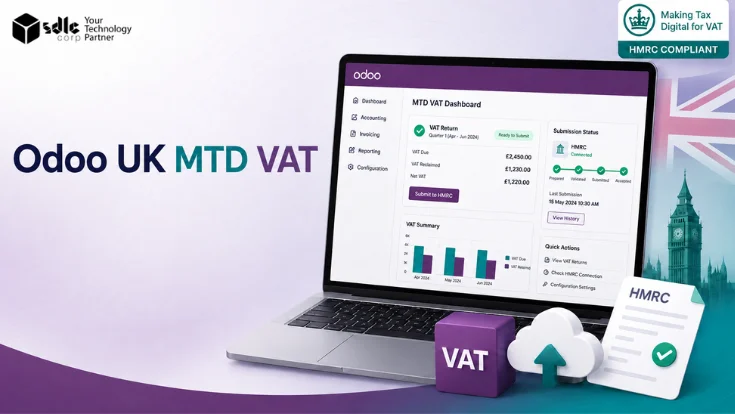
UK VAT-registered businesses must use HMRC-compatible software to keep digital VAT records and submit returns under Making Tax Digital. Odoo supports this through its UK accounting localization and the UK Accounting Reports module.
Getting MTD VAT working in Odoo requires the right modules, correct VAT configuration, a verified HMRC connection, and proper VAT return period settings - all before the first submission.
Short answer: Odoo supports UK MTD VAT through the UK Accounting (l10n_uk) and UK Accounting Reports (l10n_uk_reports) modules. Together, these provide UK taxes, a VAT100-ready tax structure, accounting reports, and direct VAT return submission to HMRC via the MTD-VAT API.
What Is Making Tax Digital for VAT?
Making Tax Digital (MTD) is HMRC's initiative requiring UK businesses to keep digital VAT records and submit returns using compatible software - not manually or via HMRC's online portal.
| Requirement | What it means |
|---|---|
| Digital records | VAT records must be kept in a compatible digital system - spreadsheets alone are not compliant without bridging software |
| Digital submission | VAT returns must be sent to HMRC digitally using MTD-compatible software |
| Compatible software | Must connect to the HMRC MTD-VAT API; Odoo's UK Accounting Reports module does this |
| No manual portal filing | HMRC's legacy VAT submission portal is no longer available for MTD-mandated businesses |
For questions about VAT registration thresholds or MTD mandate scope, consult HMRC or a qualified tax advisor directly.
Does Odoo Officially Support UK MTD VAT?
Yes. Odoo's UK localization includes native MTD-VAT submission through the UK Accounting Reports module, which connects to HMRC’s MTD-VAT API.
What Odoo officially provides
- UK chart of accounts - CT600-compliant, VAT100-ready tax structure
- UK VAT taxes created automatically with related financial accounts
- UK accounting reports including VAT tax reports
- HMRC connection and MTD-VAT API submission from Accounting Reporting
- UK counties listing and company localisation fields
Odoo Modules Required for UK MTD VAT
Use the UK fiscal localization package for MTD VAT setup. UK - Accounting provides the core localization, while UK - Accounting Reports enables VAT reporting and HMRC submissions. In most cases, the HMRC API module installs automatically as a dependency.
| Module name | Technical name | Purpose | Required? |
|---|---|---|---|
| UK - Accounting | l10n_uk | UK chart of accounts, VAT100-ready tax structure, and UK counties. | Required |
| UK - Accounting Reports | l10n_uk_reports | UK accounting reports and MTD-VAT API submissions to HMRC. | Required |
| UK - HMRC API | l10n_uk_hmrc | HMRC API support installed automatically in most setups. | Dependency |
| UK - BACS Payment Files | l10n_uk_bacs | BACS direct debit and credit payment file generation. | Optional |
| UK - Construction Industry Scheme | l10n_uk_reports_cis | CIS monthly returns submitted separately from MTD VAT. | Optional |
Module Activation
First, install l10n_uk to enable UK localisation. Then, add l10n_uk_reports to access HMRC submission features.
Hosting Compatibility
These modules support Odoo Online, Odoo.sh, and on-premise deployments. However, installation methods vary by hosting environment.
How Odoo Handles UK VAT Setup
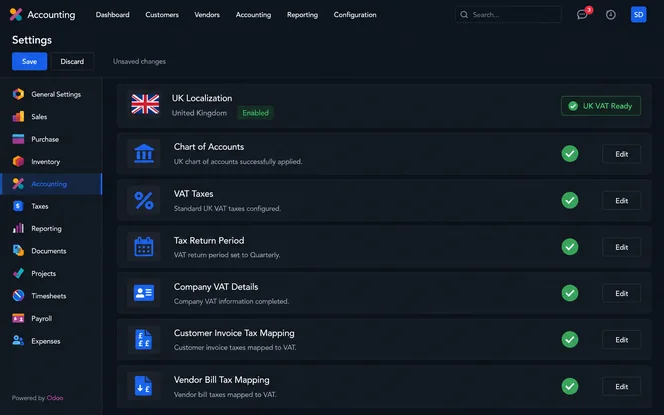
After installation, UK localisation creates VAT taxes and accounts automatically. However, every setting should be reviewed before the first HMRC submission.
Chart of accounts
A CT600-compliant chart of accounts is installed by Odoo. In addition, VAT control accounts are mapped automatically.
VAT taxes
Standard, reduced, and zero-rate VAT taxes are created during localisation. Therefore, verify them before posting transactions.
VAT return period
Set the return frequency in Odoo settings. This must align with HMRC reporting obligations.
Company settings
Before authorisation, confirm the UK address, VAT number, and country settings are accurate.
Customer invoices
Apply the correct VAT codes to invoices. Additionally, review product taxes and fiscal positions.
Vendor bills
Vendor bills should use the correct input VAT taxes. Otherwise, VAT return figures may be inaccurate.
How to Connect Odoo to HMRC for MTD VAT
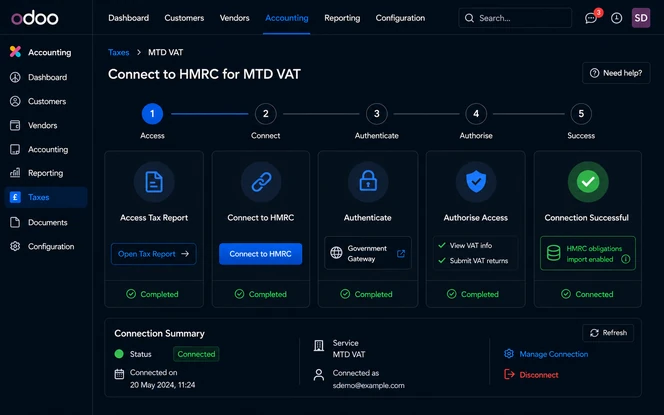
The HMRC connection is a one-time authorisation step required before the first MTD VAT submission. Complete this well before the first filing deadline.
Open the Tax Report
Go to Accounting → Reporting → Tax Report. Confirm the report shows UK tax periods and the correct company.
Click Connect to HMRC
The Connect to HMRC button appears in the Tax Report view. Click it to start the HMRC authorisation flow. This redirects to the HMRC Government Gateway.
Enter company credentials on HMRC
Log in to the HMRC Government Gateway with the business credentials. Enter the company's VAT registration number and confirm the authorisation request from Odoo.
Authorise the connection
Grant Odoo permission to access HMRC VAT obligations and submit returns. HMRC redirects back to Odoo once authorised. The connection is stored per user and per company.
Verify the connection
After authorisation, the Tax Report view should show the option to import HMRC obligations. Therefore, test the connection well before the first submission deadline - not on the day of filing.
The HMRC connection is tied to the specific Odoo user who authorised it. If that user changes, the connection must be reauthorised by the new user.
18-month authority limit: HMRC software authority lasts 18 months. Set a calendar reminder to reauthorise the connection before it expires - particularly important for quarterly filers who may not notice the expiry until a submission fails.

How to Submit VAT Returns to HMRC from Odoo
Once HMRC access is active, Odoo can submit VAT returns for each filing period. However, confirm the selected period matches the HMRC obligation first.
Before You Submit
Import HMRC obligations
In the Tax Report, click Import HMRC Obligations. Odoo then pulls open VAT periods from HMRC.
Select the correct period
Select the VAT quarter or month being submitted. Then, confirm the dates match the HMRC obligation.
Review the VAT report
Check all VAT100 boxes. In addition, review output tax, input tax, and net VAT payable before sending.
Check tax accounts
Confirm VAT control accounts are reconciled. Otherwise, report and ledger differences may cause inaccurate submissions.
Final Submission Process
Click Send to HMRC
After verification, click Send to HMRC. Odoo submits the report through the MTD-VAT API.
Retain submission confirmation
Finally, save the HMRC confirmation reference. This supports digital record-keeping and future audit checks.
Known Limitations for MTD VAT in Odoo
Odoo has some MTD VAT limitations. Therefore, review these constraints before go-live.
Multi-company HMRC connections
Only one company and one Odoo user can connect to HMRC at a time.
For multiple UK companies, the user must switch company and reauthorise HMRC before each submission.
Therefore, this process should be tested before go-live.
Late VAT submissions
Odoo only imports open VAT obligations from the last three months.
Returns older than three months must be submitted by contacting HMRC directly.
As a result, timely VAT submission is important.
Common Odoo MTD VAT Setup Mistakes
These are the most common configuration and process errors encountered during Odoo UK MTD VAT implementation.
Missing l10n_uk_reports
Installing UK Accounting without the UK Accounting Reports module means no MTD-VAT API button appears in the Tax Report view.
Incorrect company settings
The company must have a UK country, a valid VAT number, and a complete UK address. Missing any of these blocks the HMRC authorisation flow.
Wrong VAT return period
If the VAT return period does not match the HMRC obligation (quarterly vs monthly), Odoo will not retrieve the correct obligations from HMRC.
Incorrect tax mapping
Products or vendors mapped to the wrong VAT tax codes result in incorrect VAT100 box values. Review default taxes before posting any invoices.
Unreconciled VAT accounts
Submitting without reconciling VAT control accounts causes the general ledger and the VAT report to diverge. Reconcile before each submission.
HMRC connection not tested early
Instead of waiting until the filing deadline, test the HMRC connection at least two to three weeks before the first due date.
Multi-company process not planned
Groups with multiple UK VAT entities must define the switch-company and re-authentication sequence before go-live, not during a submission window.
Attempting very late returns through Odoo
VAT periods more than three months overdue cannot be retrieved or submitted through Odoo. Contact HMRC directly for these returns.
Not reviewing the VAT100 before sending
Clicking "Send to HMRC" without reviewing each VAT100 box is a compliance risk. Once submitted, amended returns require additional HMRC steps.
Odoo MTD VAT vs Bridging Software vs Accountant Filing
There are three common approaches for UK MTD VAT submission. However, the right choice depends on whether accounting is already running in Odoo.
| Option | Best for | Advantages | Limitations |
|---|---|---|---|
| Odoo MTD VAT | Businesses already using Odoo Accounting | Integrated accounting and VAT submission in one system; no export/import needed | Requires correct Odoo setup; multi-company needs extra process |
| Bridging software | Businesses keeping accounts in spreadsheets | Fast workaround for non-Odoo setups; minimal software change | More manual; VAT data lives outside the accounting system; additional software cost |
| Accountant filing | Businesses with outsourced finance teams | Expert oversight and responsibility; suitable for low-volume filings | Less real-time visibility; delay between accounting data and submission; recurring agent fees |
For businesses already running accounting inside Odoo, the native MTD VAT module is the most efficient option - it eliminates data export, manual spreadsheet steps, and third-party bridging fees.
When You Need an Odoo Partner for MTD VAT
Some MTD VAT setups can be self-configured by experienced Odoo users. However, migration, complex VAT, or multi-company filing often needs partner support.
Projects Suitable for Self-Configuration
Often self-configurable
- New Odoo setup with one UK company
- Standard VAT rates only
- Clean accounting data from the start
Expert review advised
- Migration from Xero, Sage, QuickBooks, or spreadsheets
- Multiple VAT rates, partial exemption, or CIS
- Multi-company UK VAT submissions
- Late submission backlog or data cleanup
Assess Your Implementation Needs
Do I Need an Odoo Partner for MTD VAT?
Answer two questions to see the best setup approach.
Step 1 — What is your current accounting setup?
Step 2 — How complex is your VAT situation?
Recommendation Based on Your Answers
- Install
l10n_uk,l10n_uk_reports, andl10n_uk_hmrc. - Review taxes and accounts against your VAT registration.
- Test the HMRC connection before the first filing.
- Mixed VAT rates need careful tax mapping.
- Tax groups and VAT100 boxes should be reviewed.
- A review session reduces filing risk.
- Each company needs a clear HMRC authorisation process.
- The submission workflow should be documented.
- Testing is required before any deadline.
- Chart mapping and opening balances must be transferred correctly.
- VAT history should match the new Odoo structure.
- Partner support reduces migration risk.
- Partial exemption needs accurate tax setup.
- Historical VAT data should be reconciled.
- Specialist review helps prevent compliance issues.
- Multi-company migration with CIS is high complexity.
- VAT cleanup and HMRC process design are required.
- Self-management is not recommended without UK localisation experience.
- UK localisation must be configured from scratch.
- HMRC connection should be tested early.
- Experienced users may self-configure after review.
- Mixed VAT rates require careful initial setup.
- Incorrect setup can create reconciliation issues.
- Early support helps avoid rework.
- Multi-company VAT with CIS needs expert configuration.
- Backlogs increase compliance and data risks.
- Engage a partner before accounting data is entered.
Odoo UK MTD VAT Implementation Checklist
Work through these checks before the first HMRC submission. In addition, treat each item as a prerequisite for the next.
| Area | Check |
|---|---|
| Company setup | UK company, correct VAT number, full UK address configured |
| Modules | l10n_uk, l10n_uk_reports, and l10n_uk_hmrc all installed and active |
| Chart of accounts | UK chart of accounts applied, VAT control accounts present |
| VAT taxes | UK VAT taxes reviewed - standard, reduced, and zero rates correctly mapped |
| Periodicity | VAT return period set to match HMRC registration (quarterly or monthly) |
| Customer invoices | Invoices posted with correct UK VAT tax codes |
| Vendor bills | Bills posted with correct input VAT tax codes |
| Reconciliation | VAT control accounts reconciled before submission |
| HMRC connection | Authorisation tested at least two weeks before filing deadline |
| Obligations | HMRC obligations imported and correct period visible in Tax Report |
| VAT review | VAT100 boxes reviewed and signed off before clicking Send to HMRC |
| Records | HMRC submission confirmation reference retained |
How SDLC Corp Helps with Odoo UK MTD VAT Setup
SDLC Corp configures Odoo for UK MTD VAT, including UK localisation, VAT setup, HMRC connectivity, report validation, migration, and user enablement.
Based on our implementation experience, incorrect VAT mapping and unreconciled VAT accounts are the most common issues before first submission. With clean data, businesses can often complete setup and submit successfully within 2–4 weeks.
Frequently Asked Questions: Odoo UK MTD VAT
UK MTD VAT is supported through Odoo's UK Accounting Reports module. It enables VAT return submissions using HMRC's Making Tax Digital (MTD) API framework.
Install l10n_uk and l10n_uk_reports to activate UK MTD VAT functionality. The HMRC integration dependency is typically installed automatically.
Yes. Once HMRC authorisation is completed, users can import VAT obligations, review VAT data, and submit VAT returns directly from Odoo.
Odoo supports multi-company VAT filings. However, HMRC permits only one active connection per company and authorised user at a given time.
In most cases, the HMRC API component is installed automatically as a dependency of the UK Accounting Reports module.
HMRC generally restricts VAT obligation retrieval to recent periods. For older VAT periods, businesses may need to contact HMRC and follow manual submission procedures.
Need help setting up Odoo for UK MTD VAT?
SDLC Corp can configure Odoo Accounting, UK VAT taxes, HMRC connection, reporting workflows, and finance user training for your UK business.
Talk to an Odoo specialist