Managing orders, products, and inventory across separate WooCommerce and Odoo systems often leads to delays, manual work, and avoidable backend errors. Many ecommerce teams handle this gap manually at first, but as order volume grows, the process becomes harder to manage and starts affecting fulfillment speed, reporting accuracy, and team efficiency.
An Odoo WooCommerce connector helps solve this by creating a more reliable workflow between both systems. Instead of repeating updates and checks across separate platforms, businesses can sync key data more efficiently. This guide explains how the connector works, which features matter in daily operations, and what to review before going live.
Why WooCommerce and Odoo Break Down Without a Connector
When WooCommerce and Odoo are managed separately, the business depends on repeated admin work to keep systems aligned. That creates a predictable set of problems:
- Manual order checks or re-entry into Odoo after every sale
- Stock mismatches between storefront availability and ERP records
- Product and category updates that must be repeated in both systems
- Slower refund and return coordination across platforms
- Reporting that requires manual reconciliation before it can be trusted
Each issue is manageable in isolation. Together, they create an operational bottleneck that limits growth and increases the cost of every transaction.
The section below explains how a connector eliminates each of these gaps.
How an Odoo WooCommerce Connector Works
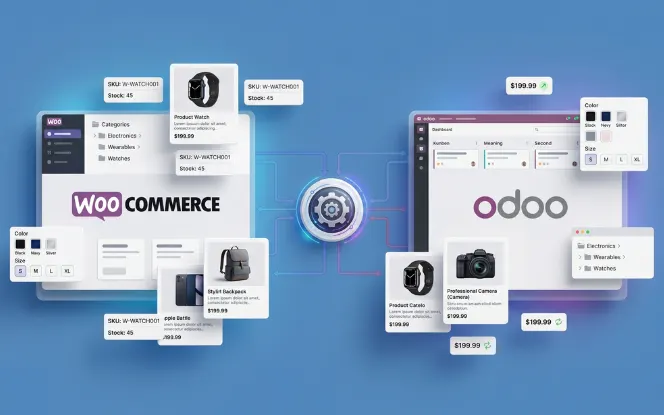
A connector acts as the operational bridge between the WooCommerce storefront and the Odoo ERP layer. It moves business data between both systems through APIs, webhook sync, or scheduled cron jobs — depending on how the connector is configured.
It typically handles:
- Orders flowing from WooCommerce into Odoo for ERP processing
- Product data, categories, and attribute mapping staying aligned
- Inventory updates pushing from Odoo to the WooCommerce storefront
- Customer sync between both platforms
- Order status mapping from Odoo fulfillment stages back to WooCommerce
- Shipping and tracking updates returning to the storefront
For most businesses, a hybrid approach works best: webhook sync handles critical events like new orders and stock changes in near-real time, while lower-priority data like product descriptions runs on configurable cron intervals. This keeps the integration responsive without creating unnecessary API load.
The next section traces exactly what that looks like across a real order lifecycle.
What the Full Order Workflow Looks Like in Practice of WooCommerce Odoo
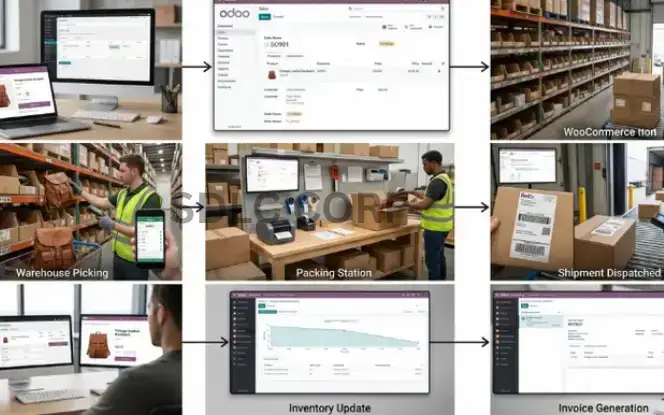
The most direct way to understand the operational impact is to trace a single order from placement through fulfillment and stock update.
| Step | What Happens | With Connector vs. Without |
|---|---|---|
| 1 | Customer places order | With connector: the order syncs to Odoo automatically with customer, product, and payment details. Without: someone checks WooCommerce and enters the order manually in Odoo. |
| 2 | Sales order confirmed in Odoo | With connector: Odoo confirms the order based on mapped rules. Without: the team must review and confirm it manually before fulfillment starts. |
| 3 | Picking and packing | This step stays the same, but with a connector it starts faster because the order reaches Odoo without delay. |
| 4 | Shipment dispatched | With connector: tracking updates sync back to WooCommerce automatically. Without: someone copies the tracking details manually. |
| 5 | Stock level updated | With connector: WooCommerce stock updates after sync. Without: stock stays incorrect until someone updates it manually. |
| 6 | Invoice generated | With connector: WooCommerce order status updates automatically. Without: status updates may be delayed or missed. |
A WooCommerce store handling 250 orders a day and 1,800 active SKUs was losing around 3.5 hours daily on manual order entry and stock correction. It also faced regular stock mismatches, which caused overselling, customer messages, and refunds.
After connecting WooCommerce and Odoo with webhook sync and cron-based automation, manual order entry was removed, stock issues dropped sharply, fulfillment started faster, and sync errors became easier to track and fix.
How the Connector Improves Order Management in Odoo WooCommerce Connector
Orders sync from WooCommerce to Odoo automatically
When a customer places an order on WooCommerce, the connector pushes it into Odoo with the full data needed for ERP processing:
- Customer name, email, and billing and shipping address
- Products, quantities, and SKUs
- Applied discounts, taxes, and shipping method
- Payment status and method
This removes the manual step of checking WooCommerce and recreating orders in Odoo — a task that becomes unsustainable above 50 to 100 daily orders.
Fulfillment runs through Odoo without manual handoff
Once the order is in Odoo, it moves through picking, packing, invoicing, and dispatch without anyone needing to cross-reference WooCommerce. WooCommerce captures the sale. Odoo manages execution.
Order status mapping keeps both systems in sync
A well-configured connector maps Odoo fulfillment stages to WooCommerce order statuses. When a delivery is confirmed in Odoo, the WooCommerce order status updates accordingly. Tracking numbers push to the storefront automatically, and support teams can check a single system for order progress instead of toggling between platforms.
Clean order management depends on equally clean product data — covered next.
How the Connector Reduces Product Management Overhead of Odoo WooCommerce Connector
Product updates no longer need to happen twice
Without a connector, every product change — price update, description edit, new variant — must be made in both WooCommerce and Odoo separately. A connector eliminates that duplication by keeping product records aligned, with Odoo or WooCommerce acting as the master source depending on your setup.
Category sync and attribute mapping work across both systems
A strong connector handles the full structure of your product catalog — not just top-level products:
- Simple and variable products, including all variant combinations
- SKUs and product identifiers syncing correctly between systems
- Category sync keeping WooCommerce taxonomy aligned with Odoo's internal structure
- Attribute mapping so that Odoo product attributes translate correctly to WooCommerce variation attributes
- Pricing updates reflecting on the storefront without manual re-entry
Category sync and attribute mapping are often overlooked in initial connector evaluations, but they become critical for businesses with structured catalogs or frequent product restructuring.
New products and pricing changes publish faster
When product data is connected, pricing updates made in Odoo reflect on the storefront within the next sync interval. New product launches move from Odoo to WooCommerce without admin re-entry. Catalog management overhead drops substantially.
Accurate product data only holds value when inventory stays equally accurate — which is where the next section focuses.
How the Connector Fixes Inventory Accuracy Between Odoo and WooCommerce Connector

Stock levels on the storefront reflect what Odoo actually holds
When Odoo manages stock and a connector keeps WooCommerce updated, several problems reduce or disappear:
- Overselling — customers ordering products that are actually out of stock
- Delayed stock corrections after sales or returns
- Manual adjustments made on one platform but not the other
- Confusion between reserved stock and available stock
Odoo becomes the single source of truth for stock
In a well-structured setup, Odoo owns inventory. WooCommerce displays what Odoo says is available. This single source of truth prevents the most common inventory problem: two systems with conflicting stock counts and no clear answer about which is correct.
More advanced inventory workflows become possible
Mature connectors can support multi-warehouse stock management, variant-level tracking, reserved stock exclusions, and controlled sync intervals to prevent race conditions during high-volume periods. These are the capabilities that separate a basic sync tool from a production-grade operational integration.
The next section covers the specific connector features that make these workflows reliable in daily use.
Core Connector Features That Matter in Daily Operations of Odoo WooCommerce
The difference between a connector that works in testing and one that holds up in production comes down to a specific set of operational features. These are the ones that matter once order volume is real and errors carry actual consequences.
Webhook sync for time-sensitive events
Scheduled sync runs at intervals. Webhook sync fires the moment an event occurs in WooCommerce — a new order, a cancellation, a status change. For businesses processing orders continuously, webhook sync means an order placed at 2am is in Odoo and moving through fulfillment before your team starts work in the morning. Without webhook support, sync timing is only as fast as your shortest cron interval.
Sync logs and retry visibility
When a sync fails — and at some point, it will — you need to know immediately and understand why. A connector without accessible sync logs turns every failed order into a manual investigation. The right connector surfaces errors in a readable log, identifies which records failed and why, and retries automatically on transient failures. This is the feature most businesses wish they had verified before going live.
Customer sync
Order sync alone does not create a unified customer record. Customer sync ensures that contact details, addresses, and account history created in WooCommerce are available in Odoo for CRM, invoicing, and support workflows. Without it, customer records exist only in WooCommerce, and Odoo is left with incomplete data for reporting and communication.
Category and attribute sync
Category sync keeps your WooCommerce taxonomy aligned with how products are organised in Odoo. Attribute mapping ensures that Odoo product attributes — size, colour, material, specification — translate correctly into WooCommerce variation attributes. Missing or misaligned attribute mapping is one of the most common causes of variant sync failures, where a product appears in WooCommerce but its variants are missing or incorrectly priced.
Multi-store WooCommerce Odoo handling
Businesses running more than one WooCommerce storefront — by brand, region, or market segment — need a connector that can route orders, products, and inventory from a single Odoo instance to multiple stores. Not all connectors support this. If multi-store handling is a current or future requirement, confirm it explicitly before selecting a solution. Adding it later typically requires significant reconfiguration.
Configurable cron intervals
Different data types have different urgency. Stock levels need to update frequently. Product descriptions can wait. A connector with configurable cron intervals lets you set sync frequency per data type — running stock updates every 5 minutes and full product syncs hourly. This reduces unnecessary API calls, prevents performance issues during peak periods, and gives you control over system load without sacrificing data freshness where it matters most.
A connector missing one of these features will eventually create an operational gap. Webhook sync without sync logs means you cannot diagnose failures. Customer sync without attribute mapping means CRM data is incomplete. Multi-store handling without configurable cron intervals creates load problems at scale. Evaluate these as a set, not individually.
Module vs Managed Connector vs Custom Integration: Which Is Right for Your Business?
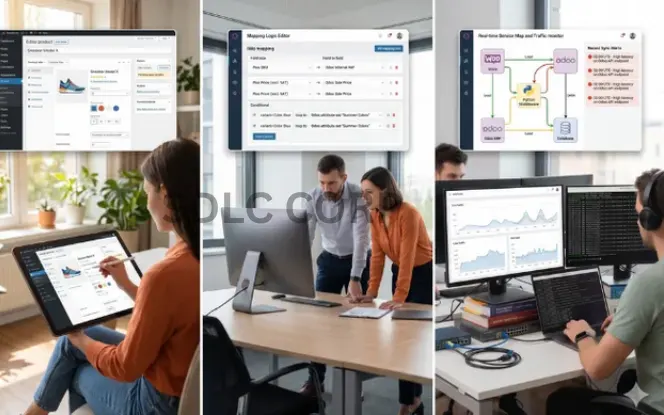
There are three main ways to connect WooCommerce and Odoo. Each involves a different trade-off between cost, control, flexibility, and ongoing maintenance burden.
| Module | Managed Connector | Custom Integration | |
|---|---|---|---|
| What it is | An Odoo module you install and set up yourself | A hosted connector service managed by a third-party provider | A custom integration built for your business workflow |
| Typical cost | $100–$500 one-time cost | $100–$500 monthly cost | $3,000–$15,000+ development cost |
| Setup effort | Medium — you handle setup and testing | Low — the provider handles setup | High — requires full development and testing |
| Flexibility | Limited to the module’s built-in features | Moderate — some custom setup may be possible | High — built around your exact needs |
| Maintenance | You manage updates and version checks | The provider manages updates and compatibility | You manage it through your team or developer |
| Compatibility | You must check Odoo and WooCommerce version support | The provider usually handles compatibility | You control compatibility and upgrade timing |
| Best for | Small to mid-size stores with standard needs | Businesses that want reliability without internal development | High-volume stores or complex workflows |
The most common mistake is choosing based on upfront cost alone. A $200 module that requires 10 hours of internal developer time on every Odoo version upgrade has a higher true cost than a $300 per month managed connector that handles compatibility automatically. Calculate the total cost of ownership over two years, not just the licence fee.
WooCommerce Odoo module compatibility breaks on major version releases. Before selecting any module, check when it was last updated and whether the developer provides paid support for version upgrades. An abandoned module on a critical workflow is an operational liability.
Even with the right connector type, specific failure points can appear after go-live — the section below covers the most common ones and how to plan for them.
Common Connector Limitations and Failure Points to Know About Odoo WooCommerce Connector
An Odoo WooCommerce connector improves operations, but it is not risk-free. Businesses still need to watch for a few common failure points after setup:
- Sync conflicts: If teams update the same product in both systems, one version may overwrite the other without warning.
- Weak error visibility: Some connectors log sync failures but do not alert your team quickly, which can delay fulfillment.
- Refund and cancellation issues: Not every connector updates Odoo stock correctly after cancelled or refunded orders.
- Broken variant mapping: Product or attribute changes in WooCommerce can break the link with Odoo and cause duplicates or failed syncs.
- Performance problems at scale: Poor sync setup can create API pressure and slow performance during busy sales periods.
- Version compatibility risks: A connector may stop working after major Odoo or WooCommerce updates if it is not maintained properly.
Test these five scenarios in staging before connecting production systems: a new order, a cancelled order, a refund, a stock-out event, and a product variant update. These are the five scenarios where connectors most commonly fail.
Once the connector is running cleanly, the business gains that extend beyond time savings — covered in the next section.
What to Verify Before Choosing an Odoo WooCommerce Connector
Verify these eight capability areas before committing to a solution. A connector missing any of them will eventually create an operational gap.
| Capability | What to Confirm |
|---|---|
| Sync direction | Does it sync one-way or two-way? Confirm which system is master for each data type. |
| Sync timing | Does it support webhook sync, scheduled sync, or both? Can you configure cron intervals per data type? |
| Error handling and sync logs | What happens when a sync fails? Are errors logged and visible? Does it retry automatically? |
| Order status mapping | Can you map WooCommerce statuses to Odoo stages? How does it handle cancellations and refunds? |
| Tracking sync | Does it push tracking numbers from Odoo back to WooCommerce and trigger customer notifications? |
| Category and attribute sync | Does it handle category sync and attribute mapping for variable products correctly? |
| Multi-store WooCommerce Odoo | Can one Odoo instance connect to multiple WooCommerce stores? |
| WooCommerce Odoo module compatibility | Is the connector actively maintained for your Odoo and WooCommerce versions? Check the last release date. |
With the right connector in place, the operational gains extend across the entire business — not just the integration layer.
Managing Separately vs Using an Odoo WooCommerce Connector
The table below shows the difference at a task level — where the time and errors actually occur.
| Task | Without a Connector | With a Connector |
|---|---|---|
| New order arrives | Manually checked in WooCommerce, re-entered in Odoo | Pushed to Odoo automatically via webhook sync |
| SKU goes out of stock | Odoo updates — WooCommerce still shows available | Stock update syncs to storefront within the cron interval |
| Price change needed | Updated in Odoo, then manually in WooCommerce | Updated once in Odoo — storefront reflects on next sync |
| Customer asks for order status | Support checks WooCommerce then Odoo | Single view in Odoo with full order status history |
| New customer places order | Customer record created in WooCommerce only | Customer synced to Odoo for invoicing and CRM |
| Month-end stock report | Reconcile Odoo vs WooCommerce manually | Odoo is the source of truth — one report, no reconciliation |
When a Business Should Consider an Odoo WooCommerce Connector
The business case becomes clear when any of these are true:
- Order volume is growing and admin time is not scaling with it
- Stock mismatches are causing overselling or customer complaints
- Product and category updates are taking twice as long because of duplicate data entry
- Support teams switch between platforms to answer routine order questions
- Month-end reporting requires manual data cleanup before it can be used
- Fulfillment slows noticeably during busy periods
If several of these apply, the manual workflow is already limiting scale — not just causing inconvenience.
If your team treats weekly stock reconciliation as a normal task, that is a strong signal the workflow has broken down. Reconciliation should be an exception, not a routine.
Conclusion
An Odoo WooCommerce connector improves daily operations by syncing orders, products, and inventory more reliably. As a result, businesses reduce manual work, avoid common errors, and prepare for growth with better control.
For teams using WooCommerce for sales and Odoo for ERP, these features are not optional at scale. Webhook sync, sync logs, customer sync, mapping controls, and cron-based automation form the baseline of a connector that can handle real production workflows.
FAQs
Does Odoo have a built-in WooCommerce connector, or do I need a third-party module?
Odoo does not include a built-in WooCommerce connector for production use. Most businesses use a third-party module or a managed connector service. Before choosing one, check version compatibility, update history, and support quality.
What is the difference between webhook sync and scheduled sync?
Webhook sync runs when an event happens, such as a new order or cancellation. Scheduled sync runs at fixed time intervals. Webhook sync is faster, while scheduled sync is useful for regular background updates. Many businesses use both.
How much does an Odoo WooCommerce connector typically cost?
Basic modules usually cost less than custom integrations. Managed services often charge monthly, while custom connectors cost more based on scope. The real cost depends on setup, support, upgrades, and long-term maintenance.
Can one Odoo instance connect to multiple WooCommerce stores?
Yes, some connectors support multiple WooCommerce stores in one Odoo setup. This helps businesses manage different stores from one backend. Still, not every connector includes this feature, so check before buying.
What happens to Odoo stock when a WooCommerce order is cancelled or refunded?
A good connector should update stock in Odoo when an order is cancelled or refunded. If it does not, your team may need to correct stock manually. That is why this workflow should be tested before go-live.
How do I know if a connector will still work after I upgrade Odoo or WooCommerce?
Check the connector's update history and changelog. A well-maintained connector should support new versions regularly. Before upgrading, always confirm compatibility and test the connector in staging.
What is customer sync, and why does it matter?
Customer sync sends customer details from WooCommerce to Odoo. This helps keep records complete for invoicing, support, and reporting. Without it, Odoo may miss important customer data.