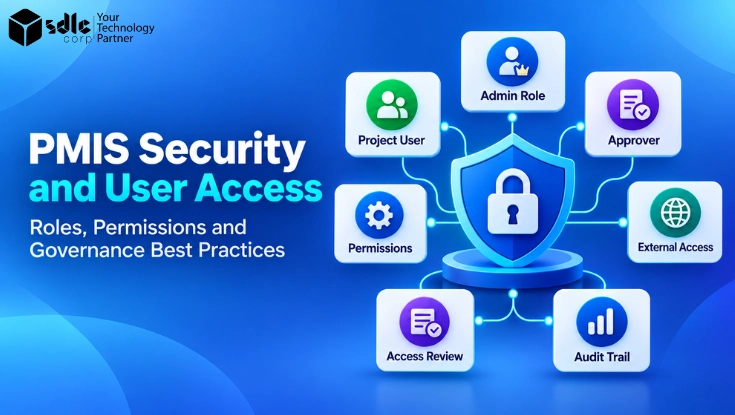
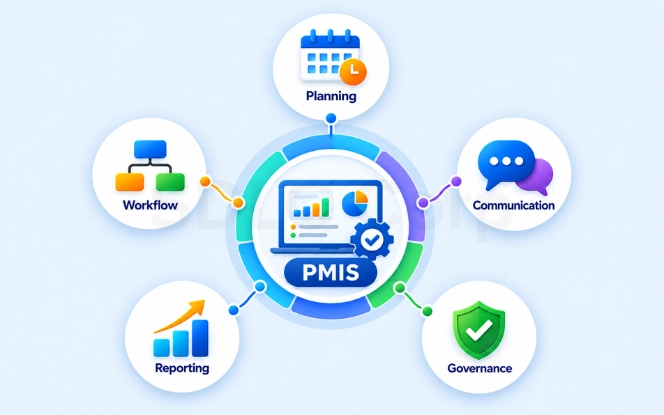
A Project Management Information System (PMIS) holds schedules, budgets, contracts, documents, approvals, risks, and project reports. Because several teams use the same system, access cannot be the same for everyone. A project manager, finance reviewer, contractor, and system administrator need different levels of access.
PMIS security ensures that each user gets the access required for their work and nothing more. A strong model combines identity controls, roles, permissions, project scope, approvals, access reviews, and audit records. It should also change or remove access when a person's responsibilities change.
The basic principle is simple: give the right user the right permission for the right project or data at the right time.
Key Takeaways
The sections below work through a complete access model, but the short version is this. Identity controls decide who signs in, authorization decides what happens next, and governance keeps both current.
- PMIS security should control both who can sign in and what they can do after signing in.
- Build access around role, resource, action, and project scope, rather than broad Admin, Editor, and Viewer rights.
- Use least privilege and limit users to the projects and data they actually need.
- Review access throughout the joiner, mover, and leaver lifecycle, especially for contractors and administrators.
- Keep high-risk approvals separate, record important activity, and include access controls in PMIS vendor evaluation.
Give the right user the right permission for the right project or data at the right time, and change that permission as soon as the responsibility behind it changes.
What Is PMIS Security And User Access?
PMIS security controls access to project information and system functions. It covers identity verification, permissions, access decisions, and ongoing governance. However, authentication and authorization solve different problems.
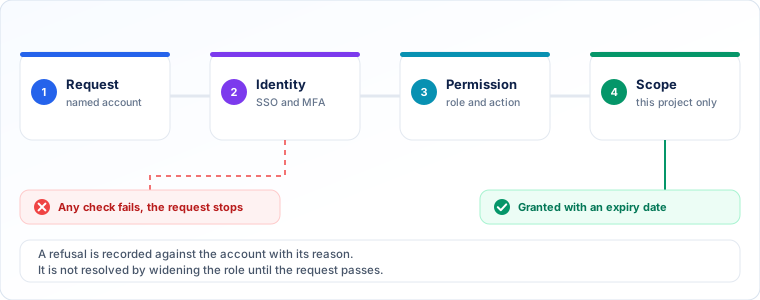
Authentication confirms who a user is through controls such as SSO and MFA. Authorization decides what that person can view, edit, approve, export, or administer. Governance then defines who approves, reviews, changes, and removes those permissions.
For example, a project manager may update the schedule for Project A. A finance manager may manage approved budget information, while a contractor may only upload documents to an assigned project.
The NIST role-based access control model links permitted actions to roles rather than managing every permission user by user. This provides a useful baseline for enterprise PMIS access design.
Therefore, effective PMIS access control should answer four questions.
Main PMIS Security And User Access Risks
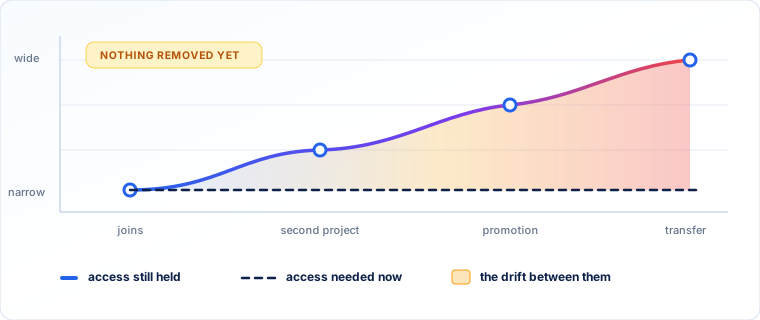
Access problems often start when permissions become broader than the user's current responsibilities. A team member may receive access to several projects when only one is required. Likewise, someone who moves to a new project may keep permissions from the previous assignment.
This creates privilege creep. Over time, the user can access more information than the current role requires. Former employees, expired contractors, dormant accounts, and shared external accounts create similar risks.
Sensitive information needs tighter controls as well. Budgets, contracts, forecasts, change orders, confidential documents, and bulk exports should not follow the same rules as general project updates.
Administrator and integration permissions also need attention. These accounts may change system settings, security rules, API connections, or large volumes of project data.
For this reason, organizations should grant high-risk access only when a clear business need exists, and should record the reason behind every exception.
Not Sure Where Your PMIS Permissions Are Too Broad?
Talk to SDLC Corp about mapping your current roles, project scopes, and administrator rights against the access each team actually needs.
Talk To Our TeamPMIS Roles And Responsibilities
Clear PMIS roles and responsibilities make access easier to manage. Instead of defining unique permissions for every person, start with standard responsibilities and then limit each role by project or data scope.
A practical access model may include a System or Security Administrator, PMIS Administrator, PMO Manager, Project Manager, Finance or Data Owner, Team Member, Executive, Contractor, and Auditor. However, job titles alone should never determine access.
Governance must also define who owns the decision. The project manager may request access, while a finance or data owner approves sensitive information. The PMIS administrator can then apply the approved permissions. A simple responsibility model is shown below.
| Activity | Business / Data Owner | Project Manager | PMIS Admin | IT / IAM | Audit |
|---|---|---|---|---|---|
| Define access need | A | R | C | C | I |
| Approve sensitive access | A | R | I | C | I |
| Provision access | I | I | R | R | I |
| Review existing access | A | R | C | C | C |
| Review audit evidence | I | I | C | C | R |
| Remove access | A | R | R | R | I |
Swipe the table sideways to see every column.
R = Responsible, A = Accountable, C = Consulted, I = Informed.
This structure reduces the chance that one administrator controls both business approval and technical access.
How To Design PMIS Roles And Permissions
A strong PMIS roles and permissions model separates four elements.
The role defines the user's responsibility. The resource identifies what they need to access, such as a schedule, budget, contract, document library, report, or workflow.
The action defines what they may do. Common actions include view, create, edit, approve, export, share, delete, and administer. Finally, scope limits the permission to a specific project, portfolio, department, or data set.
For example, a project manager may edit Project A, view Project B, and have no access to Project C. This approach gives more control than assigning broad system-wide rights.
Use RBAC As The Baseline
Role-based access control works well for stable responsibilities. Organizations can create standard roles such as Project Manager, Finance Reviewer, or Document Controller and assign the required permissions.
However, complex project environments may need more context. A user's access may depend on the project, client, data sensitivity, approval authority, or relationship. In those cases, project scope or attribute-based rules can extend RBAC without creating dozens of new roles.
Apply Least Privilege
Least privilege means giving users only the access needed for their work. It should cover the permission itself, its scope, and the period for which it remains valid.
For instance, a contractor who uploads drawings to one project does not need portfolio-wide document access. Similarly, a finance user does not need user-administration rights simply because they manage project budgets.
Example PMIS Permission Matrix
The matrix below shows how the same resources can be treated differently for each role once scope and action are applied.
| Role | Schedule | Financials | Documents | Approvals | Export | User Admin |
|---|---|---|---|---|---|---|
| PMIS Admin | Configure | Limited | Configure | Limited | Controlled | Yes |
| PMO Manager | Manage | View | View | Governance | Controlled | No |
| Project Manager | Edit | View | Edit | Defined | Controlled | No |
| Finance Manager | View | Edit | View | Financial | Controlled | No |
| Team Member | Assigned work | No | Assigned files | No | Limited | No |
| Contractor | Limited | No | Approved areas | No | Restricted | No |
| Executive | View | View | View | View | Controlled | No |
| Auditor | Read | Read | Read | Read | Approved only | No |
Swipe the table sideways to see every column.
This PMIS permission matrix is only an example. Each organization should adjust it for project risk, data sensitivity, approval authority, and business structure.
Manage PMIS User Access From Joiner To Leaver
Good PMIS user access management covers the complete account lifecycle. Access should not remain unchanged after the day a user joins the system. A practical process follows the order below, which gives every access decision an owner and a reason.
New employees should receive only the roles required for their assignments. Meanwhile, users who change projects or responsibilities should have their existing access reviewed before new permissions are added.
SSO and MFA help confirm identity, while provisioning tools can reduce manual account work. Still, these controls do not replace authorization. A verified user may sign in successfully and still have no valid reason to access a specific budget or contract.
Finally, remove permissions quickly when employment, a contract, or a project assignment ends. This reduces dormant accounts and prevents old access from accumulating.
Access lifecycle rules are easier to enforce when they are agreed during rollout. The PMIS implementation roadmap sets out the phases where these decisions belong.
Need A Joiner, Mover, And Leaver Process For Your PMIS?
SDLC Corp can help you define access requests, approvals, review cycles, and offboarding rules that fit the way your project teams actually change.
Request A Working SessionControl Administrator, Contractor And External User Access
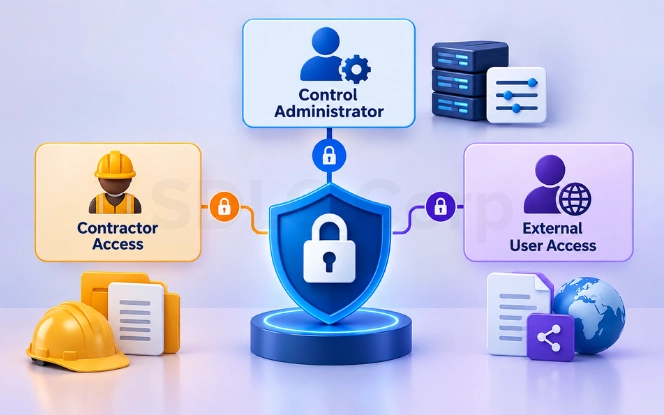
Administrator accounts can change roles, configurations, workflows, and integrations. As a result, they need stronger controls than normal project accounts.
Where practical, separate identity administration from PMIS application administration. In addition, temporary elevation can be safer than keeping powerful permissions active all the time. Sensitive administrative work should require strong authentication and generate clear audit records.
External users need a defined boundary as well. Each contractor, consultant, or vendor should have a named account, an internal sponsor, a defined project scope, and an expiry date.
For example, a contractor may upload documents and respond to assigned workflows in Project A. However, the same account should not automatically see another project, internal financial data, system settings, or unrestricted exports.
For broader implementation planning, a PMIS fit-gap analysis can help teams test whether a platform supports the required roles, approvals, integrations, and audit controls before configuration begins.
Apply PMIS Governance And Separation Of Duties
PMIS governance defines who can make access decisions and how sensitive actions are controlled. It should cover approvals, permission changes, exceptions, and accountability.
Separation of duties is especially important for financial or high-risk workflows. One person should not control every stage when the action affects money, contracts, privileged access, or audit evidence.
For example, a project manager can submit a change request. Finance can review its cost impact, while an authorized approver makes the final decision. The PMIS then records the approval history.
The same rule applies to privileged access. A person requesting administrator rights should not automatically approve that request. Likewise, an auditor should not have permission to alter the evidence under review.
Permission changes should also record the reason, approving owner, affected scope, date, and reviewer. This makes later reviews easier and provides clearer evidence during an audit.
Review, Monitor And Audit PMIS Access
Project teams change throughout delivery. Therefore, PMIS user access reviews should form part of normal governance rather than happen only after a problem appears.
Reviews should cover active accounts, privileged roles, contractors, dormant users, project memberships, and sensitive permissions. Important events should also trigger a review, including a project closure, role change, transfer, promotion, or contractor exit.
During a review, the owner should make one clear decision: retain, modify, or remove the access. Higher-risk permissions may need more frequent checks than low-risk viewer access, so organizations should set review intervals according to risk.
Set a documented review cadence and deprovisioning SLA for each access type. The following are example starting targets; the business owner and IT / IAM team should approve them against project risk and operating needs.
- Standard project access: review quarterly and at project closure; record the owner's retain, modify, or remove decision.
- Administrator and sensitive access: review monthly and after a material role or permission change.
- Contractor and external access: review monthly and before renewal; expire access automatically at the approved end date.
- Leavers and urgent removals: disable access at the effective exit time; for suspected compromise or an urgent removal, revoke access immediately and confirm completion within one hour of notification.
- Movers and review findings: remove obsolete permissions before the new assignment starts; complete non-urgent modify or remove decisions within one business day of approval.
- Evidence and escalation: record the owner, decision, due date, completion time, and affected accounts; revoke active sessions and tokens where supported, and escalate missed deadlines to IT / IAM and the business owner.
Use the PMIS support and SLA best practices to document removal targets, support coverage, escalation, and completion evidence.
The PMIS audit trail should record important changes and decisions. Useful events include permission changes, project membership changes, administrator activity, sensitive exports, sharing changes, financial approvals, API changes, and configuration changes.
Audit logs are most useful when teams can identify who performed the action, what changed, and when it happened. Therefore, logging should support investigation and governance rather than exist only as a technical feature.
PMIS Security Requirements To Check Before Choosing A Platform
Security requirements should be tested before PMIS implementation. Otherwise, teams may discover access or audit limitations after workflows and integrations are already configured.
- IdentitySSO, MFA, identity federation
- PermissionsGranular roles, project scope, custom permissions
- LifecycleProvisioning and deprovisioning
- External usersGuest restrictions, sponsors, expiry controls
- Privileged accessAdmin separation and activity logging
- AuditPermission, approval, configuration, and export logs
- DataEncryption, retention, residency options
- IntegrationsAPI authorization and credential controls
- ResilienceBackup and recovery
- AssuranceRelevant ISO 27001, SOC 2, or other security evidence
Security certification provides useful vendor assurance, but it does not replace correct customer configuration. A secure platform can still expose information if users receive overly broad roles.
Therefore, test real scenarios during selection. Verify project-level permissions, contractor access, export restrictions, approval rules, and audit history instead of accepting a general statement that the platform supports RBAC.
The PMIS for capital construction projects selection guide provides a broader framework for checking PMIS workflows, integrations, project controls, and security during platform evaluation.
The PMIS data migration strategy helps teams validate migrated permissions, project scope, and document access before go-live.
Evaluating A PMIS Against Your Own Security Requirements?
SDLC Corp can test roles, project scope, approval rules, export limits, and audit history with your real scenarios before configuration begins.
Book A Security ReviewPMIS Security Best-Practice Checklist
A practical PMIS security checklist should confirm that roles, permissions, and project scope reflect current business needs. Teams should define standard roles, document access owners, restrict sensitive actions, and use named accounts for employees and external users.
- Define standard roles instead of unique permissions per person
- Document the owner who approves each type of access
- Restrict sensitive actions such as exports and financial approvals
- Use named accounts for employees and external users
- Review access after every role or project change
- Remove stale permissions and dormant accounts
- Protect administrator rights and separate them where practical
- Monitor important configuration and approval activity
They should also review access after role or project changes, remove stale permissions, protect administrator rights, and monitor important configuration or approval activity. API and integration accounts need the same discipline because they may access large amounts of project data.
For capital programs with strong audit requirements, these controls should connect to wider project governance and evidence management. The PMIS guide for public infrastructure and capital improvement programs provides additional context on project records, approvals, and auditability.
PMIS Access Review
Would Your PMIS Access Survive An Audit?
We review your roles, project scope and privileged rights, then hand back a permission model your owners can sign off.
- Role design
- Access reviews
- Audit trails
What You Get Back
- A role and permission matrix
- Privileged access findings
- A review and removal schedule
Conclusion
Effective PMIS security does not depend on giving every user more security tools. It depends on making clear access decisions and keeping those decisions current as projects and responsibilities change.
Start with standard roles, then map each role to specific resources, actions, and project scopes. Use least privilege, separate sensitive duties, control administrators and contractors, and review access throughout the user lifecycle. In addition, maintain audit evidence for important permission and approval changes.
For organizations evaluating or implementing a capital-project PMIS, Trestle PMIS supports enterprise, portfolio, and project-level access, multiple roles per user, external-user permissions, SAML SSO, and split administrative duties. Security capabilities should still be validated against your own requirements during evaluation.
The goal is simple: each user should have the access required for their current responsibility and no unnecessary access beyond it. When that responsibility changes, the permission should change as well.
Frequently Asked Questions
What Is Role-Based Access Control In A PMIS?
Role-based access control assigns permissions to defined business roles instead of managing every user separately. Project or portfolio scope can then limit where those permissions apply.
What Should A PMIS Permission Matrix Include?
A permission matrix should connect roles with resources, actions, and scope. It should show who can view, edit, approve, export, share, delete, or administer relevant project information.
How Often Should PMIS User Access Be Reviewed?
There is no single interval that suits every permission. Organizations should use a risk-based schedule and also review access after project changes, job moves, contractor exits, or changes to privileged responsibilities.
How Should Contractor Access To A PMIS Be Controlled?
Contractors should use named accounts with an internal sponsor, restricted project scope, minimum required permissions, and an expiry date. Access should be removed when the assignment or contract ends.
Should Every PMIS Administrator Have Full Access?
No. Administrative responsibilities should be separated where practical, while powerful permissions should remain limited to the tasks that require them.
Does MFA Replace PMIS Access Control?
No. MFA helps verify identity, while authorization determines what the verified user may access or change. A secure PMIS needs both controls working together.