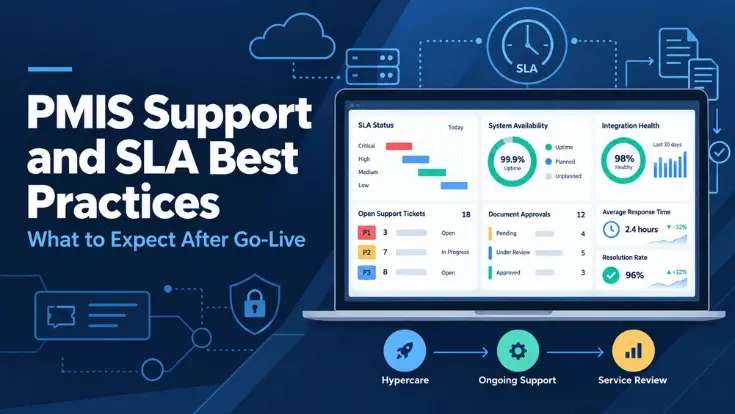
The PMIS is live. Contractors can submit invoices, project managers can approve changes, and finance can review costs. Then a payment deadline arrives, an integration stops updating, and nobody knows which team owns the problem.
That is where PMIS support and SLA best practices become operational requirements.
A successful launch needs more than a help-desk address. It needs clear ownership, measurable service commitments, and a tested way to restore work without losing control of project records.
This guide explains what to expect once the system is in use, what a support agreement should cover, and how to judge whether the service is working.
It is written for capital-program owners, PMO leaders, IT teams, and procurement managers evaluating ongoing PMIS support.

What Does PMIS Support Mean After Implementation?
PMIS support is the technical and functional assistance that keeps a Project Management Information System usable after teams begin processing real work. It covers investigating faults, helping users, maintaining agreed configurations, and coordinating problems across connected systems.
A service level agreement (SLA) records the service commitments: coverage hours, priority definitions, response targets, availability measures, responsibilities, and agreed remedies. Atlassian’s explanation of SLAs provides a useful overview of how measurable expectations support accountability.
The support scope and SLA work together. An uptime target does not automatically include new reports, unlimited configuration changes, or round-the-clock help. If you are still choosing a PMIS for capital projects, compare these obligations alongside features and implementation costs.
Start With Hypercare And A Clear Handover
Hypercare is a temporary period of increased attention immediately following deployment. Users perform their first live transactions while implementation specialists remain available to investigate early issues.
When planning PMIS implementation, use a phased PMIS implementation roadmap to define who receives support tickets, how issues are escalated, and when responsibility moves to the ongoing support team.
The length of hypercare should reflect the rollout, transaction cycles, and risks; there is no universal duration for every PMIS.
Use this period to observe complete workflows. An invoice should move from contractor submission through review and release to the financial system. A drawing revision should reach the intended users with the right permissions.
Checking that people can log in is only the beginning.
What should the support team receive?
The handover pack should contain:
- The approved PMIS configuration and release record.
- An integration map with system and interface owners.
- Support contacts and escalation routes.
- Operating and troubleshooting procedures.
- Monitoring alerts and reporting arrangements.
- A register of known issues and approved workarounds.
- Backup, recovery, and validation instructions.
Each unresolved item also needs an owner, documented business impact, workaround, and next review date.
When should hypercare end?
Microsoft’s transition-to-support guidance recommends defined hypercare exit criteria and preparation before the handover. For a PMIS, useful acceptance checks include:
- No unresolved critical incidents prevent essential work.
- Key approval, document, and financial processes have completed an agreed live cycle.
- Integration errors are visible, assigned, and reconciled.
- The ongoing team can handle routine tickets without relying on individual implementation consultants.
Record the sign-off and retain ownership of any remaining backlog. Passing into normal support must not make outstanding issues disappear.
Define What Ongoing PMIS Support Includes
Ask for a service catalog that explains what is included, what requires approval, and what is separately chargeable. This prevents a routine defect, a user question, and a new feature from entering the same queue with unrealistic expectations.
Application and workflow support
Investigate errors, failed approvals, performance problems, and behavior that differs from the accepted configuration. Identify which custom components are covered and who maintains them.
User and access assistance
Support authorized access requests, explain routine tasks, and maintain useful troubleshooting guidance. Business owners should approve access; support should not grant financial authority independently.
Integration and data support
Monitor failed exchanges, stale records, and reconciliation differences. Cover PMIS-to-ERP connections, document repositories, identity services, and reporting interfaces wherever they form part of the agreed solution.
Maintenance and planned changes
Define responsibility for updates, regression testing, release communication, and recovery checks. New workflows, additional modules, or major reports may need a separately approved change request.
Compare tiered support coverage
Microsoft Unified provides a useful enterprise example of layered support. Its current model separates:
- Unified Enterprise: foundational organization-wide technical support, incident management, and on-demand resources.
- Value Acceleration Services: proactive, solution-specific help with onboarding, optimization, adoption, and scaling.
- Mission Critical Services: elevated engineering engagement and accelerated incident resolution for the workloads and events with the greatest business impact.
These are Microsoft service layers, not default Trestle tiers or universal PMIS SLA commitments. Use the example to decide which reactive, proactive, and critical-response services your own agreement should define.
Also confirm ticket or effort limits, after-hours charges, supported versions, third-party costs, and support for external contractors. “Ongoing support included” is not a sufficient description of the service.
What Should A PMIS SLA Include?
A useful PMIS SLA explains how the service will be measured under real operating conditions.
Agree on targets with the delivery and support teams, then record them in the applicable agreement. The following is a review framework, not a universal SLA template.
| SLA component | What to confirm |
|---|---|
| Coverage and access | Support days, time zones, holidays, approved channels, and the route for out-of-hours emergencies. |
| Incident priorities | Business impact, urgency, affected workflows, available workarounds, and who can change a priority. |
| Service targets | Separate response, update, restoration, and resolution targets for each incident priority. |
| Clock rules | When timing starts, business versus elapsed hours, allowed pauses, and how a reopened ticket is measured. |
| Availability | Covered components, measurement period, monitoring source, outage definition, and explicit exclusions. |
| Escalation and remedies | Named escalation roles, breach reporting, corrective actions, and any service credits and claim conditions. |
Carry forward any support gaps identified during a PMIS fit-gap analysis. A requirement such as recovery within a defined window should become a testable obligation, not remain an unverified vendor response.
Clarify the clock: a ticket raised late on Friday may run against business hours or continuous elapsed time. Neither interpretation should be left to an argument during an outage.
Response Time Is Not The Same As Resolution Time
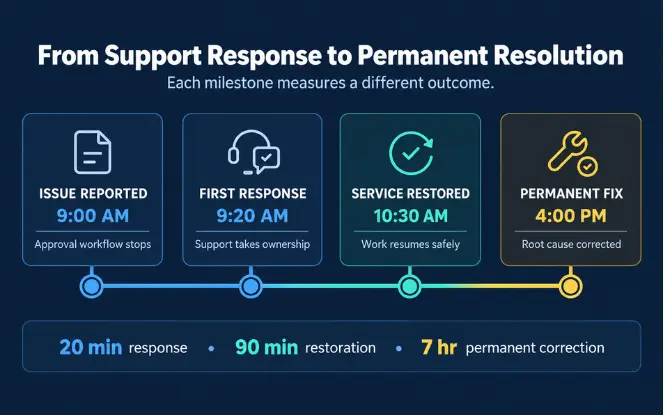
A fast acknowledgment does not mean the affected workflow is usable. Separate these milestones so performance reporting shows both communication speed and the duration of the business disruption.
- 01 / RESPONSE
Someone takes ownership
The provider acknowledges the incident and starts the agreed triage process. Define whether an automated receipt counts.
- 02 / RESTORATION
Work can safely resume
The affected service works again, potentially through a validated workaround. An underlying defect may still remain.
- 03 / RESOLUTION
The issue is addressed
The incident meets agreed closure criteria. A permanent fix or separate problem investigation may require further work.
An approval failure during payment processing
A ticket is logged at 09:00. Support responds at 09:20. A tested workaround restores approvals at 10:30. A permanent correction is deployed at 16:00.
The response took 20 minutes, restoration took 90 minutes, and the permanent correction took 7 hours from the ticket time. These measure different outcomes. Whether any target was met depends on the signed SLA and its clock rules.
Set Incident Priorities Around Business Impact
Classify incidents by impact and urgency, not by the seniority of the person reporting them.
A failure affecting one finance approver can still be serious if it blocks the only authorized payment route. Conversely, a cosmetic issue affecting every user may remain low priority.
PeopleCert’s ITIL 4 incident-management guidance emphasizes restoring a satisfactory level of service from the service consumer’s perspective rather than treating SLA compliance alone as success.
The matrix below applies that principle to PMIS support by considering business impact, urgency, and whether an acceptable workaround exists.
| Priority | Illustrative PMIS scenario | Handling to agree |
|---|---|---|
| P1 · Critical | Production is unavailable, or a critical control or data-integrity failure prevents safe operation. | Emergency ownership, agreed coverage, frequent updates, and a restoration plan. |
| P2 · High | An essential approval or financial exchange is seriously disrupted with no acceptable workaround. | Urgent investigation, named technical owners, and business-impact updates. |
| P3 · Medium | A limited workflow fails, but users can continue through an approved workaround. | Standard support targets and a scheduled correction. |
| P4 · Low | A minor display defect does not affect records, controls, or essential work. | Routine investigation and planned remediation. |
This is an illustrative, ITIL-aligned PMIS priority matrix—not an official universal ITIL table. It does not establish industry-standard response times.
Agree on timings separately, and route training questions and enhancement requests through their appropriate service processes rather than treating every request as an incident.
A useful ticket includes the project or contract reference, affected action, first observed time, error message, business deadline, and whether a workaround exists. Share redacted evidence through approved channels; do not attach passwords or unrestricted financial exports.
Read Uptime Commitments Beyond The Percentage
Availability describes whether a defined service is accessible during a measured period. Confirm what counts as unavailable: a failed login, a broken core transaction, or a wider platform outage. Also identify whether maintenance, customer networks, and third-party failures are excluded.
Illustrative calculation: 99.9% availability leaves 0.1% of 43,200 minutes, or 43.2 minutes. This assumes continuous monthly coverage with no exclusions; the actual SLA may use a different measurement basis.
This is not a promise that every incident will be fixed within 43.2 minutes. Nor does an uptime percentage establish disaster-recovery targets. Review availability, response, and restoration as separate commitments.
Check how partial outages are recorded and how the customer can challenge the report. A functioning homepage is weak evidence if contractors cannot submit invoices or finance cannot complete approvals.
Assign Ownership Across PMIS, ERP, And Document Systems
A connected PMIS can remain online while its financial data becomes stale.
When planning a PMIS integration with Microsoft Dynamics 365 and SharePoint, identify the source system, expected update frequency, failure alerts, retry process, and reconciliation owner for every interface.
For example, if an approved invoice does not reach the ERP, the support lead should coordinate the investigation across the connector, finance system, and PMIS. The customer should not have to prove which component failed before anyone accepts the incident.
| Role | Responsibility to assign |
|---|---|
| Customer process owner | Explain impact, approve workarounds, and confirm that business work can resume. |
| PMIS support lead | Own the ticket, coordinate investigation, communicate progress, and track escalation. |
| ERP / repository owner | Investigate the connected service and validate its records and permissions. |
| Security / governance lead | Oversee sensitive access, incident handling, evidence preservation, and control changes. |
Agree on these assignments contractually where relevant. After recovery, check for missing or duplicated transactions before retrying a queue. Closing the technical error without reconciling the business records leaves the real problem unresolved.
Protect Access, Records, And Recovery During Ongoing Operations
Support should restore service without bypassing the controls the PMIS was introduced to enforce. A blocked approval does not justify granting unrestricted administrator access or deleting an audit record.
Keep support access controlled
Use named accounts, approved permissions, and time-limited elevated access where appropriate. Record support changes and raemove access when staff or contractors leave.
Suspected unauthorized access or data exposure should enter the security incident process, even if the platform is still available.
Define recovery time and data-loss tolerance
AWS’s disaster-recovery guidance distinguishes two objectives: RTO (Recovery Time Objective) , the maximum acceptable time to restore service after disruption, and RPO (Recovery Point Objective) , the maximum acceptable data-loss window measured in time.
These are recovery objectives, not first-response targets.

Request evidence of recovery testing, not just a statement that backups run. Confirm what is restored across project data, attachments, permissions, and integration state. Define who verifies the recovered records and approves a return to normal processing.
Recovery planning should also reflect what originally moved into the platform. The PMIS data migration strategy should document migrated project, financial, and document records so validation can distinguish a pre-existing data gap from information lost during a disruption.
Review Service Results, Not Just Ticket Counts
A monthly review should connect support performance to the workflows users depend on. Track response and restoration compliance by priority, business-impact duration, aged tickets, reopened incidents, recurring causes, and integration reconciliation exceptions.
Show the number of eligible tickets behind every percentage. An overall compliance rate can hide a missed critical incident among many low-priority requests. Record disputed classifications and explain any excluded time.
Turn recurring issues into owned improvements. Repeated routing errors may require a configuration correction; repeated user questions may require better guidance.
Test changes outside production, obtain the appropriate approval, and retain a rollback plan. Schedule releases around payment runs and reporting deadlines where practical.
PMIS Post-Launch Support Checklist
Use these questions before handover and at service reviews. Each answer should point to a document, named owner, or demonstrated test, rather than an informal assurance.
Interactive review aid only. Selections are not submitted or saved and reset when this page reloads.
How This Applies To Trestle PMIS
Trestle PMIS brings capital-project records, contracts, financials, construction workflows, documents, and reporting into a connected platform. Its published delivery model includes implementation, training, launch assistance, hypercare, and ongoing support.
The product page lists a ticket portal, priority tiers, escalation, response SLAs, and 99.9% availability backed by an SLA. It also describes separate development/test, UAT, and production environments.
For your program, confirm coverage hours, exact service targets, availability measurement, integration responsibilities, and recovery obligations in the proposal and agreement. The examples in this article are guidance, not additional Trestle commitments.
Make Support Part Of Project Control
The best PMIS support arrangement makes responsibility clear before a problem occurs. It keeps incidents visible, distinguishes acknowledgment from recovery, protects records, and uses evidence to improve service.
Before accepting the handover, confirm who owns the next failed approval, who reconciles the next broken interface, and what proves the service is restored. Those answers matter more than a broad promise of “comprehensive support.”
Frequently Asked Questions
What Is A PMIS Support SLA?
A PMIS support SLA is an agreement that defines measurable service commitments once the platform enters regular use.
It should explain support coverage, incident priorities, response targets, availability measurement, escalation, and responsibilities. Confirm which services are included in the associated support scope.
How Long Should PMIS Hypercare Last?
There is no fixed duration for every PMIS. Agree on a planned period and exit criteria based on critical incidents, live business cycles, integration stability, and support-team readiness. Extend or adjust the plan if those criteria are not met.
Does A Response SLA Guarantee A Fix Within That Time?
No. A response target concerns acknowledgment or initial engagement as defined in the agreement. Service restoration and permanent resolution are different milestones. Confirm their targets, clock rules, and any permitted pauses separately.
Does 99.9% Uptime Include ERP And SharePoint Availability?
Not automatically. An availability commitment applies to the service boundary defined in its SLA. ERP, SharePoint, identity services, networks, and connectors may have separate obligations or exclusions. Agree on end-to-end monitoring and incident coordination as well.
Are New Features Included In Ongoing PMIS Support?
Not necessarily. Defect investigation and routine assistance may be included, while new modules, major reports, integrations, or workflow redesigns may require separate approval and pricing. Check the service catalog and change-control process before assuming coverage.