Home / Blogs & Insights / Odoo for Education

Odoo for Education

RIYA JAKHAR

Table of Contents

Odoo for Education

What Is Odoo for Education?

Odoo for Education is an ERP system configured for schools, colleges, and universities. It manages admissions, student records, attendance, exams, fee collection, faculty HR, parent updates, and multi-campus administration from one connected system.

Before rollout, schools should map their current systems, user roles, approval steps, reports, and data migration needs.

Odoo for Education is mainly an ERP setup. It manages administration, finance, and operations, while an LMS handles course delivery. Many institutions run Odoo alongside a platform like Moodle or Google Classroom.

AreaWhat Odoo Manages
AdmissionsApplications, documents, onboarding
StudentsProfiles, attendance, academic records
FeesInvoices, discounts, scholarships, reminders
FacultyTimetables, leave, payroll, workload
CommunicationParent portal, notices, alerts
ReportingDashboards, audits, accreditation preparation
When Odoo Fits

Is Odoo Right for Your Institution?

Odoo works best when an institution needs one connected system for administration, finance, student records, approvals, and reporting. It may be unnecessary if the school only needs online classes, course content, assignments, or quizzes.

Choose Odoo if…Be careful if…
✓ You need admissions, fees, HR, and reporting in one system⚠ You only need course delivery or online classes
✓ You manage multiple departments, programs, or campuses⚠ Your workflows are not documented yet
✓ You need custom fee rules, approval flows, and reports⚠ You expect a plug-and-play school app with no setup
✓ You want ERP, finance, admin, and parent updates in one place⚠ You only need an LMS like Moodle or Google Classroom

Not sure which Odoo modules your institution needs?

Talk to an Odoo Consultant
Odoo ERP vs LMS

Odoo ERP vs Learning Management System

An ERP and an LMS solve different problems. Odoo manages administration, finance, HR, approvals, and reporting, while an LMS manages course delivery, assignments, quizzes, and learning content.

SystemBest For
Odoo ERPAdmissions, student records, fees, accounting, HR, approvals, reporting
LMSCourse delivery, lessons, assignments, quizzes, learning content
Best setupRun Odoo for admin and finance, and connect it to an LMS for teaching delivery
Odoo works best as the administrative and finance layer. An LMS should remain the teaching layer for lessons, assignments, quizzes, and course content. This separation keeps academic delivery and administrative operations clear while still allowing data to move between systems.
Academic Management

Academic and Student Admin

The system gives admissions, academic teams, facilities, and operations access to the same student, timetable, fee, and facility records.

Student profiles, academic history, and document storage
Admission applications, shortlisting, and onboarding workflows
Timetable generation that accounts for room capacity and faculty availability
Campus facility bookings, maintenance requests, and resource allocation
For enrollment workflows, see: Automating Enrollment Processes Using Odoo

Manual Processes vs Odoo for Schools and Colleges

TaskWithout OdooWith Odoo
Student recordsSpreadsheets and paper filesCentral database with live updates
AdmissionsManual emails and paper formsAutomated workflow and status tracking
SchedulingManual timetables prone to errorsConflict-aware scheduling
Fee collectionManual invoicing and late remindersScheduled billing and alerts
Parent updatesPhone calls and WhatsApp groupsParent portal updates
Odoo academic management showing student records, admissions, and scheduling
Fee Management

Odoo Fee Management for Institutions

Schools, colleges, and universities often manage different fee structures by program, semester, campus, scholarship, sibling discount, or student category.

It connects fee plans, invoices, discounts, payments, reminders, and accounting records in one place.

Schools with multiple programs, grades, campuses, scholarships, or student categories can manage fee rules without rebuilding spreadsheets for every cycle. Finance teams can track paid, unpaid, and partially paid invoices, while administrators can review fee status before issuing certificates, exam permissions, or final clearances.

Fee Structures

Set fee plans by program, semester, or student type. Apply discounts and scholarships without manual calculation.

Billing Reminders

Generate invoices and send payment reminders on schedule, reducing routine follow-up for finance teams.

Budget Tracking

Monitor income and spend by department. Track grants and donations against approved budgets.

Audit Reports

Export financial reports for audits and accreditation preparation. Key transactions can be logged with timestamps.
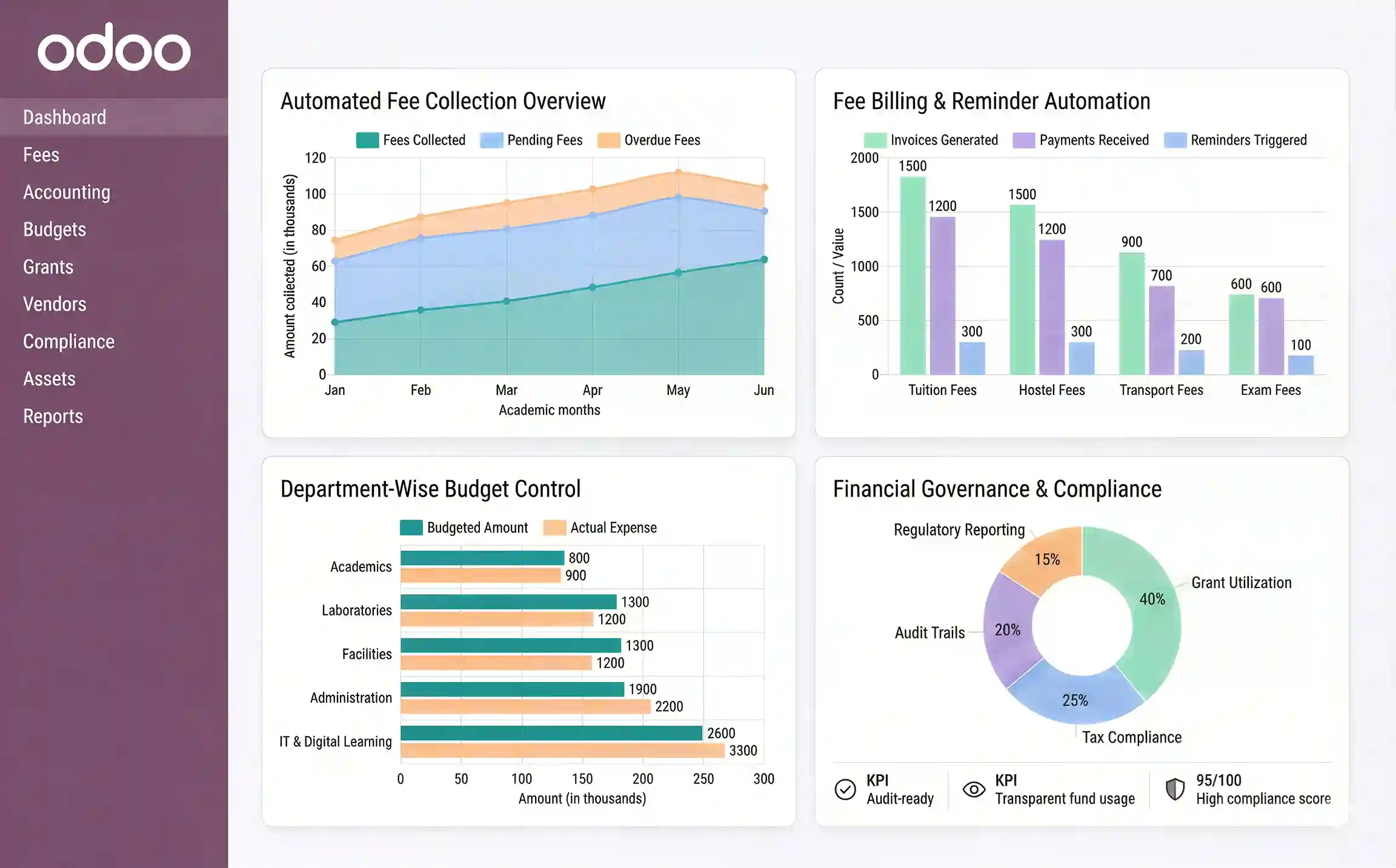
For institutions that need custom fee rules, approval chains, or scholarship workflows, Odoo Customization Services can configure these to match your institution's requirements.
Odoo fee management and financial reporting dashboard for educational institutions
Communication

Parent, Teacher, and Student Updates

Many institutions still rely on a mix of WhatsApp groups, circular emails, and phone calls. That leads to missed updates, repeated follow-ups, and unclear responsibility.

Parent updates, student notices, staff messages, fee reminders, and attendance alerts stay in one controlled communication flow. Attendance and fee records remain connected to the same student profile.

Parent Portal

Parents can check attendance, grades, fee balance, and notices from a portal, which reduces routine calls to the school office.

Broadcast Notices

Send announcements to a class, department, all parents, or the full institution from one screen.

Automated Alerts

Trigger notifications when attendance drops, a fee becomes overdue, or exam results are published.

Internal Messaging

Faculty, admin, and departments communicate through Odoo without switching to separate tools.

Odoo parent portal and teacher-student communication features for schools
Student Lifecycle

Managing the Full Student Journey

The ERP can track each student from first inquiry to graduation. Data entered once can move into the next step without being re-entered in another system.

1
Inquiry

Capture inquiries from the website, phone calls, or walk-in visits. Track source and follow-up status.

2
Admission

Collect applications, verify documents, assign student IDs, and send onboarding notices.

3
Academic

Track courses, timetable, attendance, assignments, and grades across all terms.

4
Exams

Schedule exams, assign halls, record results, and manage reassessments.

5
Graduation

Issue certificates and transcripts. Move students to the alumni database.

Attendance and Exams

Attendance recorded per session, visible in the parent portal
Alerts sent when attendance drops below a set threshold
Exam schedule published to students and faculty on confirmation
Results entered once, visible to students, parents, and admin
Academic records can be kept for accreditation and regulatory review
Reporting

Dashboards and Reporting

Dashboards help administrators, finance heads, department coordinators, and central teams monitor overdue fees, low attendance, pending approvals, department spending, and academic trends without rebuilding reports from spreadsheets. Teams can act earlier instead of waiting for month-end reporting.

Academic Dashboards

Enrollment numbers, attendance rates, grade distributions, and exam results. Filter by class, year, or program.

Financial Dashboards

Fee collection, outstanding balances, departmental spend, and budget use — updated as transactions happen.

Scheduled Reports

Set reports to run on a fixed schedule. Useful for board meetings, audits, and accreditation preparation.

For audits and accreditation: Odoo can record key academic, financial, and admin actions when configured. Reports can be exported for internal reviews and audit requirements.
Integrations

Integrations and Infrastructure

The platform can work alongside the tools your institution already uses. Education deployments often connect Odoo with LMS, payment, SSO, notification, cloud, and access-control systems.

Learning Management

Connect Moodle, Google Classroom, or another LMS for lessons, assignments, quizzes, and course content.

Payment Gateways

Stripe, Razorpay, and local gateways for online fee collection. Payment records can sync with accounting after successful transaction confirmation.

Single Sign-On

Google SSO, Azure AD, and LDAP — one login for all institutional tools.

Notifications

SMS gateways and email services for attendance alerts, fee reminders, and exam notices.

Cloud Deployment

Run in the cloud or on-premises. Multi-campus access from any device.

Role-Based Access

Staff access can be limited by role, department, campus, or responsibility. Key actions can be logged with timestamps.

Multiple campuses can be managed under one Odoo setup when permissions, branches, and reporting are configured correctly. For campus facility workflows, see Managing Campus Facilities with Odoo for Educational Institutes. For integration setup, see Odoo Integration Services.
Faculty and HR

Faculty and Staff Management

The ERP can manage faculty and staff records, contracts, timetables, payroll inputs, leave, and approval workflows alongside student operations.

Department heads can review teaching load, faculty assignments, leave status, timetable conflicts, payroll inputs, and approval requests from one place. For larger institutions, this reduces back-and-forth between HR, academic coordinators, and finance teams.

Faculty Records

Contracts, qualifications, teaching load, performance reviews, and leave history.

Timetables

Assign classes by workload, availability, and subject. Conflicts flagged on scheduling.

Payroll

Process salaries, allowances, and deductions. Synced with attendance and leave records.

Approval Workflows

Route leave requests, expense claims, and purchase orders through defined approval chains.

Odoo faculty management showing timetables, payroll, and leave management for schools

Implement Odoo for Your Institution

SDLC Corp configures Odoo for schools, colleges, and universities. We map your workflows, migrate data, and train your team.


Odoo setup for K-12, colleges, and universities
Fee management, student records, HR, and parent portal modules
Integration with existing LMS, payment gateways, and SSO
Training and post-launch support available
SDLC Corp Odoo for Education implementation services for schools and universities

Frequently Asked Questions

What does Odoo for Education include?
Odoo for Education can cover student admissions, attendance, fee management, timetabling, exam scheduling, parent updates, faculty HR, and analytics. The modules you deploy depend on institution type, campus structure, workflows, and integration needs.
How is Odoo different from an LMS?
Odoo manages administration, finance, HR, admissions, fees, student records, and reporting. An LMS manages lessons, assignments, quizzes, and course content. Many institutions use both systems together.
Can Odoo track the full student lifecycle?
Yes. Odoo can track students from inquiry and admission through attendance, assessments, fee status, academic progress, graduation, and alumni records.
How does Odoo handle fee management?
Odoo can generate invoices, send reminders, track outstanding balances, manage scholarships or discounts, and reconcile confirmed payments with accounting. Fee rules can vary by program, semester, scholarship, or student category.
Does Odoo work for multi-campus institutions?
Yes, when configured correctly. Campuses can have separate access rules, records, workflows, and reports, while central teams can view consolidated data.
Can Odoo connect to an existing LMS?
Yes. Odoo can integrate with Moodle, Google Classroom, or another LMS. A scoped integration plan should define which records sync, sync direction, user roles, failure handling, and ownership.
What data is needed before Odoo rollout?
Prepare student records, fee structures, faculty data, academic calendars, course lists, department details, finance records, user roles, and existing system exports before rollout begins.
How long does Odoo implementation take for an education institution?
A mid-size education Odoo rollout often takes 8–16 weeks after discovery, depending on modules, data migration, integrations, approvals, and customization. A proper timeline should be confirmed after reviewing workflows and existing data.

ABOUT THE AUTHOR

aaron jone

Aaron Jone is an Odoo expert with 12 years of experience in enterprise software. At SDLC Corp, he helps companies improve efficiency by customizing and deploying Odoo solutions that align with core business needs. Aaron focuses on streamlining workflows, integrating systems, and building tools that support real-time visibility and better control across operations.
PLAN YOUR SOLUTION

More Insights
You Might Find Useful

Explore expert perspectives, practical strategies, and real-world solutions related to this topic.

Odoo Multi-Currency Accounting Complete Setup Guide

Odoo Multi-Currency Accounting Guide

Businesses that sell, buy, or hold bank balances in multiple

odoo-crm-banner image

Odoo CRM for Businesses: Cost & Automation Guide

Introduction Odoo CRM for businesses helps organize leads, automate sales

Let’s Talk About Your Product

Get expert guidance on scope, architecture, timelines, and delivery approach so you can move forward with confidence.

What happens next?