Home / Blogs & Insights / Big Bang vs Phased ERP Implementation: Which Is Best?

Big Bang vs Phased ERP Implementation: Which Is Best?

Big Bang vs phased ERP implementation comparison to determine which rollout strategy is better for your business.

Table of Contents

ERP Migration Strategy

Choosing an ERP rollout model affects risk, cost, downtime, training, and business continuity. A Big Bang rollout moves the planned scope live at once. In contrast, a phased rollout moves modules, locations, or business units in stages.

The right choice depends on system complexity, data readiness, integrations, and change readiness. This guide compares Big Bang vs phased ERP implementation and shows where each strategy fits best.

Decision focus: choose Big Bang for a controlled, faster cutover; choose phased rollout when risk containment and gradual adoption matter more.

Big Bang vs Phased ERP Implementation: Quick Answer

Big Bang is usually better when speed and fast legacy retirement matter. Phased implementation is stronger when teams need tighter control over risk and disruption.

Choose Big Bang When

  • Scope is manageable
  • Processes are standardized
  • Data is migration-ready
  • Integrations are controlled
  • One cutover is practical
  • Users are fully prepared

Choose Phased When

  • Operations are complex
  • Processes vary by unit or location
  • Data needs staged migration
  • Many legacy integrations exist
  • Downtime must stay low
  • Users need gradual adoption

For many large enterprises, phased implementation is safer. However, Big Bang can work well when scope, data, and testing are under control.

Understand Big Bang And Phased ERP Implementation

Big Bang ERP Implementation: One Coordinated Go-Live

A Big Bang ERP implementation moves the approved ERP scope into production during one coordinated go-live. Teams follow a structured ERP implementation process that includes testing, data migration, training, security checks, and cutover rehearsals before launch. This approach is faster and retires the legacy ERP sooner. However, one serious failure can affect the entire operating scope.

Phased ERP Implementation: Controlled Rollout Waves

A phased ERP implementation divides deployment into controlled waves by module, location, region, or business unit. This matches the rollout options described in Microsoft Dynamics 365 deployment guidance . Each wave completes migration, testing, training, cutover, and stabilization. This limits the impact of one failed release. However, legacy and new ERP systems may need to operate together for longer.
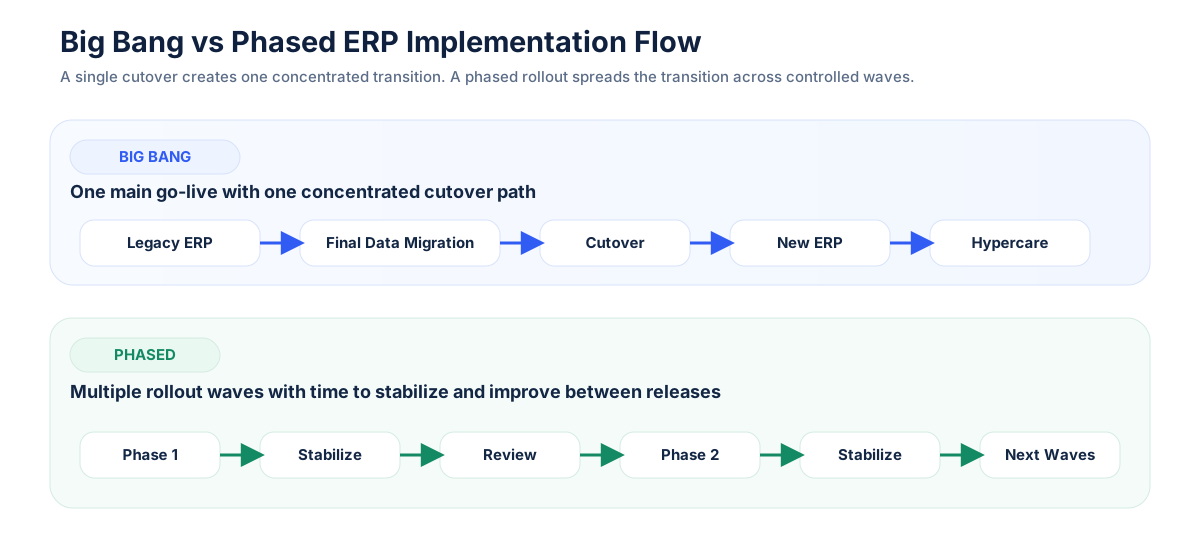
Big Bang Versus Phased ERP Implementation Showing One Cutover Compared With Multiple Rollout Waves
Big Bang uses one concentrated transition, while phased implementation distributes deployment across controlled rollout waves.

Big Bang vs Phased ERP Implementation Comparison

FactorBig BangPhased
Go-liveOne main cutoverMultiple rollout waves
SpeedFasterSlower
Cutover riskConcentratedDistributed
DowntimeHigher impact if issues occurEasier to contain
Legacy ERPRetires soonerRemains longer
Temporary integrationsUsually fewerOften more
TrainingConcentratedIncremental
User adoptionRapidGradual
Cost profileConcentratedSpread over time
Best fitSimpler environmentsComplex enterprises

Neither strategy removes risk. Instead, each distributes risk differently.

Where the Real Risk Lies in Each ERP Strategy

Big Bang concentrates risk in one launch. Phased rollout spreads risk across several releases. Compare the key risks and controls for both approaches.
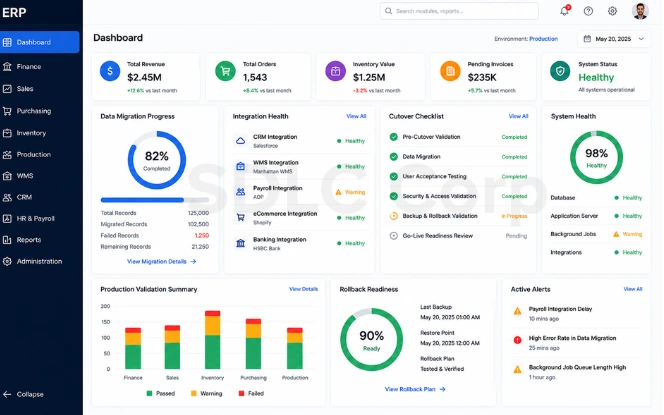
ERP rollout risks covering cutover, data migration, integrations, and user adoption
Operational Risk

Cutover and Downtime Risk

Big Bang places many processes in one cutover window. Phased rollout limits each release, but adds repeated go-live risk. Review why ERP implementations fail to improve controls and recovery plans.

Required controls
  • Measure exposure: Estimate the impact of operational delays.
  • Rehearse cutover: Test tasks and approvals with realistic data.
  • Protect each wave: Test processes across old and new systems.
  • Enforce stop rules: Pause when defects exceed tolerance.
Data Risk

ERP Data Migration Risk

Big Bang migrates all data together. Phased rollout moves smaller batches but may split records across systems. Published ERP risk research links technical, organizational, and project risks.

Required controls
  • Assign ownership: Owners approve mappings and exceptions.
  • Run mock migrations: Test repeated loads before migration.
  • Reconcile totals: Validate key records and balances.
  • Control coexistence: Define ownership and sync rules.
Technical Risk

Integration Risk

Big Bang needs every critical interface on day one. Phased rollout reduces the initial scope but may require temporary legacy connections.

Required controls
  • Inventory interfaces: Record ownership, volume, and impact.
  • Test complete chains: Validate complete business processes.
  • Test peak load: Confirm full-volume performance.
  • Monitor failures: Track queues, duplicates, and mismatches.
People Risk

User Adoption Risk

Big Bang changes many workflows at once. Phased rollout supports gradual adoption but can create training gaps, fatigue, and manual workarounds.

Required controls
  • Prove readiness: Test realistic user scenarios.
  • Validate access: Match ERP roles to job duties.
  • Prepare support: Support every rollout wave.
  • Measure adoption: Track success, errors, and support tickets.

Migration Control Flow

01
Profile and Clean Find invalid, duplicate, or missing data.
02
Map and Load Transform and load approved data.
03
Validate and Reconcile Confirm balances, counts, and transactions.

Big Bang vs Phased ERP: Cost and Timeline Trade-Offs

Big Bang Cost Profile

Big Bang concentrates spending around one go-live. A shorter timeline may reduce overhead, but teams need a strong contingency reserve.

  • Core delivery: Software, data, testing, training, and support.
  • Risk reserve: Rollback, defects, and extended staffing.
  • Peak spending: Migration and cutover occur together.
  • Release rule: Hold funds until operations stabilize.

Phased Cost Profile

Phased rollout spreads spending across waves. Repeated testing and longer legacy support may raise total costs, while reuse can reduce them.

  • Wave costs: Testing, training, cutover, and support repeat.
  • Program costs: Governance and legacy systems continue.
  • Temporary integrations: Set owners and retirement dates.
  • Reuse savings: Reuse templates, scripts, and automation.

Indicative ERP Cost and Timeline Ranges

Use these ranges as a planning baseline before adjusting the calculator.

Small organization $150K–$750K 50–250 users; limited integrations.
Mid-size company $750K–$3M 250–1,000 users; broader scope.
Large enterprise $3M–$15M+ 1,000+ users; complex integrations.
Big Bang duration Typically 6–12 months.
Phased duration Typically 12–30 months.
Time per wave Typically 2–4 months.

Planning note: Costs vary by scope, users, integrations, data, and partner rates. Review this ERP cost guide for key drivers. Treat these figures as planning ranges. Research also shows that some IT projects face exceptionally large overruns (Flyvbjerg et al., 2022).

ERP Rollout Cost & Timeline Estimator

Compare indicative Big Bang and phased rollout costs.

Months
Months
Big Bang Estimate
Base cost plus legacy overlap.
Phased Estimate
Includes wave and integration costs.
Timeline Difference
Difference between rollout durations.
Phased Cost Difference
Phased estimate minus Big Bang.
Estimate only: Actual costs depend on project scope and implementation conditions.

Key point: Phased rollout can reduce operational risk without reducing total cost.

Evaluate Your Business Before Choosing an ERP Implementation Strategy

Review these six business conditions before choosing Big Bang, phased, or hybrid ERP implementation.

Organization and Process Complexity

Standardized operations support Big Bang. Different entities, tax rules, and local workflows usually favor phased rollout.

Ask: Can every unit follow the same process and controls on one go-live date?

Integration Complexity

Many critical interfaces increase cutover and recovery risk. Smaller waves make complex dependencies easier to isolate.

Ask: Can banking, payroll, warehouse, CRM, manufacturing, and reporting interfaces launch together?

Data Readiness

Big Bang requires the complete data scope to reach acceptance together. Phased rollout allows smaller migration groups.

Ask: Can owners approve balances, inventory, open transactions, and migration exceptions before go-live?

Downtime Tolerance

Low downtime tolerance usually supports phased deployment because each release affects a smaller operating scope.

Ask: How long can order entry, production, shipping, payroll, or financial posting safely stop?

Change Readiness

Big Bang needs broad user readiness at once. Phased rollout supports gradual training but requires sustained communication.

Ask: Have users completed training, access validation, realistic practice, and escalation preparation?

Operational Exposure

Assess how widely one failed migration, interface, security rule, or batch process could interrupt operations.

Ask: Can a failed release be isolated, or would one issue stop the full operating model?

Decision signal: Choose Big Bang when most areas are standardized and controlled. Choose phased rollout when several areas require isolation, gradual readiness, or local variation.

ERP Implementation Strategy Decision Matrix

Business ConditionBetter Fit
Standardized processes Big Bang
Single entity Big Bang
Tight legacy retirement deadline Big Bang
Multiple locations Phased
Complex integrations Phased
Low downtime tolerance Phased
Different processes by region Phased
Mixed risk across business units Hybrid

These are decision signals, not fixed rules. A large enterprise can still use Big Bang if its scope and processes are highly controlled.

When Is Big Bang ERP Implementation the Better Choice?

Big Bang works best when the ERP scope is manageable, processes are standardized, data is clean, and integrations are tested. Follow a structured ERP implementation process to prepare users, rehearse cutover, and define rollback rules. Delay the launch if major defects, data gaps, or access issues remain unresolved.

Scope is manageable
Processes are standardized
Data is clean
Integrations are tested
Users are trained
Cutover rehearsals are complete
Rollback plans are clear
Legacy systems must retire quickly

When Is Phased ERP Implementation the Better Choice?

Phased ERP works best for enterprises with many locations, different processes, complex integrations, or limited downtime tolerance. It supports gradual training and smaller data migrations while reducing the impact of each release. Understanding the available types of ERP systems can also help teams plan each rollout phase. However, strong governance is needed to manage temporary integrations and legacy systems.

The company has many locations
Business units use different processes
Integrations are complex
Downtime creates major business impact
Users need gradual adoption
Data migration needs smaller controlled batches

Should You Consider a Hybrid ERP Implementation?

A hybrid ERP implementation combines phased rollout with focused Big Bang cutovers. For example, a company may deploy region by region while moving each region’s core processes in one go-live. This approach limits enterprise-wide risk while maintaining clear rollout boundaries.
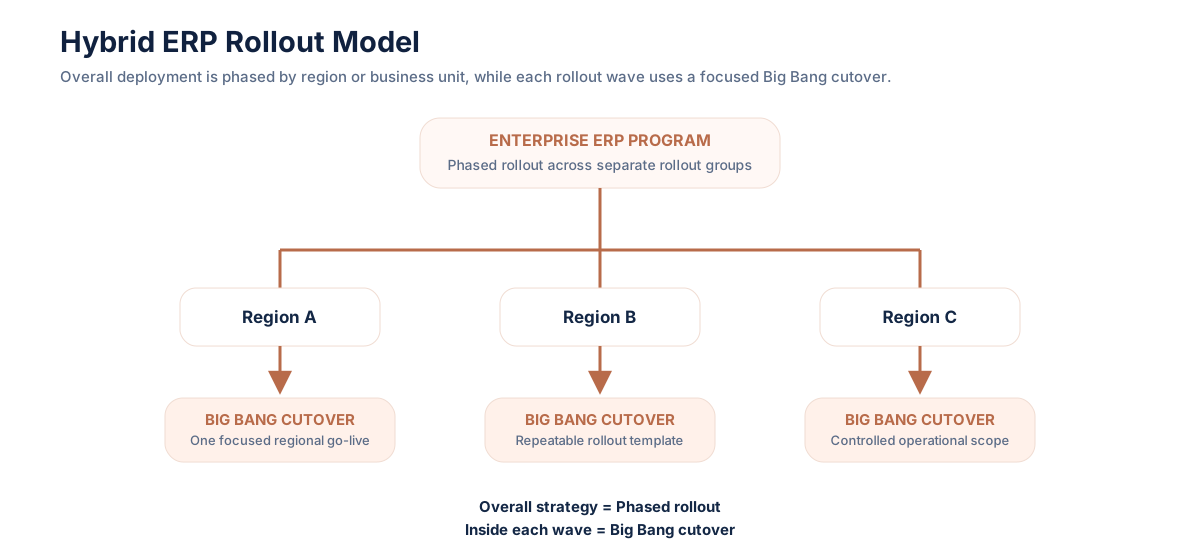
Hybrid ERP rollout model showing phased deployment with focused Big Bang cutovers
Each region follows a phased plan with one focused cutover.

Hybrid ERP suits business units with different risks or requirements. Strong governance must control configurations, integrations, testing, and legacy retirement. Use it only when a mixed rollout solves a clear operational need.


Big Bang vs Phased ERP Implementation: Final Verdict

Best for Speed Big Bang when scope, data, testing, and readiness are strong.
Best for Risk Control Phased when operations, locations, or integrations are complex.
Best for Mixed Needs Hybrid when business units need different rollout approaches.

For many complex enterprises, phased deployment provides stronger control over disruption. However, Big Bang can be more efficient in simpler and highly standardized environments.

Need Help Planning Your ERP Migration?

Choose a rollout model based on data readiness, integration dependencies, downtime tolerance, and business risk.

Talk to an ERP Expert

Final Thoughts

The best ERP rollout strategy is the one your business can execute with control. Big Bang needs strong readiness, tested integrations, clean data, and a disciplined cutover plan. Phased rollout reduces the impact of each release, but it requires longer governance and system coexistence.

Before choosing, evaluate operational risk, data quality, downtime tolerance, and change readiness. That decision matters more than choosing the fastest or most familiar rollout model.

Operational Risk
Data Quality
Downtime Tolerance
Change Readiness

Frequently Asked Questions

01

What Is The Difference Between Big Bang And Phased ERP Implementation?

Big Bang moves the planned ERP scope live in one main cutover. Phased implementation divides deployment across several rollout waves.

02

Which Is Safer, Big Bang Or Phased ERP Implementation?

Phased implementation usually offers better risk containment for complex organizations. However, it still carries data, integration, and adoption risks.

03

Is Big Bang ERP Implementation Cheaper Than Phased Implementation?

Not always. Big Bang may shorten the project, while phased rollout can add costs from longer legacy support and repeated deployment work.

04

When Should A Company Use Big Bang ERP Implementation?

Use Big Bang when processes are standardized, data is clean, integrations are tested, and the business can support one controlled cutover.

05

Can Big Bang And Phased ERP Implementation Be Combined?

Yes. A company can use phased deployment across regions while using a Big Bang cutover inside each region.

ABOUT THE AUTHOR

Scott edwards

Scott Edwards is an ERP expert with 11 years of experience helping organizations improve how they work. At SDLC Corp, he designs and implements ERP systems that streamline operations, reduce costs, and support better decision-making. With deep knowledge across industries, Scott focuses on making complex systems simple and effective, ensuring each solution fits the business’s real needs.
PLAN YOUR SOLUTION

More Insights
You Might Find Useful

Explore expert perspectives, practical strategies, and real-world solutions related to this topic.

Event management workflow showing attendee registration, secure payment processing, digital ticket confirmation, settlement, and event notifications

Event Registration and Payment Processing Features

Event registration payment processing looks simple from the attendee side:

ERP testing lifecycle showing test strategy, UAT, regression testing, automation, quality assurance, and go-live readiness.

ERP Testing Guide: From Strategy and UAT to Go-Live Readiness

ERP testing checks whether your ERP can support real business

HCM migration checklist showing legacy HCM moving to a new system through data migration, payroll validation, integrations, testing, and user adoption.

HCM Migration Checklist: A Complete Guide

Human Capital Management (HCM) migration moves critical HR, payroll, and

Let’s Talk About Your Product

Get expert guidance on scope, architecture, timelines, and delivery approach so you can move forward with confidence.

What happens next?