Legacy anchorage management migration from spreadsheets into software requires more than importing rows. The migration must identify vessels and calls, preserve allocations and history, and retain rejected records for correction rather than losing them from the operational picture.
Equal row counts do not prove success. Reconcile the identities, business values and relationships that operators rely on, including the approvals and source references attached to migrated records.
Inventory Anchorage Spreadsheets, Forms and Hidden Workflows
Inventory every file and process in use, including the ones nobody officially sanctioned.
| Artefact | What to capture | Why it matters |
|---|---|---|
| Operational spreadsheets | Fields, formulas, validation, who maintains them | They contain the business rules |
| Shared documents and forms | Who submits, who approves | Reveals the real workflow |
| Local databases or desktop tools | Data model, integrations, owner | Often the hardest dependency |
| Email and message threads | Decisions taken outside any system | Shows what the new system must absorb |
| Reports built by hand | Source, frequency, recipient | Someone downstream depends on each |
The guide to phased port system modernization covers the wider case where an application rather than a file set is being replaced.
Extract the Rules Before Designing Anything
Find the Operating Decisions Hidden in the Current Tools
Go through each spreadsheet with the person who maintains it and write down what the formulas and conditional formatting actually enforce. Capacity limits, priority orders, exceptions for particular vessel types, seasonal restrictions: these are requirements, and they are invisible in a screenshot.
Expect disagreement between files. Two spreadsheets maintained by two shifts often encode slightly different rules, and reconciling them is an operational decision, not a data cleanup task. Surface it early and let the port decide rather than picking one silently.
Example: A Spreadsheet Color Signals a Blocked Request
Suppose operators use a colored cell to mean that a request is awaiting confirmation from another team. Migrating the cell value alone would lose the rule and its owner. Capture what triggers the status, who can clear it and what work it blocks. The new workflow can then replace the informal convention with an explicit, testable state.
Before mapping spreadsheet fields, confirm that the new system supports the rules and configuration those fields depend on. A field can import correctly while its operating rule remains unsupported.
Map a Source Row into Separate Records
Illustrative example
This workbook has one row per active call. The source allocation is migrated only after its authority and meaning are validated; a spreadsheet cell alone is not evidence of approval.
row_id,vessel_ref,call_ref,requested_zone,status,source_updated_at
17,V-18,C-182,A,Approved,2026-09-18T08:12:00Z
18,V-19,,B,Approved,2026-09-18T08:20:00Z| Source | Destination | Handling |
|---|---|---|
| Row 17 vessel_ref V-18 | Vessel V-18 | Match existing identity before creating |
| Row 17 call_ref C-182 | Call C-182 | Preserve unique source row mapping |
| Zone A / Approved | Allocation with migrated source provenance | Require validated approval evidence or flag for review |
| source_updated_at | Source update timestamp | Do not substitute import time |
| Row 18 missing call_ref | Rejection REJ-18 | Retain original row and reason; no fabricated call |
Reconcile the Whole Batch
| Result For 100 Source Rows | Count | Evidence |
|---|---|---|
| Loaded call mappings | 94 | Source row to destination call register |
| Rejected for correction | 4 | Each has a reason and correction owner |
| Duplicate rows merged into mapped calls | 2 | Both originals retained; approved merge mapping |
| Accounted for source rows | 94 + 4 + 2 = 100 | No silent drops |
The batch can contain fewer unique vessels than calls, so vessel counts must not be compared directly with row counts. Reconcile active allocations, status totals and selected histories separately. Correcting the four rejected rows requires another controlled import whose identifiers prevent the 94 accepted rows from being duplicated.
Inspect the Accepted Record and the Reject Log
Assume the migration reviewer has verified row 17’s approval evidence as EV-17. The destination record preserves that reference and the original row identifier.
{
  "vessel_id": "V-18",
  "call_id": "C-182",
  "allocation": {
    "id": "AL-M17",
    "zone": "A",
    "status": "approved",
    "approval_evidence": "EV-17"
  },
  "migration": {
    "batch_id": "BATCH-1",
    "source_row": 17,
    "source_updated_at": "2026-09-18T08:12:00Z",
    "imported_at": "2026-09-18T11:00:00Z"
  }
}
{
"rejection_id": "REJ-18",
"batch_id": "BATCH-1",
"source_row": 18,
"error": "missing_call_reference",
"original": {
"vessel_ref": "V-19",
"call_ref": "",
"requested_zone": "B",
"status": "Approved",
"source_updated_at": "2026-09-18T08:20:00Z"
},
"created_destination_record": false,
"correction_owner": "migration-reviewer-2"
}If EV-17 were unavailable, the loader would not create an approved allocation merely from the word “Approved.” It would route the record for review under the migration policy. Reprocessing a corrected row uses its batch/source row mapping to prevent a second destination call.
For a related implementation reference, review the anchorage migration case study. Check the documented migration scope, source records and reconciliation evidence before treating it as comparable to your own transition.
Clean Data at Source, Not in Transit
Undocumented cleanup during migration can hide source problems and make later reconciliation harder. Where the source will continue to exist for a period, fix it there first.
- Profile the data: duplicates, missing fields, inconsistent naming, impossible values
- Agree canonical formats for vessel identifiers, dates, zones and statuses
- Resolve duplicates as an operational decision with a named owner
- Record which records could not be cleaned and why
- Freeze structural changes to the source once mapping begins
The reconciliation and override design matters during the transition period, because for a while both the old files and the new system will hold the same facts.
Choose Which Calls, History and Attachments to Migrate
Not all history needs to move. Migrating everything imports old quality problems and inflates the timeline; migrating nothing removes the ability to answer questions about last year.
Decide by use: which records are needed for live operation, which for reporting, which only for occasional reference. Move the first two and keep the rest readable in place, with a documented route to find them. Record what was excluded so nobody assumes it is in the new system.
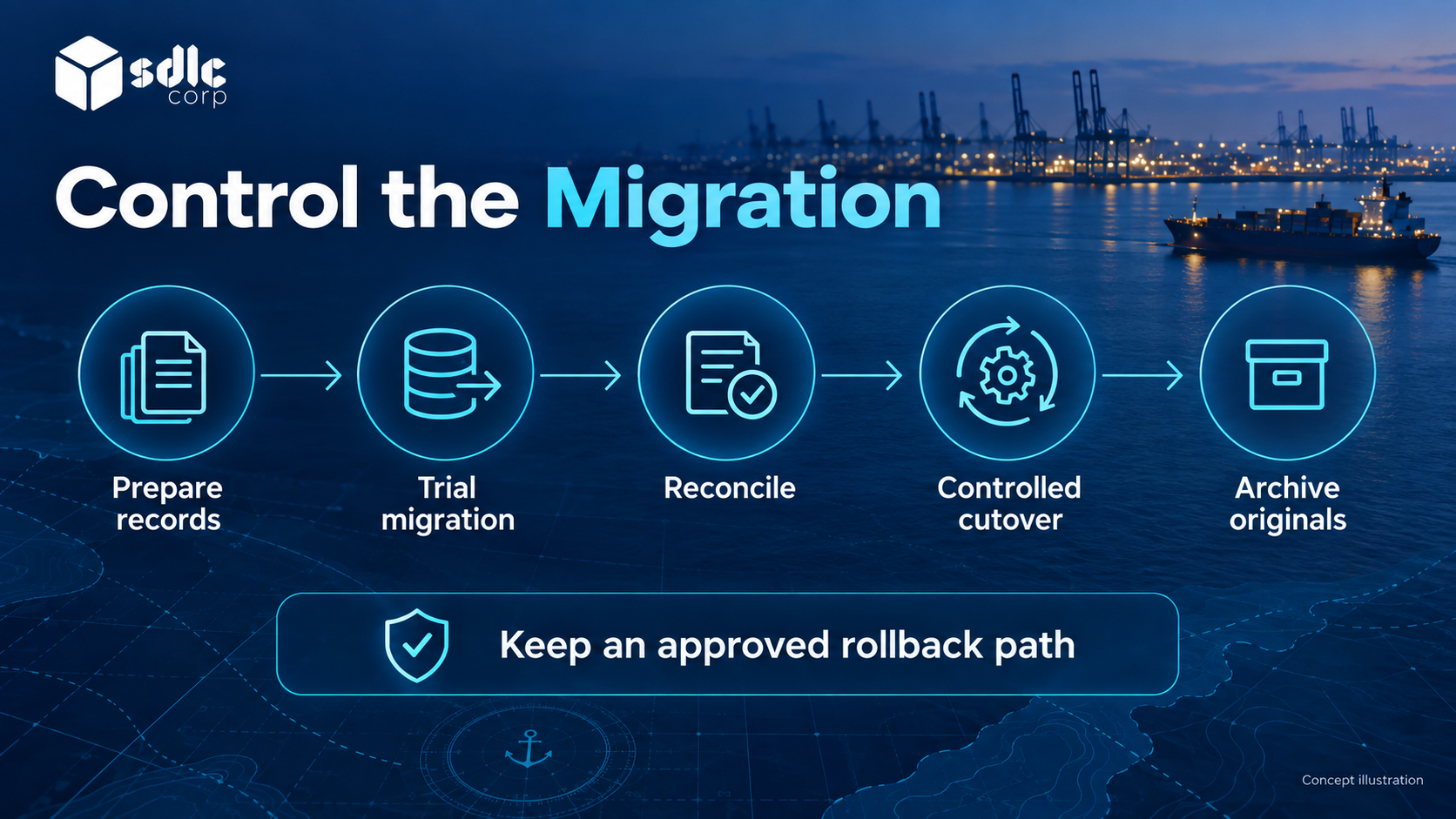
Maintain a field mapping with source column, target field, transformation, validation rule and exception owner. Reconcile counts, relationships and sampled decisions after trial loads. Before cutover, capture the approved checkpoint, define the rollback trigger and decide how post-cutover writes would be reconciled.
Example Mapping from a Workbook to Operational Records
| Spreadsheet content | Candidate target | Decision to document |
|---|---|---|
| Vessel name and visit date | Vessel reference plus call record | How ambiguous names and repeat visits are resolved |
| Color indicating a hold | Explicit status and reason | Which approved rule the color represents |
| Last edited allocation cell | Allocation history or approved current state | Whether prior values exist and can be verified |
| Free-text comments | Attributed notes or review exceptions | What can be trusted, corrected or archived |
Keep the original file reference and mapping version with the migration evidence. Do not fabricate an approval history from the last visible spreadsheet value. Unverifiable records need a documented treatment: correction by an owner, restricted historical import or controlled archive. Reconcile record counts and meaningful state relationships, not just whether an import completed.
Run in Parallel with an Exit Criterion
Parallel running for a spreadsheet migration is genuinely useful, because discrepancies reveal rules that were never captured. Define the comparison scope, planned review dates and exit criteria before starting. Assign one authoritative write path for each operational record, with any shadow updates controlled and reconciled to avoid conflicting decisions.
- What is compared, by whom, and how often
- The discrepancy level that permits cutover
- Who investigates each difference and records the cause
- A review date and a documented extend, stop or rollback decision if exit criteria are unmet
Every discrepancy traced to an uncaptured rule is a requirement found before go-live rather than after. The operational acceptance checklist should reuse the same comparison scenarios.
Parallel comparison does not mean two authoritative writers. Name the active system for requests and approvals at each stage, reconcile changes made during the transition and disable the old write route when ownership transfers. Retain source rows and correction decisions with the migration history; an imported “Approved” cell needs evidence of the original authority, not a new approval silently created by the importer.
Plan for Adoption, Not Just Cutover
Adoption also needs attention. Operators may value the speed and flexibility of a familiar spreadsheet. A system with approvals and audit changes how they complete tasks. Test those changes with users and explain why each control is needed.
- Involve the spreadsheet owners in design; they know the edge cases
- Retire editable operational copies at approved cutover while preserving controlled read-only archives and rollback records with approved retention periods and access permissions
- Give operators a faster path for the tasks they do most
- Watch for shadow spreadsheets reappearing, and treat each as a requirement signal
- Keep a named person available during the first weeks who can answer "how do I do X now"
Before retiring a spreadsheet, verify the rules, selected records and exception paths in the replacement workflow, and agree when parallel working can end.
Coordinate migration with the delivery phases and acceptance gates. Record external connections in the integration access and testing checklist before retiring the files that currently bridge them.
Final Thoughts
Review accepted destination records alongside the rejection log, then reconcile the important operational totals and relationships. Correct and reprocess rejected rows through a traceable procedure.
Use representative work during parallel operation to confirm that users can continue the accepted workflow. Retire the previous system only after the exit criteria, retained history and recovery decision have been approved.
Explore Migration Planning with SDLC Corp
Discuss migrating to the anchorage operations platform with SDLC Corp through its legacy software modernization services. Bring representative rows, formulas, approval evidence and downstream dependencies. Request a scoped mapping and rehearsal covering rejected records, authoritative-writer ownership and rollback conditions before committing to the migration.
Frequently Asked Questions
What Should Be Checked Beyond the Imported Row Count?
Check vessel and call identities, record relationships, allocation values, approval evidence and history. A matching total can still conceal duplicated calls, missing references or values mapped into the wrong fields.
Should Rejected Rows Be Deleted?
No. Keep their original reference and rejection reason in a controlled log, then resolve them through the agreed correction and reprocessing process. Every excluded row should have an explainable outcome.
When Can the Previous System Be Retired?
After the accepted data reconciles, representative work passes and parallel operation meets its exit conditions. Preserve required history and approve the recovery position before ending the old operating arrangement.