For Ports and Maritime Authorities

Anchorage Management Software

Every vessel at anchor, planned, watched and accounted for.

Our anchorage management software lets you allocate anchorage positions, track every vessel in real time, manage the waiting queue and move ships to berth on schedule, with your operators in control of every decision.

AIS + VTMISConnected
FullAudit history
3 ModelsCloud, private, on-prem
  • Port authorities
  • Harbour masters
  • VTS operators
Live OperationsAnchorage overview · sample data
Live
18At anchor
74%Occupancy
1Open alert
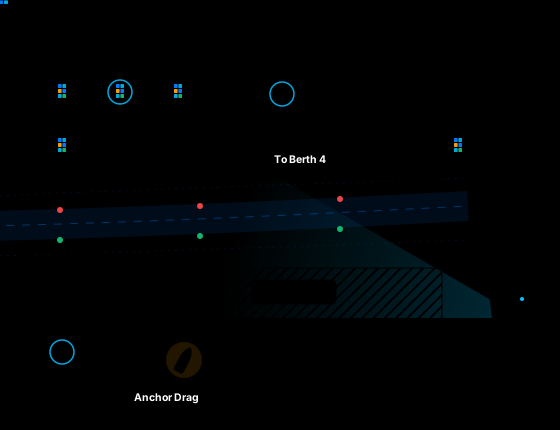
Anchorage management software live map showing vessels at anchor in three zones, a ship moving to Berth 4, an inbound ship and an anchor drag alert
Vessel at anchor Vessel moving Vessel alert Free position Restricted

Interface visuals are illustrative and use sample data.

What the Platform Does

One Record, from Arrival to Berth

Our anchorage management software replaces radio, email and spreadsheets with one connected workflow for every vessel at anchor.

  1. Plan

    Define anchorage zones, capacity, depths and restrictions once, so every allocation works from the same rules.

  2. Allocate

    Get recommended positions based on vessel size, draft and cargo, then approve the best fit in seconds.

  3. Schedule

    Order the arrival queue by your priority rules and line it up with berth readiness.

  4. Monitor

    Track every vessel live on the map, with alerts for anchor drag, zone breaches and lost AIS.

  5. Coordinate

    Keep shipping agents, clearances, pilots and berths aligned on one shared record.

  6. Analyze

    Review occupancy, waiting time and congestion to plan the next shift and the next season.

Plan and Allocate

Put the Right Vessel in the Right Position

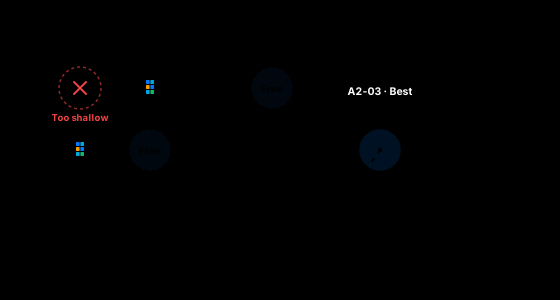
Planners see every anchorage position live, and the platform recommends the spot that fits the vessel, the conditions and your port's rules.
See and Monitor

Your Whole Anchorage, Live on One Map

Operators see AIS positions, zones and vessel status in one live view, instead of piecing the picture together from radio and spreadsheets.
Live OperationsAnchorage overview · Last 24 hours
Live
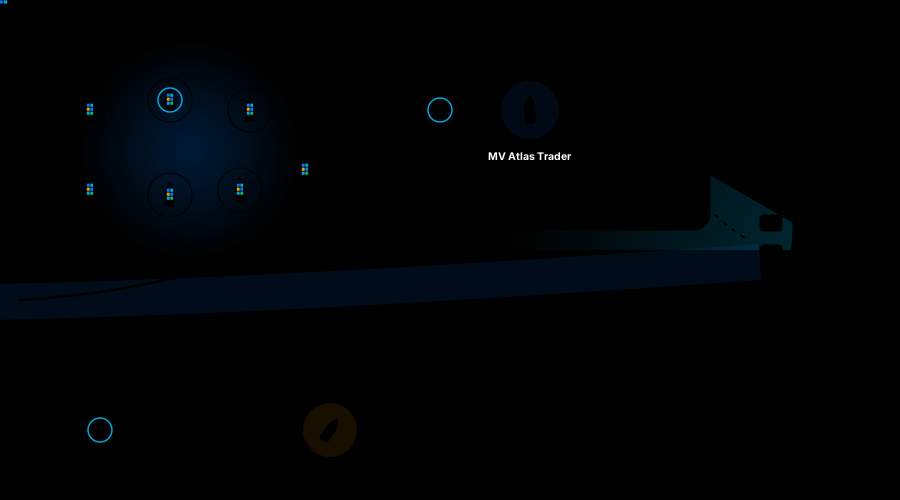
Live anchorage map showing vessels at anchor in three zones, the selected MV Atlas Trader, an inbound ship and an anchor drag alert
MV Atlas TraderSelected
A2-03Position
6h 12mAt anchor
Dry bulkCargo
Customs pendingClearance
Next move: Berth 6 at 14:30
18At anchor
7Inbound, 24h
11h 42mAverage waiting
1Open alert
Zone Occupancy
  • A1 General cargo90%
  • A2 Bulk62%
  • B1 Tankers / DG66%

Vessel Positions and Zones

Every vessel in its assigned position, with zones, restricted areas and swing circles to scale.

Occupancy at a Glance

See how full each zone is, with counts for occupied, reserved and free positions.

Vessel Details in One Click

Identity, size, cargo, agent, time at anchor, clearance status and next move in one card.

Movement History

Replay any vessel's track to see how it arrived and whether it moved at anchor.

Congestion View

Spot build-ups early with density and waiting-time indicators across the anchorage.

Operational Dashboard

Vessels at anchor, inbound traffic, waiting time, alerts and next berth moves beside the map.

See the live map with your own anchorage layout.

Request a Demo
Schedule and Coordinate

Schedule Every Vessel, from Queue to Berth

A vessel anchorage scheduling system that runs the full journey from pre-arrival notice to berth, so the queue stays fair, visible and predictable.

Arrival Queue · TodayOrdered by your port priority rules · sample data
Live
VesselWaitingClearancesBerthStatus
MV Nordic PearlContainer · Liner window · A1-02
9h 20m
Arrived 01:15
PCIH
Berth 2Ready now
Ready to Move
MV Atlas TraderDry bulk · Standard · A2-03
6h 05m
Arrived 04:30
PCIH
Berth 614:30
Scheduled
MT Gulf HarmonyTanker · DG handling · B1-01
14h 05m
Arrived yesterday
PCIH
Berth 9Pending
Clearance Open
MV Sierra CoastGeneral cargo · Standard
Not arrived
ETA 12:50
PCIH
To be planned
Pre-Arrival
P Port · C Customs · I Immigration · H HealthAmber bar: waiting longer than 12 hours

From Pre-Arrival to the Queue

Agents submit notices in their own portal, and gaps are flagged before the ship arrives.

Prioritization You Can Explain

Queue order follows your published rules, and every manual change records a reason.

Waiting Time, Tracked and Predicted

See time waited and expected time to berth, with long waits flagged before disputes start.

Scheduling Against the Berth

Linked to berth planning, so a vessel is marked ready only when its berth is free.

Clearances in the Same Workflow

Port, customs, immigration and health tracked per vessel, so no ship moves with paperwork open.

Anchorage-to-Berth Movements

Confirm pilot and tug timing, then update position and berth status in one step.

Alerts and Control

Automated Alerts, Human Decisions

The platform watches your anchorage around the clock, raises exceptions early and leaves every response in your operators' hands.

Configurable Exception Rules

Set the limits that count as an exception at your port, and change them any time without code.

  • Anchor drag0.2 NM
  • Outside assigned circle50 m
  • AIS signal lost10 min
  • Overstay72 h
  • Wind speed35 kn

Alerts That Reach the Right Person

Ranked by severity, sent by dashboard, email or SMS, and escalated if no one responds.

Manual Override, Always Available

Operators can override a recommendation, reassign a position or hold a movement at any time.

Approval Workflows

Sensitive changes, like closing an area or extending a stay, can require a second approver.

A Complete Audit Trail

Every action is saved with user, time and the value before and after the change.

Integrations

Connected to Your Port Systems

AIS, VTMIS and your port systems feed one anchorage record, so every team works from the same live picture.

Data In
  • AIS

    Live positions from terrestrial or satellite providers.

  • VTS and VTMIS

    Traffic data and status shared with vessel traffic services.

  • Weather and Tide

    Wind, sea state and tides used in rules and alerts.

  • GIS and Charts

    Your existing charts and anchorage boundaries.

Data Shared
  • Port Management (PMIS)

    Vessel calls, services and billing data exchanged.

  • PCS and Single Window

    Pre-arrival and clearance information, where in place.

  • Terminal and Berth

    Berth availability used to schedule movements.

  • Open REST API

    Events and data for ERP, finance and reporting tools.

Integration scope is confirmed during discovery, based on the systems your port already uses.

AI Assistance

AI That Advises, Operators Decide

Built-in AI helps busy teams see further ahead and act faster, while every decision stays with authorized operators.

Anchorage Assistant Answers from your live anchorage record
Online
Which vessels could wait more than 12 hours today?
Two vessels are at risk:
  • MT Gulf Harmony: immigration and health clearances still open.
  • MV Sierra Coast: Berth 9 is congested until 18:00.
Where should MV Sierra Coast anchor?
A2-05 is the best fit.
Recommended: A2-05 18 m depth · 1.9 NM to berth · no conflicts
Waiting for operator approval
Example conversation with sample data

Best-Fit Positions

Ranked by fit, safety margin and distance to berth.

Conflict Warnings

Early warning when movements or swing circles may clash.

Priority Assistance

Queue suggestions that follow your rules.

Delay Insights

The likely causes of long waits, spotted early.

Shift Summaries

Handover and daily reports written from the record.

Operators in Control

Every AI suggestion waits for operator approval.

Built for the Enterprise

Enterprise-Ready From Day One

Analytics, a clear architecture and port-grade security come as standard, so the platform fits both your operations and your IT policies.

Analytics

Turn Anchorage Activity Into Decisions

Standard dashboards and reports, ready to export to PDF or Excel, schedule, or connect to your BI tool.

  • Occupancy By zone, position and period
  • Utilization Anchorage capacity over time
  • Waiting Time By vessel type, cargo and terminal
  • Dwell Time From arrival to berth
  • Congestion By day, season and weather
  • Scheduled Reports Sent to the right people automatically
Case Study

Proven in a Live Port Operation

See how a port moved anchorage planning, monitoring and berthing from radio and spreadsheets onto one live platform.

Port Operations Anchorage Management

35% Less

Waiting time · 100% alerts tracked

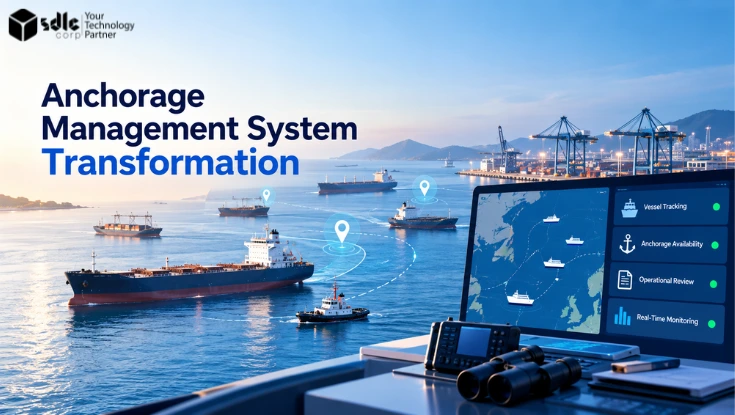
Anchorage Management System Digital Transformation

A port replaced radio calls and spreadsheets with one live platform for allocating, monitoring and berthing every vessel at anchor.

  • Rule-based anchorage allocation
  • Live AIS map with drag alerts
  • Queue linked to berth planning
View the anchorage case study
Aerial view of a busy container port Anchorage Monitoring · Live
FAQ

Frequently Asked Questions

Quick answers to what port teams ask first. Don't see yours? Reach out and we'll respond within 24 hours.

Anchorage management software helps ports plan, allocate and monitor vessels waiting at anchor. It combines anchorage capacity, vessel details, live AIS positions and berth availability, so operators can assign safe positions, manage the queue and move ships to berth efficiently.

Yes. The platform connects to AIS data providers and exchanges information with VTS and VTMIS environments. Integration scope is confirmed during discovery, based on the systems and interfaces your port already uses.

Yes. Administrators define anchorage areas, positions, restrictions, allocation rules, alert thresholds and dues tariffs without code changes.

Always. AI suggestions are advisory. Authorized operators approve, adjust or reject every recommendation, and each decision is recorded in the audit trail.

Yes. Agents get their own secure portal to submit pre-arrival information, track queue position and clearance status, and receive updates, with access limited to their own vessels.

The platform can be deployed in the cloud, in a private cloud or on-premises, where supported, to meet your port's data and security policies.

Timelines depend on the number of anchorage areas, integrations and data migration involved. A phased rollout plan is agreed after discovery, so teams can start using core capabilities early.

Pricing is scoped to your port: the number of anchorage areas, users, integrations and deployment model. You receive a written scope and proposal after discovery.

Book a walkthrough

See Anchorage Management
Software in Action

Book a walkthrough with your own anchorage layout and see how planning, monitoring and berth coordination work on one platform.

Allocate Positions
Monitor Live map
Move To berth

Let’s Talk About Your Product

Get expert guidance on scope, architecture, timelines, and delivery approach so you can move forward with confidence.

What happens next?