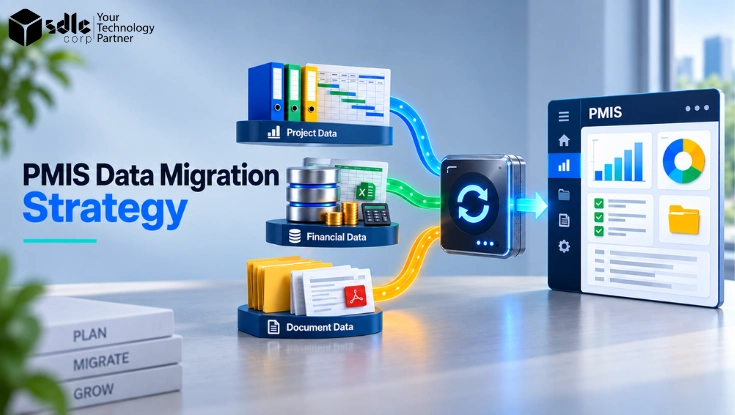
A PMIS data migration strategy explains how to move project information from legacy systems into a new Project Management Information System. The goal is not to copy every old record.
Instead, teams need to move useful data while keeping project structures, financial values, documents, permissions, and record links intact.
Most organizations store project information across several systems. For example, schedules may sit in Primavera P6, financial data in an ERP, documents in SharePoint, and project registers in Excel.
Therefore, the migration must bring these sources together without damaging their business meaning.
A strong process follows a clear path.
In the PMIS implementation roadmap, this work is Phase 4, data migration and integration, which runs from week 13 to week 20.
This guide explains how to follow that path without making the migration more complex than it needs to be.
Key takeaways
- Treat project data, financial data, and documents as separate migration streams.
- Decide what to migrate, archive, transform, or retire before building mappings.
- Preserve links between projects, WBS items, budgets, contracts, invoices, and documents.
- Run mock migrations before production and fix root causes, not just failed records.
- Reconcile financial data and validate document metadata, versions, and permissions.
- Define go/no-go, rollback, and hypercare rules before the final cutover.
This three-domain approach, combined with relationship validation, is one of the strongest ways to make PMIS migration guidance more useful than generic data migration content.
What PMIS data migration actually includes
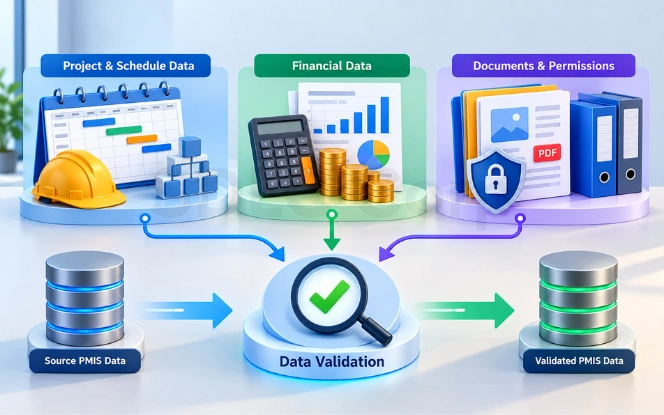
PMIS migration usually covers three main data groups. Each group has different structures, risks, and validation needs. Therefore, teams should not treat all records as one dataset.
| Data Area | Typical Records |
|---|---|
| Project and schedule data | Project IDs, WBS/CBS, schedules, milestones, resources, risks, issues, changes |
| Financial and cost data | Budgets, cost codes, contracts, commitments, actuals, invoices, forecasts |
| Documents and metadata | Files, document IDs, revisions, metadata, permissions, approvals, project links |
For project data migration, structure matters as much as values. A schedule may contain the right activities but still fail if its WBS links or dependencies break.
Financial data needs stronger reconciliation, because budgets, contracts, commitments, and actual costs must remain linked to the correct project and cost structure.
Document migration also goes beyond file transfer. A usable project document may depend on the correct metadata, revision, permission, and parent record. Therefore, teams must also preserve relationships between records, often called referential integrity.
For example, an invoice may contain the correct amount but still be wrong if it points to the wrong contract.
Define migration scope, sources, and ownership
A good data migration plan starts with scope. First, identify every system that holds information needed by the new PMIS. Common sources include a legacy PMIS, ERP, scheduling platform, SharePoint, spreadsheets, and file repositories.
That source list usually comes out of the earlier PMIS fit-gap analysis. Next, decide what should happen to each data set, because not every historical record needs to enter the new system.
| Decision | When To Use It |
|---|---|
| Migrate | Active and operationally required data |
| Transform | Required data that needs restructuring |
| Archive | Historical information kept for reference |
| Retain Read-Only | Records users may still need to view |
| Retire | Duplicates, obsolete records, and unnecessary data |
For example, an organization may migrate open projects while keeping older completed projects in a searchable archive. Likewise, Finance may keep detailed historical transactions in the ERP while sending current project balances to the PMIS.
Ownership also needs to be clear. The PMO should approve project structures, while Finance owns financial reconciliation. Document Control should validate documents and metadata. Meanwhile, IT or the migration team should manage extraction, transformation, and loading.
Business owners should provide final acceptance. As a result, migration quality does not become the responsibility of one technical team.
The research recommends making this disposition decision before detailed field mapping begins.
Planning A PMIS Data Migration?
Talk to SDLC Corp about scope, disposition rules, and data ownership before your team starts detailed field mapping.
Talk To Our TeamClean and prepare legacy data
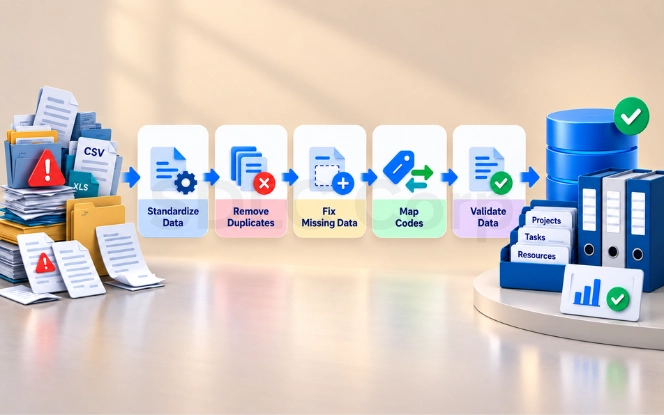
A new PMIS will not automatically fix poor legacy data. Therefore, teams should profile and clean source information before production migration begins.
Start by checking duplicate project IDs, invalid dates, missing owners, inactive users, retired cost codes, inconsistent WBS values, duplicate documents, and missing metadata. In addition, check whether important project, contract, invoice, and document links still work.
Not every issue needs the same response. For example, an old cost code may map to a new code through an approved crosswalk. However, duplicate project IDs may require a business decision before migration.
Keep an exception register for records that cannot follow the normal rule, and record the issue, affected data, owner, decision, and status.
Also preserve useful legacy IDs where they help users trace a migrated record back to its source. This can make post-go-live support much easier.
The objective is simple: move approved and understandable data into the new PMIS instead of carrying old data problems forward.
Map legacy data to the new PMIS
Source-to-target mapping defines how each legacy value fits into the new PMIS data model. This is one of the most important parts of the migration. A practical mapping table may look like this.
| Source Field | PMIS Target | Transformation | Validation |
|---|---|---|---|
| Legacy_Project_ID | Project ID | Standardize format | Project remains unique |
| WBS_Code | WBS Code | Apply approved crosswalk | No missing parent |
| Cost_Code | Budget Code | Map target structure | Totals reconcile |
| Manager_Name | Project Owner | Match active user | User exists |
| Document_No | Document ID | Keep legacy reference | Correct file opens |
However, good PMIS data mapping goes beyond field names. Teams may also need to map status values, lookup tables, currencies, user accounts, workflow states, document types, and accounting periods.
Relationships need separate checks as well. Consider an invoice. It may depend on a valid project, contract, vendor, cost code, and accounting period.
If one reference points to the wrong target record, the invoice may load but still be incorrect.
Therefore, each important mapping rule should include a validation rule.
Teams should also document transformation logic instead of fixing records manually during every load. Repeatable rules make mock migrations easier to test and easier to audit.
Documented mapping rules are also a core deliverable in our PMIS implementation solutions.
Choose the right PMIS migration approach
The right PMIS migration strategy depends on data volume, downtime, active projects, integrations, and business risk. Three approaches cover most implementations.
- Big-Bang MigrationThis moves the required production data during one cutover window. It can work when the migration is manageable and the business can support a clear freeze period. However, risk rises when the environment has many integrations or active projects.
- Phased MigrationThis moves data in controlled waves. For example, teams may migrate by region, business unit, project type, or project status. This reduces the amount of change at one time, although temporary parallel processes may be needed.
- Hybrid MigrationThis loads stable data earlier and moves the final changes during cutover. As a result, the final production load can be smaller and faster.
The technical method may also vary by object. Native PMIS imports may suit some records, while APIs, scripts, ETL, or iPaaS tools may suit others. Therefore, avoid forcing one migration method across every data type.
Choose the method based on structure, volume, dependency, and validation needs.
The research also recommends comparing big-bang, phased, and hybrid approaches rather than presenting one as universally best.
Run mock migrations before production
Data migration testing should happen before the final cutover. A mock migration gives the team a safe way to test mappings, timing, integrations, and validation rules.
- Run the first rehearsal. Teams may find missing mappings, rejected records, invalid user accounts, incomplete document metadata, or slow migration jobs.
- Fix the root cause. When those issues appear, correct the underlying logic instead of patching only the failed record.
- Repeat with revised logic. Each cycle should reduce unresolved errors and improve confidence in the process.
- Measure the load window. If the process exceeds the cutover window, change the sequence, preload stable data, or use smaller waves.
- Complete business UAT. Users should open representative projects and review schedules, financial records, documents, approvals, and permissions.
There is no universal number of mock migrations. Therefore, continue until the agreed acceptance criteria pass consistently.
Testing, UAT, reconciliation, rollback, and go/no-go controls are all high-priority areas in the research.
Need Help Rehearsing Your Migration?
SDLC Corp can run mock migrations, mapping validation, and reconciliation checks so fewer surprises appear during your cutover window.
Request A ConsultationValidate project, financial, and document data
A migration job can report success while the new PMIS still contains unusable information. Therefore, data reconciliation needs to check completeness, accuracy, relationships, and business use.
Validate project and schedule data
Compare project counts, WBS structures, schedules, milestones, dependencies, resources, risks, issues, and workflow states. In addition, check whether every critical child record still belongs to the correct parent.
For example, each activity should belong to the correct project and WBS node. A correct activity count alone does not prove that the schedule structure survived migration.
Reconcile financial data
Financial data requires deeper checks. Compare budgets, contracts, commitments, change orders, invoices, actual costs, and forecasts between the source and target.
For example, consider a project with a ₹20 million approved budget, ₹12 million in commitments, and ₹7 million in actual costs. Those values should match after migration.
However, the totals alone are not enough, because each amount should also point to the correct project and cost code. Where appropriate, reconcile financial data by the following path.
This gives Finance a more useful check than one high-level total.
Agree the reconciliation tolerances in writing before the first mock migration. The split below follows the model in our legacy data pipeline modernization guide.
| Check | Tolerance | How To Treat A Gap |
|---|---|---|
| Operational record counts | Within 0.1% of source | Record the reason, such as late-arriving records, instead of widening the tolerance |
| Financial control totals by project, cost code, and period | Zero variance | Any difference blocks Finance sign-off until it is resolved |
| Figures that reach financial, grant, or regulatory reports | Zero variance | Trace the value back to its source record before go-live |
Validate documents and permissions
For Aconex project document migration, confirm that required files arrived. Then check metadata, revision, ownership, permissions, and project links. A document is not fully migrated if the file exists but users cannot find it or access it correctly.
Therefore, test representative user roles as part of document validation, using the role model from PMIS security roles, permissions, and governance.
This is why functional testing and reconciliation should remain separate. A PMIS may contain the right number of rows while workflows, permissions, and record links still fail.
Set acceptance criteria and execute PMIS cutover
Teams should define data migration acceptance criteria before production begins. Otherwise, go-live decisions may become subjective when issues appear.
Acceptance criteria may require all critical projects to load, no critical orphan relationships, approved financial reconciliation, successful document-access checks, working priority workflows, and completed UAT.
Apply the reconciliation tolerances agreed during validation, and do not choose a new threshold during cutover.
The split stays the same: zero variance on financial control totals, and up to 0.1% on operational record counts.
Grant-funded work, as covered in PMIS for public infrastructure and capital improvement programs, normally sits on the zero-variance side of that split.
- Freeze The SourceFreeze or tightly control changes in the source systems, then capture the final extract and any remaining delta records.
- Load And ValidateLoad the production data and run the agreed validation checks, so every owner reviews evidence rather than assumptions.
- Approve By OwnerFinance, Document Control, the PMO, and business owners should approve the areas they own before the final decision is made.
The final go/no-go decision should use those results. If a mandatory gate fails, the team should follow the agreed remediation or rollback process. A migration rollback plan should also include clear triggers.
These may include missing active projects, material financial differences, major permission failures, broken critical workflows, or a migration that exceeds the approved window.
This turns cutover into a controlled business decision instead of just a technical import.
Manage hypercare and retire the legacy PMIS
Migration work continues after users enter the new PMIS. During hypercare, the team should monitor issues that appear during normal production use. Common examples include missing records, financial differences, document-access failures, permission errors, failed integrations, and incorrect workflow states.
Each issue should have an owner, severity, target date, and status.
In addition, monitor the first important business cycles. Finance may need to review the first reporting or close process. Meanwhile, project teams should confirm that approvals, reporting, and document workflows work as expected.
Do not shut down the legacy PMIS immediately after go-live. Keep it available under the approved retention and access plan until the business confirms that required history remains available.
For federally funded programs, that plan must meet the 2 CFR 200.334 record retention requirements.
A controlled legacy system decommissioning process should confirm archival, audit needs, access requirements, and business approval. Only then should the organization retire the old system.
The research specifically recommends including hypercare and legacy-system decommissioning instead of ending the migration story at go-live.
Common PMIS data migration risks and final checklist
Several migration problems come from preventable decisions. Teams may move too much historical data, skip data cleaning, rely on incomplete mappings, or check totals without checking relationships.
Financial data creates another risk when teams reconcile only at a high level. Therefore, important balances may need checks by project, cost code, or period.
Likewise, document migration can fail when files arrive but metadata or access rules do not.
Before production, confirm the following points.
- Migration scope and source systems are approved.
- Data owners and sign-off roles are clear.
- Legacy data has been cleaned.
- Mappings and crosswalks have been tested.
- Mock migrations meet acceptance criteria.
- Project structures and relationships work.
- Financial data reconciles within approved tolerance.
- Documents, metadata, versions, and permissions pass validation.
- UAT and go/no-go approvals are complete.
- Final delta, rollback, and hypercare plans are ready.
This final PMIS data migration checklist should be reviewed before the team approves production cutover. A structured workbook can also help track mapping rules, validation evidence, defects, reconciliation results, and sign-offs.
Ready To Move Into Your New PMIS?
SDLC Corp can support scope, mapping, reconciliation, cutover, and hypercare so project, financial, and document data stays accurate and connected.
Get In TouchConclusion
A successful PMIS migration is not measured by how many records the team moves. It is measured by whether the new system contains accurate, connected, and usable project information. Project teams need working schedules and controls.
Finance needs trusted budgets, commitments, and actuals. Document users need the correct files, metadata, versions, and permissions.
Therefore, the safest approach is to control each stage. Define the scope, clean the data, map it carefully, run mock migrations, reconcile the results, and use clear go/no-go criteria before production.
When these controls work together, the organization can move into the new PMIS with fewer migration issues and stronger confidence in the data.
For teams planning a wider PMIS rollout, migration should align with configuration, integrations, testing, and rollout activities.
In addition, organizations connecting finance and document platforms should coordinate the migration with their PMIS Dynamics and SharePoint integration.
Control each stage, and the new PMIS starts with data the business can trust.
Quick FAQs
What Data Should Be Migrated To A New PMIS?
Migrate data that supports active operations, reporting, compliance, or required historical access. This may include active projects, schedules, WBS structures, current financial data, open contracts, risks, issues, and required documents. However, not every historical record needs to move.
Older projects or detailed transaction history may be better suited to an archive or read-only system.
How Do You Validate Financial Data After PMIS Migration?
Compare source and target values for budgets, commitments, contracts, actual costs, invoices, and forecasts. Where possible, reconcile these values by project, cost code, and accounting period. In addition, check the relationships behind the totals.
A correct amount linked to the wrong project or cost code still creates a migration error.
Should PMIS Migration Use A Big-Bang Or Phased Approach?
It depends on migration volume, downtime, active projects, integration complexity, and rollback needs. A big-bang approach may suit a smaller and simpler environment. However, larger organizations may prefer phased or hybrid migration.
Those approaches can reduce the amount of data and change handled during the final cutover.
How Many Mock Migrations Should A PMIS Implementation Run?
There is no fixed number that applies to every implementation. Teams should continue mock migrations until the process produces repeatable results and meets the agreed acceptance criteria.
Each rehearsal should test data quality, mapping rules, migration duration, reconciliation, integrations, and business workflows.
How Should Project Documents And Metadata Be Migrated?
Treat each document as more than a file. Preserve the relevant metadata, revision, document ID, project link, permissions, and access rules. After migration, test both the document record and real user access.
This confirms that users can find the right file, open the correct version, and follow the expected security rules.
What Is A PMIS Data Migration Reconciliation Report?
A reconciliation report compares source and target results after migration. It may include record counts, financial totals, document counts, exceptions, orphan records, and validation status. The report gives data owners evidence they can use for sign-off before go-live.
When Should The Old PMIS Be Decommissioned?
Do not retire the legacy PMIS immediately after the new system goes live. First, complete hypercare, resolve critical migration issues, confirm required history, and meet retention or audit needs.
After that, the organization can archive the old environment, keep it read-only if needed, and obtain formal approval for decommissioning.