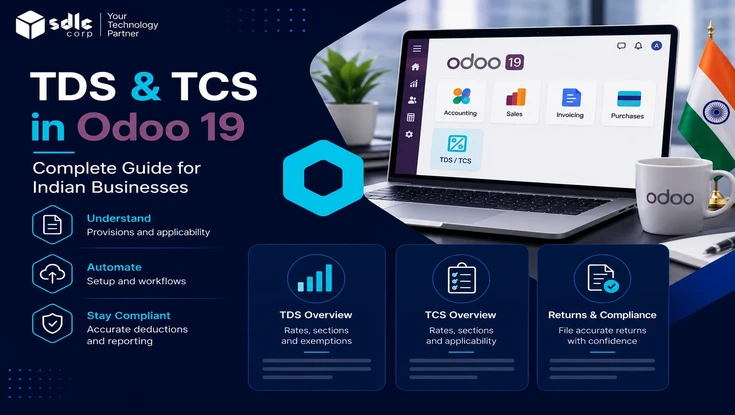
Odoo 19 handles both TDS and TCS natively through its Indian localization (l10n_in). Your team can deduct TDS on vendor bills, collect TCS on customer invoices, receive an alert when a section threshold is crossed, and export the data your accountant needs for quarterly TDS and TCS returns.
This guide walks you through the complete setup, maps rates to each field, and explains when the built-in functionality is sufficient versus when a paid module may be worth considering.
From 1 April 2026, the Income Tax Act 2025 replaced the 1961 Act. The former TDS provisions now fall under Section 393, while salary-related deductions are covered under Section 392. Return forms also have new names, with Form 26Q becoming Form 140 and Form 27EQ becoming Form 144A.
Odoo still uses familiar codes such as 194J in daily accounting workflows, but reporting must follow the new sections and form names. Returns submitted with outdated codes or forms may be rejected. Review the full legislation on India Code (indiacode.nic.in), the official repository of the Ministry of Law and Justice.
- Odoo handles TDS and TCS natively, so no paid module is needed for standard cases.
- Setting rates and sections on the chart of accounts means every bill and invoice applies them automatically.
- Odoo aggregates amounts per PAN across branches and warns you when a threshold is crossed.
- Built-in reports give you the figures for your Form 140 and Form 144A filings.
- A paid module helps only for high volume, bulk certificates, or advanced reporting.
What are TDS and TCS?
TDS explained
TDS requires the payer to deduct tax before paying a vendor and then deposit it with the government. In Odoo, this applies to vendor bills professional fees, rent, and contractor payments are the most common examples.
TCS explained
TCS works differently: the seller adds tax to a sale of specified goods and collects it from the buyer. In Odoo, this applies on customer invoices for example scrap sales or a motor vehicle above ₹10 lakh.
Key differences between TDS and TCS
Direction is the core distinction: the payer deducts TDS, while the seller collects TCS. The table below sums it up.
| Point | TDS | TCS |
|---|---|---|
| Who acts | Payer deducts | Seller collects |
| Applies to | Vendor bills | Customer invoices |
| Common example | Professional fees, rent, contractor payments | Scrap, motor vehicle above 10 lakh |
| Governing law (FY 2026-27) | Income Tax Act 2025, Section 393 (salary 392) | Income Tax Act 2025, Section 206C equivalent |
| Odoo document | Vendor Bill | Customer Invoice |
TDS and TCS rates and sections mapped to Odoo
Your chart of accounts is where you assign a TDS or TCS section to the relevant account. Once you complete the mapping, Odoo applies the right rate whenever that account appears on a bill or invoice. The codes below are what you select in Odoo. For FY 2026-27, report them under the consolidated Section 393, with salary under Section 392.
| Code (Section 393) | Nature of payment | Rate | Threshold | Where to set in Odoo |
|---|---|---|---|---|
194C | Payments to contractors | 1% (individual or HUF), 2% (others) | ₹30,000 single / ₹1,00,000 yearly | TDS/TCS Section on the expense account |
194J | Professional or technical fees | 10% (2% for technical services) | ₹30,000 yearly | TDS/TCS Section on the fees account |
194I | Rent | 10% (land or building), 2% (plant or machinery) | ₹2,40,000 yearly | TDS/TCS Section on the rent account |
194Q | Purchase of goods | 0.1% | Above ₹50,00,000 (buyer turnover above ₹10 crore) | TDS/TCS Section on the purchase account |
194A | Interest other than securities | 10% | ₹50,000 bank / ₹5,000 others | TDS/TCS Section on the interest account |
192 | Salary (now Section 392) | As per income slab | Basic exemption | Handled via Payroll |
For the purchase side that trigg purchase order processing in Odoo.
Does Odoo support TDS and TCS natively?
Yes. Odoo's Indian localization deducts TDS on vendor bills, collects TCS on customer invoices, and ships with preloaded sections such as 192, 194A, 194C, and 194J.
Beyond basic deduction and collection, the localization also raises threshold alerts, aggregates amounts per PAN, exports the figures you need to file, and supports broader financial compliance workflows.
A third-party Odoo TDS module from a vendor such as Softhealer or Globalteckz adds value only in specific cases. Use the table below to decide which path suits your business.
| Use native Odoo when | Consider a paid module when |
|---|---|
| You use the preloaded TDS and TCS sections | You process very high bill and invoice volume |
| Your transaction volume is moderate | You want bulk Form 16A or 27D certificate generation |
| You file with your CA using exported data | You need advanced or custom TDS reporting |
| You run a single or a few branches | You manage complex multi GSTIN or multi company setups |
Most Indian SMBs find the native feature sufficient. Test it before buying a module.
Setting up Odoo for India?
Our Odoo team configures TDS, TCS, GST, and payroll end to end.
Prerequisites and enabling TDS and TCS in Odoo 19
Start by installing the Accounting app and the Odoo Indian localization, then add your TAN.
- Open Apps and install Accounting with the Indian (
l10n_in) localization. - Go to Accounting, then Configuration, then Settings.
- Under Indian Integration, enable TDS and TCS.
- Enter your TAN in the field that appears this is required on returns and certificates.
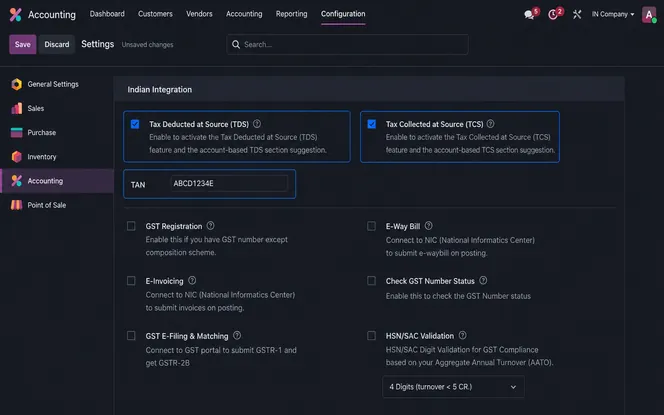
Your Indian chart of accounts loads automatically and is ready to map. New to the platform? See how to manage users in Odoo first.
How to configure and apply TDS on vendor bills
Setting the TDS/TCS Section once on the expense account is all it takes. The system then applies the correct deduction automatically to every matching vendor bill. Keeping your expense accounts clean before you begin makes this easier; see how to track expenses in Odoo.
- Open the expense account in your chart of accounts and set its TDS/TCS Section, for example
194J. - Create or confirm a vendor bill that uses that account.
- When the amount crosses the threshold, the system displays a banner and a TDS Entry smart button.
- Click TDS Entry, review the base and rate in the popup, then confirm the deduction.
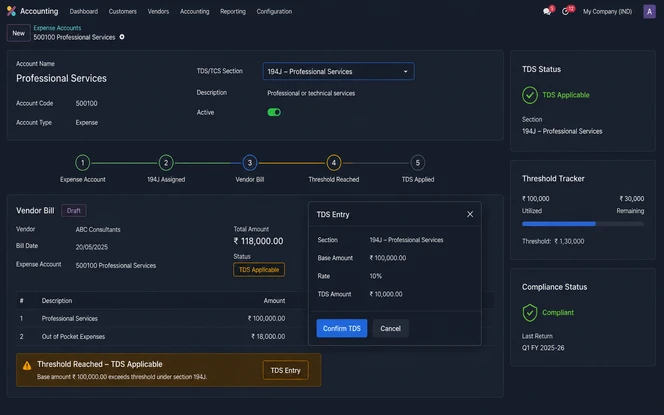
194J attracts TDS at 10%. This creates a deduction of ₹5,000, leaving a net vendor payment of ₹45,000. After posting the entry, the deducted amount moves to the government deposit account for later remittance.Scenario: ABC Consulting raises a vendor bill for ₹75,000 for professional services.
| Particular | Amount |
|---|---|
| Professional Fees | ₹75,000 |
| TDS Section | 194J |
| TDS Rate | 10% |
| TDS Deducted | ₹7,500 |
| Net Payable to Vendor | ₹67,500 |
After posting the bill, Odoo calculates the deduction automatically. The vendor ledger shows a payable of ₹67,500, while ₹7,500 moves to the TDS payable account for deposit with the Income Tax Department.
How to configure and apply TCS on customer invoices in Odoo
TCS in Odoo covers specified goods under Section 206C scrap sales and motor vehicles above ₹10 lakh are the most common cases. Note that TCS on the general sale of goods under Section 206C(1H) was withdrawn from 1 April 2025, so only buyer-side TDS under 194Q now applies to high-value goods purchases.
- Create a TCS tax for the applicable rate, or use the preloaded one.
- Add the TCS tax on the invoice line for the applicable sale.
- Confirm the customer invoice. Odoo then adds TCS and posts it to the correct ledger automatically.
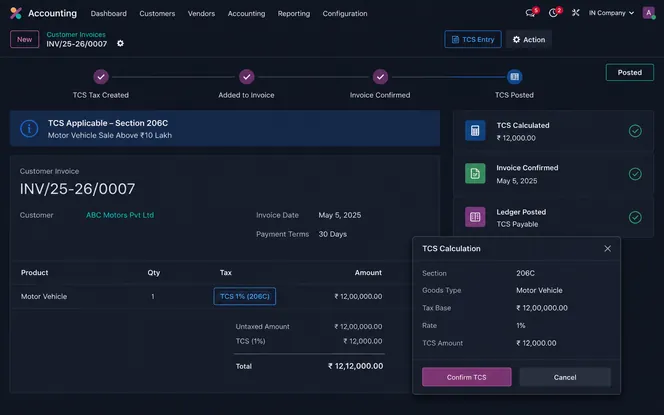
Scenario: A motor vehicle worth ₹12,00,000 attracts TCS at 1%.
| Particular | Amount |
|---|---|
| Vehicle Value | ₹12,00,000 |
| TCS Rate | 1% |
| TCS Amount | ₹12,000 |
| Total Invoice Value | ₹12,12,000 |
Confirming the invoice triggers Odoo to post the TCS liability and include the amount in TCS reporting for future return filing.
Threshold alerts and PAN aggregation across branches
Odoo tracks amounts per PAN, not per bill. Based on the account selected, it checks the threshold defined in that account's TDS/TCS Section and shows a banner when the limit is crossed. The alert disappears once you apply the tax.
Because Odoo calculates the aggregate per PAN across all company branches, a vendor billed from several GSTINs under one PAN still counts against a single cumulative limit.
TRACES (tdscpc.gov.in) the official TDS Reconciliation Analysis and Correction Enabling System operated by the Income Tax Department is where your team manages TDS certificates, challan validation, and deductee corrections.
Your CA can use TRACES to download Form 16A, validate challans, and verify credits reflected in Form 26AS or the AIS before filing.
Reconcile the figures with your books using invoice reconciliation before each quarterly filing.
TDS and TCS compliance calendar
Mark these dates to avoid interest and late fees.
| Task | Typical due date |
|---|---|
| Deposit TDS or TCS for a month | 7th of the next month (April deduction by 30 April) |
| Quarterly return (Form 140 or 144A) | End of the month after the quarter |
| Issue TDS or TCS certificate to the party | After the return is filed |
Confirm the current schedule on the CBDT due dates page and check the ICAI Direct Taxes Committee (icai.org) for practice guidance and technical pronouncements on TDS compliance.
Common TDS and TCS mistakes in Odoo
Several errors come up regularly during Odoo TDS and TCS setups. Catching them early saves significant effort at filing time.
- Leaving the TDS/TCS Section blank on an account Odoo skips the deduction entirely when no section is set.
- Skipping the TAN entry a missing TAN blocks clean reporting and return filing.
- Ignoring the threshold banner dismissing the alert leads to late deduction and interest charges.
- Mapping the wrong section to an account this causes incorrect rates and compliance gaps.
- Filing under old form names or section codes for FY 2026-27 the portal rejects returns that use pre-2025 Act terminology.
Conclusion
Accurate TDS and TCS management keeps Indian tax compliance on track and prevents filing issues. With Odoo 19 Indian localization, finance teams can deduct TDS, collect TCS, track PAN-based thresholds, and prepare clean reporting data from one accounting system.
Mapping the correct sections to accounts means Odoo applies taxes consistently on every vendor bill and customer invoice. Threshold alerts remove the need for manual tracking, and transaction data stays ready for review before each quarterly return.
For most Indian businesses, Odoo 19 native TDS and TCS features cover standard compliance needs completely. A paid module makes sense only when bulk certificates, advanced reports, or very high-volume automation are a priority.
Frequently Asked Questions
Odoo TDS and TCS support overview
Odoo editions that support TDS and TCS
Enabling TDS in Odoo 19
TDS calculation on vendor bills
Applying TCS on customer invoices
TDS threshold tracking in Odoo
Paid module requirements for TDS and TCS
Filing TDS and TCS returns from Odoo
Impact of Income Tax Act 2025 changes on Odoo
TDS vs TCS at a glance
TDS certificate (Form 16A) in Odoo
Official reference: Odoo 19 India Fiscal Localization Documentation