Payroll compliance India is not a single rule. It is five separate statutory obligations, each with its own registration, rates, deadlines, and penalties. Miss one, and government notices follow. Two major changes in 2026 have made correct setup more critical than ever: the Labour Code 50% wage rule (November 2025) and the Income Tax Act 2025, which replaced Form 24Q with Form 138 from April 1, 2026.
The good news is that Odoo 18 and Odoo 19's Indian payroll localization handles all five components EPF, ESI, Professional Tax, TDS, and LWF natively. This guide covers PF ESI compliance India configuration inside Odoo, statutory compliance payroll India deadlines, and the reports you need to file every month.
Key Takeaways
- Odoo 18/19 covers all 5 statutory payroll components natively
- Labour Code 2026: basic salary must be at least 50% of CTC
- Form 24Q is now Form 138 from April 1, 2026
- Monthly deadlines: TDS 7th, EPF 15th, ESI 21st
- All statutory reports export directly from Odoo Reporting
What Changed in Indian Payroll Compliance in 2026
Two regulatory changes took effect in 2025 and 2026 that directly affect every Indian payroll configuration. If your Odoo setup predates these changes, action is required before your next payroll run.
Labour Code 2026: the 50% Wage Rule
The four Labour Codes were implemented in November 2025, consolidating 29 older laws. The critical payroll impact is the 50% wage rule: basic salary plus dearness allowance must now be at least 50% of total CTC. This is mandatory, not optional.
Many businesses previously kept basic at 20 to 30% of CTC to minimise PF liability. This structure now triggers retrospective PF dues, interest, and penalties during EPFO inspections. If you are also using automated actions in Odoo 18 to trigger payroll workflows, verify those actions use the updated salary structure.
The Ministry of Labour and Employment published the Labour Codes gazette notification. Check the official Labour Codes portal for the applicable implementation date in your state.
Income Tax Act 2025: Form 138 Replaces Form 24Q
From April 1, 2026, the Income Tax Act 2025 is in force. TDS on salary now falls under Section 392(1), not Section 192. The quarterly TDS return is now Form 138, not Form 24Q. The annual employee TDS certificate is now Form 130, not Form 16.
Filing Q1 FY 2026-27 (due July 2026) using old form numbers will fail portal validation. Verify your Odoo version reflects IT Act 2025 terminology before your first quarterly filing. The Income Tax India portal has official Form 138 filing guidance.
India's Statutory Payroll Framework: the 5 Components
Statutory compliance payroll India covers five separate obligations under different central and state laws. While PF builds long-term retirement savings for employees, ESI covers short-term medical and sickness benefits both are mandatory under separate central laws. PF ESI compliance India alone accounts for two of the five components; Professional Tax, TDS, and LWF add three more layers.
| Component | Employee % | Employer % | Threshold | Deadline | Penalty (late) |
|---|---|---|---|---|---|
| EPF (PF) | 12% of basic | 12% + 1% admin | ₹15,000 cap | 15th monthly | 12%/yr + ₹3L max |
| ESI | 0.75% of gross | 3.25% of gross | ≤₹21,000/mo | 21st monthly | ₹5,000+ |
| TDS (salary) | Per income slab | N/A | All salaried | 7th monthly | 1.5%/month |
| Professional Tax | ₹0 to ₹208/mo | N/A | Varies by state | Monthly/half-yearly | Varies |
| LWF | Varies | Varies | State-specific | June & Dec | Varies |
Contribution rates are governed by the EPFO Act for PF, and the ESIC wage ceiling notification for ESI. Verify current thresholds on official portals as these are revised periodically.
Setting Up Odoo Indian Payroll Localization (Step-by-Step)
The Odoo 18 payroll module India localization handles all five statutory components once correctly configured. Follow this sequence exactly, because each step activates features used in the next. Before you begin, ensure employees are set up: see our guide on how to create an employee and assign them to a department, and manage users in Odoo so your payroll team has correct permissions.
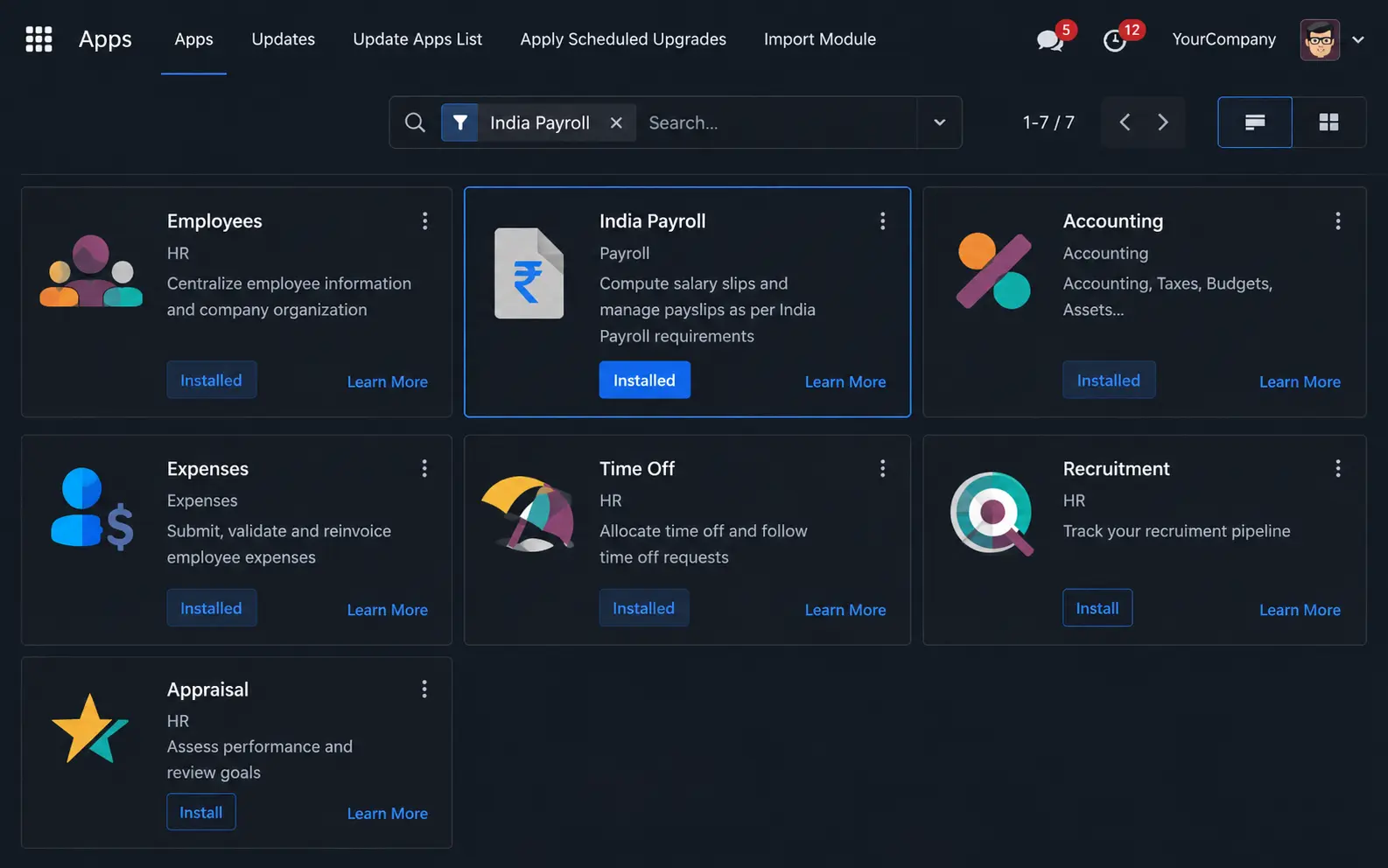
Go to Apps, search for India Payroll, and install. The module activates India-specific salary structures, employee statutory fields (UAN, ESIC number, PAN), and the Indian Payroll Settings section in Configuration. Since Indian payroll localization is generally used with Enterprise features, businesses evaluating deployment options should also compare Odoo Community vs Enterprise before implementation.
Go to Payroll → Configuration → Settings → Indian Payroll. Enter your EPF Employer ID, ESIC Employer Code (10-digit), and PT registration esic.gov.in before this step if not already done.
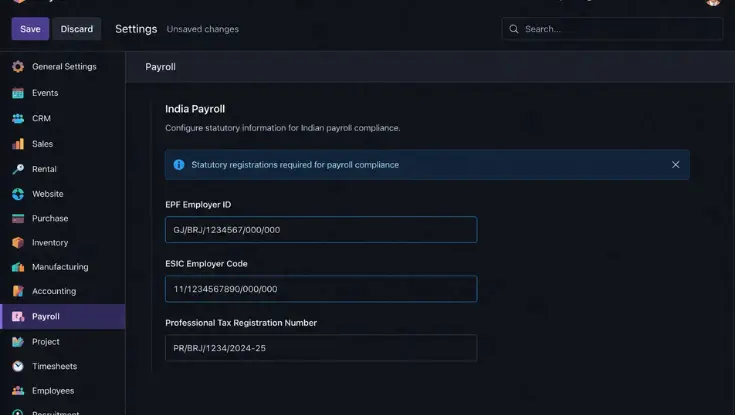
If these fields are left blank, EPF, ESI, and PT deductions will not appear in employee payslips.
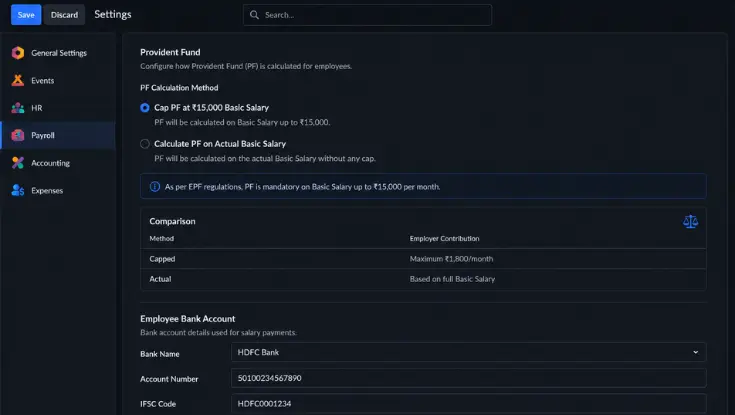
Odoo offers two options: Cap at ₹15,000 basic (max ₹1,800/month) or calculate on actual basic (higher retirement savings). Most businesses use the cap; IT firms often choose actual as an employee benefit. Also add bank account details at this stage, see our guide on adding a bank account in the Odoo 18 employee app.
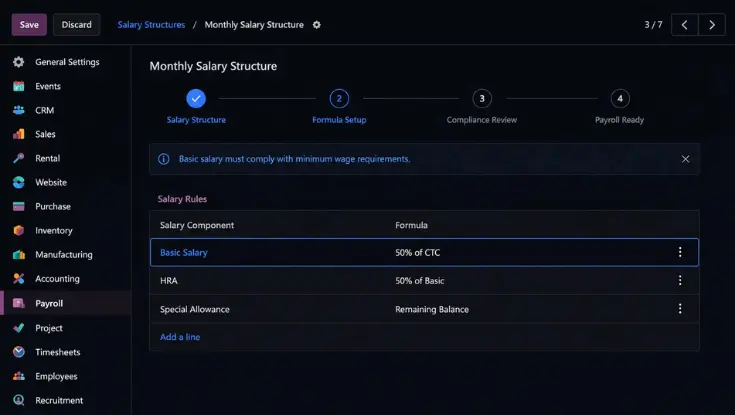
Go to Payroll → Configuration → Salary Structures. Set basic salary as a formula equal to minimum 50% of CTC. HRA is typically 40 to 50% of basic (50% for metro cities). Special allowance makes up the remainder. Have your CA review and sign off before the first payroll run.
Configuring PF (Provident Fund) in Odoo
Once the localization is installed, the Odoo salary rules PF ESI India setup is largely automatic. Here is what to verify and where to act.
PF Salary Rules in Odoo
The India Payroll module creates two salary rules automatically: employee 12% of basic, and employer 13% total. Go to Payroll → Configuration → Salary Structures → India: Regular Pay to verify both rules are active. For how the Payroll module fits within the broader Odoo ecosystem, see key Odoo modules and how they connect. The module architecture applies across industries even though that post uses a manufacturing context.
UAN Number in Employee Records
The UAN number Odoo employee India field is in the employee profile under Private Information → UAN. The UAN is a 12-digit EPFO identifier assigned to each employee for life. Without a UAN, Odoo cannot generate the ECR file. For new hires, collect the UAN or generate one via the EPFO Unified Portal before their first payslip.
Generating and Exporting the EPF ECR File
After confirming the monthly payslip batch, go to Payroll → Reporting → EPF Report. Odoo generates the ECR (Electronic Challan cum Return) file in XLSX format. The EPF ECR file Odoo India export contains a UAN-wise breakdown of contributions. Upload to the EPFO Unified Portal by the 15th of every month.
Configuring ESI in Odoo
The ESI salary limit India 2026 is ₹21,000 gross per month. Employees earning above this amount are excluded from ESI. Odoo automatically applies this threshold, so when an employee's gross salary in their contract exceeds ₹21,000, the ESI salary rules return zero deduction on the next payslip.
The ESI threshold 2026 India payroll calculation uses 0.75% employee + 3.25% employer. ESI contribution periods run half-yearly: April to September and October to March. Refer to esic.gov.in for the official wage ceiling notification.
If an employee's increment pushes gross salary above ₹21,000, update the contract before the next payroll run. Continuing to deduct ESI after the ceiling creates an overpayment that is difficult to recover from ESIC.
To generate the ESI challan, go to Payroll → Reporting → ESI Report. Download the XLSX and upload to the ESIC portal by the 21st of every month.
Professional Tax in Odoo: State-Wise Slab Setup
Professional Tax India payroll is a state-level tax with a maximum of ₹2,500 per year. Delhi, Haryana, and Rajasthan do not levy PT. Odoo reads the employee's state from their contract and automatically applies the correct slab. Enter your PT registration number in Payroll → Configuration → Settings → Indian Payroll. You can set filing date reminders using automated actions in Odoo 18.
PT State-Wise Slab Table (FY 2026-27)
| State | Monthly Salary Range | PT per Month |
|---|---|---|
| Maharashtra | Up to ₹7,500 | Nil |
| Maharashtra | ₹7,501 to ₹10,000 | ₹175 |
| Maharashtra | Above ₹10,000 | ₹200 (Feb: ₹300) |
| Karnataka | Up to ₹25,000 | Nil |
| Karnataka | ₹25,001 to ₹41,666 | ₹150 |
| Karnataka | Above ₹41,667 | ₹200 |
| Tamil Nadu | Up to ₹3,500 | Nil |
| Tamil Nadu | ₹3,501 to ₹7,500 | ₹22.50 to ₹52.50 |
| Tamil Nadu | Above ₹7,500 | ₹208.33 |
| West Bengal | Up to ₹10,000 | Nil |
| West Bengal | ₹10,001 to ₹25,000 | ₹110 to ₹130 |
| West Bengal | Above ₹25,000 | ₹200 |
| Andhra Pradesh | Up to ₹15,000 | Nil |
| Andhra Pradesh | Above ₹20,000 | ₹200 |
| Delhi / Haryana / Rajasthan | All salary levels | No PT applicable |
Karnataka Professional Tax: Additional Surcharge and Compliance Considerations
Karnataka Professional Tax rates are revised periodically through state budget notifications, making annual review essential. Businesses should validate PT slabs at the beginning of every financial year to ensure payroll deductions remain compliant. In Odoo, reviewing salary rules and testing payroll calculations each April helps prevent under-deduction and audit issues.
Create an annual compliance checklist in Odoo Activities or Automated Actions to review Karnataka PT slabs every April. This prevents outdated deductions and employee reconciliation issues during audits.
Maharashtra Professional Tax: Understanding the February ₹300 Anomaly
Maharashtra follows a unique Professional Tax structure where employees earning above the prescribed threshold pay ₹200 per month for most of the year, but ₹300 in February. This additional deduction ensures the annual Professional Tax contribution reaches the statutory ceiling of ₹2,500. Payroll teams migrating from legacy systems should verify that this February adjustment is correctly configured in Odoo.
Companies migrating from Tally, Excel, or custom payroll software often forget the Maharashtra February adjustment. Always compare total annual PT deducted per employee against the ₹2,500 statutory limit during migration validation.
Handling Multi-State Payroll in Odoo
For companies with employees across states, Odoo manages PT automatically. An employee in Maharashtra pays ₹200/month, a colleague in Karnataka pays under a different slab, and an employee in Delhi pays nothing, all handled in a single payroll run. If an employee relocates between states, update the contract state field and Odoo applies the new slab from the next payslip.
TDS on Salary in Odoo: Old vs New Regime + Form 138
TDS on salary India section 192 2026 is now Section 392(1) under the Income Tax Act 2025. Odoo calculates TDS by projecting each employee's annual taxable income from their contract CTC, declared exemptions (80C, HRA, 80D), and chosen tax regime. The annual projected tax is divided equally across the remaining months of the FY and deducted monthly. Businesses that also deduct tax on vendor payments or collect tax on sales can review our detailed guide on Odoo India TDS and TCS compliance for broader Indian withholding tax scenarios.
From April 2026, the new tax regime is the default. Employees who want old-regime deductions must submit a signed declaration. Collect declarations from all employees every April and store them against the employee contract in Odoo. The Income Tax India portal has official regime comparison and declaration forms.
Form 24Q is now Form 138 effective April 1, 2026. Form 16 is now Form 130. TDS falls under Section 392(1), not Section 192. Q1 FY 2026-27 return is due July 2026. Filing with old form numbers will fail validation. Verify the TDS Report in Odoo shows "Form 138" before your first quarterly filing.
Labour Welfare Fund (LWF) in Odoo
The labour welfare fund India applies in approximately 16 states. Delhi, Haryana, and Rajasthan do not levy LWF. Most states follow a semi-annual schedule with contributions due in June and December.
Enter your LWF establishment number in Payroll → Configuration → Settings → Indian Payroll and set state-wise contribution amounts. Verify LWF applicability for every state where you have employees at setup.
Statutory Reports in Odoo: Generate, Export, and File
After confirming each monthly payslip batch, all statutory reports are available directly from the Payroll module, formatted for direct portal upload. The Odoo EPF report India and Odoo ESI report India are the two you will run every month without exception. You can also track payroll-related expenses directly from your accounting workflow after payroll journals are posted.
| Report | Odoo Path | Format | Portal | Frequency |
|---|---|---|---|---|
| EPF ECR file | Payroll → Reporting → EPF Report | XLSX | EPFO Portal | Monthly, by 15th |
| ESI challan | Payroll → Reporting → ESI Report | XLSX | ESIC portal | Monthly, by 21st |
| LWF report | Payroll → Reporting → LWF Report | XLSX | State LWF board | Per state schedule |
| TDS return (Form 138) | Payroll → Reporting → TDS Report | XLSX/PDF | TRACES portal | Quarterly |
| Form 130 (employee TDS cert.) | Per employee from payslip | Distribute to employees | Annual, June 15 | |
| Salary Register | Payroll → Reporting → Salary Register | XLSX | Internal / auditors | Monthly |
India Payroll Compliance Calendar + Penalty Table (2026)
Missing a statutory deadline does not produce an immediate penalty it produces silently accumulating interest and penalties that most businesses discover only during an inspection or audit.
Compliance Deadline Calendar
| Obligation | Deadline | Portal |
|---|---|---|
| TDS on salary deposit | 7th of following month | Income tax portal |
| EPF contribution deposit | 15th of following month | EPFO portal |
| ESI contribution deposit | 21st of following month | ESIC portal |
| Form 138 (quarterly TDS return) | 31 days after quarter end | TRACES portal |
| Form 130 (employee TDS certificate) | June 15 each year | Issue to employees |
| Professional Tax | Monthly or half-yearly | State Commercial Tax Dept |
| LWF contribution | June and December | State LWF board |
ESI PF TDS Penalty India: What a 30-Day Delay Actually Costs
| Law | Penalty Rate | 30-Day Delay on ₹10L Payroll |
|---|---|---|
| EPF (late deposit) | 12%/yr + up to ₹3L | ₹10,000 interest + ₹3L notice |
| TDS (late deposit) | 1.5%/month from deduction | ₹15,000 |
| TDS (late return filing) | ₹200/day under Section 234E | ₹6,000 for 30 days |
| ESI (late payment) | 12%/yr simple interest | Approx. ₹10,000 |
| EPF (non-compliance) | Up to ₹5,000/day (court) | Potentially unlimited |
Review payroll liabilities regularly so delayed PF, ESI, or TDS payments do not create hidden statutory exposure in your books.
Need Help Setting Up Payroll Compliance in Odoo?
Ensure PF, ESI, Professional Tax, TDS, and Labour Welfare Fund are configured correctly in Odoo. Our certified Odoo experts help Indian businesses implement compliant payroll workflows, automate statutory reports, and avoid costly penalties.
5 Payroll Compliance India Mistakes That Trigger Government Notices
Many companies kept basic at 20 to 30% of CTC to minimise PF liability. Under the 50% wage rule Labour Code India 2026, this triggers retrospective dues, interest, and penalties for the entire non-compliant period during EPFO inspections.
When an employee's salary increment pushes gross above ₹21,000, ESI must stop from the next contribution period. Continuing to deduct creates an overpayment that is difficult to recover from ESIC.
From April 2026, the new tax regime is the default. Employees who want old-regime deductions such as 80C, HRA, and 80D but have not submitted a declaration will have TDS calculated incorrectly all year, creating a large adjustment in the final months.
EPF deposits delayed past the 15th attract 12% per annum interest plus penalties of up to ₹3 lakh. These accumulate silently. Most businesses discover the full exposure only when an inspection triggers a demand notice.
From April 1, 2026, Form 24Q is replaced by Form 138. Configurations not updated to the new form numbers will fail portal validation when filing Q1 FY 2026-27 (due July 2026).
Need certified Odoo implementation support?
Get help reviewing salary rules, statutory reports, and India-specific payroll workflows before go-live.
Odoo Payroll and Accounting Integration
The strongest argument for running payroll inside Odoo rather than a standalone tool is the accounting integration. When a payslip batch is confirmed in Odoo, the system automatically creates journal entries: debiting salary expense accounts and crediting EPF payable, ESI payable, TDS payable, PT payable, and salary payable. Businesses already managing GST compliance in Odoo should ensure payroll journals align with their accounting and tax setup; our guide on Odoo India GST, e-Invoicing, and e-Way Bill explains how Indian tax processes integrate across finance operations.
For businesses with project-based billing, Odoo's analytic accounts tag each payslip line to the correct department or project automatically. Compared to Greytip, Keka, or HROne, where salary journal entries must be entered manually into accounting each month, Odoo payroll automation India eliminates this bottleneck entirely. See our guides on financial statement analysis, purchase order processing in Odoo, and tracking expenses in Odoo.
Frequently Asked Questions
Does Odoo support Indian payroll compliance with PF, ESI, and PT?
Yes. Odoo Enterprise's Indian payroll localization covers all five statutory components natively: EPF (12% + 12%), ESI (0.75% + 3.25%), state-based Professional Tax slabs, TDS on salary under both old and new tax regimes, and Labour Welfare Fund. All statutory reports export directly from Odoo for portal upload.
What is the PF contribution rate in India 2026?
12% of basic salary from both employee and employer. Employers also pay 1% administrative charges, making total employer outflow 13%. PF is calculated on basic up to ₹15,000 by default.
What is the ESI salary ceiling in India 2026?
₹21,000 gross per month. Employees earning above this threshold are excluded from ESI. When an employee's salary crosses this ceiling during the year, ESI deductions must stop from the beginning of the next contribution period, April or October.
How to configure PF in Odoo for Indian employees?
Install the India Payroll localization, enter your EPF Employer ID in Payroll → Configuration → Settings → Indian Payroll, choose the PF cap method (₹15,000 or actual basic), add the UAN to each employee record, verify salary rule lines for 12% employee and 13% employer, then generate the ECR file from Payroll → Reporting → EPF Report after each monthly payrun.
What are the payroll compliance deadlines in India?
TDS deposit: 7th of each month. EPF deposit: 15th. ESI deposit: 21st. Form 138 (quarterly TDS return): 31 days after quarter end. Form 130 (employee TDS certificate): June 15 annually. Professional Tax and LWF deadlines vary by state.
What is Form 138 for TDS in India 2026?
Form 138 replaced Form 24Q under the Income Tax Act 2025 effective April 1, 2026. It is the quarterly TDS return for salary deductions filed on the income tax portal via TRACES. The annual employee certificate was simultaneously renamed from Form 16 to Form 130. Filing with old form numbers will fail portal validation from Q1 FY 2026-27 onward.
What is the 50% wage rule under Labour Code India?
Under the Labour Codes implemented in November 2025, basic salary plus dearness allowance must be at least 50% of total CTC. This increases EPF and gratuity contributions significantly. Non-compliance triggers retrospective dues, interest, and penalties during EPFO inspections.
How to set up professional tax in Odoo for multiple states?
Enter your state-issued PT registration number in Payroll → Configuration → Settings → Indian Payroll. Odoo reads each employee's state from their contract and automatically applies the correct PT slab. For employees in PT-exempt states like Delhi, Haryana, and Rajasthan, no additional configuration is needed.
What is the ECR file for EPF in India?
The ECR (Electronic Challan cum Return) is EPFO's prescribed format for monthly PF contribution uploads. In Odoo, generate it from Payroll → Reporting → EPF Report. The XLSX file contains a UAN-wise breakdown of contributions ready for upload to the EPFO Unified Portal by the 15th of each month.
What is a UAN number and where is it in Odoo?
The UAN (Universal Account Number) is a 12-digit EPFO identifier assigned to each employee for life. In Odoo, it is stored in the employee profile under the Private Information tab. It is mandatory. Without a UAN, Odoo cannot generate the ECR file for that employee.
How long does it take to set up Odoo payroll for India?
Initial configuration takes 1 to 3 days depending on employee count and states covered. Salary structure design and CA review add 2 to 5 days. Most businesses complete full go-live within 2 weeks. For a faster setup, consider working with an experienced Odoo implementation team.
Ready to Configure Odoo Payroll for India?
Get your PF, ESI, PT, TDS, and LWF set up correctly the first time with expert Odoo implementation support.