
Odoo Inventory Analytics for Smarter Stock Control
Transform sales, purchase, and inventory data from Odoo 19 into a 0–100 Inventory Health Score, ten ready-to-use reports, and draft Purchase Orders in one click. No spreadsheets. No extra software. No manual data entry.
- Inventory Health Score with stock risk visibility
- Ten ready reports for sales, purchase, and stock analysis
- One-click draft Purchase Order from Odoo data
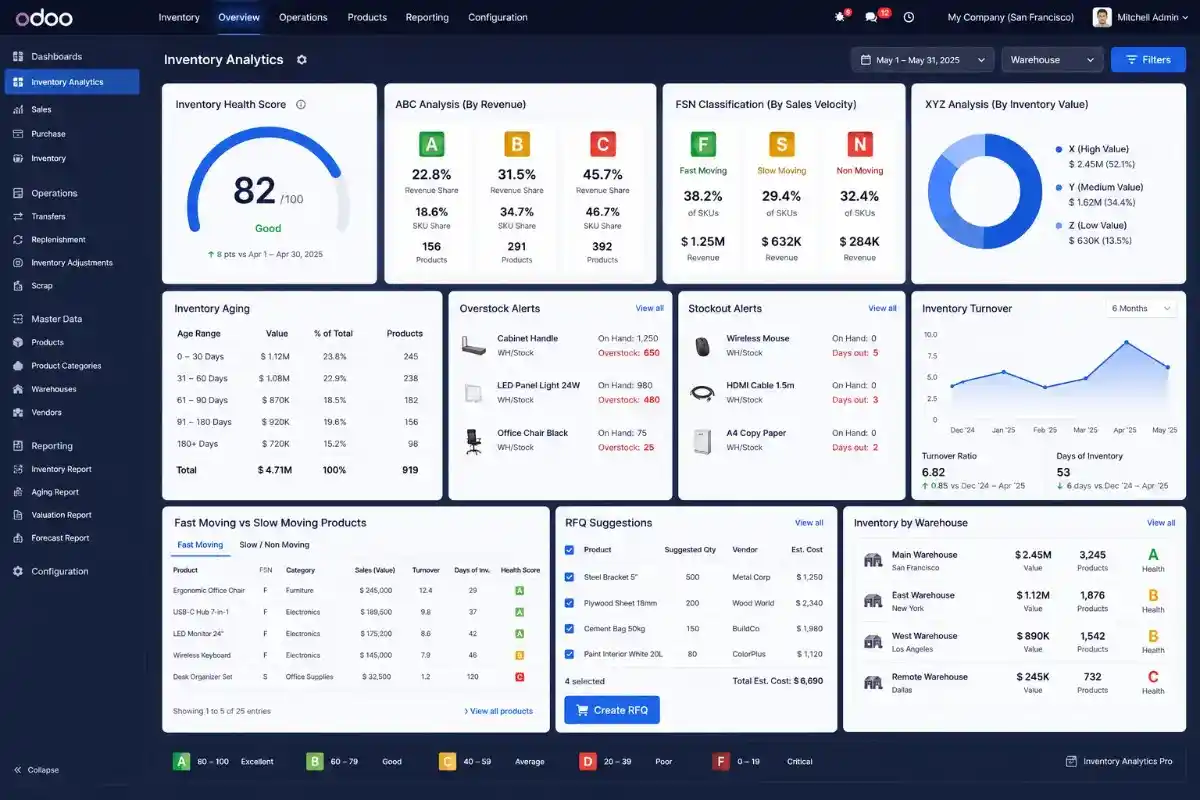
Odoo Inventory Analytics Dashboard for Smarter Stock Decisions
Inventory Analytics Pro gives teams a clear 0–100 Inventory Health Score inside Odoo. It uses turnover, margin, stock age, and stockout signals to help businesses find risky stock, reduce waste, and make better purchasing decisions.
Review Inventory Score
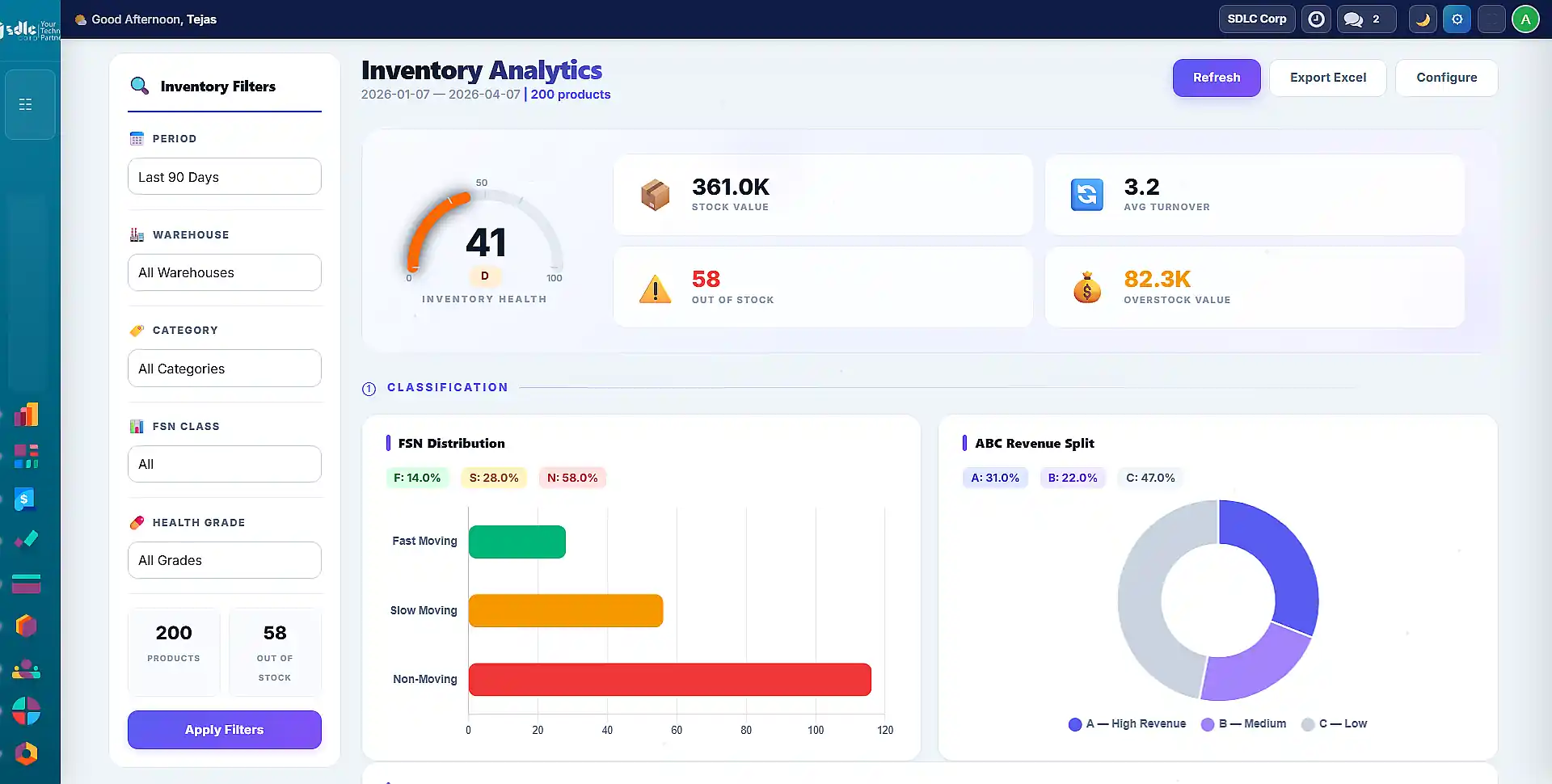
Odoo Inventory Analytics for Faster Stock Decisions
Your Odoo system already stores sales, receipts, deliveries, and stock adjustments. However, raw data is not enough without clear inventory insights that help teams make faster stock decisions.
- Find products that quietly lock up working capital
- Identify slow-moving stock before it becomes dead inventory
- Spot fast-moving items before stockouts affect sales
- Review vendor performance with clearer purchase insights
Most teams still depend on Excel exports, pivot tables, and delayed reviews. Inventory Analytics Pro brings these answers inside Odoo, so teams can act before the decision window closes.

Odoo Inventory Health Score for Stock Performance Review
Inventory Analytics Pro converts turnover, stockouts, stock age, and margin contribution into a simple 0–100 inventory health score inside Odoo. As a result, teams can quickly identify weak stock performance and take faster inventory action.
Check Inventory ScoreOdoo ABC-FSN Inventory Analysis Matrix for SKU Decisions
Inventory Analytics Pro combines ABC revenue analysis with FSN stock movement analysis to help inventory teams make faster and smarter SKU decisions inside Odoo.
ABC classifies products by revenue and inventory value, while FSN identifies how quickly products move: Fast, Slow, or Non-Moving. Together, they help businesses decide which products to scale, monitor, promote, or discontinue.
View Inventory StrategyOdoo Inventory Analytics Workflow for Faster Procurement Actions
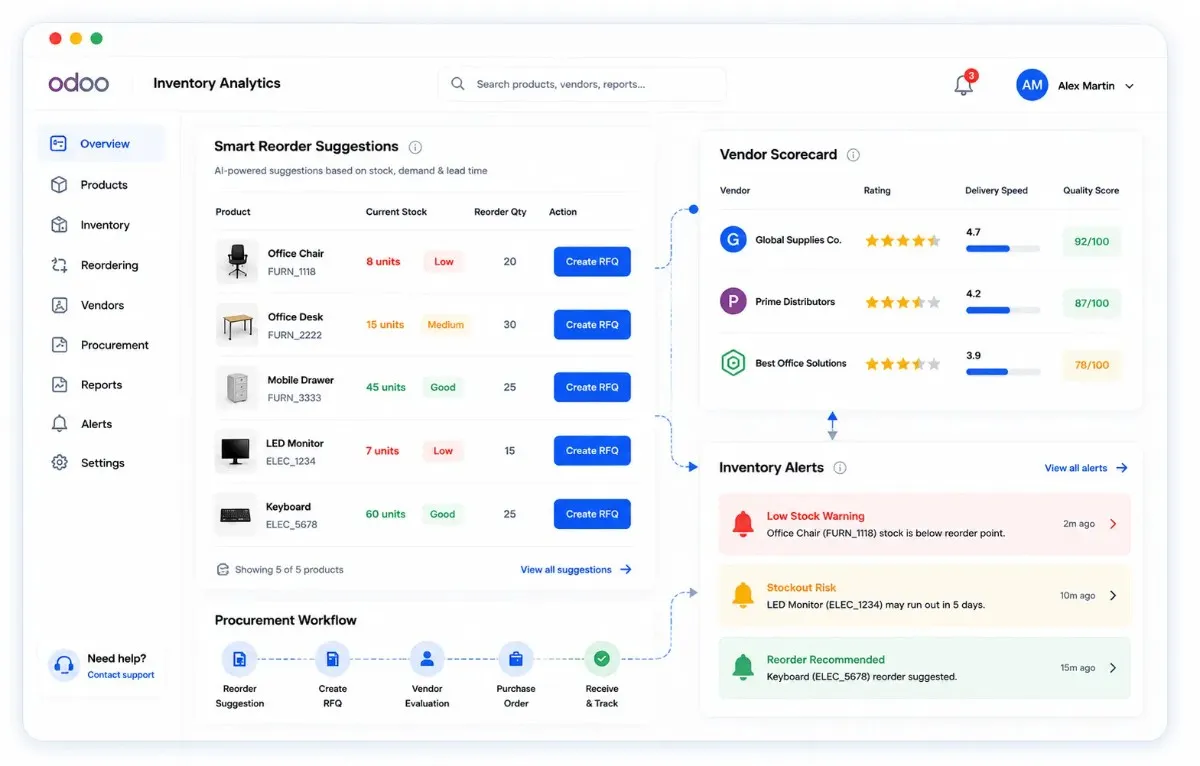
Inventory Analytics Pro helps teams move from inventory insights to reorder suggestions, RFQs (Request for Quotation), vendor scoring, and automated alerts inside Odoo. As a result, businesses can respond faster to stock risks and procurement needs.
Explore Inventory WorkflowSmart Reorder Suggestions
Calculate reorder points, safety stock, lead-time demand, and urgency levels automatically.
1-Click RFQ Creation
Create draft purchase orders using vendor records, purchase pricing, and reorder quantities.
Vendor Scorecard
Compare delivery speed, price consistency, quality, and supplier fulfillment performance.
Inventory Alerts
Use Odoo cron jobs to notify teams before stock risks affect operations.
Odoo Inventory Analytics Reports for Stock and Procurement Decisions
Inventory Analytics Pro provides detailed inventory reports for stock movement, inventory aging, overstock, turnover, procurement planning, and product performance inside Odoo.
Explore Inventory Reports| # | Report | What it tells you | Recommended Action |
|---|---|---|---|
| 1 | Health Score | Overall inventory health and performance score from 0–100 | Prioritize low-performing inventory categories quickly |
| 2 | FSN Classification | Products grouped as fast, slow, or non-moving stock | Refill fast movers and reduce slow-moving inventory |
| 3 | ABC Revenue | Revenue contribution ranking by product category | Protect and maintain top-performing inventory items |
| 4 | XYZ Value | Inventory value concentration across important SKUs | Monitor high-value inventory more closely |
| 5 | ABC-FSN Matrix | Combined view of product revenue and stock movement | Scale high-performing products and clear dead stock |
| 6 | Inventory Aging | Inventory grouped by stock age and holding duration | Clear aging stock before holding costs increase |
| 7 | Turnover | Sales velocity and inventory movement trends | Focus on profitable and fast-moving products |
| 8 | Overstock | Products exceeding planned inventory levels | Pause excess purchasing and run clearance campaigns |
| 9 | Out of Stock | Products currently unavailable or out of inventory | Create RFQs before shortages affect sales |
| 10 | Stock Movement | Incoming, outgoing, transfer, and adjustment activity | Audit stock discrepancies and inventory leakage |
Why Odoo Inventory Analytics Pro Stands Out Against Alternatives
Inventory Analytics Pro helps Odoo businesses improve inventory visibility and take faster procurement action without external BI tools.
Compare Inventory Solutions| Inventory Analytics Pro | Generic BI (Zoho / PowerBI) | NetSuite Inventory | Custom-built | |
|---|---|---|---|---|
| Native Odoo 19 integration | Yes | Connector setup required | Works outside Odoo | Needs custom API integration |
| Inventory Health Score (0–100) | Out of the box | Requires custom dashboard logic | No | Requires manual development |
| ABC-FSN visual matrix | Included | Not available by default | No | Needs custom reporting setup |
| 10 pre-built inventory reports | Included | Requires manual dashboard creation | Available through SuiteAnalytics | Depends on development scope |
| 1-Click RFQ from dashboard | Yes | No | Inside NetSuite | Needs custom workflow automation |
| Dark mode interface | Yes | Limited dashboard-only support | Available in selected screens | Requires separate UI development |
| Pricing model | One-time license | Subscription pricing | Enterprise contract | Hourly billing |
| Time to first insight | Within minutes | Usually takes dashboard setup time | Weeks to months | Depends on development timeline |
Industries Using Odoo Inventory Analytics Pro
Inventory Analytics Pro helps businesses improve stock visibility, reduce inventory risk, and make faster procurement and inventory decisions inside Odoo.
Find Your Inventory Use CaseWholesale Distribution
Identify inventory that is blocking working capital and use ABC-XYZ reports to control excess stock before it affects cash flow.
eCommerce Operations
Detect fast-moving products approaching stockout and generate RFQs quickly before inventory shortages impact sales.
Manufacturing Businesses
Monitor raw material aging, production inventory movement, and finished goods turnover with centralized analytics dashboards.
Retail Multi-Store
Compare inventory health across locations and transfer stock intelligently before unnecessary reordering starts.
Spare Parts Management
Track slow-moving but business-critical spare parts while monitoring obsolete inventory and stock value exposure.
Multi-Warehouse Operations
Review warehouse inventory performance across locations and analyze stock movement directly inside Odoo.
Odoo Inventory Analytics Pro FAQs
No. Inventory Analytics Pro works with your existing Odoo Inventory setup and adds deeper reporting, stock visibility, classification, and inventory performance insights without changing normal inventory operations.
Yes. The module uses existing sales, purchase, warehouse, and stock movement data already available inside Odoo. As a result, teams can view analytics without maintaining separate spreadsheets.
The Inventory Health Score combines turnover, stock age, margin contribution, and stockout frequency into a simple 0–100 rating. Therefore, teams can quickly identify healthy, risky, or slow-moving inventory.
Yes. Inventory Analytics Pro supports ABC, FSN, XYZ, inventory aging, and ABC-FSN matrix analysis inside Odoo to help businesses identify high-value, fast-moving, and non-moving products more easily.
Yes. Users can export inventory reports into a professionally formatted multi-sheet Excel workbook for procurement, finance, warehouse, and management review.
Yes. The module supports both Odoo Community and Odoo Enterprise editions and works with standard Odoo inventory data.
Yes. Inventory Analytics Pro supports Odoo Online, Odoo.sh, and self-hosted On-Premise deployments for flexible implementation.
The module includes lifetime bug fixes, version updates, and direct technical support for installation, compatibility, and issue resolution.
- Contact Us
Let’s Talk About Your Product
What happens next?
- We review your requirements
- Strategy call with experts
- Clear roadmap & estimate
- NDA Protected
- Enterprise Grade Delivery
- Global Clients
- By submitting this form, you acknowledge that SDLC Corp may process your details to respond to your inquiry. See our Privacy Policy and Cookie Notice.




