Case Study

Inventory Analytics Pro for Smarter Odoo Inventory Planning

Inventory data was already available in Odoo, but managers still needed a clearer way to review stock health, slow-moving SKUs, aging stock, stockout risks, and reorder needs. Inventory Analytics Proadded an inventory dashboard that connected stock movement, vendor performance, and purchase planning in one place.
Tracks stock health from one dashboard
Finds slow, aging, and risky inventory faster
Supports reorder planning with RFQ and vendor insights
Product Hunt listed badge Product Hunt Listed
Trusted software partner badge Trusted Software Partner
Multiple products listed badge Multiple Products Listed
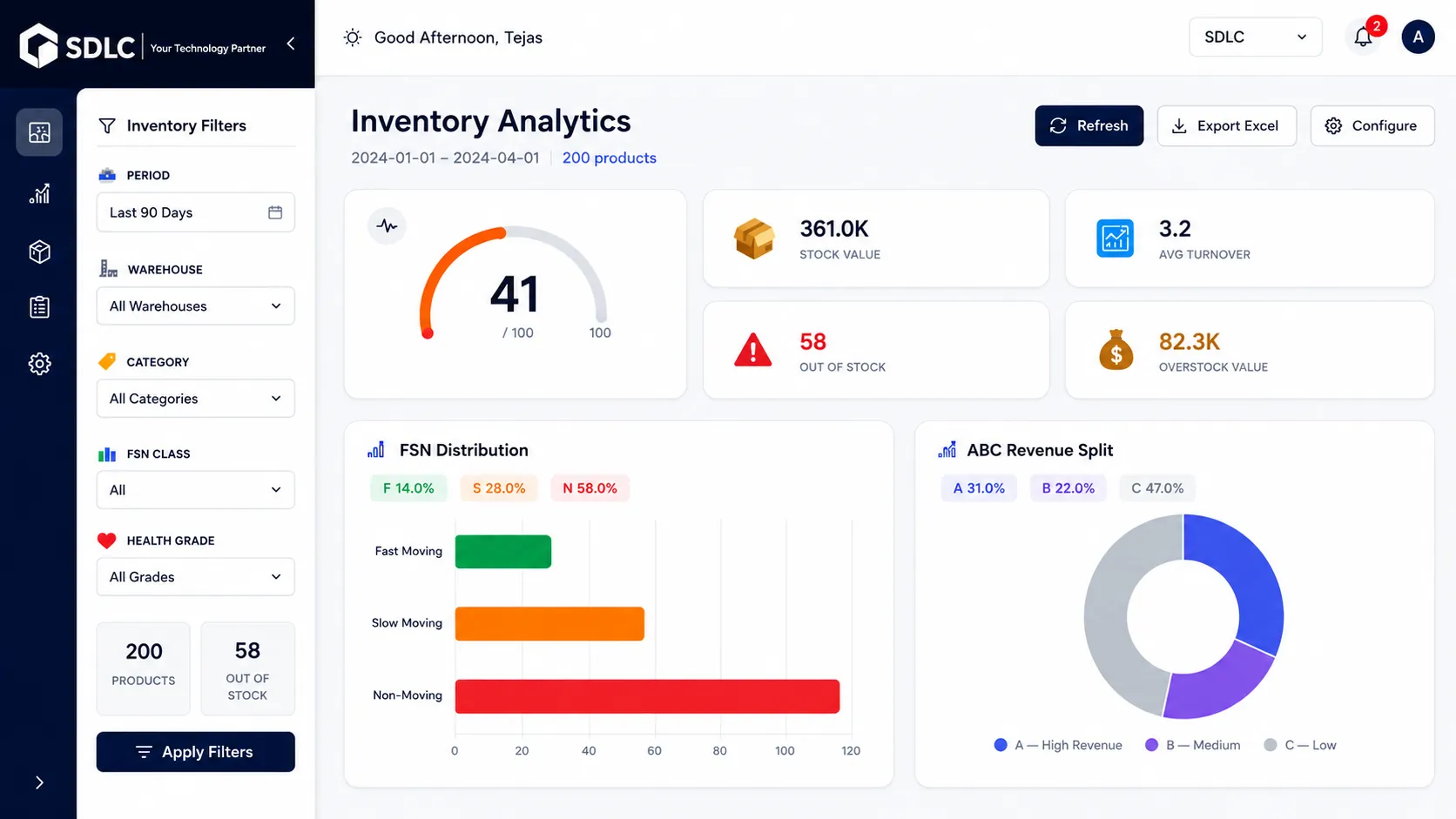
Inventory Analytics Pro Odoo dashboard showing stock health slow moving inventory reorder planning vendor insights and RFQ actions
Inventory Snapshot

Project Details for Inventory Analytics Pro

A simple overview of the client need, Odoo platform, inventory pain points, core analytics features, and final business outcome.

Client Type

Odoo inventory team managing products, vendors, warehouse stock, and purchase planning across daily operations.

Platform

Odoo 19.

Main Need

Faster inventory review to identify stock health, slow-moving products, aging inventory, reorder needs, and purchase priorities without repeated Excel checks.

Key Problem

Stock data was available in Odoo, but teams still depended on manual reports. This delayed SKU risk review, caused missed reorder decisions, and increased reporting effort.

Module Used

Inventory Analytics Pro.

Core Features

Inventory Health Score,Fast/Slow/Non-Moving Stock, Stock Value Grouping, and Demand Pattern Review, aging, turnover, stockout, overstock, reorder suggestions, vendor scorecard, alerts, Excel export, and RFQ.

Business Outcome

Inventory Analytics Pro helped the team reduce manual report work, improve stock visibility, find risky SKUs faster, and make clearer purchase planning decisions from one Odoo inventory dashboard.

Stock Health Score
SKU Risk Review
Vendor Scorecard
RFQ Planning
CLIENT BACKGROUND

Manual Stock Review Slowed Odoo Inventory Planning

The team needed a faster way to review stock movement, aging inventory, vendor performance, and reorder needs before purchase decisions were delayed.

The client used Odoo for sales orders, purchase orders, receipts, deliveries, stock transfers, stock adjustments, and product availability checks. However, inventory teams still needed extra manual reports to understand which products needed attention first.

Odoo stored the core stock data, but managers had to compare multiple reports to review inventory health, slow-moving products, aging stock, overstock, stockout risks, and reorder priorities. This slowed purchase planning and created missed reorder opportunities.

Clear Stock Health View

Managers could spot healthy, risky, slow-moving, aging, and overstocked products faster.

Faster Purchase Review

Purchase users could review reorder needs, vendor details, and RFQ actions in less time.
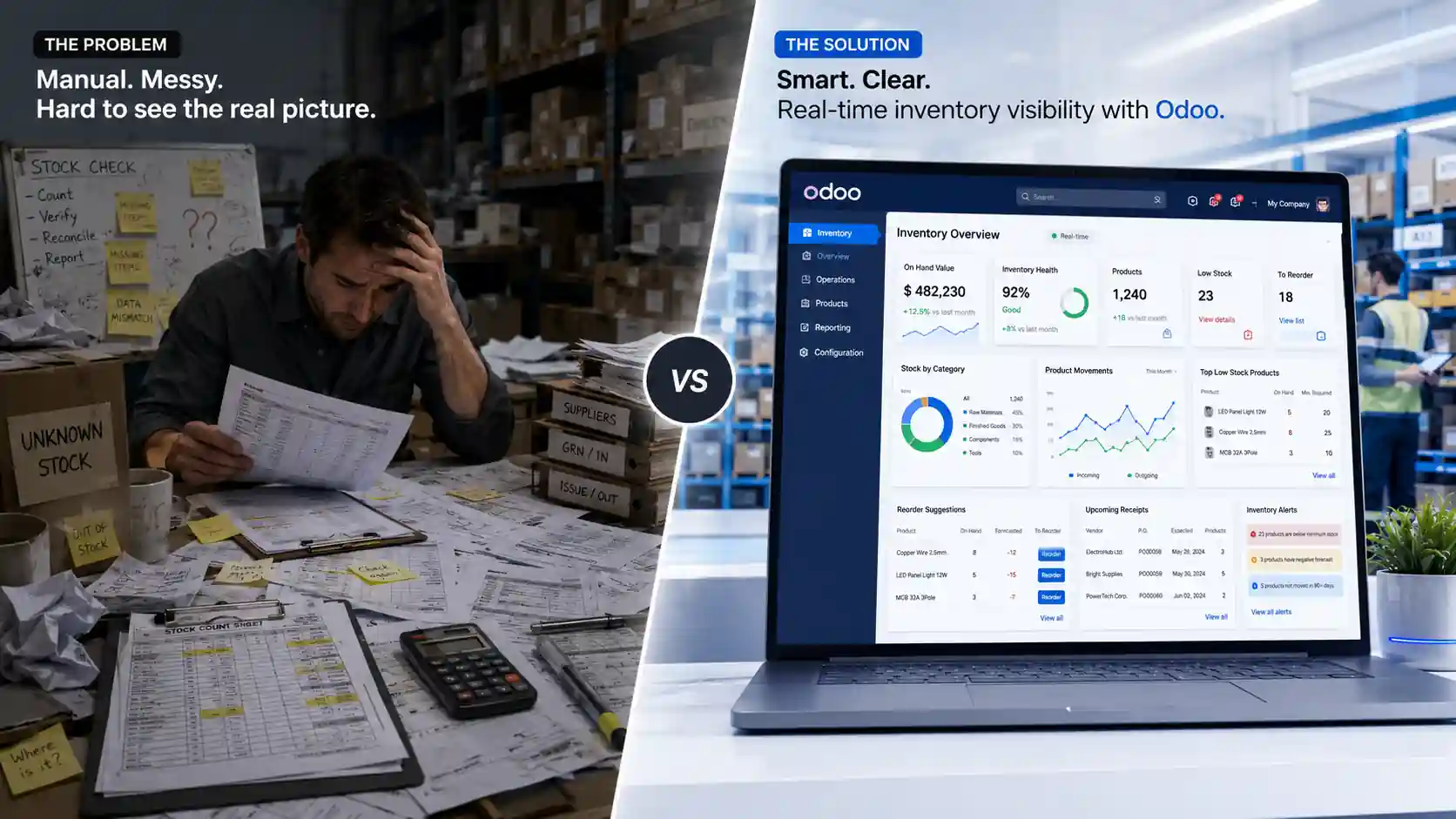
Inventory Analytics Pro Odoo dashboard for stock health product movement and reorder planning
INVENTORY PROBLEMS

Challenges Before Using Inventory Analytics Pro

Before using Inventory Analytics Pro, the team had stock data in Odoo, but they still needed manual checks to find risky SKUs, aging stock, reorder needs, and vendor issues.

No Clear Stock Health View

Product quantity showed stock levels, but managers could not see risky, aging, or overstocked SKUs quickly.

Slow-Moving Stock Found Late

Slow and non-moving products were found after working capital was already blocked.

Aging Inventory Review Was Delayed

Old stock was not grouped early, which made dead inventory harder to control.

Stockout Risks Were Missed

Fast-moving products reached low or zero stock before purchase users could act.

Reorder Planning Took More Time

Purchase users checked demand, stock, vendors, and lead time manually before buying.

Vendor Review Was Not Clear

Teams could not compare suppliers by delivery, quality, price, and lead time in one view.

Solution

How Inventory Analytics Pro Solved the Inventory Review Problem

Inventory Analytics Pro turned daily Odoo stock data into SKU risk analysis, stock movement ranking, RFQ planning, vendor performance tracking, and automated inventory reports.

Faster SKU Risk Analysis

Managers could spot low-health, aging, overstocked, and stockout-prone products from one Odoo inventory dashboard.

Clear Stock Movement Ranking

Teams could rank products by movement, value, and demand pattern to plan stock actions with better priority.

Smarter Reorder and RFQ Planning

Purchase users could review urgency, suggested quantity, safety stock, reorder points, and vendor details before creating RFQs.

Better Vendor Performance Tracking

Teams could compare vendors by delivery, quality, price, and lead time to support cleaner purchase decisions.

For businesses that need custom inventory dashboards, inventory reporting automation, or reorder workflows, our Odoo Development services can help build solutions around real stock, warehouse, and purchase processes.

Process

Implementation Process Inside Odoo

A structured Odoo Implementation process helped connect Inventory Analytics Pro with inventory, sales, purchase, warehouse, RFQ planning, vendor tracking, and reporting workflows.

Inventory Review Setup Flow

Inventory Analytics Pro was set up in Odoo to track SKU movement, stock risk, reorder needs, RFQ planning, and vendor performance.

Step 1

Install the Module

Installed Inventory Analytics Pro in Odoo 19 and connected inventory, sales, purchase, and warehouse data.

Step 2

Review Inventory Flow

Checked stock movement, product demand, transfers, vendor follow-ups, and availability checks.

Step 3

Configure Reports

Set up reports for stock health, aging inventory, slow-moving SKUs, overstock, and stockout risk.

Step 4

Set SKU Risk Rules

Highlighted products requiring attention based on stock level, movement, aging days, and reorder priority.

Step 5

Connect Reorder Planning

Added reorder urgency, suggested quantity, vendor details, and RFQ planning.

Step 6

Test With Users

Inventory and purchase teams tested reports, filters, alerts, exports, and RFQ actions.

Step 7

Confirm Go-Live

Checked report accuracy, SKU risk results, vendor tracking, and user access before rollout.

Features

Key Features That Improved Inventory Monitoring

Inventory Analytics Pro helped teams review stock health, movement, reorder needs, vendor performance, alerts, and reports from one Odoo dashboard.

Inventory Health and Risk Reports

Shows healthy, risky, aging, overstocked, and slow-moving SKUs so teams can find priority products faster.

Movement and Value Classification

Ranks products by movement, value, and demand pattern to support better inventory planning.

Aging, Turnover, and Stock Risk Reports

Highlights aging stock, low stock, stockout risks, and overstock before they affect purchase decisions.

Reorder Suggestions and RFQ Flow

Gives reorder suggestions, vendor details, and RFQ support to speed up buying actions.

Vendor Scorecard and Alerts

Compares vendors by delivery, quality, price, and lead time for clearer purchase review.

Inventory Report Export

Exports inventory reports for management review, finance checks, and weekly planning.

Need custom inventory reports or Odoo inventory planning logic? Our Odoo Customization services can help build reports around your stock and purchase workflow.

SYSTEM SETUP

Technology Stack Behind Inventory Analytics Pro

The module used Odoo’s core framework, Python, PostgreSQL, Odoo apps, and reporting tools to turn inventory data into dashboards, alerts, RFQs, and export-ready reports.

Connected Odoo Inventory Intelligence Layer

Inventory Analytics Pro used Odoo data, backend logic, dashboard views, reporting tools, and app-level connections to support stock review and purchase planning.

  • Built inside the Odoo backend
  • Connected with inventory and purchase data
  • Supported dashboards, alerts, RFQs, and exports
  • Helped managers review stock risk faster

Frontend

JavaScript and Odoo views displayed dashboards, reports, filters, charts, product details, and action buttons inside the Odoo backend.

JavaScript Odoo Views Dashboard UI

Backend

Python and the Odoo framework handled health score logic, classification rules, reorder suggestions, alerts, vendor scorecards, and reports.

Python Odoo Framework

Database

PostgreSQL stored product data, stock movement, purchase records, sales data, warehouse details, and vendor data.

PostgreSQL

Odoo Apps Layer

Odoo Inventory, Purchase, Sales, Invoicing, and Discuss supported stock data, demand data, RFQ flow, vendor details, and alerts.

Odoo Inventory Odoo Purchase Odoo Sales Odoo Discuss

Reporting Layer

The reporting layer supported health score, FSN, ABC, XYZ, aging, turnover, overstock, stockout, movement reports, and Excel export.

Inventory Reports Excel Export Analytics

BUSINESS IMPACT

Results After Using Inventory Analytics Pro

After using Inventory Analytics Pro, the team reduced manual stock review work, found risky SKUs faster, and improved purchase planning inside Odoo.

Cleaner SKU Risk Ranking

Managers reviewed healthy, risky, aging, overstocked, and stockout-prone products up to 40% faster.

Earlier Stock Issue Detection

Stock health, aging, turnover, and overstock reports helped teams find inventory risks before they affected planning.

Better Purchase Priority Planning

Reorder suggestions, vendor details, and RFQ actions helped purchase users plan buying decisions faster.

More Useful Vendor Review

Vendor scorecards made it easier to compare delivery, quality, price, and lead time in one place.

Less Manual Report Work

Prebuilt reports and Excel exports reduced repeated spreadsheet cleanup and weekly reporting effort.

Clearer Working Capital View

Aging stock, overstock value, and blocked inventory views showed where money was tied up in stock.

Inventory Analytics Pro gave the team one Odoo inventory dashboard to review stock risk, reorder needs, vendor performance, and blocked inventory value with less manual work.

Inventory Analytics Pro

Ready to Improve Odoo Inventory Review?

Use Inventory Analytics Pro to review stock faster, reduce manual reporting, track reorder needs, and improve purchase planning from one Odoo dashboard.

Stock Health Tracking Reorder and RFQ Support Vendor Performance Review

Let’s Talk About Your Product

Get expert guidance on scope, architecture, timelines, and delivery approach so you can move forward with confidence.

What happens next?