WhatsApp Messenger for Odoo

Odoo WhatsApp Integration for Faster Customer Communication

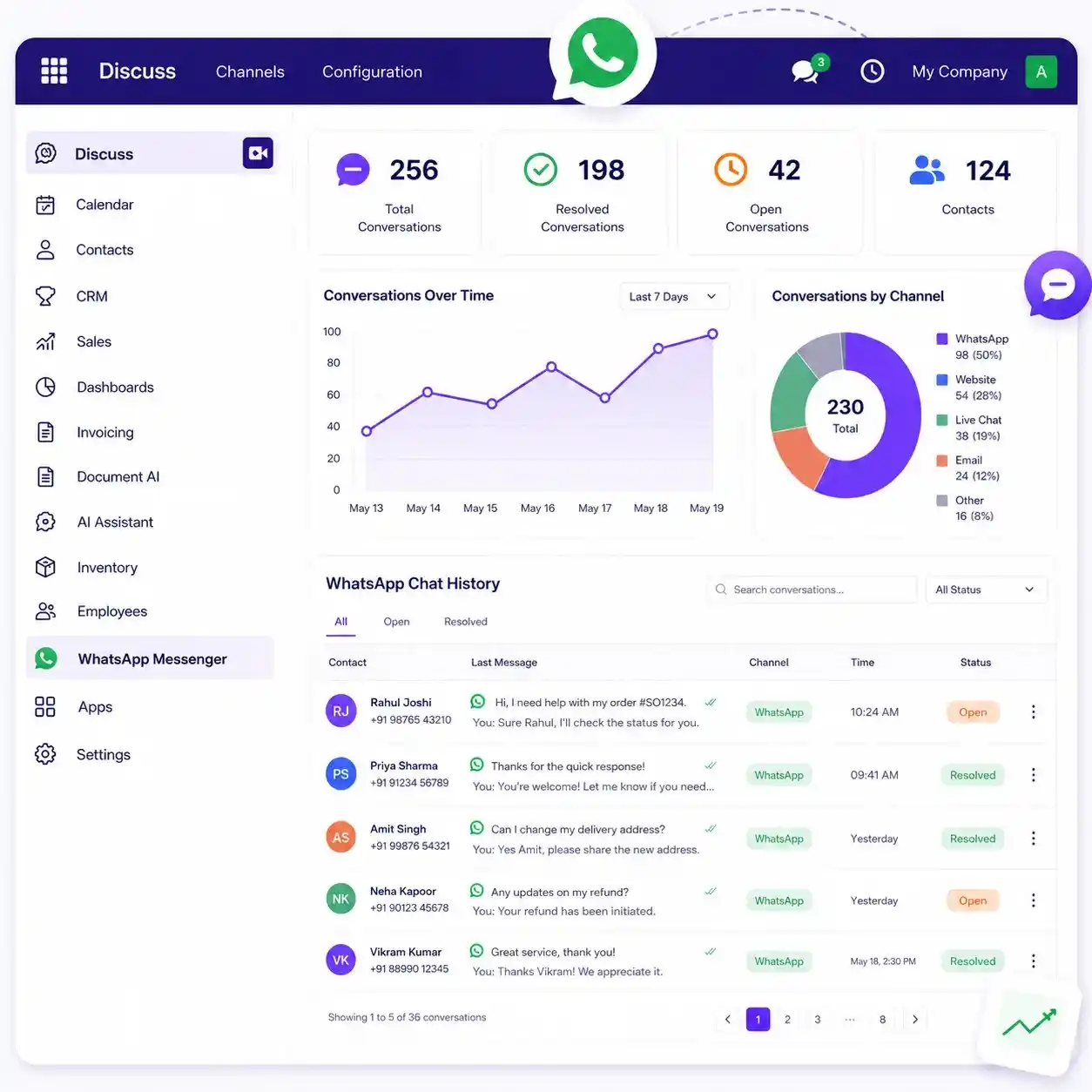
Help sales, CRM, invoicing, and support teams communicate faster by sending WhatsApp messages directly inside Odoo. Reduce tool switching, save daily follow up time, track message delivery in real time, and keep every customer conversation connected to your ERP records.

  • Send WhatsApp messages directly from CRM, Sale Orders, Invoices, and Support
  • Save team time with approved templates, automated follow-ups, and PDF sharing
  • Keep customer communication, delivery tracking, and history inside Odoo
Clutch
5/5 ★★★★★
F GoodFirms
4.9/5.0 ★★★★★
AppFutura
4.9/5.0 ★★★★★
Odoo WhatsApp integration dashboard with invoice messaging and delivery tracking
Problem

The Cost of Disconnected Odoo WhatsApp Customer Messaging

Sales, support, and accounting teams often switch between Odoo, WhatsApp, emails, and spreadsheets. This slows responses, creates missed follow ups, and affects customer experience.

Start Messaging
Manual follow-ups

Teams repeat the same customer updates across quotes, invoices, and support conversations.

No delivery proof

Sales and accounting teams cannot easily confirm whether important messages were delivered or read.

Disconnected tools

Customer communication gets scattered across WhatsApp, emails, spreadsheets, and ERP records.
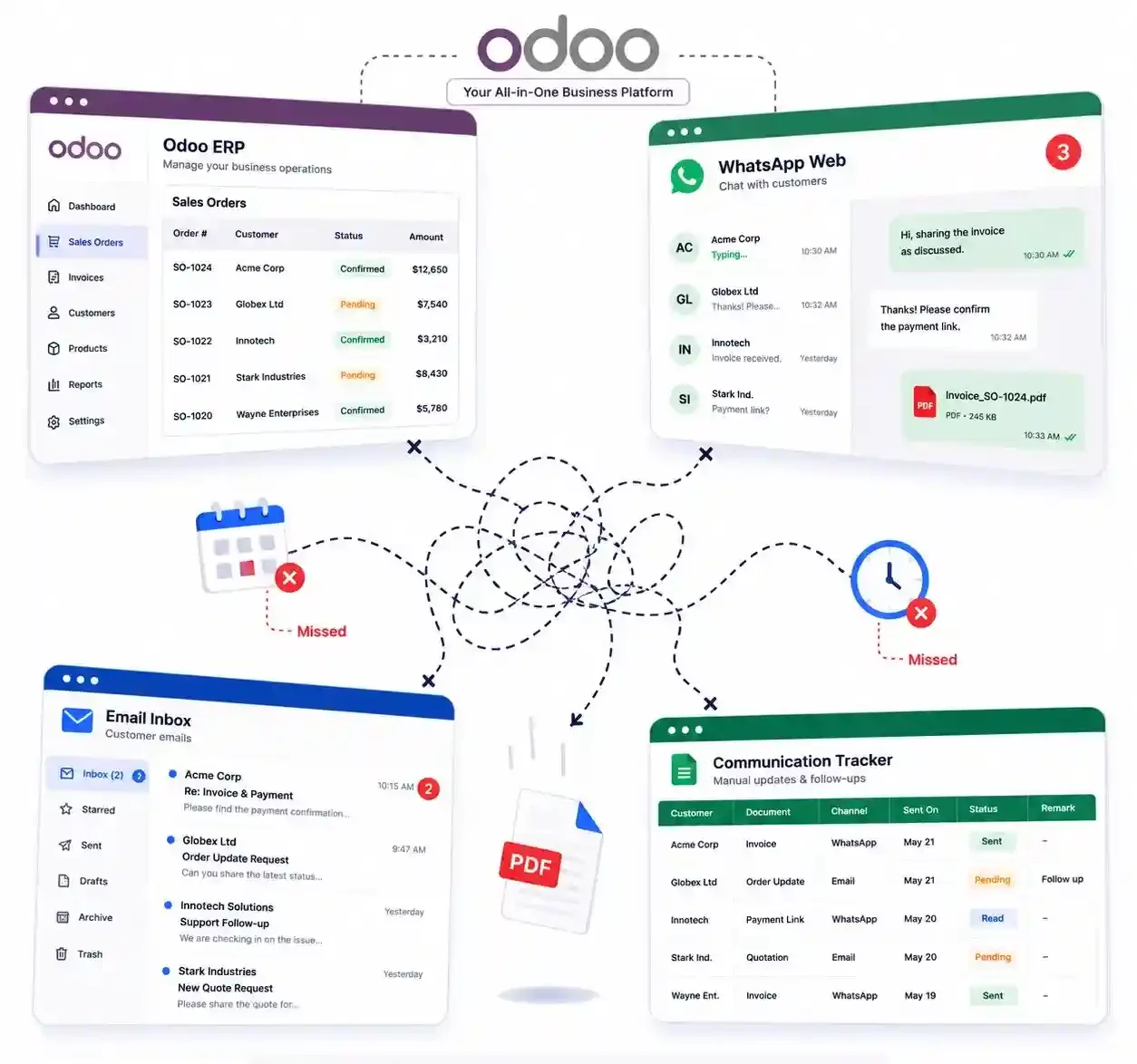
Odoo WhatsApp communication workflow problem illustration
Solution

Connect WhatsApp Messaging Directly with Odoo

Help sales, CRM, and support teams work faster by managing WhatsApp communication directly inside Odoo. Reduce tool switching, save follow up time, and keep customer conversations connected to the right records.

Start Messaging

Send from Odoo

Message customers from CRM, sales, invoices, and contact records without switching between tools.

Attach documents

Share quotations, invoices, and reports directly from the related Odoo record.

Track delivery

View sent, delivered, read, and failed statuses from one centralized place.

Keep history

Keep WhatsApp conversations connected to Odoo so every team sees the same customer context.

How It Works

Start Sending WhatsApp Messages From Odoo in Four Steps

Quickly configure WhatsApp Messenger in Odoo, connect the WhatsApp Business API, and start messaging customers faster without switching tools.

Read the Setup Guide
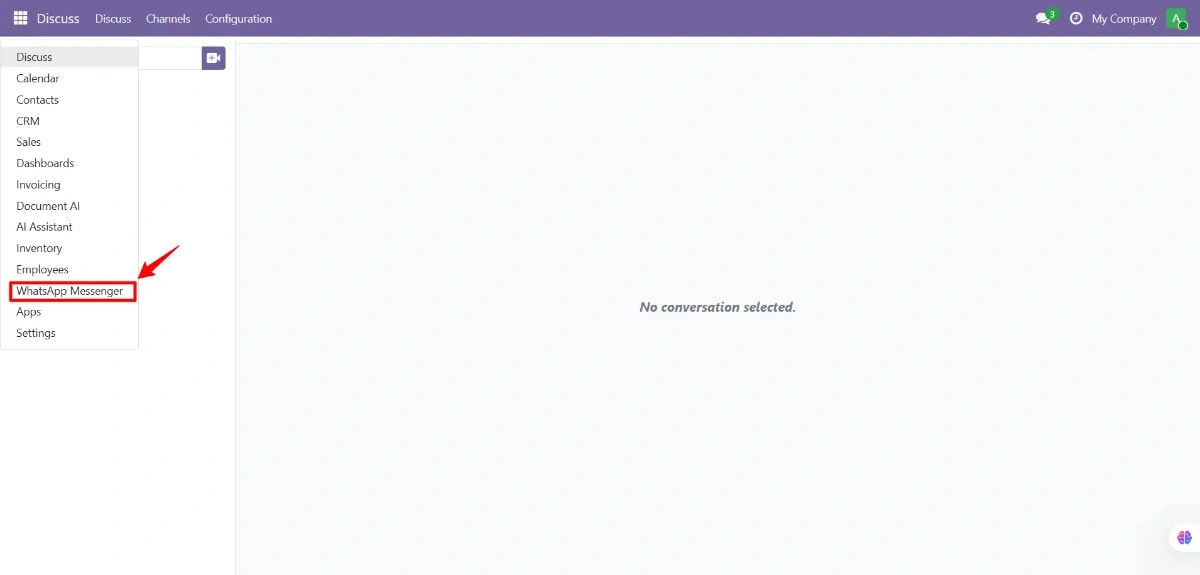
Install WhatsApp Messenger module in Odoo

Install WhatsApp Messenger in Odoo

Install and open the WhatsApp Messenger module from your Odoo app menu to start customer messaging faster.
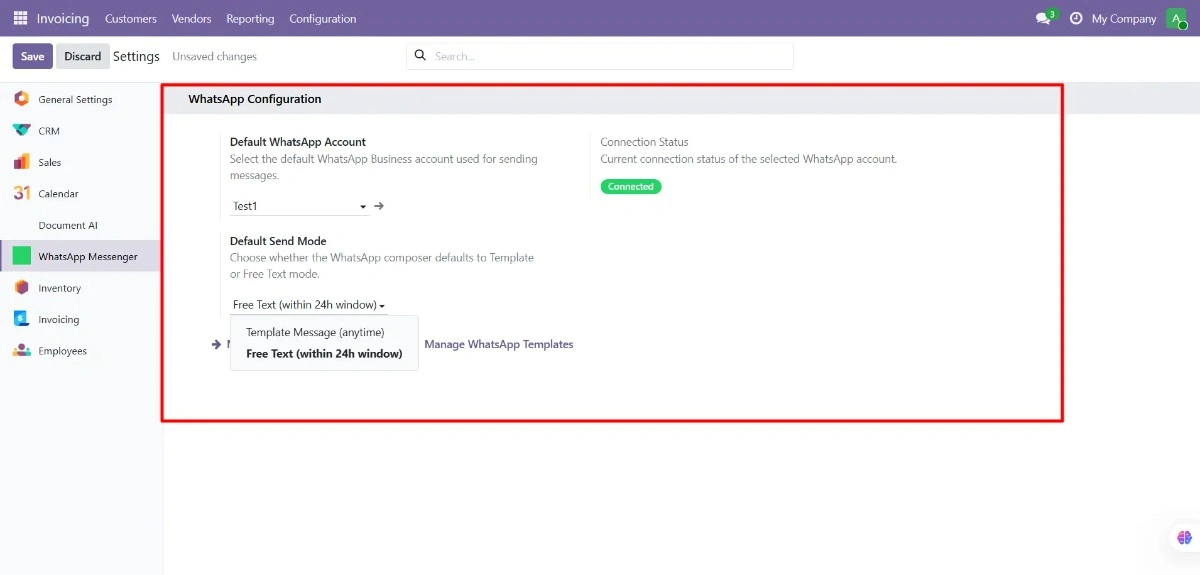
Connect WhatsApp Business API with Odoo settings

Connect WhatsApp Business API

Configure Odoo WhatsApp integration setup and verify the API connection so messages can be sent successfully from sales orders, invoices, CRM, and customer records.
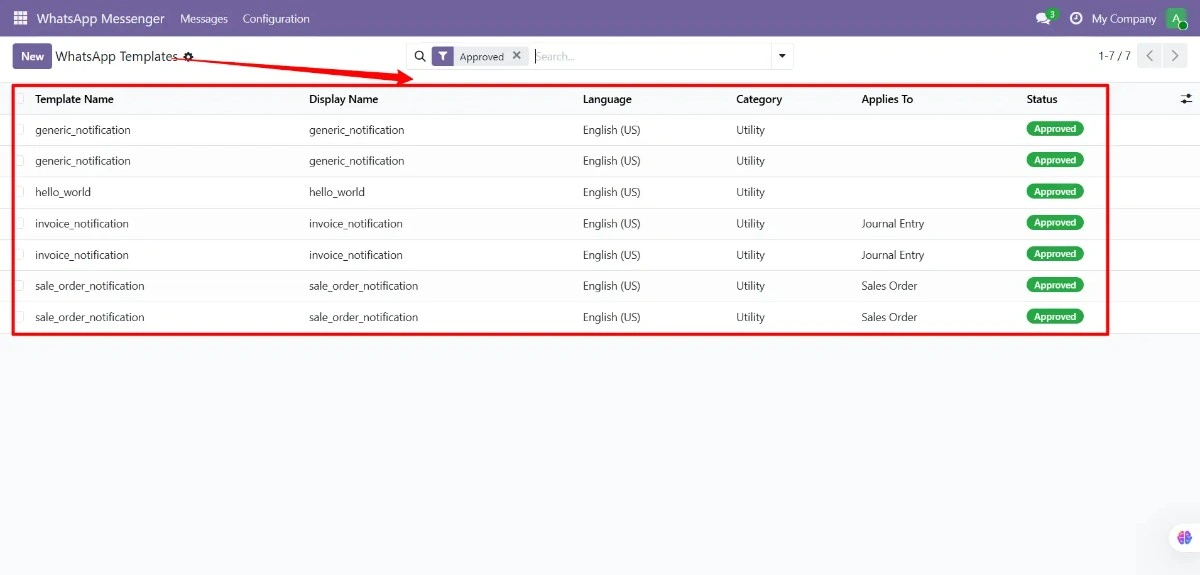
Create WhatsApp message templates in Odoo

Create Approved WhatsApp Message Templates in Odoo

Create reusable WhatsApp Business API templates for invoices, payment reminders, sales orders, order updates, and support messages to improve communication consistency and reduce manual typing.
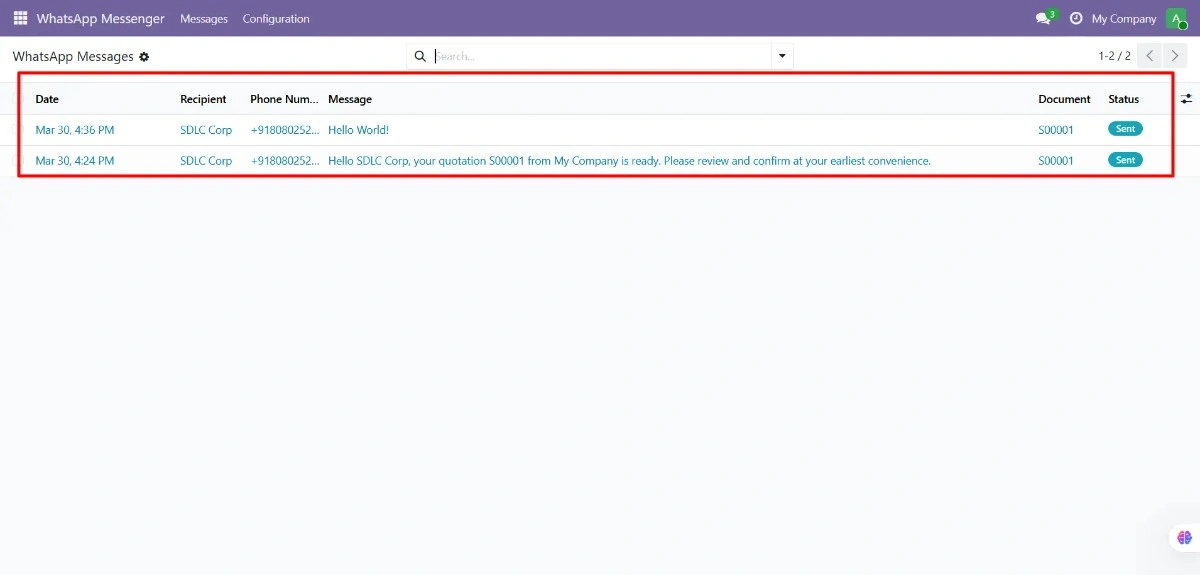
Send and track WhatsApp messages from Odoo

Send WhatsApp Messages and Track Delivery in Odoo

Track sent, delivered, read, and failed statuses with WhatsApp message tracking and delivery status inside Odoo for better follow-ups and clearer communication records.

Features

Everything You Need for WhatsApp Customer Messaging in Odoo

Keep customer messaging inside Odoo so sales, support, and finance teams can respond faster and manage conversations from one place.

See How WhatsApp Messaging Works in Odoo

One Click WhatsApp Sending

Send WhatsApp messages from quotations, sales orders, invoices, CRM leads, and customer records.

WhatsApp PDF Sharing

Share invoices, quotations, receipts, and reports directly from Odoo records.

Approved WhatsApp Templates

Create reusable templates for reminders, invoices, and customer updates.

WhatsApp Delivery Tracking

Check whether customer messages were sent, delivered, read, or failed.

Shared Customer History

Keep WhatsApp conversations connected to Odoo so every team sees the same customer history.

Live WhatsApp Replies

Continue customer conversations naturally while keeping communication linked to Odoo records.

Automated Message Updates

Keep message activity updated automatically for reminders, CRM, and support workflows.

Team Access Control

Control who can send messages, manage templates, and view customer communication.

Business Value

Why Businesses Use Odoo WhatsApp Integration for Customer Communication

Save time, reduce manual work, and improve follow up visibility by keeping WhatsApp delivery tracking, customer message history, and Odoo CRM communication in one place.

See WhatsApp Messaging Benefits

Faster Responses

Send customer updates from Odoo without opening separate WhatsApp tabs or copying details manually.

Better Follow Ups

Share invoices, quotations, and reminders with better message visibility and delivery tracking.

Centralized Communication

Keep WhatsApp activity connected to sales orders, invoices, CRM leads, and customer records.

Better Team Visibility

Give sales, finance, and support teams access to complete customer message history in Odoo.

Use Cases

Odoo WhatsApp Integration Built for Real Business Workflows

Use WhatsApp Messenger for Odoo to manage WhatsApp invoice reminders, order notifications, sales follow ups, and B2B communication with faster follow ups and centralized customer visibility.

Talk to an Expert

Sales Teams

Send quotation PDFs and sales follow ups from Odoo sales orders without switching tools manually.

Accounting Teams

Manage WhatsApp invoice reminders, payment updates, and receipts with better follow up visibility.

Ecommerce Orders

Send order confirmations, shipping updates, and customer notifications directly from Odoo.

B2B Communication

Keep sales, finance, and fulfillment teams aligned with shared customer message history in Odoo.

Comparison

Why This Odoo WhatsApp Module Is Different

Many low cost WhatsApp modules only open WhatsApp Web. This module supports official API workflows, delivery visibility, templates, chatter history, and controlled ERP communication.

Book Free Demo
CapabilityWhatsApp Messenger by SDLC CorpBasic WhatsApp Web ModulesHigher-Priced Enterprise Modules
Official WhatsApp Business APIYesNoOften yes
Odoo versionOdoo 19Older versions commonVaries
Delivery trackingSent, Delivered, Read, FailedNoPartial to full
Retry failed messagesYesNoVaries
Template managementYesLimitedOften yes
PDF invoice sharingYesLimitedOften yes
Chatter integrationYesNoOften yes
WebhooksYesNoVaries
LicenseLGPL-3VariesOften proprietary
Proof & Services

Odoo WhatsApp Support Backed by Real ERP Expertise

Get faster setup, reliable implementation, and long term support for WhatsApp Business API setup, template configuration, delivery tracking, and Odoo workflows connected to sales orders, invoices, CRM, and customer records.

Get Odoo WhatsApp Support

Built by SDLC Corp backed by people, not just code

Our team helps businesses configure WhatsApp Messenger for Odoo, customize workflows, improve follow up visibility, and keep customer communication connected across ERP operations.
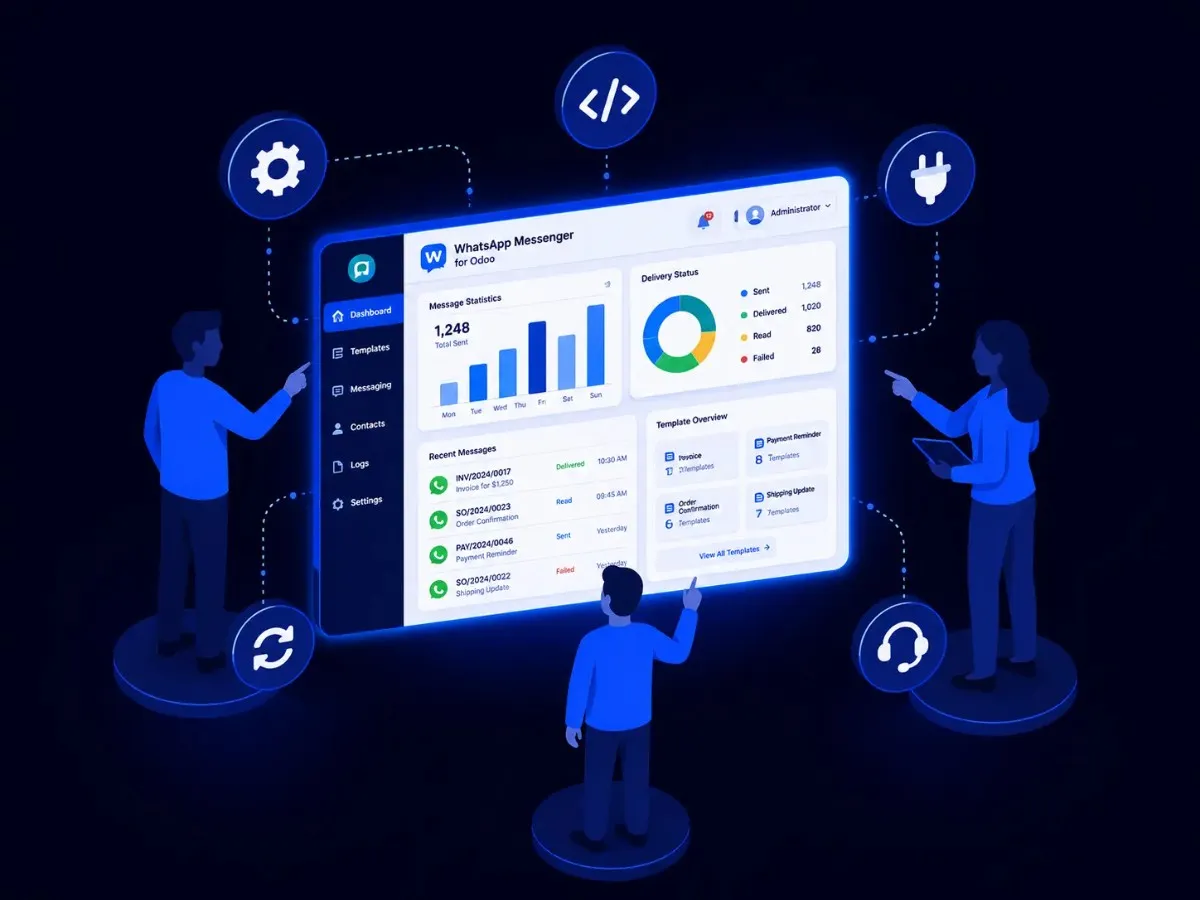

WhatsApp Business API setup Template configuration Delivery tracking setup Odoo CRM workflows ERP implementation Long-term support
SDLC Corp Odoo WhatsApp support and ERP expertise
Add your proof-and-services image URL inside the empty image src.
FAQ

Odoo WhatsApp Integration FAQ

Is this a real WhatsApp Business API integration?

Yes. The module is built for official WhatsApp Business API workflows, including approved templates, delivery statuses, and ERP connected communication.

Will it work with Odoo Online, Odoo.sh, and On-Premise?

Yes. WhatsApp Messenger supports Odoo Online, Odoo.sh, and On-Premise installations for Odoo 19.

Do I need a WhatsApp Business API account separately?

Yes. WhatsApp Business API access comes from Meta or a Business Solution Provider. After access is ready, the module connects your API credentials with Odoo.

Can I send invoice PDFs through WhatsApp?

Yes. Odoo generates the invoice PDF, attaches it to the WhatsApp message, and keeps the message activity connected to the related invoice record.

Can I track failed messages?

Yes. The module tracks Sent, Delivered, Read, and Failed statuses. Failed messages can be retried, and logs help teams understand delivery issues.

What is included in lifetime support?

Lifetime support includes bug fixes, version updates, and direct technical assistance for setup and module-related issues.

Can SDLC Corp customize the workflow?

Yes. SDLC Corp can support custom Odoo workflows, third-party integrations, migration, API setup, and dedicated Odoo development when your business needs more than the standard module.

Let’s Talk About Your Product

Get expert guidance on scope, architecture, timelines, and delivery approach so you can move forward with confidence.

What happens next?