
Odoo WhatsApp Integration for Faster Sales, Invoice, and Customer Messaging
The solution helped the team send sales updates, invoice PDFs, quotations, and customer messages directly from Odoo. Odoo WhatsApp Integration reduced repeated typing, improved follow-up speed, and kept WhatsApp communication connected with Odoo records.
 Product Hunt Listed
 Trusted Software Partner
 Multiple Products Listed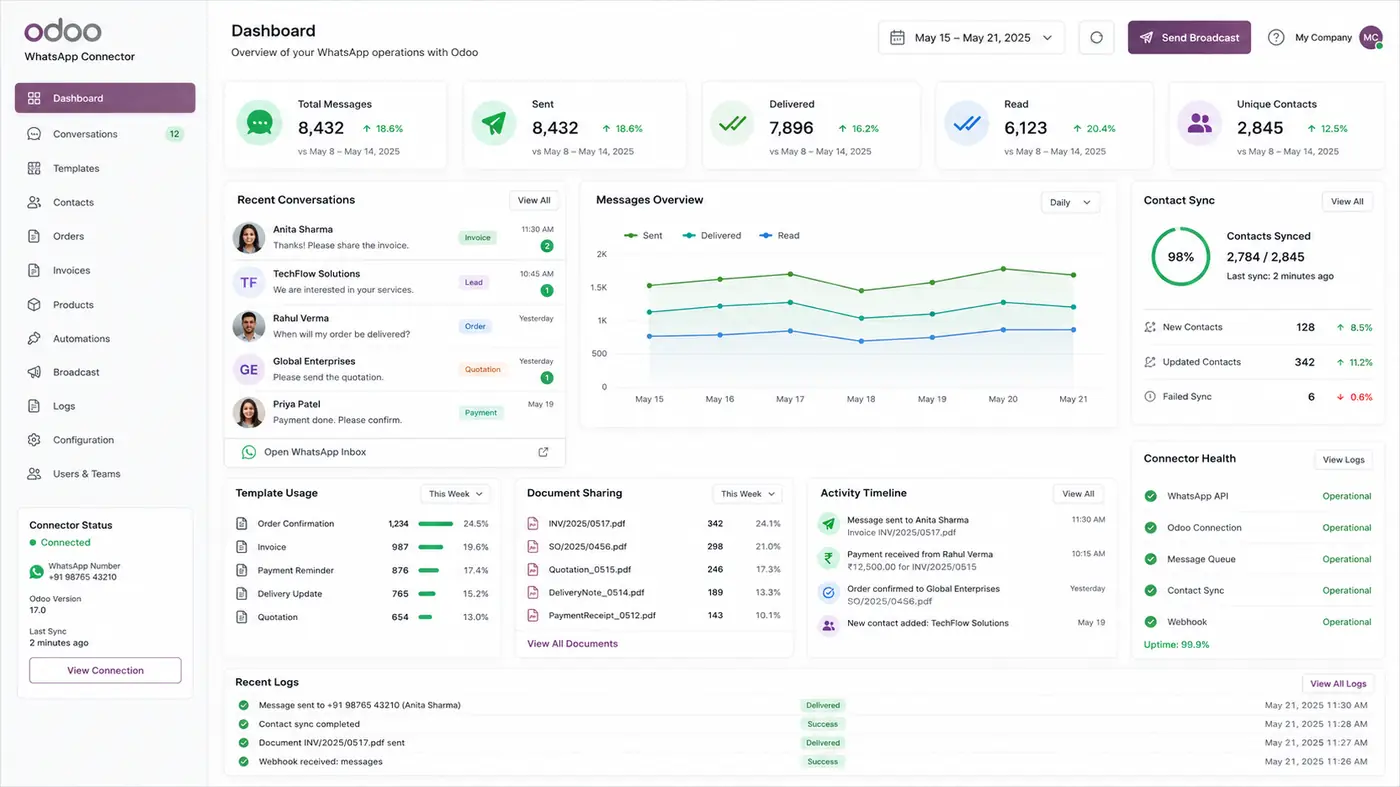
WhatsApp Messenger for Odoo Project Overview
A clear project overview of how WhatsApp Messenger for Odoo helped the team send updates, share invoices, and track customer follow-ups directly from one Odoo workflow.
WhatsApp Messenger for Odoo
The team used the module to send WhatsApp messages from Odoo records and keep communication connected with daily sales and invoice work.
Sales, Service, Ecommerce, and Invoice Teams
The setup supported teams that handled customer updates, order details, payment reminders, and support replies every day.
Odoo 19
The WhatsApp workflow was managed inside Odoo, helping users reduce tool switching and keep customer activity linked to sales and invoice records.
Scattered Customer Messages
Customer messages were managed across Odoo, WhatsApp, email, and spreadsheets, which slowed follow-ups and made tracking harder.
Sales, Invoice, Payment, and Support Updates
Users could send order updates, invoice reminders, payment follow-ups, quotations, and support replies directly from Odoo.
Templates, PDFs, Tracking, and Chatter History
The team used WhatsApp templates, PDF sharing, message tracking, button history, and rule-based access to manage communication more clearly.
Faster Customer Updates with Cleaner Message Records
The team improved follow-up speed, reduced repeated typing, and kept WhatsApp communication connected with Odoo sales, invoice, and customer records.
Client Overview
About the Client and Their Odoo Communication Needs
The sales team managed customer records, invoices, quotations, and follow-ups inside Odoo. However, WhatsApp communication was still handled separately, which slowed daily updates and made customer response tracking harder.
The client needed a faster way to send invoice PDFs, quotations, payment reminders, and customer updates directly from Odoo.
Before the setup, the sales team had to move details between Odoo and WhatsApp manually. As a result, invoice follow-ups took more time, customer replies were harder to monitor, and sales communication lacked a clear connected record.
Manual Message Handling
Sales users copied customer details, invoices, and order information from Odoo before sending WhatsApp messages.
Slower Follow-Up Tracking
WhatsApp replies and sent updates were not clearly connected with Odoo sales, invoices, and customer records.
WhatsApp + Odoo
Users copied invoice and customer details manually before sending WhatsApp messages.
Challenge
What Slowed Down Customer Communication Before the Integration
Customer updates were handled outside Odoo, which slowed sales follow-ups, invoice sharing, and support communication.
Too Much Tool Switching
Users moved between Odoo, WhatsApp, email, and sheets, so follow-ups took more time.
Repeated Manual Typing
Invoice details, quotations, and payment updates were typed manually, increasing error risk.
No Clear Message Status
The team could not quickly check sent, delivered, read, or failed WhatsApp messages.
Scattered Customer History
WhatsApp chats were not linked with Odoo sales, invoice, and customer records.
Slow PDF Sharing
Users downloaded invoices and quotations before sharing them, which delayed customer updates.
Limited Team Control
Managers had less visibility into shared messages, pending follow-ups, and team activity.
Overall, the team needed one connected Odoo WhatsApp workflow to manage customer updates, invoice sharing, message status, and follow-up history without switching between different tools.
Solution
A Smarter Way to Send WhatsApp Messages from Odoo
SDLC Corp implemented WhatsApp Messenger for Odoo through its Odoo integration services to connect customer messaging with daily Odoo workflows.
WhatsApp Messaging from Odoo Records
First, users could send WhatsApp messages from sales orders, invoices, CRM leads, and customer profiles without copying details manually.
Faster Invoice and Quotation Sharing
In addition, the team could share invoice PDFs, quotations, receipts, and payment updates directly from Odoo.
Approved Message Templates
After that, reusable templates helped users send invoice reminders, sales updates, payment follow-ups, and support replies faster.
Message Status Tracking
Meanwhile, users could track sent, delivered, read, and failed messages inside Odoo for clearer follow-ups.
Customer History Inside Odoo
Moreover, sales, finance, and support teams could review past WhatsApp chats from the related Odoo record.
Controlled Team Access
Finally, managers could control who sends messages and keep customer communication under better team visibility.
Overall, the solution improved sales follow-ups, invoice communication, customer response time, and team control inside Odoo.
Process
Step-by-Step Setup for Connected WhatsApp Messaging
With Odoo implementation support, the setup connected WhatsApp Business API workflows with Odoo sales, invoice, and customer communication processes.
Installed WhatsApp Messenger in Odoo
First, the module was installed to bring WhatsApp messaging inside the client’s Odoo workflow.
Connected WhatsApp Business API
Next, the WhatsApp API was connected so users could send customer messages securely from Odoo.
Configured Message Templates
After that, approved templates were set up for invoice reminders, order updates, payment follow-ups, and support replies.
Enabled PDF Sharing
Then, users could share invoices, quotations, and receipts directly from Odoo without manual downloads.
Set User Permissions
In addition, access rules were added so only approved users could send messages and manage communication.
Started Daily Messaging from Odoo
Once the setup was ready, sales and finance teams started sending updates from Odoo records without switching tools.
Tracked Message Activity
Finally, message status tracking helped users check sent, delivered, read, and failed updates clearly.
Key Features
Features That Made WhatsApp Communication Easier in Odoo
These features helped the client send WhatsApp messages faster, reduce manual work, and keep sales, finance, and support communication connected inside Odoo.
One-Click WhatsApp Sending from Odoo
Users could send messages from sales orders, invoices, CRM leads, and customer records without switching tools.
PDF Invoice and Quotation Sharing
Finance users could share invoices, quotations, receipts, and reports directly from Odoo.
Approved WhatsApp Templates
Ready templates helped teams send invoice reminders, order updates, and follow-ups faster.
Delivery Status Tracking
Users could track sent, delivered, read, and failed messages inside Odoo for clearer follow-ups.
Chatter and Shared History
WhatsApp activity stayed linked with the right Odoo record for easy review.
Live WhatsApp Replies
Customer replies synced back to Odoo, helping teams continue conversations from one place.
Failed Message Retry
Failed messages could be checked and resent, reducing missed customer updates.
Role-Based Access
Managers controlled message sending, template access, and communication logs.
Together, these features helped sales, finance, and support teams reply faster, share documents easily, and keep customer communication clearly tracked inside Odoo.
Technology Stack
Technology Stack Behind the Odoo WhatsApp Integration
The module used Odoo, Python, WhatsApp Business API, Meta Cloud API, webhooks, PDF attachments, and role-based access to help the client send messages, share invoices, and track customer communication from Odoo.
Odoo Native UI
Users could send WhatsApp messages from Sales Orders, Invoices, CRM leads, and customer records without leaving Odoo.
Python & Odoo Framework
The backend handled message creation, approved template use, PDF sharing, and message retry flow
WhatsApp Business API
The API helped the team send approved WhatsApp messages, invoice reminders, quotations, and customer updates.
Meta Cloud API
Supported secure WhatsApp message sending, delivery updates, and template-based customer communication through Meta Cloud API.
Webhooks & Delivery Logs
Captured sent, delivered, read, and failed message status inside Odoo, helping teams track follow-ups more clearly.
Role-Based Access Control
Managers could control who sends messages, uses templates, and views communication logs.
Results
Results After Using Odoo WhatsApp Integration
The team improved sales follow-ups, reduced manual work, shared invoices faster, and tracked WhatsApp communication directly from Odoo.
Faster Customer Communication
Sales and finance teams sent customer updates from Odoo without switching tools.
40% Less Manual Follow-Up Work
Ready templates reduced repeated typing for invoice reminders, order updates, quotations, and payment follow-ups.
35% Faster Invoice and Quotation Sharing
Invoice PDFs and quotation PDFs were shared directly from Odoo, so users did not need to download files manually.
Better Follow-Up Visibility
Sent, delivered, read, and failed status helped the team know when to follow up again.
Cleaner Customer History
WhatsApp activity stayed linked with Odoo records, giving teams better context during customer conversations.
Stronger Team Control
Managers controlled message access, templates, and WhatsApp activity from Odoo.
Overall, Odoo WhatsApp Integration helped the team manage faster customer updates, easier invoice sharing, clearer message status, and cleaner communication history inside one Odoo workflow.
Need Faster Customer Messaging Inside Odoo?
Need expert help to connect WhatsApp with Odoo? Our hire Odoo developers can set up API-based messaging, automate invoice and quotation sharing, track message status, and reduce manual customer follow-ups from one clear Odoo workflow.
- Get Started
Set Up Odoo WhatsApp Integration Faster
Get expert support for Odoo WhatsApp Integration setup, API configuration, and message template workflow.Share invoice PDFs faster, track delivery status, and manage customer conversations inside Odoo.Reduce manual follow-ups, improve response speed, and keep communication records clear.
What happens after you submit?
- Odoo WhatsApp messaging requirement review
- Consultation with Odoo integration specialists
- Setup guidance for templates, PDF sharing, delivery logs, and user access
- Secure Integration
- Odoo-Ready
- Global Clients


