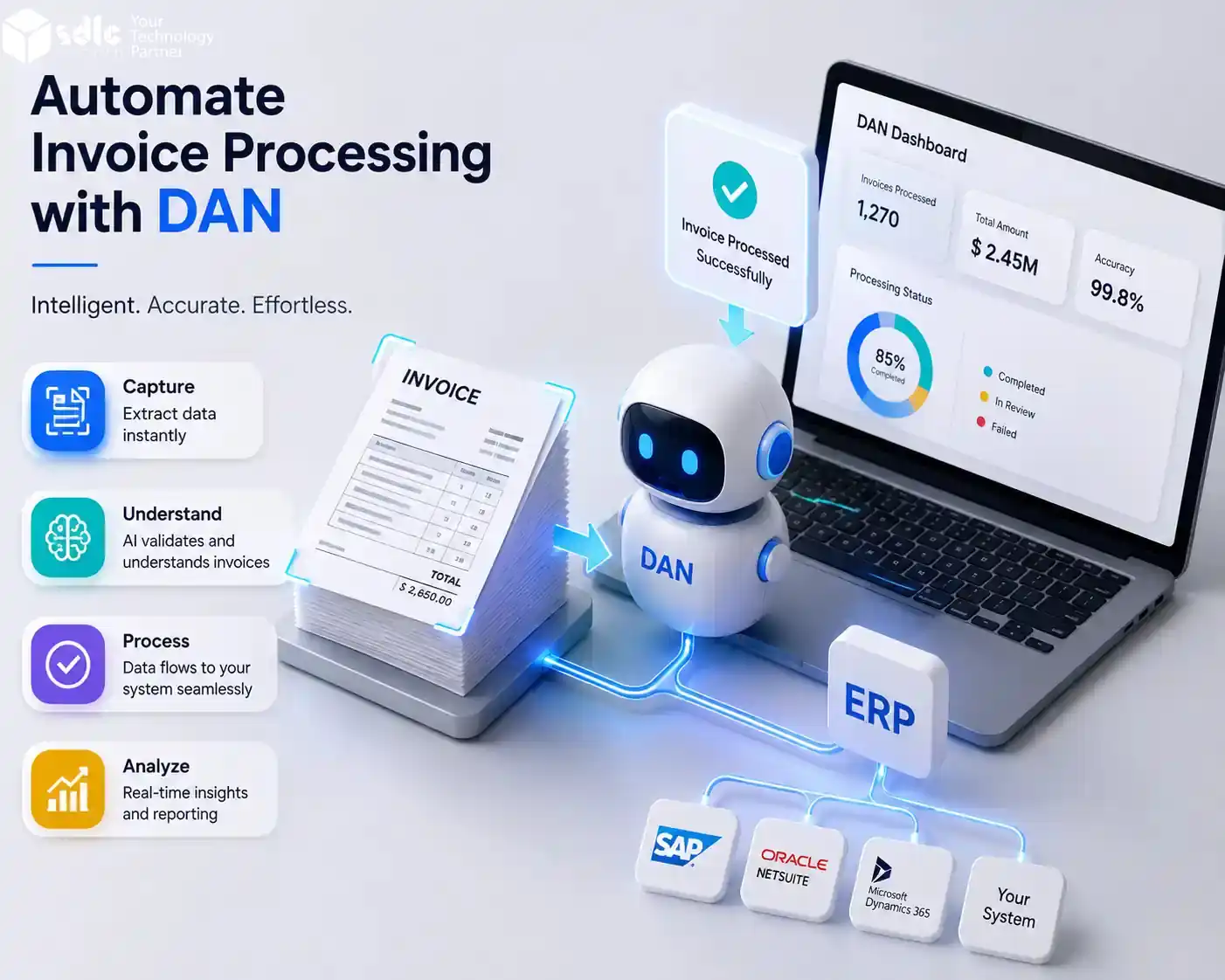
Automated invoice processing uses software to capture invoices, read key fields, check values, flag exceptions, and export approved data to accounting or ERP systems. In this guide, DAN refers to Data AI Ninja, the SDLC Corp document automation product used in the examples below. It helps finance teams reduce manual entry, catch errors earlier, and process vendor bills faster.
Invoice work feels manageable when only a few vendor bills arrive each week. It becomes harder when invoices come from many sources and formats.
Finance teams receive invoices from emails, PDFs, scanned files, vendor portals, and shared folders. Then someone has to read each invoice, copy the details, check totals, confirm tax values, and enter the data into another system.
DAN by SDLC Corp helps teams automate invoice processing with AI OCR, field extraction, confidence scoring, validation, human review, and structured exports.
Instead of copying invoice data by hand, teams can turn invoice files into clean data that is ready for Excel, JSON, API, webhook, ERP, or accounting workflows.
What Is Automated Invoice Processing?
Automated invoice processing is the use of software to capture, read, check, and move invoice data without manual typing.
It helps extract details such as:
- Vendor name
- Invoice number
- Invoice date
- Due date
- PO number
- Subtotal
- Tax
- Discount
- Total amount
- Currency
- Payment terms
- Line items
- Bank details
Reading the invoice is only the first step. Teams also need checked fields that are ready for approval, reporting, or ERP entry.
NIST OCR research. NIST explains its OCR research and document image understanding work.
Why Manual Invoice Processing Slows Finance Teams
Manual invoice handling creates small problems every day. Over time, these problems become costly.
Finance teams can also compare their current invoice cycle time and cost with accounts payable benchmarks before choosing an automation workflow.
A finance team may spend hours opening invoice files, checking values, correcting mistakes, and updating spreadsheets. If an invoice has a missing PO number, wrong tax amount, or duplicate entry, the team needs more time to fix it.
Common issues include:
- Repeated copy-paste work
- Missed invoice fields
- Wrong totals or tax values
- Slow approval cycles
- Duplicate invoice risk
- Poor tracking of invoice status
- More dependency on spreadsheets
IOFM benchmarks invoice cycle time, cost per invoice, and AP performance metrics.
This is why finance teams need more than basic OCR. They need invoice data that is extracted, checked, reviewed, and exported in a structured format.
Manual Invoice Processing vs DAN
This table shows how DAN changes common invoice tasks from manual tracking to a more controlled AI OCR workflow.
| Area | Manual Process | With DAN |
|---|---|---|
| Invoice intake | Files stay in emails and folders | Invoices move into one workspace |
| Data entry | Staff copy fields by hand | AI OCR extracts key fields |
| PO check | Checked manually | Missing PO fields are flagged |
| Tax check | Errors are found late | Tax mismatch is sent for review |
| Duplicate risk | Hard to track | Possible duplicates can be blocked |
| Review work | Every invoice may need checking | Only risky fields need review |
| Export | Data is copied into another tool | Data exports to Excel, CSV, JSON, API, or webhook |
| Control | Depends on manual tracking | Confidence scores guide the workflow |
How DAN Automates Invoice Processing
DAN works well for invoice automation, AI OCR, validation, and structured exports. Businesses that need custom AI workflows, model deployment, or API-based automation can also explore SDLC Corp’s AI as a Service solutions.
DAN organizes invoice work into intake, extraction, validation, review, and export steps. For a product view of the same flow, see the Data AI Ninja invoice processing module.
Capture Invoices
Teams upload invoices into DAN from PDFs, scanned files, images, receipts, and other business documents. DAN supports upload, batch upload, API upload, and dashboard-based document handling.
Extract Invoice Data with AI OCR
Next, DAN reads the invoice and extracts key fields. For a deeper look at how AI OCR reads invoices and turns them into structured data, read our guide on invoice data extraction with AI OCR.
Oracle also shows how AI can be used to extract invoice information and automate document-heavy finance tasks.
Verify Fields with Confidence Scores
Some invoices have blurry scans, unusual layouts, missing fields, or low-quality images. DAN uses confidence scoring so reviewers can see which fields need attention.
Validate Invoice Data
DAN can help apply validation checks before invoice data moves into another system. Teams can flag missing values, total mismatches, duplicate files, and records that need review.
Review Exceptions
DAN supports human verification, so reviewers can check extracted data beside the original document before approval.
Export Clean Invoice Data
DAN exports approved invoice data to Excel, CSV, JSON, REST API, webhook, or ERP-ready formats for accounting and AP workflows.
Supported ERP and Accounting Integrations
DAN can prepare invoice data for ERP, accounting, and finance workflows through structured exports, APIs, webhooks, or custom integrations.
| System | Best Use Case | Connection Method |
|---|---|---|
| SAP | Enterprise invoice posting | API, webhook, or custom export |
| Oracle NetSuite | Finance and AP workflows | API or structured export |
| QuickBooks | Small business accounting | CSV, API, or custom connector |
| Xero | Invoice and accounting records | CSV, API, or custom connector |
| Odoo | ERP and accounting workflow | API, CSV, or custom integration |
| Tally | India accounting workflows | Excel, CSV, or custom export |
| Microsoft Dynamics | Finance and operations teams | API or custom integration |
| Custom ERP | Internal finance systems | REST API, webhook, JSON, or CSV |
DAN Invoice Processing Workflow
This workflow shows how DAN moves invoice data from upload to export.
| Step | What Happens | Why It Matters |
|---|---|---|
| Capture | Upload invoices, PDFs, scans, or images | Keeps invoice intake in one place |
| Extract | AI OCR reads invoice fields | Reduces manual typing |
| Verify | Confidence scores show risky fields | Helps reviewers focus faster |
| Validate | Rules check missing or wrong data | Improves data quality |
| Review | Team checks exceptions | Keeps finance control |
| Export | Data moves to Excel, JSON, API, or ERP | Reduces re-entry work |
Real World Workflow Example
A mid sized supplier business receives 150 to 300 invoices every week.
Invoices arrive through vendor emails, scanned PDFs, and shared folders. The AP team opens each file, copies the invoice number, checks the PO number, confirms the tax value, and updates a spreadsheet before sending records to the accounting system.
With DAN, the workflow can look like this:
- The team uploads all invoices into one workspace.
- DAN extracts vendor name, invoice number, date, tax, total, PO number, and line items.
- Low confidence fields are marked for review.
- The reviewer checks only the flagged values.
- Missing PO numbers and total mismatches go into an exception queue.
- Approved records are exported to Excel, JSON, API, or webhook.
- The AP team uses the exported data for ERP posting, reporting, or approval workflows.
Anonymized deployment result: A 12-person AP team processing around 1,500 invoices per month used DAN to reduce manual invoice touch time from about 6 minutes per invoice to around 40 seconds for clean invoices after validation and exception routing were configured.
Key Benefits of Automating Invoice Processing with DAN
Click any benefit to learn more about how DAN helps your finance team.
When Should a Business Automate Invoice Processing?
A business should consider invoice automation when the finance team spends too much time on manual invoice work.
Good signs include:
- Invoice volume is increasing
- Staff copy invoice data into spreadsheets
- Approvals take too long
- Duplicate invoices are hard to catch
- Invoice fields often need correction
- ERP updates happen manually
- Reporting depends on cleaned spreadsheet data
Even small teams can benefit if invoice handling takes time away from higher-value finance work.
A business should consider invoice automation when the finance team spends too much time on manual invoice work. In fact, the AP automation market is projected to grow from $3.07 billion in 2023 to $7.1 billion by 2030, according to Grand View Research.
Why SDLC Corp and DAN Are Reliable
DAN, or Data AI Ninja, is the SDLC Corp product for document extraction, validation, and workflow automation.
The platform supports invoices, receipts, contracts, bank statements, forms, and scanned PDFs. It also supports structured outputs such as JSON, CSV, Excel, REST API, and webhooks.
This matters because invoice processing is not only about OCR. Businesses need a system that can read documents, structure the data, flag issues, support review, and connect with existing workflows.
AI OCR for Documents
Supports invoices, scanned documents, receipts, forms, and other business files.
Confidence Scoring
Helps teams identify risky fields before data moves forward.
Validation Workflows
Supports checks before final export to reduce finance data errors.
Human Review
Keeps review control with finance teams when exceptions appear.
Export Options
Supports Excel, CSV, JSON, REST API, and webhook-based workflows.
Workflow Ready Data
Helps AP, ERP, operations, and back-office teams use clean structured records.
DAN Performance Benchmarks: Pilot Targets
DAN performance can vary by invoice layout, scan quality, field type, and validation setup. For a standard AP pilot, teams can use these benchmark targets:
| Metric | Benchmark Target |
|---|---|
| Header-field accuracy | Up to 94% on standard invoice fields |
| Average processing time | 8 to 12 seconds per invoice |
| Manual touch reduction | Up to 65% fewer manual checks |
| Best-performing fields | Vendor name, invoice number, invoice date, tax, total, and PO number |
| Review needed for | Low-confidence fields, missing values, mismatches, and duplicates |
Methodology: These targets are based on pilot testing/planned testing across mixed invoice formats, including PDFs, scanned PDFs, images, and vendor email invoices. A clean invoice means key fields such as vendor name, invoice number, date, PO number, tax, total amount, and line items are extracted, checked, and approved without manual correction.
Confidence-Based Routing Rules
These rules help finance teams decide when invoice data can move forward, when only selected fields need review, and when the full invoice should be checked manually.
| Confidence Score / Issue | Action |
|---|---|
| 95% and above | Export if validation checks pass |
| 85% to 94% | Review only flagged fields |
| 70% to 84% | Send full invoice for human review |
| Below 70% | Hold for manual checking |
| Missing PO number | Move to exception queue |
| Tax or total mismatch | Send to finance review |
| Possible duplicate invoice | Block export until checked |
Common Invoice Processing Mistakes DAN Helps Reduce
Relying Only on Manual Entry
Manual entry works for a few invoices. It becomes slow and risky when invoice volume grows. DAN helps reduce copy-paste work by extracting invoice fields automatically.
Using Basic OCR Without Validation
Basic OCR can read text, but finance teams still need structured fields. DAN helps turn invoice content into usable data with field extraction, validation, and review.
Reviewing Every Field Manually
Checking every field wastes time. DAN uses confidence scores so reviewers can focus on uncertain values first.
Exporting Data Before Review
Unverified data can create payment errors, reporting issues, and correction work. DAN supports human review before final approval or export.
Keeping Invoice Data in Spreadsheets Only
Spreadsheets are useful, but they can become hard to manage at scale. DAN supports Excel, CSV, JSON, REST API, and webhooks.
How DAN Supports the Accounts Payable Invoice Processing Flow
DAN supports finance and accounts payable teams from invoice intake to final export.
Teams can upload vendor invoices, check required fields, flag missing PO numbers, review tax or total mismatches, and export approved invoice records into ERP, accounting, or reporting workflows.
This keeps invoice processing controlled because finance teams can review exceptions before the data moves into another system.
Who Can Use DAN for Invoice Processing?
DAN is useful for teams that receive repeated vendor invoices through emails, PDFs, scans, and shared folders.
It can help:
- Finance teams
- Accounts payable teams
- Operations teams
- Procurement teams
- Accounting teams
- ERP administrators
- Back-office teams
- Businesses with repeated vendor invoices
It is especially useful when invoices arrive in many formats and the team needs clean data for review, approval, reporting, or system updates.
Final Thoughts
Invoice processing should not depend on repeated manual entry.
Finance teams can capture, extract, review, and export clean invoice data from one workflow.
Reduces re-entry work and catches risky fields earlier in the process.
Keeps invoice approval under finance control before data moves to ERP or accounting.
Start Automating Invoice Processing with DAN
Turn invoices, receipts, and scanned PDFs into structured, review-ready data for AP, ERP, and accounting workflows.
Start Invoice AutomationPlanning a First Implementation
Which fields to automate first
Start with the fields every invoice has and every downstream system needs: supplier name and identifier, invoice number, invoice and due date, currency, net, tax and gross totals, and purchase order reference where one exists. Approval routing fields come next: cost centre, entity, payment terms and approver. Line-item extraction is the most valuable and the most variable, so add it once header extraction is stable.
A realistic first scope
In a straightforward setup, with a single entity, a handful of high-volume suppliers, clean PDF inputs and an export target that already exists, a first working flow can be running in days rather than months. That is a scenario, not a guarantee: the sequence is intake, field definition, extraction on real invoices, validation rules, exception review, export, then a test batch before go-live.
- Intake. One route in, whether that is email, upload or a shared folder.
- Field definition. Agreed with finance before extraction starts, including which fields block posting.
- Extraction on real documents. Use the messy ones, not the clean samples.
- Validation. Totals reconciliation, tax checks, duplicate detection and supplier matching.
- Exception review. A queue with the document, the extracted values and the failed rule side by side.
- Export. The format the accounting or ERP system actually accepts.
What extends the timeline
- Many suppliers with very different layouts, or scanned and photographed documents.
- Line-item extraction with three-way matching against purchase orders and receipts.
- Multiple entities, currencies or tax regimes.
- ERP integration that needs new interfaces rather than a file export.
- Approval workflows that have to be redesigned rather than connected.
Measuring whether it worked
Track straight-through rate, exception rate by reason, correction rate after export, time from receipt to posting, and cost per processed invoice. Accuracy on a sample set is a starting signal; the operational numbers are what tell you the process improved.
FAQs
Invoice automation uses software to read invoices, extract key details, check errors, and send approved data to accounting or ERP systems.
It captures invoices, reads fields like vendor name, invoice number, date, tax, total, and PO number, then sends unclear fields for review.
It helps reduce manual typing, slow approvals, duplicate invoices, and wrong invoice data.
OCR reads text from invoices. AI OCR understands invoice fields, layout, totals, taxes, and line items better.
A business should use it when invoice volume increases, manual entry takes too much time, or finance teams often fix invoice errors.
It can extract vendor name, invoice number, invoice date, due date, PO number, tax, total amount, currency, payment terms, and line items.
Yes. It can reduce repeated copy-paste work and help AP teams review only the fields that need attention.
It should include invoice capture, AI OCR, field validation, confidence scores, human review, and export to ERP or accounting tools.
Yes. DAN helps extract invoice data, check fields, flag low-confidence values, support human review, and export clean data.
Yes. DAN supports structured export options such as Excel, CSV, JSON, REST API, and webhooks for ERP, accounting, and AP workflows.