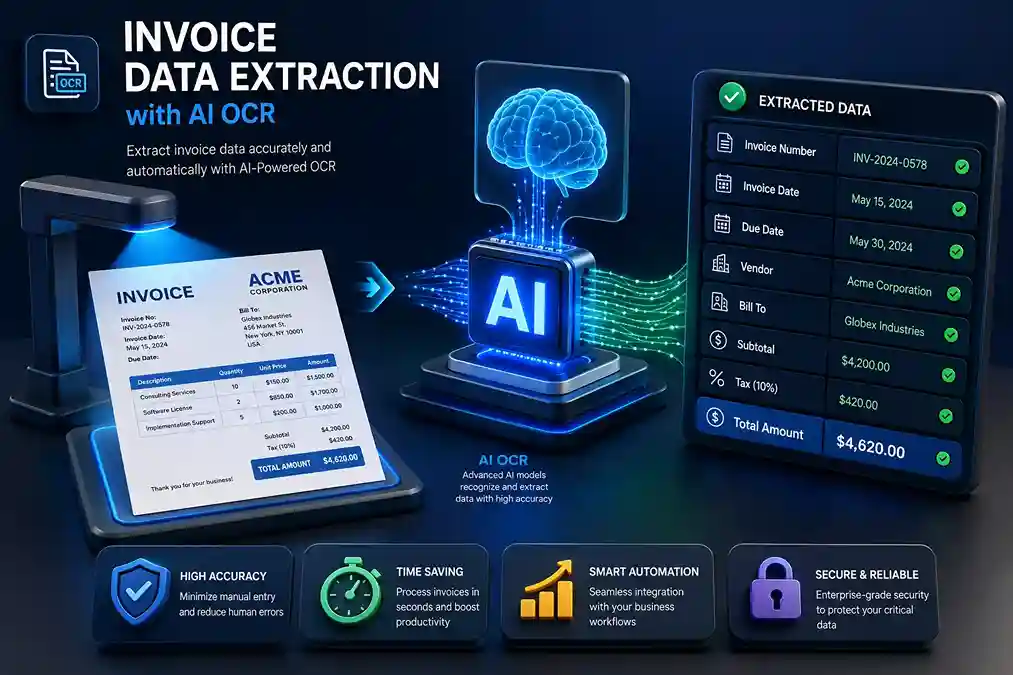
Invoice Data Extraction with AI OCR helps finance teams capture invoice fields from PDFs, scans, and email attachments automatically then validate, review, and export clean data to Excel, JSON, or ERP systems.
Most finance delays begin with simple invoice tasks. Teams open vendor PDFs, check PO details, copy invoice numbers, review tax values, match line items, and enter totals into ERP or accounting software. When one value is missed or typed wrong, approval slows down and payment may get pushed back.
Invoice Data Extraction turns this manual process into a cleaner workflow. With AI OCR, teams can read PDFs, scans, images, and email attachments, then send verified data to Excel, JSON, ERP, or accounting tools. This guide explains the full process vendor-neutrally. For a product-specific walkthrough, see automating invoice processing with Data AI Ninja, which covers the same workflow inside Data AI Ninja including human review, APIs and webhooks.
Key Takeaways
- Replace manual entry: AI OCR captures invoice fields automatically from PDFs, scans, and Gmail attachments.
- Validate before posting: Validation rules flag missing fields, duplicate invoices, and mismatched totals before ERP export.
- Keep human control: Exceptions go to human review teams check only the invoices that need attention.
- Export anywhere: Clean data moves to Excel, JSON, ERP, accounting software, or custom tools via API and webhooks.
What Is Invoice Data Extraction?
Invoice Data Extraction means pulling key details from an invoice and turning them into structured data your finance team can use. It captures fields like vendor name, invoice number, invoice date, PO number, tax amount, total value, payment terms, bank details, and line items without manual typing.
Once the data is captured, teams can review it, validate it, and send it to Excel, JSON, ERP software, accounting tools, or approval systems. For example, instead of copying invoice values into a spreadsheet, a finance user can upload the invoice, check the extracted fields, and export clean data in the required format.
Collect
Bring PDFs, scans, Gmail attachments, and vendor invoices into one clean intake flow.
Extract
AI OCR reads invoice fields, line items, totals, tax values, and PO details with validation checks.
Send
Move verified invoice data to Excel, JSON, ERP, accounting tools, APIs, or webhooks.
Why Manual Invoice Processing Slows Finance Teams
Manual invoice processing creates hidden delays. A finance user may spend several minutes opening a file, reading the values, checking the totals, and entering the data into another system.
That may not feel like a problem for 10 invoices. But at 500 invoices a month, the workload becomes harder to manage. The team may spend hours on repetitive data entry before actual review even begins.
Manual work also increases the risk of mistakes. A user may enter the wrong invoice number, miss a tax value, copy the wrong total, or skip a line item. These errors can delay approvals and create extra checks during month-end closing.
Automated invoice processing is also used to reduce manual invoice entry, validation delays, and AP routing work.
When invoices sit across inboxes, folders, and local files, managers cannot easily track which invoices are pending, approved, rejected, or ready for ERP posting.
What Is AI OCR in Invoice Processing?
OCR stands for Optical Character Recognition. Traditional OCR reads text from scanned documents or images and turns it into machine-readable text. It is useful for digitizing documents, but invoice processing needs more than text reading.
AI OCR adds context. It reads the invoice layout, understands labels, detects table structure, and identifies related values. This is important because invoices do not follow one fixed design.
One vendor may use "Total Amount." Another may use "Grand Total." Another may use "Amount Due." AI OCR can understand that these labels may refer to the same field and map them correctly without templates.
OCR accuracy can depend on scan quality, layout, and recognition conditions, which is why OCR evaluation sources such as NIST are useful when discussing document extraction.
If your company needs custom document automation or AI-led finance workflows, SDLC Corp’s AI as a Service can support custom use cases beyond standard OCR tools.
OCR vs AI OCR for Invoice Data Extraction
| Area | Traditional OCR | AI OCR |
|---|---|---|
| Main role | Reads text from documents | Reads and understands invoice data |
| Layout handling | Works better with fixed formats | Handles changing vendor layouts |
| Field capture | Needs templates or rules | Detects fields using context |
| Line items | Often hard to capture | Better at table and row extraction |
| Validation | Usually limited | Can support field checks and rules |
| Workflow fit | Needs extra manual steps | Fits better into invoice automation |
For reference, Microsoft Azure AI Document Intelligence also provides document models for invoices, OCR, layout, and structured field extraction.
What Invoice Data Can AI OCR Extract?
A good invoice extraction workflow should capture both header level data and line-item details. This gives finance teams a full view of the invoice before approval or ERP posting.
Google Document AI invoice parser also supports header and line-item extraction, including invoice number, supplier name, tax, due date, and line item amounts.
Header-Level Fields
- Vendor name & address
- Invoice number & date
- Due date & PO number
- Currency & payment terms
- Tax ID & bank details
Financial & Line-Item Fields
- Subtotal, tax, discount, shipping
- Grand total & balance due
- Product name & SKU
- Quantity, unit price, tax rate
- Line total per row
End-to-End Invoice Automation Workflow
A strong invoice automation workflow does more than read invoices. It collects documents, extracts data, validates fields, supports review, and exports clean data to business systems.
Collect Invoices from Different Sources
Invoices can come from PDFs, scans, Gmail attachments, email inboxes, vendor portals, APIs, or ERP attachments. Bringing them into one intake flow makes the process easier to track and reduces manual checking.
DAN supports PDFs, invoices, receipts, scans, and Gmail attachments, so teams can start extraction from common document sources.
Read the Invoice with OCR
AI OCR reads the invoice text, layout, labels, tables, and field positions. This helps the system understand values like invoice number, vendor name, PO number, tax amount, and total due.
Understand the Invoice Layout
Invoices rarely follow one fixed layout. AI OCR checks the full layout labels, values, tables, and field positions to understand what each value means. For example, if "INV-1045" appears next to "Invoice No," the system maps it as the invoice number automatically.
Extract Key Invoice Fields
After layout detection, the system extracts the required fields: vendor name, invoice number, invoice date, due date, PO number, subtotal, tax amount, total amount, and line items. The result becomes structured data usable in Excel, JSON, ERP, or accounting tools. DAN can turn invoices into verified JSON or Excel.
Capture Line Items from Invoice Tables
Line-item extraction needs special care. A clean invoice may have clear columns for description, quantity, unit price, tax, and line total. A complex invoice may include merged columns, multi-page tables, or missing headers. AI OCR captures each row as structured data important for purchase order matching.
Validate the Extracted Data
Extraction alone is not enough. The workflow must check whether captured data is complete and correct.
- Is the invoice number present?
- Is the vendor name recognized?
- Does the invoice total match subtotal plus tax?
- Is the PO number valid and non-duplicate?
- Do line-item totals match the invoice total?
For example, if the invoice total is $2,450 but the line-item total is $2,350, the system should flag the invoice before ERP posting.
Add Human Review for Exceptions
Not every invoice should move forward automatically. A system may flag an invoice when a field is missing, the scan is unclear, the total does not match, the vendor is new, or a duplicate invoice number appears. The finance user checks only the invoices that need attention instead of reviewing every file from the beginning. DAN supports human review so teams can verify exceptions before using the final data.
Export Data to Excel, JSON, ERP, or Accounting Tools
After extraction and review, clean data moves into the right system. Common export options include Excel, CSV, JSON, API, webhooks, ERP systems, accounting software, and finance dashboards. DAN provides structured JSON output that developers can map into ERP, accounting tools, or internal platforms.
Track Results and Improve Accuracy
Invoice automation should improve over time. Track useful metrics:
- Number of invoices processed and average processing time
- Fields corrected by users and failed extractions
- Duplicate invoices found and approval delays
- Straight-through processing rate
Need a Faster Invoice Extraction Workflow?
Turn PDFs, scans, receipts, and Gmail attachments into verified Excel or JSON output. Use AI OCR, human review, APIs, and webhooks to reduce manual invoice entry.
Example: Invoice Extraction Output in JSON
A good invoice extraction tool should not only show captured values on screen. It should also provide structured output that can move into other systems. Here is a simple invoice to JSON example:
{
  "vendor_name": "ABC Supplies",
  "invoice_number": "INV-1045",
  "invoice_date": "2026-05-12",
  "due_date": "2026-06-12",
  "purchase_order_number": "PO-7781",
  "currency": "USD",
  "subtotal": 2250.00,
  "tax_amount": 200.00,
  "total_amount": 2450.00,
  "line_items": [
    {
      "description": "Cloud hosting service",
      "quantity": 1,
      "unit_price": 2250.00,
      "tax": 200.00,
      "line_total": 2450.00
    }
  ]
}
This type of structured output helps finance and technical teams work from the same data. Finance users can review totals and vendor details. Developers can send the JSON into ERP, accounting software, approval systems, or custom dashboards.
Mini Use Case: AP Team Processing 500 Invoices a Month
Before vs After Automation
Before: An AP team receives 500 invoices each month. Most come as PDFs or scans. Users copy invoice numbers, tax values, totals, and line items into spreadsheets before entering approved data into the ERP. Duplicate invoices are often found late.
After: With AI OCR invoice extraction, each invoice enters one intake flow. The system captures header fields and line items, flags duplicates, and sends missing PO numbers for review. Clean data moves to Excel or JSON for ERP posting, while the team checks only exceptions.
Manual Invoice Processing vs AI OCR Workflow
| Process Area | Manual Method | AI OCR Workflow |
|---|---|---|
| Invoice collection | Users check emails and folders | Invoices enter one intake flow |
| Data reading | Users open and read each file | AI OCR reads PDFs, scans, and attachments |
| Field entry | Values are typed by hand | Fields are captured automatically |
| Line items | Tables are checked row by row | Rows are captured as structured data |
| Validation | Users check totals manually | Rules flag missing or mismatched values |
| Review | Every invoice needs attention | Only exceptions need review |
| Export | Data is copied or uploaded manually | Data moves to Excel, JSON, ERP, or API |
| Reporting | Data is delayed or scattered | Clean data supports faster visibility |
Key Benefits of Automated Invoice Data Extraction
Faster Invoice Handling
Finance teams no longer need to copy invoice numbers, tax values, and line items into spreadsheets before approval. AI OCR captures the data when the invoice enters the workflow, giving reviewers cleaner information earlier in the process.
Fewer Manual Entry Errors
Manual entry can create wrong totals, missing dates, incorrect vendor names, or skipped line items. AI OCR reduces typing errors when paired with validation rules and exception review, resulting in cleaner data before ERP or accounting posting.
Better Control Over Exceptions
A strong workflow flags missing fields, duplicate invoices, unclear scans, invalid PO numbers, and total mismatches. Users can then focus on invoices that need real attention instead of reviewing every document.
Easier ERP and Accounting Updates
Structured invoice data can move into ERP, accounting software, or internal systems. This reduces duplicate entry and keeps records more consistent across finance platforms.
Better Line-Item Visibility
Line-item extraction gives finance and procurement teams more detail. They can check quantity, unit price, tax, discount, and line total before approval useful for PO matching and vendor cost review.
Easier Scaling
Manual processing becomes harder as invoice volume grows. An invoice automation workflow lets teams handle higher volume without adding the same level of repetitive work useful for shared service centers, multi-branch companies, and growing finance teams.
Common Questions Before Automating Invoice Extraction
What If Invoice Quality Is Poor?
Poor scans can reduce accuracy. The system should flag unclear fields for review instead of sending weak data to ERP.
What If Vendors Use Different Formats?
AI OCR reads labels, layout, and tables. This helps it handle mixed vendor formats without fixed templates.
Can It Work with Existing ERP Systems?
Yes. Invoice data can move to ERP through Excel, JSON, APIs, or webhooks. Field mapping should be tested first.
Is Human Review Still Needed?
Yes, for exceptions. Users should review missing fields, wrong totals, unclear scans, and unusual invoice formats before export.
How to Choose the Right Invoice OCR Software
AI OCR That Reads More Than Text
The tool should understand invoice layouts, field labels, tables, and context. Avoid tools that only work well with one fixed template if your vendors send mixed invoice formats.
Line-Item Capture for PO Matching
If your team needs PO matching, line-item extraction should be a priority. It allows teams to review quantity, price, tax, discount, and item totals before approval.
Built-In Validation Rules
A good tool should flag missing fields, wrong totals, duplicate invoices, unclear data, and invalid PO numbers. Validation makes automation safer because it stops weak data before export.
Human Review for Exceptions
Some invoices need a final check. Choose a tool that lets users review unclear scans, missing fields, or mismatched totals before sending data to ERP.
Flexible Output Formats
Finance teams often need Excel. Developers often need JSON, API, or webhook support. Choose a tool that works for both business and technical users.
Check Integration Fit
Before choosing a tool, check how invoice data will move after extraction. The setup should support your review flow, output format, ERP mapping, API needs, and accounting process.
DAN vs Tipalti vs Vic.ai vs Rossum
Each invoice OCR tool solves a different problem. The best choice depends on how your AP team works, how much review you need, and where the invoice data must go after extraction.
| Area | DAN | Tipalti | Vic.ai | Rossum |
|---|---|---|---|---|
| Main use | Invoice data extraction | Full AP automation | AI-based AP approvals | Document processing |
| Best for | Teams that need JSON, Excel, API, and review | Teams that need invoice approval and payments | Teams that want less manual AP review | Teams with many invoice formats |
| OCR capture | Extracts invoice fields from PDFs, scans, receipts, and emails | Captures invoice data inside AP workflows | Reads invoices for AP decisions | Extracts data from changing layouts |
| Line items | Supports table and line-item extraction | Useful for PO and invoice checks | Useful for AP matching | Good for complex invoice tables |
| Validation | Flags missing or unclear data for review | Strong AP checks and controls | AI-led invoice checks | Validation and exception handling |
| Human review | Good for exception review before export | Strong approval workflow | Focus on reducing manual review | Review workflow for exceptions |
| Integration | API, webhooks, Excel, JSON, ERP mapping | ERP, accounting, and payment systems | AP and finance integrations | ERP and business system integrations |
| Better choice when | You need flexible extraction and custom workflow control | You need AP plus supplier payments | You want AI-led invoice approval | You process many document layouts |
DAN is a good fit when the team needs clean invoice data first. It works well for PDFs, scans, Gmail attachments, Excel output, JSON output, APIs, and human review. Tipalti is better when the company needs a full AP platform with approvals, supplier management, and payments. Vic.ai is useful when the main goal is to reduce manual AP decisions and move toward AI-led approvals. Rossum is a strong option for teams that handle many changing invoice layouts and need document processing at scale.
Where DAN Helps in Invoice Data Extraction
DAN helps when invoices come from many places and your team needs clean data without typing every field by hand.
Supported Document Formats
DAN can read PDFs, scanned invoices, TIFF files, receipts, images, and Gmail attachments.
This works well when vendors send invoices in different formats.
Output Formats
DAN can send extracted data in JSON, Excel, CSV, or directly into an ERP system.
Finance teams can review Excel or CSV. Developers can use JSON, APIs, and webhooks.
ERP and Accounting Integrations
DAN can support invoice workflows for SAP, NetSuite, QuickBooks, Xero, Tally, and Odoo.
The data can be mapped to the right ERP fields before posting.
Validation Rules
DAN can flag missing PO numbers, wrong totals, tax mismatch, duplicate invoices, unclear fields, and invalid dates.
This helps your team check problem invoices before export.
Best Use Cases for AI Invoice Data Extraction
Accounts Payable Teams
Reduce manual entry and speed up invoice checks. Track pending invoices better and reduce payment delays and vendor follow-ups.
Finance Operations Teams
Improve data quality before invoices move into accounting systems. Reduce repeated checking during month-end and audit preparation.
Procurement Teams
Compare invoice line items with purchase orders. Check quantity, price, tax, and vendor details before approval.
ERP Users
Send clean invoice data into systems like SAP, Oracle, Odoo, NetSuite, Microsoft Dynamics, or custom ERP platforms. Reduce duplicate entry and keep finance records updated.
Shared Service Centers
Process invoices for many branches, vendors, or regions with a more standard workflow for high-volume invoice handling.
SaaS and Software Teams
Add invoice extraction into your own platforms through APIs and webhooks. Reduce the need to build OCR and extraction logic from scratch.
Common Mistakes to Avoid in Invoice Automation
OCR Without Validation
OCR can read text but may not catch business errors like duplicate invoices. Always add validation rules for important finance checks.
Ignoring Line Items
Header fields are useful, but line items provide deeper value. Without them, teams may still need to review invoice tables manually.
Unverified Data to ERP
Teams should review exceptions first, especially when totals do not match, fields are missing, or scan quality is poor before posting.
Not Testing Real Invoices
Demo invoices look clean, but real invoices are often messy. Test the tool with actual vendor documents — different formats, scans, and multi-page files.
Best Practices for Better Invoice Extraction Results
- Use clear invoice files. Blurry images, dark scans, and tilted files reduce extraction quality. Ask vendors to send clearer PDFs when possible.
- Standardize invoice intake. Create one place where invoices enter the workflow shared inbox, upload page, Gmail flow, or API.
- Define required fields before setup. Clear field requirements keep extraction focused and reduce review work.
- Add review rules for exceptions. Create rules for missing fields, mismatched totals, duplicate invoices, and high-value invoices.
- Keep ERP mapping clean. Wrong field mapping can create finance errors even when extraction is accurate.
Final Thoughts
Invoice processing should not depend on repeated typing, scattered files, and manual checking. AI OCR gives finance teams a better way to capture invoice data, validate important fields, review exceptions, and export clean data.
A strong Invoice Data Extraction workflow starts with invoice intake and ends with verified data in Excel, JSON, ERP, or accounting software. It improves control while reducing repetitive work.
DAN by SDLC Corp supports this workflow with AI document extraction, human review, API, webhooks, and structured output. If your team handles invoices through PDFs, scans, emails, or attachments, DAN can help turn those documents into usable business data.
Turn Invoices into Verified JSON or Excel
Use AI OCR, human review, APIs, and webhooks to build a faster invoice workflow with DAN by SDLC Corp.
FAQs
Invoice Data Extraction is the process of capturing key fields from invoices and converting them into structured data. This data can include invoice number, vendor name, invoice date, tax amount, total amount, and line items.
AI OCR reads invoice text, layout, and context. It can identify fields from different invoice formats and convert them into structured output for review, export, or integration.
Yes. AI OCR can extract line items such as product description, quantity, unit price, tax, discount, and line total. Line-item extraction is useful for PO matching and cost checks.
Yes, when it includes validation and human review. It reduces repeated typing, lowers manual entry risk, and gives finance teams cleaner data before approval or posting.
Yes. Tools like DAN can convert invoice data into Excel or JSON output. Excel is useful for finance review, while JSON is useful for APIs, ERP systems, and custom workflows.
Yes. Invoice extraction can connect with ERP or accounting systems through Excel upload, API, webhooks, or custom integration. The right method depends on your ERP and data rules.
Yes, for exceptions. Human review is useful when a scan is unclear, a field is missing, totals do not match, or the invoice format is unusual.
AI OCR can process PDFs, scanned invoices, images, email attachments, and other invoice formats. Results depend on document quality, layout complexity, and validation setup.
Validation checks whether extracted data is complete and correct. It helps catch missing fields, duplicate invoices, wrong totals, PO mismatches, and unclear data before export.
DAN helps extract data from PDFs, scanned invoices, TIFF files, receipts, images, and Gmail attachments. It can send clean invoice data to JSON, Excel, CSV, ERP systems, APIs, and webhooks, with validation rules and human review for exceptions.