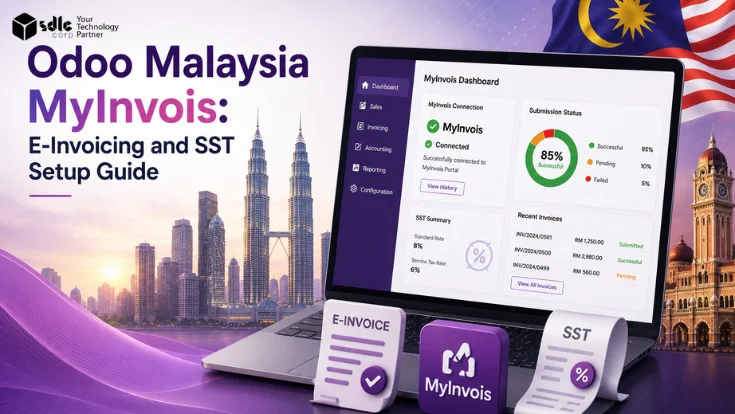
However Malaysia e-invoicing through MyInvois is a government validation workflow - not a PDF template upgrade. It requires correct company data, Tax Identification Number, intermediary setup, MyInvois mode selection, contact field completion, product classification codes, and tax type mapping before a single invoice can be submitted.
Odoo supports this through its Malaysia localization and electronic invoicing configuration, available for Odoo 17 databases and onward.
Short answer: Odoo officially supports Malaysia MyInvois e-invoicing. Businesses can configure Malaysia localization, register Odoo for MyInvois, submit confirmed invoices and vendor bills, track validation status, cancel within the allowed window, and send credit notes once the original invoice is validated.
What Is Malaysia MyInvois E-Invoicing?
MyInvois is Malaysia's national e-invoicing system, operated by LHDN (Lembaga Hasil Dalam Negeri). It validates and stores transaction data in near real-time across B2B, B2C, and B2G transactions. It is not a document format change - it is a government validation requirement.
| Annual turnover / revenue | Implementation date |
|---|---|
| More than RM100 million | 1 August 2024 |
| More than RM25 million up to RM100 million | 1 January 2025 |
| More than RM5 million up to RM25 million | 1 July 2025 |
| Up to RM5 million | 1 January 2026 |
| Less than RM1 million | Exempted from e-invoice implementation |
Timeline sourced from LHDN's
Does Odoo Officially Support Malaysia MyInvois?
Yes. Odoo officially supports Malaysia MyInvois through its Malaysia localization and electronic invoicing configuration. Here odoo's blog confirms the MyInvois integration is available for databases running Odoo 17 and onward.
Odoo-supported Malaysia MyInvois capabilities
- MyInvois mode - select pre-production or production environment based on company registration status
- Odoo registration - register Odoo to process e-invoices via the MyInvois integration
- MyTax intermediary setup - add Odoo as intermediary and grant document submit, cancel, and rejection permissions
- Company e-invoicing fields - identification type, ID number, and Tax ID configuration
- Contact e-invoicing fields - country, state, phone, Tax ID, and identification type per contact
- Product classification codes - Malaysian classification code required per product
- Malaysian Tax Type - tax type configuration and tax exemption reason where applicable
- Invoice submission - send confirmed customer invoices to MyInvois from the invoice record
- Vendor bill / self-billed invoice submission - send confirmed bills to MyInvois on behalf of suppliers
- Status tracking - validation state, Submission UID, MyInvois ID, and validation time shown per invoice
- Cancellation - cancel submitted invoices within the 72-hour allowed window
- Credit notes - send credit notes after the original invoice has been validated
Odoo Malaysia Localization Data Required Before Setup
Gather and verify all of the following before configuring MyInvois in Odoo. Missing or incorrect data causes validation failures that must be corrected invoice by invoice. If you are still organising your Odoo finance setup, our guide to expense tracking in Odoo shows how the accounting modules fit together.
Company Data
- Tax Identification Number (TIN)
- Identification type (e.g. BRN, NRIC, Passport)
- Identification number matching the type
- Registered business name and address
MyTax / MyInvois Access
- Active MyTax account access
- Odoo registered as intermediary in MyTax
- Submit, cancel, and rejection permissions granted
- Pre-production environment access for testing
Contact Data (Per Buyer/Supplier)
- Country and state fields completed
- Phone number in correct format
- Tax ID / TIN where applicable
- Identification type and ID number
Product and Tax Data
- Malaysian classification code per product
- Malaysian Tax Type configured per tax
- Tax Exemption Reason defined for exempt lines
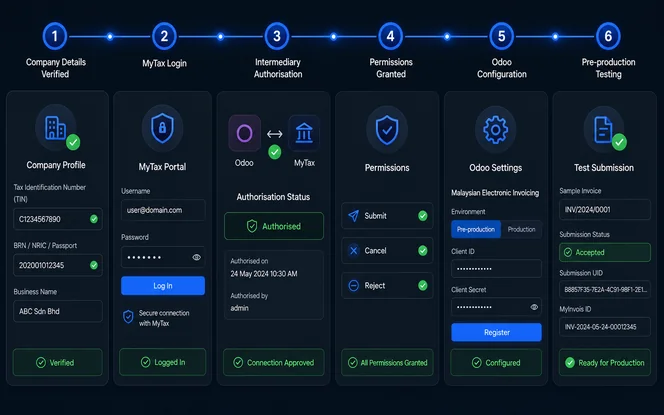
How to Configure MyInvois in Odoo
Complete these steps in sequence. Before switching to production, test the workflow in pre-production because a rejected production submission cannot be undone without cancellation.
Confirm company Tax ID and identification details
Within Odoo company settings, verify the Tax ID (TIN), identification type, and identification number. These fields populate every e-invoice payload sent to MyInvois.
Log in to MyTax and add Odoo as an intermediary
Next, open the MyTax portal and go to the intermediary management section. Add Odoo as an authorised intermediary for your company’s TIN.
Grant document permissions
After that, grant Odoo permission for document submission, cancellation, and rejection request. All three permissions are required for full MyInvois workflow support in Odoo. New to Odoo’s permission model? See our guide to How to create user create and manage users in odoo.
Select MyInvois mode in Odoo
Then, go to Accounting → Configuration → Settings. Under Malaysian Electronic Invoicing, choose pre-production for testing or production for live submissions.
Allow Odoo to process e-invoices and click Register
Once the mode is selected, enable the permission for Odoo to process e-invoices and click Register. This links the Odoo database to MyInvois for the selected company.
Test in pre-production before switching to production
Finally, run sample invoices through pre-production MyInvois. Verify that validation succeeds, status updates correctly, and the Submission UID and MyInvois ID are populated as expected.
How to Send Invoices to MyInvois from Odoo
Invoices can only be submitted to MyInvois after they are confirmed and posted. Draft invoices cannot be sent. The MyInvois tab on the invoice record shows all submission fields and status updates.
Create and complete the customer invoice
Ensure all required fields are populated: buyer Tax ID, contact identification, product classification codes, and Malaysian Tax Type. Missing fields cause validation failure.
Confirm (post) the invoice
Click Confirm to post the invoice. The Send to MyInvois option becomes available only after the invoice is in confirmed status.
Click Send to MyInvois from the MyInvois tab
Open the MyInvois tab on the confirmed invoice. Click Send to MyInvois to submit. Odoo transmits the e-invoice payload to MyInvois for validation.
Monitor validation status
The MyInvois tab updates with Validation in Progress, then Valid or Invalid. Odoo checks and updates status automatically every hour. A manual update option is also available.
Record the Submission UID, MyInvois ID, and validation time
Once validated, these three fields are populated in the MyInvois tab. Retain them as proof of successful e-invoice submission. Odoo also supports batch submissions for higher invoice volumes.
How Vendor Bills and Self-Billed Invoices Work
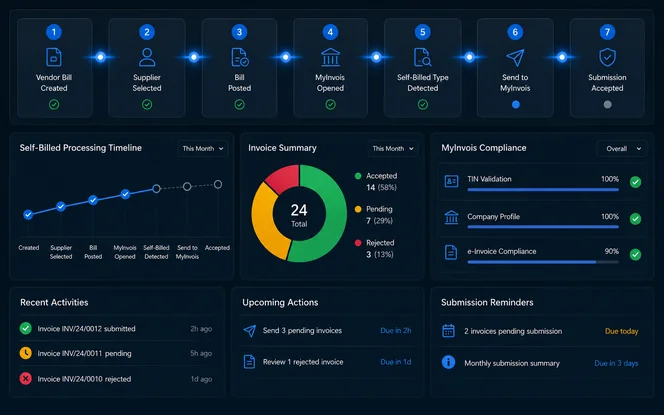
Sending a vendor bill to MyInvois is required when issuing an e-invoice on behalf of a supplier - for example, when the supplier cannot issue their own compliant e-invoice. Before posting supplier bills, teams often verify them with 3-way invoice matching to catch quantity or price discrepancies early. MyInvois categorises these as Self-billed Invoice.
Self-billed invoice workflow
- Create the vendor bill in Odoo for the relevant supplier
- Confirm (post) the vendor bill in Odoo
- Open the MyInvois tab on the confirmed bill
- Click Send to MyInvois - this submits as a self-billed invoice type
- MyInvois categorises the submission as Self-billed Invoice
Review the Bill Reference behaviour for self-billed invoices with your tax advisor before go-live. The treatment of self-billed invoice submission obligations depends on the supplier arrangement and LHDN guidelines for your business type.
MyInvois Statuses, Cancellation and Credit Notes in Odoo
Understanding MyInvois status fields and the rules for cancellation and credit notes prevents common errors in the post-submission workflow.
| Workflow | Behaviour in Odoo / MyInvois |
|---|---|
| Validation in Progress | MyInvois is processing the submission. Status auto-updates hourly or via manual refresh. |
| Valid | Submission UID, MyInvois ID, and Validation Time are populated in the MyInvois tab. |
| Invalid / Rejected | Submission failed validation. Correct the identified data fields and resubmit. |
| Status update frequency | Odoo checks and updates MyInvois status automatically every hour. Manual update is available. |
| Cancellation window | Submitted invoices can be cancelled within 72 hours from the MyInvois validation time. |
| Post-72-hour correction | Beyond 72 hours, a credit note is the required correction mechanism - cancellation is no longer available. |
| Credit note - requirement | The original invoice must be successfully submitted and validated before a credit note can be sent. |
| Credit note - MyInvois categorisation | MyInvois may categorise Odoo credit notes differently depending on reconciliation. Verify with your tax advisor. |
Odoo documentation confirms the hourly automatic status check, the 72-hour cancellation window, and the requirement for original invoice validation before credit note submission.
Malaysia SST and Tax Type Setup in Odoo
For MyInvois submissions, correct tax type configuration affects the e-invoice payload and LHDN validation. However, SST filing treatment remains a separate compliance matter that should be reviewed independently.
Malaysian Tax Type configuration for MyInvois
| Tax configuration area | What to set up | Why it matters for MyInvois |
|---|---|---|
| Malaysian Tax Type | Select the correct type per tax (e.g. Sales Tax, Service Tax, Tax Exempt) | Tax type is included in the e-invoice payload submitted to MyInvois |
| Tax Exempt handling | Mark lines as tax-exempt where applicable | Exempt lines require a Tax Exemption Reason in the MyInvois tab |
| Tax Exemption Reason | Define the exemption reason in the MyInvois tab | Required field - missing reason causes submission failure for exempt invoices |
| Product classification code | Malaysian classification code per product line |
Additionally, Odoo supports tax configuration and MyInvois tax-type fields. However, SST registration, filing obligations, and rate applicability should still be reviewed with a qualified Malaysian tax advisor, as these compliance requirements are not handled automatically by Odoo.
Common Odoo Malaysia MyInvois Setup Mistakes
These are the most frequent errors in Odoo MyInvois implementations. However, most are preventable during setup and testing.
Wrong MyInvois environment
Submitting live invoices to the pre-production environment - or vice versa - causes failed or test submissions. Therefore, confirm the mode before go-live.
Odoo not added as intermediary
Without the MyTax intermediary registration, Odoo cannot communicate with MyInvois. As a result, this step must be completed before submission.
Incomplete MyTax permissions
All three permissions - document submit, cancel, and rejection request - must be granted. Otherwise, specific MyInvois workflows may fail.
Incorrect company TIN or identification
The company TIN, identification type, and identification number must exactly match LHDN records. Even small format errors can cause immediate validation failure.
Incomplete contact fields
Buyer and supplier contacts must include country, state, phone, Tax ID, and identification details. Before go-live, audit these records to avoid e-invoice rejection.
Missing product classification codes
Each e-invoice product requires a Malaysian classification code. Without it, MyInvois validation can fail.
Missing tax exemption reason
For tax-exempt invoice lines, the Tax Exemption Reason must be added in the MyInvois tab. Otherwise, exempt transactions may fail submission.
Sending draft invoices
Only confirmed or posted invoices can be submitted to MyInvois. Therefore, confirm the invoice before sending it.
Credit note before original validation
A credit note can only be submitted after the original invoice has been validated by MyInvois. Submitting it too early may cause rejection.
No 72-hour cancellation process
Without a defined internal process, cancellation windows are often missed. After 72 hours, a credit note becomes the only correction path.
POS/eCommerce not tested
POS and eCommerce invoice workflows may require additional configuration for MyInvois. For this reason, test these channels separately before go-live. For POS specifically, our walkthrough of Odoo 18 POS setup covers user access and configuration.
No pre-production testing
Going live without pre-production validation leaves data issues undiscovered until production submissions fail. Finally, test the full workflow before switching to production.
Odoo Malaysia MyInvois Implementation Checklist
Before going live, use this checklist to confirm each dependency. Complete all items before the first production submission, as every row represents a prerequisite for successful MyInvois processing.
| Area | Check |
|---|---|
| Company | Tax ID/TIN, identification type, and identification number confirmed and verified against LHDN records |
| MyTax | You can odoo check registered as intermediary in MyTax for the company TIN |
| Permissions | Submit, cancel, and rejection permissions all granted to Odoo in MyTax |
| Odoo settings | Malaysian Electronic Invoicing mode selected in Accounting → Configuration → Settings |
| Registration | Odoo registered for MyInvois processing and pre-production connection tested |
| Contacts | Country, state, phone, Tax ID, identification type, and ID fields completed for all active buyers/suppliers |
| Products | Malaysian classification code added to every product used on invoices |
| Taxes | Malaysian Tax Type configured for all applicable taxes |
| Exemptions | Tax Exemption Reason process defined for exempt invoice lines |
| Invoices | Invoices confirmed before submission - no draft invoices submitted to MyInvois |
| Bills | Self-billed invoice workflow tested for applicable supplier scenarios |
| Status | Hourly status update behaviour understood; manual update process known |
| Cancellation | 72-hour cancellation window process documented and team trained |
| Credit notes | Original invoice validation requirement understood before issuing credit notes |
Odoo MyInvois Integration vs MyInvois Portal vs Custom API
Three ways to submit e-invoices to MyInvois. The best choice depends on whether accounting and invoicing already happen in Odoo.
| Option | Best for | Advantages | Limitations |
|---|---|---|---|
| Odoo MyInvois integration | Businesses using Odoo Accounting and Sales | Invoice workflow stays in Odoo; status, UID, and ID tracked per invoice record; supports individual and batch submission | Requires correct Odoo setup, MyTax intermediary, and data completeness before submission |
| MyInvois Portal | Small businesses with low invoice volume | Direct portal access without integration setup; no ERP needed | Manual data entry; no ERP synchronisation; higher effort at scale |
| Custom API integration | Non-Odoo systems or complex platform requirements | Full workflow control; system-specific logic | Requires development, testing, maintenance, and LHDN API compliance work |
Which Option Is Best?
For businesses already running invoicing and accounting in Odoo, the native MyInvois integration eliminates manual data entry, keeps submission evidence inside Odoo, and supports the full status tracking and cancellation workflow. For POS or eCommerce integration, Odoo integration services can connect the required channels. For complex POS or eCommerce invoice customisation, Odoo customization services can extend the standard MyInvois workflow. Businesses with very low volume can submit manually through the MyInvois Portal, while non-Odoo platforms typically integrate against the official MyInvois SDK.
When You Need an Odoo Partner for MyInvois Setup
Some MyInvois configurations can be handled by an experienced Odoo admin, especially when the setup is simple and the business already has clean master data. However, more complex environments often benefit from specialist guidance.
For example, businesses operating across multiple branches, sales channels, or invoice types may need additional configuration and testing. In addition, organisations with a near production go-live date should validate their configuration early, test submissions in pre-production, and confirm that MyTax permissions are correctly assigned. More advanced needs, such as building custom forms in Odoo or custom document layouts, are usually best handled with partner support.
Often self-configurable
- Standard invoice-only workflow, single entity
- Clean master data already in Odoo
- Low volume, straightforward tax types
Partner recommended
- High invoice volume or batch submission needed
- POS, eCommerce, or multi-branch setup
- Many tax-exempt transactions or self-billed invoices
- Production go-live deadline is near
How SDLC Corp Helps with Odoo Malaysia MyInvois Setup
SDLC Corp configures Odoo for Malaysia MyInvois e-invoicing, covering Malaysia localization, MyTax and MyInvois registration guidance, company and contact data readiness, product classification code mapping, Malaysian Tax Type setup, and invoice workflow testing.
In addition, our team supports bill workflow validation, POS and eCommerce integration where required, pre-production testing, and go-live assistance to help businesses submit e-invoices with confidence.
Frequently Asked Questions: Odoo Malaysia MyInvois
Need help setting up Odoo Malaysia MyInvois?
SDLC Corp can configure Malaysia localization, MyInvois registration, e-invoice workflows, tax type mapping, product classification, and invoice validation processes in Odoo. Explore our Odoo accounting & finance services for end-to-end support.
Talk to an Odoo expert