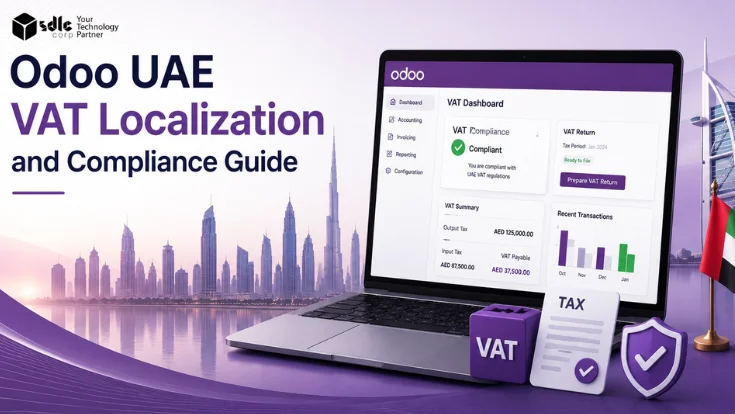
UAE businesses using Odoo need more than a basic accounting setup. Start with the right chart of accounts, VAT tax mapping, TRN details, and tax invoice formatting. Then review bilingual invoices, exchange rates, and VAT reports against FTA requirements.
Odoo's UAE fiscal localization gives finance teams a local accounting base. It includes UAE accounts, taxes, exchange rates, and English, Arabic, or bilingual invoices. However, reliable output still depends on clean master data, correct settings, and finance review.
UAE VAT rules, invoice requirements, e-invoicing timelines, and FTA guidance can change. Verify current obligations with the Federal Tax Authority or a qualified UAE tax advisor before go-live.
This guide is useful for
UAE Localization
What Odoo UAE Localization Covers
Odoo officially supports UAE fiscal localization through the United Arab Emirates. Accounting module (l10n_ae). This localization includes UAE accounts, taxes, and reports, and is maintained as part of Odoo's official fiscal localization library.
For businesses going through Odoo implementation services, include UAE localization setup in the project scope. Also include VAT configuration, invoice template testing, and VAT report review. The table below maps each localization area to its role inside Odoo.
| Area | What it means in Odoo |
|---|---|
| UAE chart of accounts | Localized account structure configured for UAE accounting requirements. |
| VAT taxes | UAE VAT tax setup, tax groups, and sales/purchase tax mapping. |
| Corporate tax readiness | Accounting setup aligned with UAE corporate tax context. |
| Currency exchange rates | UAE Central Bank exchange rate service available by default; other providers also supported. |
| Invoice language | Invoice output in English, Arabic, or bilingual format. |
| VAT per line | VAT amount displayed per invoice line as required. |
| Payroll localization | Covered separately. UAE payroll, WPS, and end-of-service setup are not part of VAT localization scope. |
| Multi-company | UAE localization configurable per company where applicable. |
VAT Setup
UAE VAT Setup in Odoo
Before issuing VAT invoices, complete the UAE localization foundation. First, install the localization. Then configure VAT, invoice templates, and VAT report checks. Confirm each step before moving to the next one.
Tax Invoice
UAE Tax Invoice Requirements in Odoo
Odoo can format UAE tax invoices correctly when the base settings are clean. Configure company, customer, tax, language, and invoice template settings first. Then test the fields below before the first live invoice. If customer data starts in the sales flow, the Odoo CRM for businesses guide can help align customer records before invoicing.
- Supplier name and TRN.
- Buyer name and TRN where required.
- Invoice date and unique invoice number.
- Taxable amount per line.
- Applicable VAT rate per line.
- VAT amount per line.
- Total amount including VAT.
- Arabic or bilingual output where needed.
- PDF alignment and print quality tested.
- TRN visible in correct position.
- Credit note reference to original invoice.
- Customer email and print output consistent.
- Simplified invoice format tested where applicable.
Test invoice output against FTA invoice requirements. A qualified UAE tax advisor can also review the format. Odoo generates invoice data from configuration. Finance owns the final compliance check.
VAT Treatment
UAE VAT Rates and Tax Treatment in Odoo
UAE VAT includes standard-rated, zero-rated, and exempt treatments. Each one needs separate tax mapping in Odoo. Zero-rated and exempt are not the same. They affect the VAT return and input tax recovery differently. Therefore, verify treatment with the FTA or a qualified UAE tax advisor before configuration. Sector-specific billing can add more rules, as shown in the Odoo for energy and utilities guide.
| VAT Treatment | Odoo Setup Consideration |
|---|---|
| Standard-rated sales | Map standard UAE VAT sales tax; verify rate and output VAT account. |
| Zero-rated supplies | Use correct zero-rated tax treatment with separate reporting tags from exempt. |
| Exempt supplies | Separate exempt tax mapping from zero-rated; both affect the VAT return differently. |
| Imports of goods/services | Review reverse charge and import tax handling for applicable transactions. |
| Local purchases | Map input VAT to correct recoverable and non-recoverable accounts. |
| Mixed supplies | Test invoice and VAT report treatment carefully before relying on output. |
VAT Reporting
VAT Return Preparation in Odoo
Odoo supports tax reporting through accounting and fiscal localization features. Finance teams need to review VAT return data, reconcile tax accounts, and verify all figures. Wider finance controls can be planned through Odoo accounting and finance services. Do this before using EmaraTax or submitting figures to the FTA. If you also manage UK entities, the Odoo UK MTD VAT and HMRC submission setup guide explains a separate digital VAT workflow.
Multi-Currency
Currency Exchange Rates and Multi-Currency VAT
Odoo uses the UAE Central Bank exchange rate service by default for currency updates. It also supports other providers. Foreign-currency invoices affect taxable amounts and VAT reporting. Therefore, stale rates can create gaps between invoice values and VAT return figures.
Why exchange rates matter for UAE VAT
- Foreign currency invoices convert at the rate set in Odoo.
- VAT amounts on foreign invoices depend on the rate used.
- Stale rates create mismatches in VAT reporting.
- Include rate verification during period close.
Multi-currency review checklist
- Exchange rate provider configured and tested.
- Scheduled rate updates confirmed.
- Multi-currency invoice VAT amounts reviewed.
- Period-close exchange rate check in place.
Invoice Language
English, Arabic and Bilingual Invoices in Odoo
Odoo's UAE localization allows invoice output in English, Arabic, or both. It also includes VAT amount per line. Configure templates and test PDF output before go-live. Language settings affect label alignment, field positions, and text direction.
Decision Guide
Native Odoo UAE Localization vs Customization
Native Odoo UAE localization covers standard VAT invoicing and reporting for most businesses. However, some flows need customization. This includes POS, eCommerce, WMS, or external systems that affect invoice data before reporting.
- Standard Odoo Accounting is used with no custom flows.
- Invoice flows match standard Odoo processes.
- UAE VAT setup matches standard business operations.
- Bilingual templates meet business and customer requirements.
- VAT report review is handled by finance users without custom views.
- Invoice layout has industry-specific fields or formats.
- Multi-branch or complex multi-company setups are involved.
- Custom approval workflows before invoicing are required.
- POS, eCommerce, WMS, or marketplace data affects invoice output.
- Non-standard VAT reporting views or external accounting synchronisation is needed.
If your UAE invoicing needs custom formats, complex multi-company setup, or external integration, use Odoo customization services. You can also work with an Odoo development company in UAE to extend the system without disrupting standard accounting flows.
Quick Decision Guide
UAE VAT Configuration Path: Match Your Situation
Match your situation to one of the six paths below. Each shows who it is for, three suggested next steps, and the main thing to avoid. Use the implementation roadmap further down for the full sequence.
New UAE Setup
- Install UAE localization.
- Add TRN and company details.
- Test sales and purchase invoices.
VAT Return Review
- Reconcile tax accounts.
- Check posted invoice periods.
- Review exchange rates.
Invoice Format Fix
- Review invoice fields.
- Test Arabic and bilingual PDFs.
- Check credit note output.
Multi-Currency Review
- Confirm exchange rate source.
- Test currency conversion.
- Review VAT reporting totals.
System Integration
- Map source data fields.
- Test posting logic.
- Reconcile tax accounts.
E-Invoicing Readiness
- Review required invoice data.
- Plan ASP integration.
- Test validation flow.
Troubleshooting
Common Odoo UAE VAT Setup Errors
Most UAE VAT errors in Odoo come from missing master data, incorrect tax mapping, or exchange-rate gaps. They rarely come from the software alone. Each error has a preventable root cause. Fix it during configuration, not after live invoicing starts.
| Error Type | Common Cause | How to Prevent |
|---|---|---|
| Missing TRN | Company or customer tax registration number not added. | Validate master data before invoicing begins. |
| Incorrect VAT rate | Wrong tax selected on product or invoice line. | Review product tax defaults and fiscal position mapping. |
| Zero-rated vs exempt confusion | Incorrect tax mapping treats the two identically. | Separate zero-rated and exempt treatments clearly in tax configuration. |
| VAT report mismatch | Draft, unposted, or misdated invoices included in period. | Review posting status and tax period before VAT return review. |
| Input VAT error | Recoverable/non-recoverable VAT mapped to the same account. | Review purchase tax accounts and verify recovery treatment. |
| Exchange-rate issue | Currency rates not updated before period close. | Schedule exchange-rate updates and review before closing. |
| Invoice format issue | Template missing VAT fields, TRN, or Arabic labels. | Test invoice PDF output in all required languages before go-live. |
| Multi-company issue | Wrong localization or tax settings applied per company. | Validate each company setup separately before invoicing. |
Use a structured review process to fix recurring tax mapping errors, VAT report mismatches, or invoice template issues. Post-go-live Odoo support helps identify root causes and apply corrections without disrupting live transactions.
SDLC Corp can review your localization, tax mapping, invoice templates, VAT reports, and multi-currency configuration before go-live.
Future Readiness
UAE E-Invoicing Readiness for Odoo Users
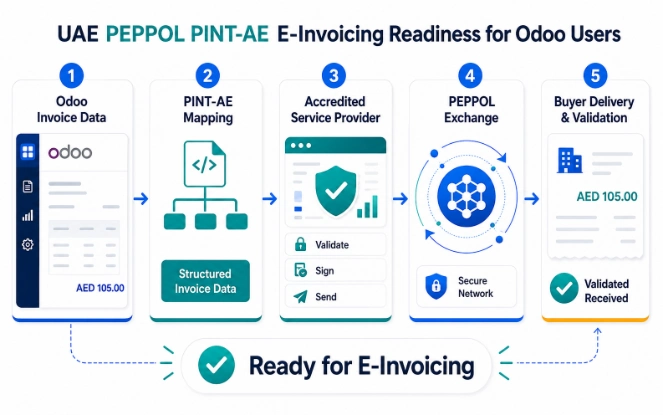
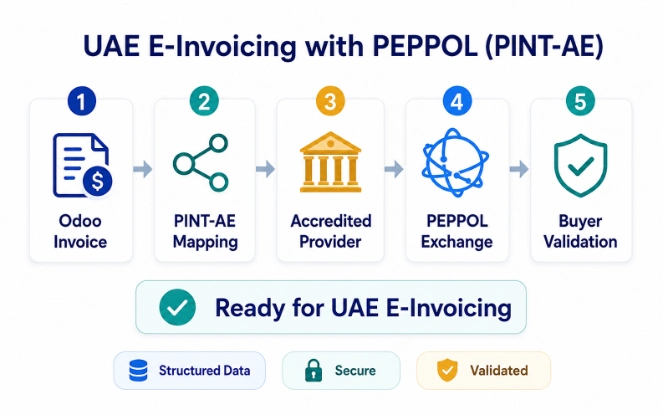
The UAE Ministry of Finance has announced e-invoicing implementation for B2B and B2G transactions. The model uses Accredited Service Providers and an OpenPeppol-based exchange. This is separate from today's PDF tax invoice process.
Treat e-invoicing as a readiness area. First, verify official requirements, ASP obligations, and technical integration needs. Then assess whether Odoo data can support future obligations. For comparison with another electronic invoicing model, see the Odoo India GST e-invoicing and e-way bill guide.
The UAE e-invoicing programme is moving toward a PEPPOL-based model. The Ministry of Finance now sets accreditation conditions for service providers. These include active Peppol certification and OpenPeppol conformance testing.
For Odoo users, the key change is simple. A compliant invoice will not only be a human-readable PDF. It also needs structured invoice data. That data must move through an Accredited Service Provider and align with the UAE PINT-AE specification. OpenPeppol documentation lists PINT BIS Billing AE specifications for the United Arab Emirates.
Run implementation planning through the 2026-2027 rollout window. Ministerial Decision No. 66 of 2026 sets a key deadline. Businesses with revenue of AED 50,000,000 or more must appoint an Accredited Service Provider by 30 October 2026. They must implement the Electronic Invoicing System by 1 January 2027. Confirm your own cohort and deadlines with official sources before changing production workflows.
| Area | Current UAE tax invoice setup in Odoo | Incoming PEPPOL PINT-AE readiness need |
|---|---|---|
| Output format | PDF or printed invoice with required tax fields and bilingual layout where needed. | Structured invoice data mapped to PINT-AE fields, plus any required human-readable output. |
| Transmission | Sent by email, print, portal upload, or normal customer process. | Routed through an Accredited Service Provider and PEPPOL exchange flow where applicable. |
| Data dependency | Correct TRN, customer details, invoice lines, VAT rate, and VAT amount per line. | Clean master data, validated tax codes, structured field mapping, and rejection-handling workflow. |
| Odoo impact | Template, tax mapping, localization, exchange rates, and VAT report checks. | Integration with the selected ASP, XML/data mapping, invoice response handling, and audit trail review. |
Confirm UAE e-invoicing timelines, technical requirements, and ASP obligations with official Ministry of Finance or FTA sources. Do not rely on third-party summaries alone for compliance planning.
Readiness
Odoo UAE VAT Readiness Checklist
Work through all five groups before issuing live VAT invoices or preparing VAT return figures. Confirm each item. Do not assume it.
Implementation
Step-by-Step Implementation Roadmap
A structured UAE Odoo implementation plan covers localization, VAT configuration, master data, invoice setup, transaction testing, and VAT report validation. Follow the sequence. Compressing steps can create configuration errors. Those errors can affect live invoices and VAT return accuracy. For timeline planning, the Odoo implementation timeline guide explains how project scope affects delivery time.
Confirm VAT registration status, TRN, applicable supplies, and multi-company structure. Also confirm integration requirements before configuration begins.
Install UAE fiscal localization and review the localized chart of accounts. Then configure VAT taxes, map output and input VAT accounts, and complete company details including TRN.
Validate customer and vendor records, TRNs, addresses, and tax defaults. Then review journal configuration before issuing test invoices.
Set invoice language first. Then verify VAT amount per line, TRN visibility, credit note format, PDF output, and email output.
Test sales, purchases, zero-rated supplies, exempt supplies, and reverse charge where applicable. Also test credit notes, multi-currency invoices, and VAT report output.
Reconcile tax accounts with VAT report totals. Then confirm exchange rates, review draft invoice exclusion, and get finance sign-off.
Monitor Ministry of Finance and FTA updates on UAE e-invoicing timelines. Then review ASP obligations, assess integration readiness, and map invoice data fields.
Team Responsibilities
Finance, Odoo Admin and IT Responsibilities
UAE VAT compliance in Odoo is not only an accounting task. Finance, IT, external advisors, and management all play a role. Together, they support go-live and ongoing operations.
| Role | Responsibilities |
|---|---|
| Finance | VAT treatment decisions, TRN validation, VAT report review, VAT filing coordination, credit notes. |
| Odoo Admin | UAE localization setup, tax configuration, invoice templates, access rights, master data. |
| IT / Integration | External system connections, POS/eCommerce/WMS data sync, backups, API monitoring. |
| Management | Compliance ownership, go-live approval, external advisor coordination. |
| External Tax Advisor | VAT treatment review, FTA interpretation, filing guidance, e-invoicing readiness planning. |
If your UAE VAT workflow includes POS, eCommerce, WMS, or marketplace invoice data, review the integration path early. Odoo integration services help move invoice and tax data into Odoo before reporting. Finance teams handling bank flows can also review banking operations with Odoo ERP.
How SDLC Corp Helps
How SDLC Corp Helps with Odoo UAE VAT Localization
SDLC Corp helps UAE businesses configure Odoo for VAT localization and tax mapping. The team also supports chart of accounts setup, bilingual invoice templates, VAT report readiness, multi-currency accounting, POS and eCommerce integrations, and post-go-live support.
FAQ
Frequently Asked Questions
Does Odoo support UAE VAT localization?
Yes. Odoo UAE fiscal localization gives finance teams local accounts, taxes, and invoice features. Correct output still depends on configuration quality, clean master data, and finance review.
Can Odoo generate UAE tax invoices?
Yes. Odoo supports English, Arabic, or bilingual invoice output. It can also show VAT amount per line. Test TRN, VAT fields, credit notes, and PDF alignment before go-live.
Does Odoo support UAE VAT return preparation?
Odoo supports VAT reporting through accounting and fiscal localization features. Finance teams still need to reconcile tax accounts and verify figures before using EmaraTax or filing review.
Does Odoo support UAE PEPPOL PINT-AE readiness?
Odoo users should treat PEPPOL and PINT-AE as a separate readiness area. Confirm Accredited Service Provider, structured invoice data, and integration needs with official UAE sources.
When does UAE VAT setup need customization?
Customization may be needed for industry-specific invoice formats, complex multi-company setup, POS, eCommerce, WMS, marketplace flows, or external accounting integrations.
What should be tested before Odoo VAT go-live?
Test sales invoices, purchase invoices, credit notes, zero-rated and exempt treatment, multi-currency invoices, bilingual PDFs, VAT report figures, and tax account reconciliation.
How should multi-currency invoices be handled?
Odoo can use UAE Central Bank exchange rates by default. Finance teams should still review foreign-currency invoice values, VAT amounts, and reporting totals before period close.
Who should verify UAE VAT compliance?
Finance users and a qualified UAE tax advisor should verify VAT treatment, invoice requirements, FTA obligations, and filing positions. Odoo provides the tooling, not the final tax judgement.
Start with clean VAT master data and correct tax mapping. Then test tax invoices, VAT report output, and e-invoicing readiness before go-live.
Talk to an Odoo expert