
Odoo PSQL Query Execute for Faster and Safer Backend Data Review
Technical teams can check Odoo database records faster without switching between multiple tools. With Odoo PSQL Query Execute users can run PostgreSQL SELECT queries, review clean results, and export data to XLSX for easier reporting.
 Product Hunt Listed
 Trusted Software Partner
 Multiple Products Listed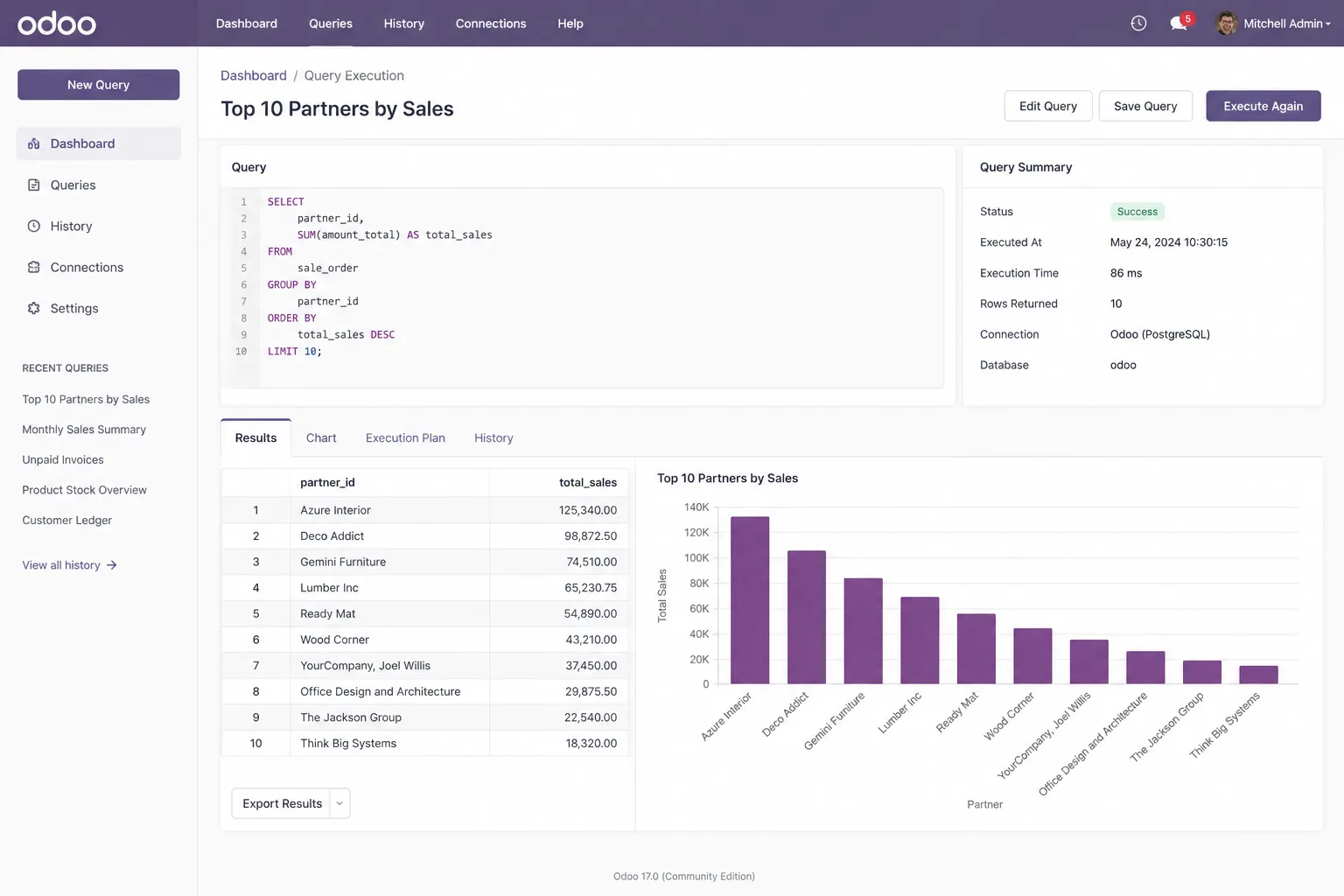
Project Snapshot
A Project Snapshot Showing the Need for Odoo PSQL Query Execute
A quick look at how Odoo PSQL Query Execute helped a technical team simplify database checks, reduce tool switching, and improve backend data visibility inside Odoo.
Client Type and Industry Fit
The client was an Odoo-based technical, service, or operations team working across ERP support, IT services, consulting, trading, operations, and Odoo implementation services.
Platform and Product Used
The team used Odoo along with Odoo PSQL Query Execute by SDLC Corp to review backend database records directly inside the Odoo environment.
Main Database Checking Challenge
Database checks were slow because users had to depend on external SQL tools. This created extra tool switching and made record validation less convenient for technical users.
Core Features Used
The team used SELECT query execution, formatted HTML results, XLSX export, saved query records, and error validation to review data faster and more clearly.
Business Goal and Result Focus
The goal was to help technical users inspect records faster inside Odoo, reduce tool switching, create cleaner exports, and improve backend data visibility.
Focused on Faster Backend Data Review
The setup helped technical teams run SELECT-based database checks inside Odoo using SELECT queries, formatted results, saved records, and export-ready outputs.
Client Background
An Odoo Team Needed Faster Backend Data Visibility
The client needed a simple way to check backend records, review query results, and export reports without switching between Odoo and external SQL tools.
The client handled support checks, reports, and backend data reviews inside Odoo, often verifying customer, invoice, product, and custom module records.
However, many database checks still depended on external SQL tools. As a result, simple record reviews took more time, reporting work became manual, and support teams had to wait for technical confirmation.
Key Users
Developers, system administrators, consultants, and support teams needed quick access to backend records for validation and troubleshooting.
Core Workflow Need
The team needed a SELECT-based query review workflow with clean result views, XLSX export, and reusable query records inside Odoo.
Formatted Result Preview
The Challenge
Technical Teams Needed Faster Access to Odoo Data
Before using Odoo PSQL Query Execute, the team had to depend on external tools to review database records. This slowed down support checks, reporting tasks, and issue investigation.
Too Much Tool Switching
Users had to move between Odoo, SQL tools, spreadsheets, and internal messages. As a result, even simple database checks took more time than needed.
Slow Issue Investigation
When a support issue came in, the team could not always verify records quickly. They had to check data manually or depend on separate database tools.
Manual XLSX Report Preparation
After running database queries, users often copied results into spreadsheets and formatted them manually. This added extra work and increased the chance of errors.
No Simple Saved Query Flow
Common queries were stored in notes, files, or personal systems. The team did not have one clear place inside Odoo to save and reuse frequent technical checks.
Limited Backend Visibility Inside Odoo
Odoo handled daily business operations, but database-level review still required external access. This created a gap between business workflow and technical review.
Safety Concerns Around SQL Access
The business wanted technical users to inspect records without creating a risk of accidental data changes. A safer read-only query workflow was needed.
Overall, the team needed a safer Odoo-based workflow to inspect records, run SELECT queries, export results, reuse common checks, and reduce dependency on external SQL tools.
The Solution
A Controlled Query Review Workflow Inside Odoo
SDLC Corp implemented Odoo PSQL Query Execute to help technical users run SELECT queries, review results, save checks, and export reports inside Odoo.
Database Review Moved Inside Odoo
Technical users could review backend records directly from the Odoo backend. This reduced the need to open separate SQL tools for routine checks.
Clearer Query Results for Faster Review
Instead of reviewing raw outputs, users could see query results in a clean table format. This made record checking faster and easier to understand.
Easier Report Sharing With Saved Formats
When results needed to be shared with managers, clients, or internal teams, users could export the data in XLSX format without extra copy-paste work.
Reusable Checks Reduced Repeat Work
The team could save query records with clear names. This helped users repeat common checks without writing the same query every time.
Safer SQL Access for Approved Users
The workflow supported SELECT queries only. Role-based access helped prevent unwanted data changes and kept database review more controlled.
Organized Review Flow for Better Team Control
From query creation to result review and export, the process stayed inside Odoo. This created a cleaner technical workflow for support, testing, and backend inspection.
This solution helped the team reduce tool switching, review backend records faster, export cleaner reports, reuse common checks, and improve technical visibility inside Odoo development.
Implementation Process
Easy Query Setup and Result Review with Odoo PSQL Query Execute
The implementation gave technical users a simple workflow to install the module, access the PSQL Query menu, create reusable SELECT queries, review clean results, export reports, and fix query issues directly inside Odoo.
Install the Module
The team installed the module in Odoo. This added the query execution feature inside the Odoo backend without needing a separate database tool for basic record review.
Activate Developer Mode
Developer Mode was enabled to access the Technical menu. This step was required because the PSQL Query menu is available inside Odoo’s technical settings.
Open the PSQL Query Menu
After enabling Developer Mode, users opened Settings → Technical → PSQL Query. This gave them one place to create, manage, and review saved database queries.
Create a Query Record
The user created a new query record, added a clear query name, and entered the required PostgreSQL SELECT query. This made each database check easier to identify and reuse later.
Execute the Query
The user clicked the execute or refresh option to run the query. The system then displayed the result directly inside Odoo, helping users review data without switching tools.
Review the HTML Result Table
The query output appeared in a clean table format. This made the result easier to read than raw database output and helped users check records faster.
Export Results to XLSX
When the result needed to be shared, the user exported it to XLSX with one click. This reduced manual copy-paste work and made reporting easier for managers or internal teams.
Fix Errors With Clear Validation Messages
If a query had a syntax issue or referenced a wrong table, the system showed a validation error. This helped users correct issues quickly and run safer database checks.
This implementation process helped the team run SELECT queries, review clean results, export reports, and fix query errors faster inside Odoo.
Core Features Used
Product Features That Improved SQL Query Review Inside Odoo
These features helped technical teams run, review, save, and export database checks without leaving Odoo.
Execute SELECT Queries Inside Odoo
Users can run PostgreSQL SELECT queries directly from the Odoo backend. This is useful for checking customer records, invoice data, product records, custom module data.
Formatted HTML Result Tables
Query output appears in a structured table format. This helps users review records clearly without reading plain database output.
One-Click XLSX Export
Users can export query results into an XLSX file for reporting, sharing, or internal documentation.
Saved Query Records
Users can name and save query records. This makes repeated technical checks easier to reuse.
Clear Error Handling
The module displays validation messages for invalid queries, syntax errors, or missing tables. This helps users fix query issues faster.
Zero Configuration Setup
The module does not require a complex setup process after installation. This helps technical teams start using it quickly.
Together, these features helped technical teams review backend records faster, reduce external tool dependency, reuse common checks, export cleaner reports, and maintain safer access inside Odoo.
Technology Stack Behind Odoo PSQL Query Execute
Built with Odoo backend tools, PostgreSQL query execution, secure access control, formatted result views, and XLSX export support to help technical users inspect database records faster inside Odoo.
Odoo ORM
Odoo ORM helps manage query records, backend actions, menu access, and user permissions inside Odoo. Direct SQL bypasses Odoo ORM access rights and record rules. Database privileges, company-data exposure, exports, query timeouts and logging require separate validation; SELECT-only syntax does not establish complete safety.
PostgreSQL
PostgreSQL is used to run SELECT queries and inspect Odoo database records in a controlled way. This helps technical users check business data without directly editing database values.
PSQL Query Engine
The PSQL Query Engine processes PostgreSQL SELECT queries, validates query input, and displays results directly inside Odoo. It helps users review data faster without switching to external SQL tools.
HTML Result Table
The HTML Result Table shows query output in a clean and structured table format. This makes database results easier to read, compare, and review during support, testing, or backend checks.
XLSX Export
XLSX Export allows users to download query results in Excel format for reporting, sharing, audits, and internal review. This reduces manual copy-paste work and makes result sharing cleaner.
Admin-Level Access
Admin-level access controls who can create, execute, and review SQL queries. This helps keep database inspection safer by allowing only approved technical users to use the feature.
Results
Results After Using Odoo PSQL Query Execute
After implementation, the team gained a faster and cleaner way to inspect Odoo database records. The biggest business impact came from reduced tool switching, faster support checks, and safer data review.
Faster Database Review
Admin and support users could review Odoo database records directly from the Odoo backend. This reduced tool switching and helped the team check data faster.
Less Manual Reporting Work
With XLSX export, users no longer had to copy query results into spreadsheets manually. This made reporting cleaner and reduced repeated formatting work.
Quicker Support Response
Support and technical teams could validate Odoo database records faster. This helped them respond to data-related issues with clearer information during troubleshooting.
Safer Data Inspection
Because the module supported read-only SELECT queries, users could inspect records without changing Odoo database data. This made backend data review more controlled.
Easier Repeated Checks
Saved query records helped users repeat common backend data review checks more easily. This reduced repeated work across similar support cases.
Better Backend Visibility
The team gained a clearer way to inspect Odoo database records from the backend. This improved technical confidence during issue review, testing, and reporting.
Overall, Odoo PSQL Query Execute helped the team reduce tool switching, review Odoo database records faster, export results through XLSX export, repeat common backend data review checks easily, and inspect backend data more safely using read-only SELECT queries.
Need a Faster Way to Review Odoo Backend Data?
Odoo PSQL Query Execute helps technical teams inspect database records, run SELECT queries, export XLSX reports, and review backend data without switching between multiple tools.
- Get Started
Let’s Connect Your Odoo Query Review Process
Get expert guidance on PostgreSQL SELECT query execution, backend record review, XLSX export, saved query workflows, and safer data inspection inside Odoo.
What happens after you submit?
- We check your Odoo data review needs.
- Our team explains the best module workflow.
- You get support for setup, query use, and XLSX export.
- Secure Integration
- Odoo-Ready
- Global Clients



