
Odoo WooCommerce Connector for Real-Time eCommerce and ERP Sync
Connect WooCommerce with Odoo ERP to automate orders, products, customers, inventory, coupons, and categories in one reliable workflow. With the Odoo WooCommerce Connector, businesses can reduce manual errors, speed up order fulfillment, maintain accurate stock updates, and manage eCommerce operations from one centralized ERP system.
 Product Hunt Listed
 Trusted Software Partner
 Multiple Products Listed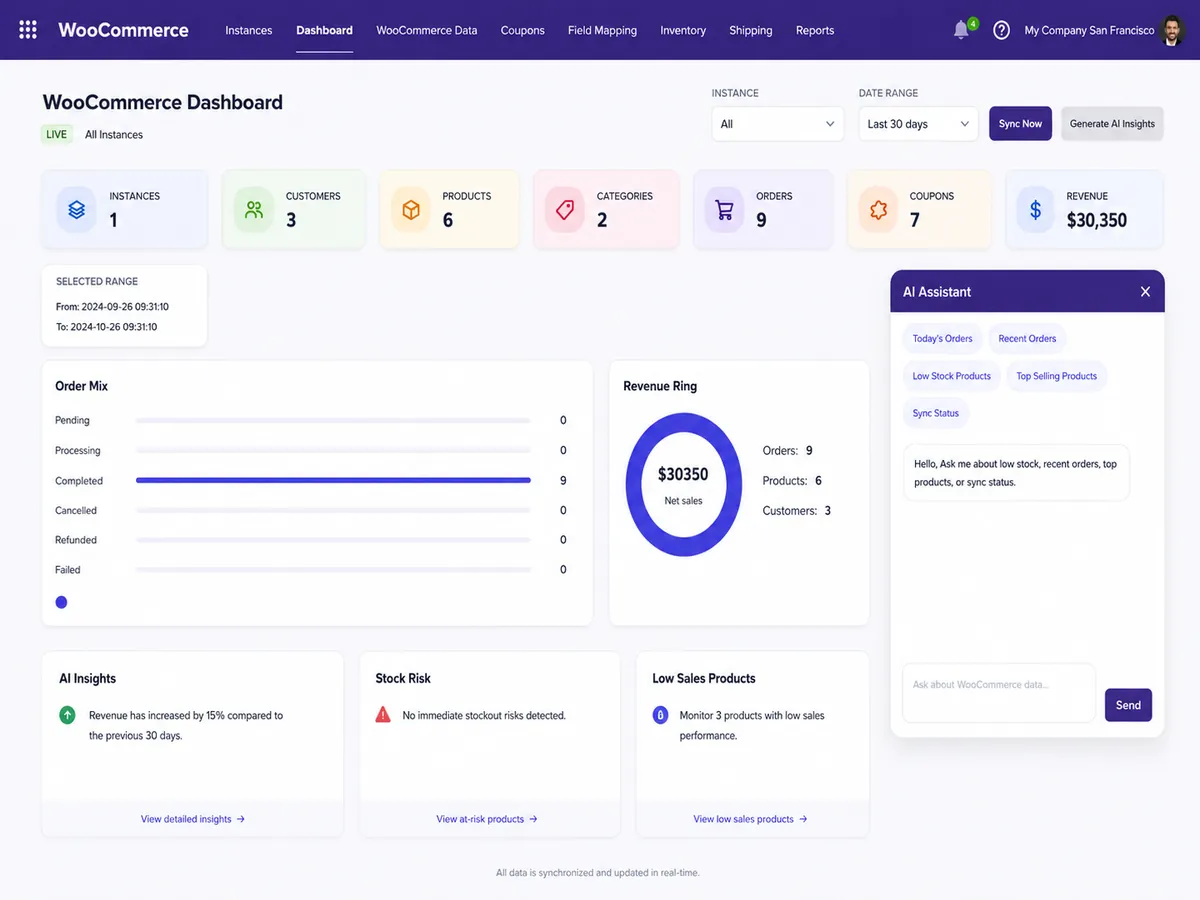
Project Snapshot
Odoo WooCommerce Connector Project Overview
A quick case study snapshot showing how WooCommerce store data was connected with Odoo ERP to reduce manual checks, improve customer, order, and inventory record accuracy, and speed up order processing.
Connecting WooCommerce Sales With Odoo ERP
The project focused on helping a growing retail business connect WooCommerce with Odoo for products, orders, customers, inventory, pricing, categories, and coupons. This helped the team reduce repeated data checks and manage store operations from one ERP workflow.
Client Type
Growing eCommerce and retail business managing online sales, product data, customer records, inventory updates, and backend operations.
Industry
Online retail and consumer products with regular order flow, stock updates, customer activity, and product catalog changes.
Platform Used
WooCommerce was used for online selling, while Odoo ERP handled backend operations, order control, stock management, and business records.
Product Used
Odoo WooCommerce Connector by SDLC Corp was used to connect storefront activity with Odoo ERP workflows for smoother data movement.
Project Timeline
The connector setup, configuration, field mapping, testing, and sync validation were completed in around 4–6 weeks.
Main Challenge
Manual data handling between WooCommerce and Odoo caused repeated checks, slower order updates, inventory mismatch risks, and higher chances of customer or order record errors.
Core Sync Areas
Products, orders, customers, inventory, pricing, categories, and coupons were synced to reduce repeated checks and keep key WooCommerce data aligned inside Odoo.
Key Features Used
Webhooks, bi-directional sync, field mapping, queue processing, cron jobs, and log tracking helped the team control, monitor, and verify WooCommerce data inside Odoo.
Business Goal
The main goal was to reduce manual data entry, improve stock accuracy, speed up order processing, and manage WooCommerce operations more efficiently through Odoo.
Result Focus
The implementation helped reduce repeated manual checks, improve customer, order, and inventory record accuracy, support faster order processing, and give the team better sync monitoring inside Odoo.
About the Client
Growing eCommerce Brand Using WooCommerce and Odoo ERP
The Odoo WooCommerce Connector became important because the client needed a reliable way to move WooCommerce store data into Odoo ERP with fewer manual checks, faster updates, and better backend control.
The business used WooCommerce for online sales and needed Odoo ERP backend support for handling sales orders, stock updates, pricing, customer records, and reporting.
However, as order volume increased, the team had to review the same data across WooCommerce and Odoo. This created duplicate work, delayed updates, manual errors, and a higher risk of mismatched customer, order, and inventory records.
Growing Storefront Data
WooCommerce activity was increasing quickly, including orders, products, customers, pricing, and inventory updates. The team needed a cleaner way to move this data into Odoo ERP without repeated manual checks.
Need for Scalable ERP Sync
The client wanted a reliable setup that could support higher order volume, more products, faster stock updates, and future multi-store growth with fewer manual errors and less duplicate work.
Challenges
Operational Gaps Between WooCommerce and Odoo
Before using the Odoo WooCommerce Connector, the team had to manage WooCommerce orders, stock, customers, coupons, and product data across separate systems. This created duplicate work, delayed order updates, inventory errors, weak reporting visibility, and made it harder to scale daily eCommerce operations.
Manual Product Updates
Product names, SKUs, prices, stock levels, images, categories, and tags had to be updated in more than one place. This increased the risk of incorrect product data across WooCommerce and Odoo.
Delayed Order Processing
WooCommerce orders needed manual review before they could be managed inside Odoo Sales. During high-order periods, this slowed fulfillment and created extra coordination work for internal teams.
Stock Mismatch
Inventory changes were not updated quickly in the backend system. This created stock confusion for sales, warehouse, and support teams, especially when product movement increased.
Duplicate Customer Records
Customer names, emails, phone numbers, billing addresses, and shipping details were stored across both platforms without a clear automated sync process, increasing duplicate record risks.
Limited Error Visibility
When data failed to move correctly, the team did not have a simple way to identify sync errors, review failed records, or understand which issue needed attention first.
Multi-Store Scalability Concern
As the business planned to handle more WooCommerce activity, manual work became harder to manage, reporting became less clear, and the process was not suitable for long-term growth.
These operational gaps showed why the Odoo WooCommerce Connector was needed: to reduce manual checks, improve product and inventory accuracy, speed up fulfillment, strengthen reporting visibility, and help the business scale WooCommerce operations through Odoo.
Solution
Real-Time Odoo WooCommerce Connector for Smoother eCommerce Operations
SDLC Corp connected WooCommerce with Odoo ERP using expert Odoo WooCommerce integration services and the Odoo WooCommerce Connector. This helped the client move store data faster, reduce manual checks, improve sync reliability, and manage backend operations with better control.
Storefront Data Moved Into Odoo
Orders, products, customers, categories, coupons, pricing, and inventory data were synced with Odoo. This reduced repeated manual entry and gave the team one reliable backend workflow.
Webhooks Supported Faster Updates
Webhooks triggered data movement when orders were created, products changed, customers were updated, or order statuses were modified. This helped the team receive faster updates without waiting for manual checks.
Field Mapping Improved Data Accuracy
WooCommerce fields were mapped with Odoo fields based on the client’s product, customer, and order structure. This helped keep records consistent and reduced data mismatch issues.
Queue and Cron Jobs Improved Sync Reliability
Queue processing and cron jobs supported scheduled sync, retry handling, and high-volume data movement. This helped improve sync reliability during busy order periods.
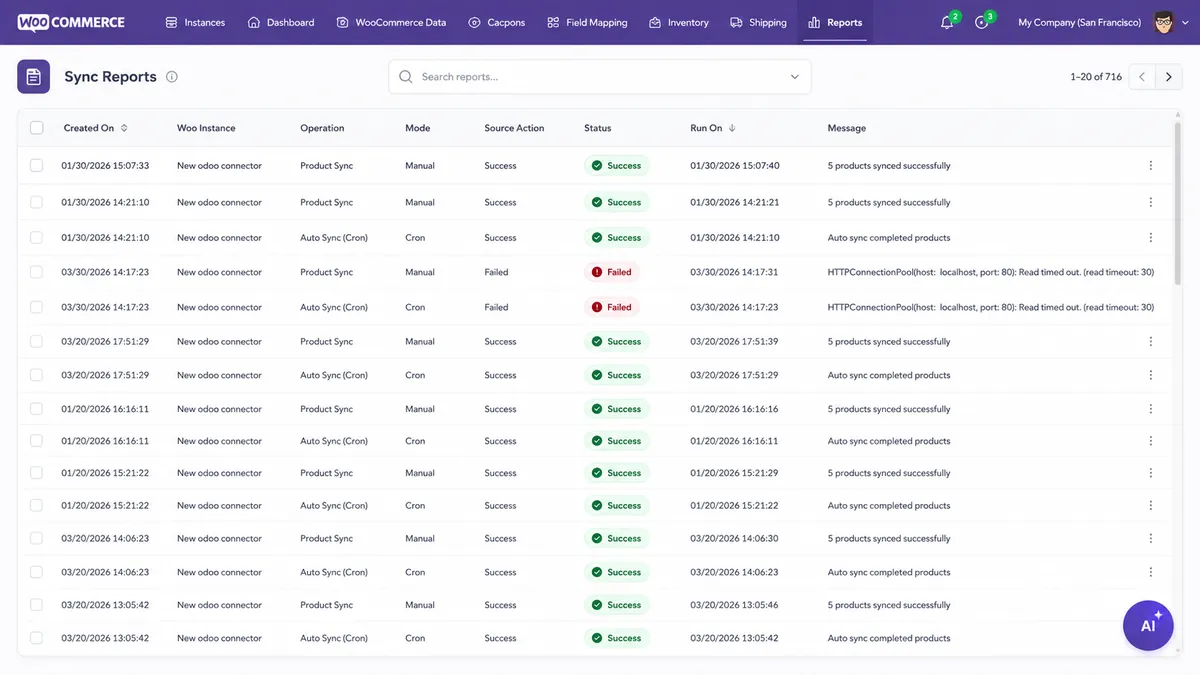
Logs Made Sync Monitoring Easier
Odoo logs gave the team a clear view of successful and failed sync activity. This made issue tracking faster, reduced manual investigation, and improved backend control.
Together, these features helped the business reduce manual checks, speed up data updates, improve record accuracy, strengthen sync reliability, and manage WooCommerce operations more confidently inside Odoo.
Process
Implementation Process for WooCommerce and Odoo Connector
SDLC Corp configured the connector step by step to make sure products, orders, customers, inventory, categories, and coupons synced accurately between WooCommerce and Odoo. Each stage focused on reducing implementation errors, improving order flow, and creating smoother backend operations.
Odoo WooCommerce Connector Installation
SDLC Corp installed the Odoo WooCommerce Connector from the Odoo Apps environment and added to the client’s Odoo setup to start the integration process with the correct module base.
WooCommerce Store API Configuration
The team configured the WooCommerce store URL, consumer key, consumer secret, WordPress username, app password, and webhook secret for secure data communication.
WooCommerce and Odoo Connection Testing
Before live sync, the connection was tested to confirm that WooCommerce and Odoo could communicate properly. This helped reduce setup errors before active data movement.
Data Mapping and Sync Rule Setup
Product, customer, category, coupon, and field mapping rules were configured based on the client’s workflow to support accurate data sync and consistent records.
Real Store Data Sync Testing
The team tested product, order, customer, inventory, category, and coupon data using real store conditions to confirm accurate sync results before go-live.
Webhook and Cron Job Setup
The team enabled webhooks for faster updates, while cron jobs and queue logic supported scheduled sync, retry handling, and reliable high-volume order processing.
Sync Monitoring and Go-Live
After validation, the connector was moved into active use. Logs and reports helped the team monitor daily sync performance, review issues faster, and maintain smoother backend operations.
This implementation process helped the client reduce setup errors, confirm accurate WooCommerce-to-Odoo data sync, improve order flow, and manage backend operations with more confidence.
Features
Key Features Used in the WooCommerce Odoo Connector
The client did not need every feature at once. The main requirement was to reduce manual updates, improve data accuracy, speed up order handling, and make WooCommerce data easier to control inside Odoo.
Bi-Directional Sync
Data moved between WooCommerce and Odoo in a controlled workflow. This reduced duplicate updates, improved record accuracy, and helped both systems stay aligned.
Real-Time Webhooks
Webhooks supported faster updates for order creation, product changes, customer updates, and order status changes. This helped the team reduce delays and respond faster.
Product and Variant Sync
Product names, SKUs, prices, stock, images, categories, tags, and variants were synced with Odoo. This improved catalog accuracy and reduced manual product corrections.
Order Sync
The connector imported WooCommerce orders into Odoo Sales, helping the team review, process, and track orders faster without switching between platforms.
Inventory and Price Sync
Stock levels and prices were updated through the connector, helping reduce manual corrections, stock mismatch issues, and pricing confusion.
Customer Sync
Customer profiles, billing addresses, shipping addresses, and contacts were brought into Odoo. This improved customer record accuracy for sales, invoicing, and delivery workflows.
Category and Coupon Sync
WooCommerce categories, coupons, and discount data became easier to review inside Odoo. This helped the team manage promotions with better visibility.
Flexible Field Mapping
WooCommerce fields were mapped with Odoo fields according to the client’s data structure and business rules. This improved data consistency and reduced mismatch errors.
Logs, Queue, and Cron-Based Processing
The team could review sync activity, retry failed operations, and manage scheduled updates with better control. This improved sync visibility and backend reliability.
Together, these features helped the business reduce manual updates, speed up order handling, improve inventory accuracy, and gain better visibility over WooCommerce-to-Odoo sync activity.
Technology Architecture
Technology Architecture Behind the WooCommerce Odoo Connector
The implementation used JavaScript, Python ORM, PostgreSQL, WooCommerce REST API, webhook triggers, cron jobs, queue processing, and Odoo reporting layers to support reliable sync, faster updates, better error tracking, and smoother WooCommerce-to-Odoo ERP workflows.
JavaScript
Supported WooCommerce-side storefront interactions such as cart updates, checkout actions, and customer activity. This helped the store capture data smoothly before syncing it with Odoo.
Python ORM
Managed Odoo business logic, order processing, customer records, inventory updates, and ERP workflows with support from experienced Odoo Development practices. This helped keep backend operations reliable and easier to control.
PostgreSQL
Stored synced products, orders, customer details, inventory records, pricing, coupon data, and activity logs. This supported accurate records and better data consistency inside Odoo.
WooCommerce REST API
Connected WooCommerce with Odoo for product, order, customer, category, coupon, and inventory data exchange. This reduced manual updates and improved sync accuracy.
Webhook Triggers
Triggered faster updates when orders were created, products changed, customers were updated, or order statuses were modified. This helped reduce delays in daily operations.
Field Mapping Logic
Matched WooCommerce fields with Odoo fields based on the client’s business structure. This improved data accuracy and reduced mismatch issues between both systems.
Queue and Cron Jobs
Supported scheduled sync, retry handling, and larger data processing. This improved sync reliability during busy order periods and reduced the risk of missed updates.
Odoo Logs and Sync Reports
Helped the team review successful syncs, failed syncs, and activity history. This made error tracking easier and gave the team better backend visibility.
Together, this architecture helped the business maintain reliable WooCommerce-to-Odoo sync, improve data accuracy, track errors faster, and manage ERP workflows with better control.
Results
Results After Using the Odoo WooCommerce Connector
After implementation, the client reduced manual work and managed WooCommerce data more confidently through Odoo. The team gained a clearer process for order handling, stock review, customer records, product updates, and sync monitoring.
Significantly Less Repeated Data Entry
The connector automated product, order, customer, coupon, category, and inventory updates between WooCommerce and Odoo. This reduced repeated manual updates across both systems.
Faster Order Handling Inside Odoo
WooCommerce orders started moving into Odoo Sales, allowing the team to review, process, and track orders faster without checking the storefront separately every time.
Improved Inventory Accuracy
Stock updates became easier to review and manage, helping sales, warehouse, and support teams work with clearer inventory information and fewer stock-related mismatches.
More Accurate Customer Records
The team managed customer billing, shipping, and contact details more clearly inside Odoo. This supported smoother invoicing, delivery, and customer service workflows.
Better Sync Error Visibility
Logs and sync reports helped the team identify successful and failed operations faster. This reduced the time spent manually searching for sync issues.
Stronger Multi-Store Readiness
The connector gave the business a more scalable setup for managing future WooCommerce store growth from one ERP system with better backend control.
The business gained a smoother WooCommerce-to-Odoo workflow with reduced manual work, faster fulfillment support, improved inventory accuracy, better sync visibility, and stronger readiness for future eCommerce growth.
Need a Cleaner Way to Sync WooCommerce With Odoo?
Need custom sync rules, field mapping, or workflow changes? Odoo developers to customize the connector, improve data flow, and build a smoother WooCommerce-to-Odoo workflow for your business process.
- Get Started
Let’s Connect Your WooCommerce Store Odoo
Get expert guidance on WooCommerce and Odoo integration, product sync, order automation, inventory updates, and sync monitoring inside Odoo.
What happens after you submit?
- Integration Requirement Review
- Consultation With Odoo Integration Specialists
- Setup Guidance for Reliable Sync Flow
- Secure Integration
- Odoo-Ready
- Global Clients



