
Case Study

How SDLC Corp Built Odoo AI Dashboard Ninja for Live BI Dashboards

Odoo teams manage sales, CRM, finance, inventory, and HR data in one ERP system. But many reporting workflows still depend on exports, Excel files, and manual checks. SDLC Corp built Odoo AI Dashboard Ninja to help teams create live KPI dashboards, track real-time analytics, speed up reporting, and make better business decisions inside Odoo.
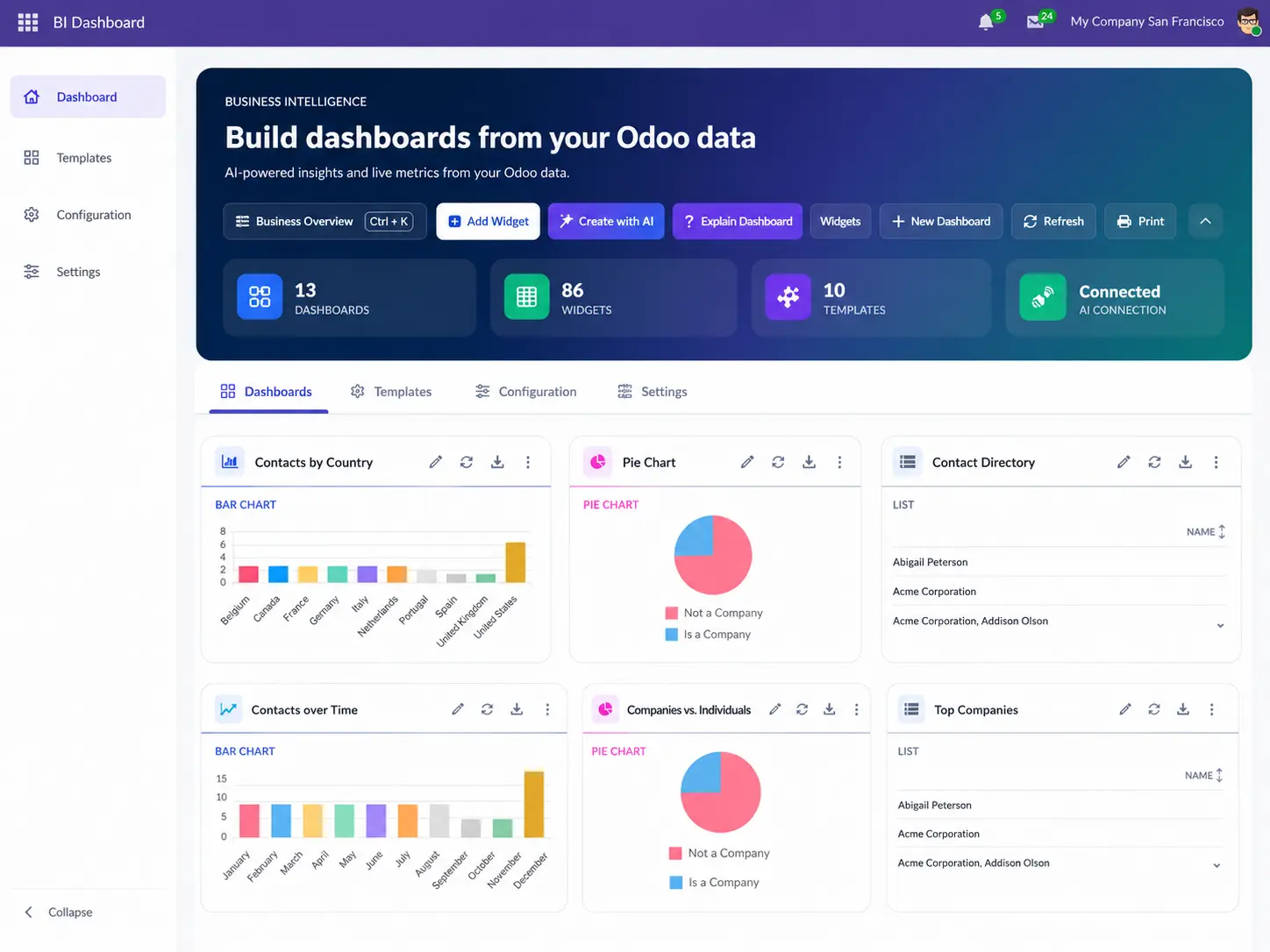
Build Odoo dashboards without code
Track live KPIs from Odoo records
Share dashboards with role-based access
Live KPI View 12 Widget Types
Odoo AI Dashboard Ninja Live BI Dashboard
Role-Based Access Odoo Security Rules
Project Snapshot

Quick Overview of the Odoo
AI Dashboard Solution

This snapshot shows what SDLC Corp built, who uses it, how AI setup works, and what reporting problem the module solves.

Odoo BI Reporting Module

AI Dashboard
Ninja by SDLC Corp

A native Odoo BI dashboard app that helps teams build live reports, track KPIs, and reduce manual spreadsheet-based report work.

Odoo 18.0 & 19.0 Gemini AI ERP / BI Reporting Dashboard Module
Product AI Dashboard Ninja
Company SDLC Corp
Platform Odoo 18.0 & 19.0
AI Setup Gemini API Key
What, Who & Why
Main Need Quicker business reviews without exporting data to external tools live KPI views inside Odoo.
Key Users Sales, CRM, Finance, Inventory, Purchase, Project, HR, and Admin teams.
Core Features KPI tiles, charts, lists, AI builder, templates, and linked records back to live Odoo source.
Industry Built for businesses using Odoo across operations, sales, finance, inventory, and HR, with real-time reporting and less spreadsheet work.
Final Outcome A native Odoo BI dashboard app that helps teams track live KPIs, reduce manual reporting, and make faster business decisions from one analytics view.
Client Overview

Why Odoo Teams Needed Better Business Visibility

Many teams use Odoo for daily work, but reporting often becomes a separate task.

Odoo data was spread across daily work screens

Managers check sales orders, leads, invoices, stock, tasks, and employee records from different screens.

Reporting moved outside Odoo into Excel

Then someone exports the data and prepares reports in Excel before managers can review business updates.

Old reports created delays and trust issues

That flow creates delays. It also makes reports harder to trust because the numbers may be old by the time the file is shared.

SDLC Corp built AI Dashboard Ninja to close this gap

The goal was to help Odoo users build live dashboards inside Odoo without moving data to another BI system.

Live Odoo KPIs
No Excel Export Flow
Visibility Gap From scattered checks to live dashboards
Live View
Before Different Screens
Before Excel Reports
Needed Faster Reviews
Goal Dashboards in Odoo
Built for better business visibility AI Dashboard Ninja helps teams review live Odoo data without moving reports to another BI system.
Problems

Reporting Problems Before AI Dashboard Ninja

Odoo stored the data, but teams still depended on exports, Excel files, and manual checks. Business reviews took more time, and managers could not check key metrics quickly.

Problem
Business Impact
Too Much Manual Report Work
Teams exported data, cleaned sheets, and rebuilt the same reports for daily and weekly reviews.
Slower Business Reviews
Hours spent on preparation meant managers received reports late, making timely decisions harder.
Too Many Screens to Check
Managers had to open CRM, sales, invoices, inventory, and project records before seeing the full picture.
Incomplete Cross-Team View
No single view of business performance meant key connections between sales, finance, and inventory were missed.
Reports Became Outdated Quickly
Excel reports lost accuracy once Odoo data changed. Teams needed live numbers instead of old files.
Decisions Based on Stale Data
Business decisions were made using outdated report copies that no longer matched current Odoo records.
Small Changes Needed Developers
Even simple chart, filter, or field changes often needed Odoo Customization Services. This slowed all business teams.
Developer Bottleneck for Reports
Business teams waited on developer queues for every small reporting change, reducing agility and speed.
The Clear Objective Build a native Odoo dashboard module that reduced export-based reporting and let users create live KPI views without code or developer support.
The Solution

Solution Built by SDLC Corp for Live Odoo Reporting

SDLC Corp built AI Dashboard Ninja as a native BI module. It brings KPI tiles, charts, lists, and linked records into one clean analytics view.

One View for Daily Reviews

Managers can check sales, CRM, finance, inventory, and project data in one place. This reduces screen switching and makes reviews faster.

Reports Without Developer Support

Users choose fields, filters, measures, and chart types on their own. Small report changes no longer wait on developer queues.

Faster Widget Setup With AI

Users type a simple request like "show monthly sales by salesperson" and the AI builder prepares the widget for review instantly.

Ready Dashboards With Safe Access

Teams start with ready templates. Odoo roles and record rules ensure users only see data they are permitted to view.

The product needed to feel simple for business users and reliable for technical teams keeping everything inside Odoo without extra BI tools, connectors, or separate viewer access.

Process

Core Workflow After Odoo AI Dashboard Ninja Implementation

AI Dashboard Ninja keeps the full review flow simple, from setup to team sharing. Every step is built to work directly inside Odoo.

1
Step 01
Install the Module

Add AI Dashboard Ninja to the Odoo setup.

2
Step 02
Set Access Roles

Assign Viewer, User, or Manager access per team.

3
Step 03
Build or Open a Dashboard

Start with a ready template or create a new view.

4
Step 04
Add Useful Widgets

KPI tiles, charts, lists, funnels, gauges added.

5
Step 05
Share With the Right Team

Share dashboards while keeping permissions active.

Result: A cleaner reporting flow inside Odoo Teams move from setup to shared dashboard review without repeated exports, file sharing, or developer help for every small report change. Live Odoo data is always ready when the team needs it.
No Excel export needed
No extra BI tool required
Live data, always up to date
Features

Key Features Delivered in AI Dashboard Ninja

AI Dashboard Ninja helps Odoo teams build reports, track KPIs, and review live data faster — all without leaving the ERP system.

Current Metric Views
Check sales, finance, CRM, inventory, and project numbers from one dashboard.
No-Code Report Builder
Create report widgets with clicks. Choose fields, filters, and chart types without coding.
AI Widget Setup
Type the report you need. The AI helps create the widget faster for review.
8 Ready Dashboard Templates
Start with built-in dashboards for Sales, CRM, Finance, Inventory, Purchase, Project, HR, and Contacts.
Linked Records
Click any KPI and open the related orders, invoices, leads, tasks, or stock records.
Role-Based Sharing
Share dashboards safely. Each user sees only the data allowed by Odoo access rules.
Built With

Technology Stack Used for AI Dashboard Ninja

AI Dashboard Ninja was built as a native Odoo module. The stack supports real-time data views, AI-assisted setup, secure sharing, and metric tracking inside the ERP system.

Backend
Python Backend

Handles dashboard logic, widget setup, filters, measures, and report rules inside the Odoo module.

Native
Database
Odoo ORM

Reads permitted Odoo records and connects dashboards with live business data — no exports needed.

Native
Frontend
JavaScript Frontend

Supports dashboard layout, widget actions, chart views, drag-and-drop, and interactive record links.

Native
AI Layer
Gemini API Integration

Uses the user's own Gemini API key for AI-assisted widget creation from simple plain-text prompts.

API
Security
Odoo Security Rules

Applies user roles, record rules, and company-wise access before showing any dashboard data.

Native
Platform
Odoo Framework

Built for Odoo 18.0 and 19.0 with full support for Community and Enterprise edition installations.

Native
Odoo Online Cloud-hosted deployment — fully supported
Odoo.sh Platform-hosted deployment — fully supported
On-Premise Self-hosted deployment — fully supported
Transformation

Reporting Workflow Before and After AI Dashboard Ninja

Odoo teams no longer needed repeated exports, old report files, or separate BI access to review business data.

Area
Before
After
Reporting
Export Odoo data to prepare reports manually
View live dashboards inside Odoo directly
Report Format
Prepare Excel reports and clean sheets manually
Use KPI tiles, charts, and lists inside Odoo
Data Access
Check many apps separately before every review
Review key data from one unified dashboard
Report Changes
Wait for developer time for small report changes
Build widgets with clicks — no developer needed
Sharing
Share report files manually via email or folders
Share dashboards by Odoo role instantly
Data Freshness
Review old report copies with outdated numbers
Check current live Odoo data every time
Access Control
Manage BI viewer access separately from Odoo
Use Odoo roles and record rules natively
Outcome

Business Results After AI Dashboard Ninja

AI Dashboard Ninja helped Odoo teams reduce export-based report work and review key business numbers from one place.

Faster
Report Reviews
Managers open current KPI views inside Odoo instead of rebuilding Excel reports for daily and weekly reviews.
Less
Manual Report Work
Teams reduced repeated exports, sheet cleaning, and file preparation — spending more time reviewing and less time preparing.
Clearer
Cross-Team Visibility
Sales, CRM, finance, inventory, purchase, project, HR, and contact updates became easier to review from one reporting view.
12
Widget and Chart Types Supported
KPI tiles, lists, charts, funnels, gauges, and more — supporting different report needs across all business teams.
8
Ready Dashboard Templates
Teams started faster with ready views for Sales, CRM, Finance, Inventory, Purchase, Project, HR, and Contacts.
Safer
Protected Access
Dashboard access followed Odoo roles, record rules, and company-wise permissions — no restricted records exposed.
Odoo BI Dashboard Module

Build Live Odoo Dashboards Without Excel Work

Need custom dashboards for your ERP? Hire Odoo Developer from SDLC Corp to build reporting views for your business.

No Excel Exports Needed Role-Based Access Included 8 Ready Dashboard Templates

Let’s Talk About Your Product

Get expert guidance on scope, architecture, timelines, and delivery approach so you can move forward with confidence.

What happens next?
