
Odoo Construction Management for BOQ, Billing & Site Control
Centralize BOQ tracking, procurement approvals, RA billing, and site execution into one connected ERP workflow for better operational control. Odoo Construction Management helps construction teams reduce manual coordination, improve project visibility, and manage execution more efficiently.
 Product Hunt Listed
 Trusted software partner
 Multiple products listed
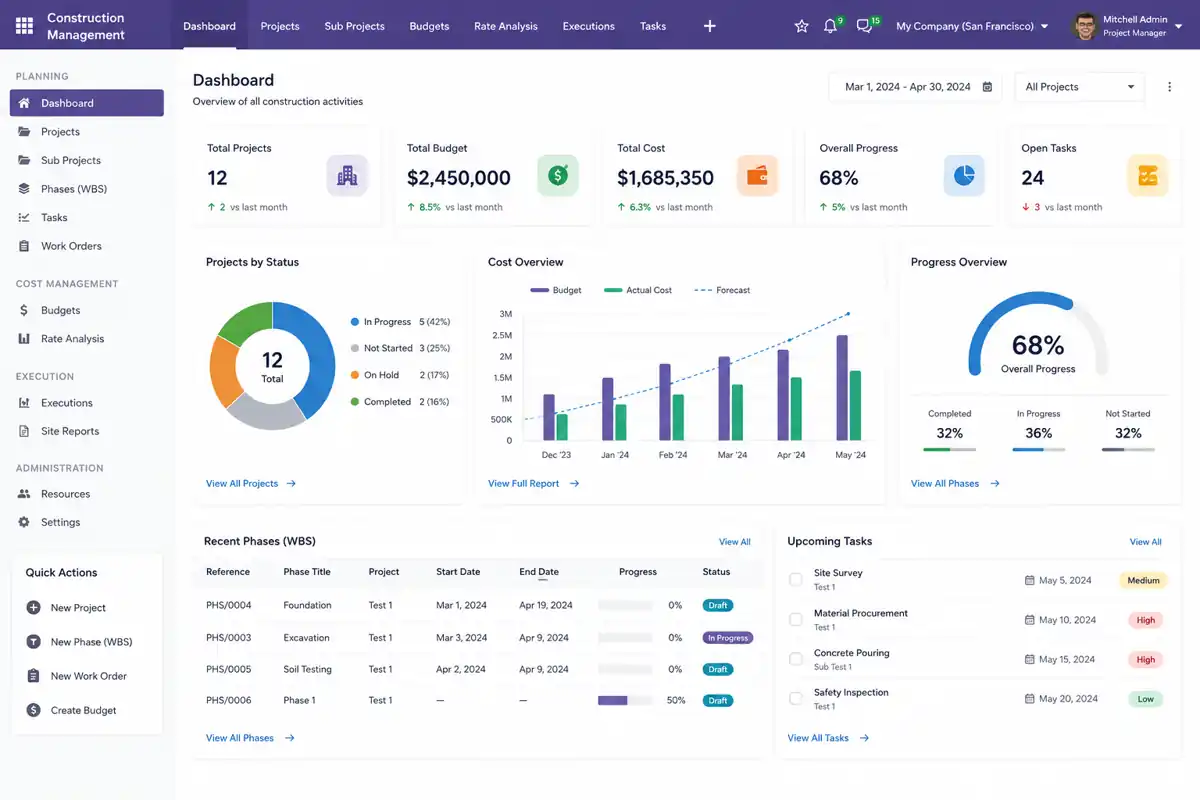
Complete BOQ tracking with quantities, rates, and revisions inside Odoo.
Material requests move through defined approval paths.
Progress billing linked with work updates and project records.
Real-time budget vs actual cost comparison.
A Construction ERP Setup Built for BOQ, Procurement & Site Execution
The project replaced manual construction tracking with a connected Odoo ERP setup for BOQ control, procurement approvals, RA billing, site progress, budget checks, and project reporting. This helped teams reduce manual work, improve approval speed, and gain centralized project visibility.
Industry
Construction & Infrastructure
Managed multi-site construction operations with better control over budgeting, procurement, billing, and site execution.
Solution
Odoo Construction Management ERP
Implemented a connected ERP workflow to manage BOQ revisions, material requests, billing reviews, and project reporting from one system.
Platform
Odoo ERP v19
Built on Odoo ERP v19 with construction-focused workflows configured for daily project, finance, and site operations.
Core Operations
BOQ, Procurement, RA Billing
Connected key construction processes to reduce spreadsheet dependency, manual follow-ups, and scattered approval tracking.
Main Goal
Reduce Manual Project Tracking
Replaced scattered records with structured Odoo workflows to improve approval speed, reduce rework, and simplify project monitoring.
Focus Area
Budget, Billing & Site Control
Improved budget visibility, billing checks, site progress tracking, and project control through one centralized ERP system.
Construction Company Managing Multi-Site Project Operations
The client was a construction and infrastructure business managing BOQ revisions, material requests, subcontractor updates, RA billing, and project cost reviews across multiple active sites.
However, scattered records and manual tracking made it difficult to monitor approvals, control costs, and view project progress clearly. As a result, the company needed a centralized Odoo ERP setup to improve project visibility, streamline approvals, and manage budget and site operations from one system.
Business Type
Construction & Infrastructure
Team Users
Project, Site, Procurement & Finance
Project Type
Multi-Site Operations
Key Need
BOQ, Billing & Budget Control
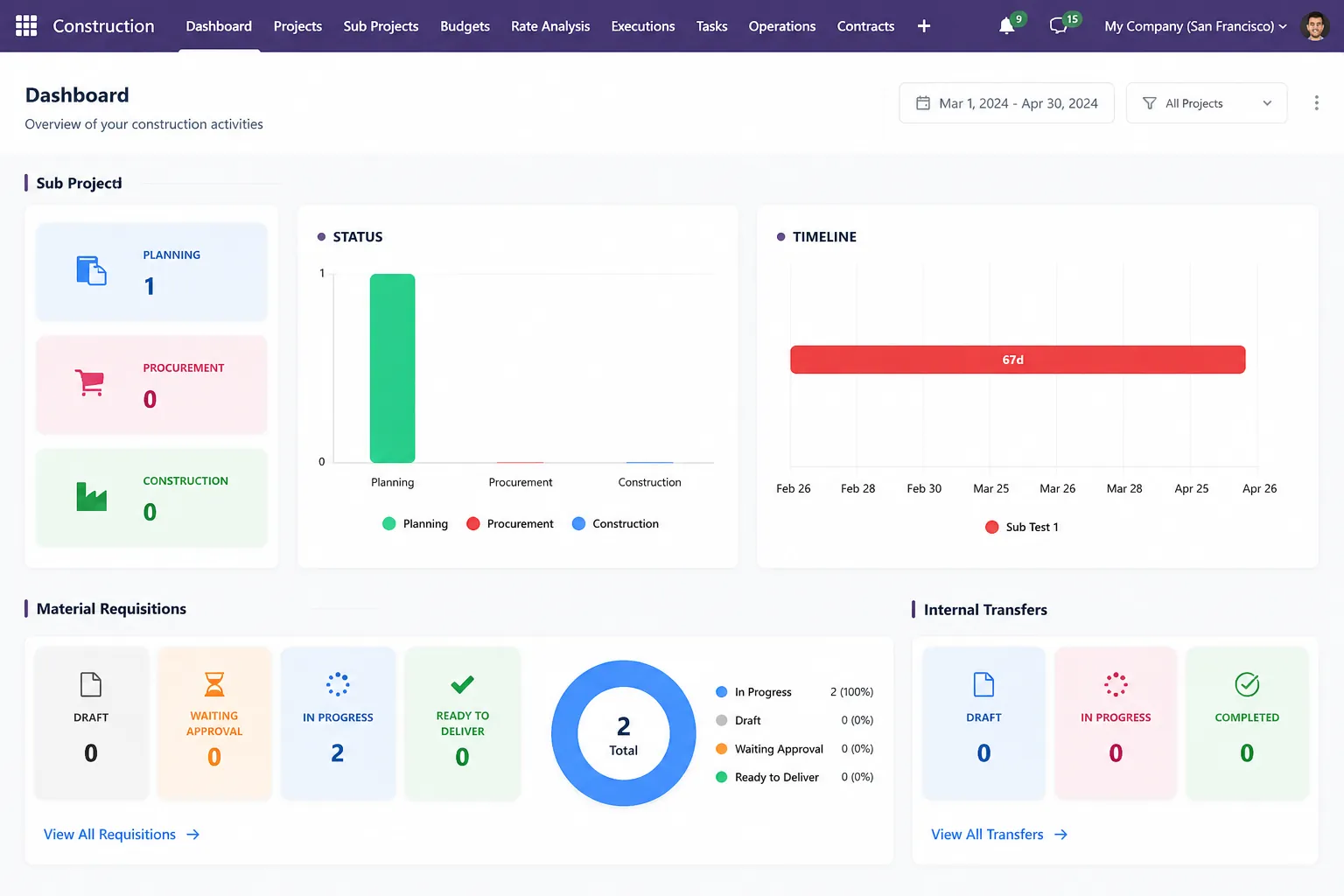
Construction Teams Needed Stronger Control Over BOQ, Procurement & Billing
The main challenge was not only manual data entry. Construction teams also needed a reliable way to connect planning, site execution, material movement, subcontractor work, billing reviews, and budget control. However, scattered records and unclear approval flows created delays, cost errors, poor visibility, and slower decision-making across active project sites.
Manual BOQ Tracking Increased Rework
First, quantity changes, rate revisions, and BOQ updates were handled manually, which increased rework, cost-checking delays, and the risk of budget errors.
Procurement Approvals Had No Clear Trail
Next, material requests did not move through a defined approval path, so teams depended on calls and follow-ups, causing approval gaps and slower procurement decisions.
RA Billing Needed Repeated Verification
Then, finance teams had to verify progress billing against work updates and project records before processing invoices, which delayed billing reviews and affected finance accuracy.
Budget Variance Reviews Took Longer
In addition, project managers could not quickly compare planned costs with actual spending across active work areas, making cost control and decision-making slower.
Subcontractor Records Were Fragmented
Also, work status, billing progress, and subcontractor scope were managed in separate files, reducing visibility and making project coordination more difficult.
Management Reporting Required Manual Compilation
Finally, managers had to collect project status, billing progress, procurement updates, and cost movement from different sources, which slowed reporting and reduced decision clarity.
As a result, these gaps slowed BOQ reviews, delayed material approvals, increased RA billing checks, created cost-control challenges, and reduced project visibility across active construction sites.
How BOQ, Procurement & RA Billing Were Connected Inside Odoo
SDLC Corp configured Odoo Construction Management to centralize BOQ records, material requisitions, procurement approvals, subcontractor updates, work orders, RA billing, and project reporting inside one connected ERP workflow. This helped teams reduce manual checks, improve approval visibility, and manage project cost reviews more accurately.
BOQ & Estimation Setup
BOQ lines, quantities, rate analysis, and estimation details were organized inside Odoo to centralize planning data and reduce repeated cost checks.
Budget vs Actual Cost Review
Project teams compared planned budgets with actual cost movement during execution, helping managers improve cost control and identify budget gaps faster.
Material Requisition Approval Flow
Site teams raised material requests in Odoo, and approvals moved through a defined MREQ workflow to reduce follow-ups and improve procurement visibility.
Work Order & WBS Mapping
Construction stages, work orders, and execution activities were mapped to project-level records for better site tracking and centralized progress monitoring.
RA Billing Review Flow
RA billing data moved through one structured review process, improving billing accuracy, approval visibility, and reducing repeated manual verification across site and finance teams.
Project Reporting Dashboard
Managers reviewed project cost, billing, procurement, and site status from one Odoo dashboard instead of checking separate files and scattered updates.
This setup gave site, procurement, finance, and management teams one centralized workflow for BOQ changes, material approvals, RA billing, project cost reviews, and faster decision-making.
How the Odoo Construction ERP Was Delivered
The implementation followed a structured delivery flow to connect BOQ, procurement, RA billing, work orders, site execution, and reporting inside Odoo. Each step helped validate workflows, reduce manual tracking, improve approval visibility, and prepare users for smooth ERP adoption.
Construction Workflow Review
First, the team reviewed BOQ formats, approval steps, billing checks, subcontractor workflows, and reporting needs to identify manual gaps across active construction sites.
Estimated Duration: 3–5 DaysBOQ & Budget Configuration
Next, BOQ templates, quantity structures, rate analysis, estimation logic, and project budget records were configured inside Odoo for better cost control.
Estimated Duration: 1 WeekMaterial Request & Procurement Flow Setup
Then, material requisitions, approval rules, vendor coordination, purchase records, and procurement tracking workflows were connected to improve approval speed.
Estimated Duration: 1 WeekWork Order & RA Billing Setup
After that, work orders, project stages, subcontractor updates, execution tracking, RA billing reviews, and invoice workflows were mapped inside Odoo to reduce manual checks.
Estimated Duration: 1–2 WeeksTesting, Reporting & Go-Live Preparation
Next, project reports, dashboards, billing checks, workflow testing, and user validation were completed to ensure accurate data and prepare users for adoption.
Estimated Duration: 1 WeekGo-Live Support & User Handover
Finally, the ERP setup was deployed with workflow validation, user guidance, and post-launch support to ensure a smoother transition after go-live.
Estimated Duration: 3–5 DaysAs a result, the construction team moved from scattered manual tracking to validated Odoo workflows with better project visibility, faster approvals, reduced manual effort, and smoother user adoption.
Construction Management Features Configured for Daily Project Work
The Odoo Construction Management setup connected BOQ, cost analysis, budget control, material requests, purchase workflows, work orders, subcontractor records, RA billing, invoices, and project dashboards inside one system. This helped teams reduce manual tracking, improve approval visibility, and control project costs more effectively.
BOQ Management
Manage BOQ items, quantities, rates, revisions, and estimation details in one structured workflow to reduce manual cost tracking.
Rate Analysis
Define and review labor, material, and overhead cost rates to support accurate estimation and better cost planning.
Budget Control
Set project budgets, cost limits, and approval rules to control planned spending before execution starts.
Budget vs Actual Tracking
Compare planned budgets with actual project expenses in real time to identify cost overruns and improve financial control.
Material Requisition
Create and track material requests with quantities, specifications, and approval status for better procurement visibility.
Purchase Workflow
Connect approved material requests with purchase orders and vendor coordination to speed up procurement approvals.
Work Order
Assign work orders, execution tasks, and responsibilities to site teams for better daily project coordination.
WBS Structure
Break large construction work into structured phases, stages, and activities for clearer project tracking.
Subcontractor Management
Track subcontractor work scope, progress updates, billing status, and performance records in one place.
RA Billing
Review running account bills with progress details, billing verification, and approval visibility before invoice processing.
Invoice Management
Connect project invoices with billing records, approvals, and reconciliation details to improve finance accuracy.
Project Dashboard
View BOQ status, material requests, billing progress, budget movement, and site updates from one centralized dashboard.
Technology Stack Used for Odoo Construction Management
The Odoo Construction Management setup used frontend views, backend business logic, PostgreSQL records, approval automation, reporting dashboards, and connected Odoo modules to manage daily construction operations. Together, these technologies supported faster approvals, better cost tracking, centralized reporting, and smoother project workflow integration.
JavaScript, XML & Odoo Views
First, custom Odoo views were built for BOQ forms, billing screens, material request tables, and project dashboards to make daily construction work easier to manage.
Python ORM & Odoo Modules
Next, backend logic was developed to manage project stages, BOQ calculations, budget tracking, approval workflows, and billing processing inside Odoo.
PostgreSQL
In addition, PostgreSQL stored secure project data, BOQ history, billing records, material requests, approval logs, and reporting data for better accuracy.
Approval Rules & Scheduled Actions
Then, approval rules and automated actions helped move material requests, purchase approvals, billing checks, and project updates faster through the workflow.
Project, Billing & Cost Dashboards
Also, dashboards were configured to show project status, budget movement, billing progress, site updates, and financial summaries in one centralized view.
Purchase, Inventory, Accounting & Project Modules
Finally, Odoo modules were connected to link procurement, stock movement, project execution, billing, and accounting for smoother construction ERP operations.
As a result, the technology stack helped construction teams reduce manual tracking, speed up approvals, improve cost visibility, and manage project operations from one connected Odoo ERP system.
What Changed After Odoo Construction Management Went Live
After implementation, the construction team reduced repeated manual checks, improved project visibility, streamlined BOQ, procurement, billing, and budget workflows, and gained better control over connected Odoo records.
50% Faster BOQ Revision Tracking
First, BOQ revision tracking became up to 50% faster because rate changes, quantity updates, and project records were managed through one connected project workflow.
35% Faster Procurement Approval
Next, material request approvals became up to 35% faster after site, purchase, and approval teams used one defined MREQ workflow.
40% Less Manual RA Billing
Then, finance teams reduced repeated RA billing checks by up to 40% because billing records were linked with work progress and project data.
30% Faster Budget Variance Review
Finally, project managers reviewed planned cost and actual spending up to 30% faster using Odoo project and cost dashboards.
As a result, the business reduced manual coordination, reviewed BOQ, procurement, billing, and budget data with more confidence, and improved control across daily construction operations.
Need Odoo Construction Management for Your Business?
Build a centralized Odoo Construction Management system for BOQ, RA billing, procurement approvals, and better project control.
- Contact Us
Let’s Discuss Your Odoo Construction Management
Book a free consultation with SDLC Corp to plan your Odoo Construction Management workflow for BOQ, billing, procurement and project cost control.
What happens next?
- We review your construction workflow
- We check BOQ, billing, and procurement needs
- You get a clear setup roadmap
- NDA Protected
- Enterprise Grade Delivery
- Global Clients


