
How Data AI Ninja Improved Finance Document Processing
A finance team was spending too much time entering data from invoices, receipts, purchase orders, and scanned PDFs. With Data AI Ninja, the team moved to an AI-powered workflow to capture, review, validate, and export clean business data faster.
 Product Hunt Listed
 Trusted Software Partner
 Multiple Products Listed
Project Snapshot Data AI Ninja AI Document Extraction in Action
A quick summary of how the finance team used Data AI Ninja to reduce manual entry and improve document review.
Finance Document Processing Moved from Manual Entry to AI Review
Data AI Ninja helped the finance and operations team extract, review, and validate data from invoices, receipts, purchase orders, PDFs, bank statements, expense claims, and business forms. With AI OCR, field extraction, confidence scoring, human review, and structured exports, the team improved document processing speed, accuracy, and control. Data AI Ninja also uses computer vision for visual document understanding across scanned and image-based records, helping identify document structure, fields, and layout before validation.
Product Used
Data AI Ninja
Product Type
AI Document Extraction Software
Client Type
Finance and operations team
Main Challenge
Manual document entry and slow review process
Core Need
Extract clean data from business documents
Export Options
JSON, CSV, Excel, REST API, and webhooks
Final Outcome
Faster document handling, fewer manual errors, cleaner records, and better review control.
Manual Finance Document Processing Slowed Review and Reporting
The client needed a cleaner way to manage invoices, receipts, purchase orders, and scanned PDFs without relying on repeated manual data entry.
The finance team handled documents across multiple departments every week. These included vendor invoices, receipts, tax files, expense claims, purchase orders, and supporting records.
Most of the work still depended on manual checking. Staff had to read each file, copy key fields, verify values, and update spreadsheets. As document volume increased, this process caused delayed reviews, more correction work, and slower finance reporting.
Heavy Finance Documents
The client handled invoices, receipts, PDFs, and supporting records across teams.
Faster Data Handling
The team needed a quicker way to extract, review, and track document data.
Manual Document Work Slowed Finance Operations Before Data AI Ninja
The finance team needed a faster way to extract, review, and organize data from invoices, receipts, and PDFs. Manual entry made the process slow, repetitive, and difficult to track.
Repeated Manual Entry
The team copied invoice numbers, vendor names, totals, taxes, due dates, and payment details by hand. Because of this, small errors could enter the finance workflow and create extra correction work later.
Slow Document Review
Every file needed manual checking before approval. As a result, invoice processing took longer, and finance reports were often delayed.
Extra Spreadsheet Cleanup
Even after data was collected, the team had to clean and format it before use. This added more work after every document upload.
Basic OCR Was Not Enough
The team had used basic OCR tools before, but those tools only captured raw text. They did not structure the data properly, so staff still had to clean and arrange the output manually.
No Confidence Score
Reviewers could not see which fields needed attention. Therefore, they had to check most values one by one, even when many fields were already correct.
Limited Workflow Visibility
Managers could not easily track document status, reviewer actions, or processing history. This made audits, internal checks, and follow-ups harder to manage.
AI Powered Document Extraction With Data AI Ninja
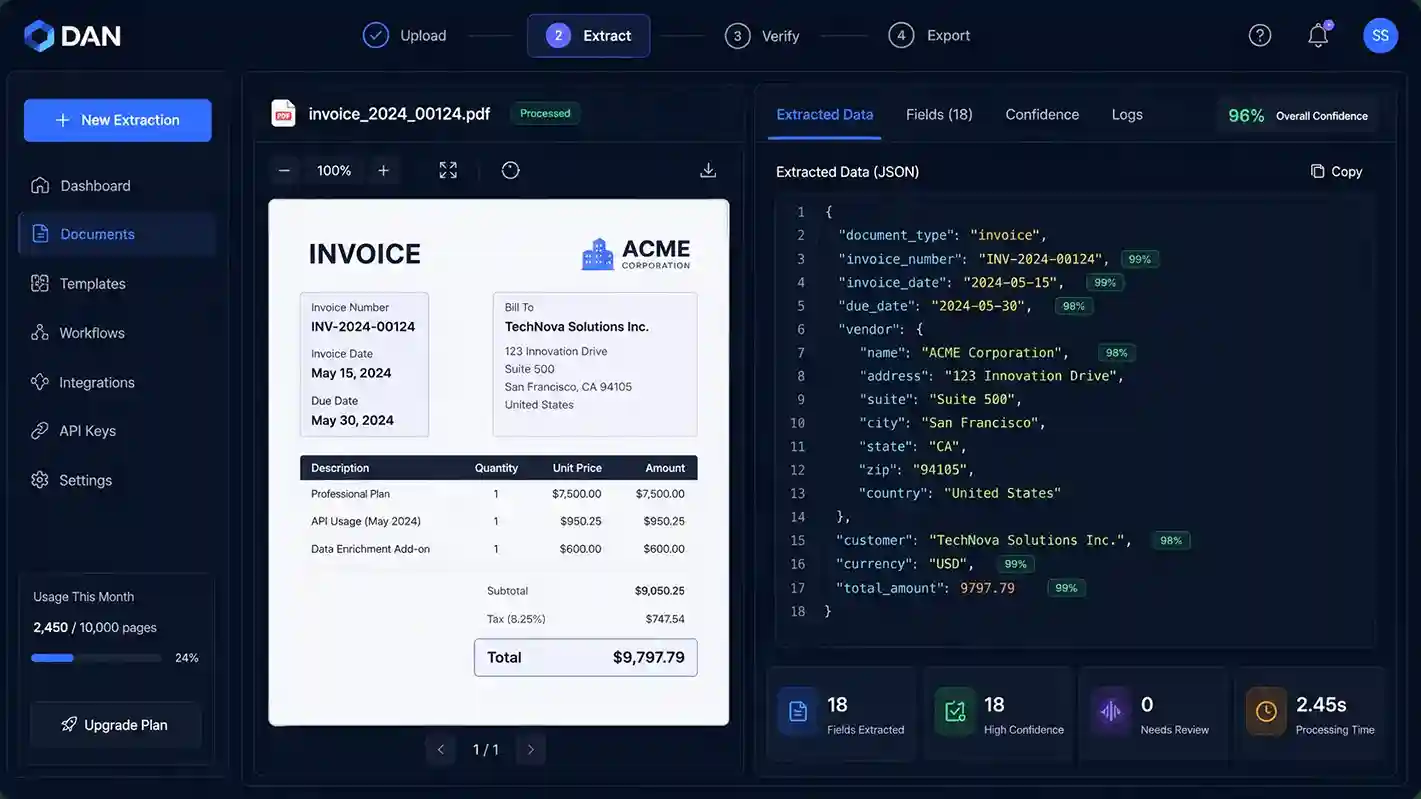
Data AI Ninja helped the client replace manual copy-paste work with a clear document automation flow. Instead of checking every document from scratch, the team could upload files, extract key fields, review flagged values, and export verified data from one platform.
Document Upload and Capture
The team uploaded invoices, receipts, scanned PDFs, bank statements, purchase orders, and forms in one place. This made the process easier because staff no longer had to manage different document types separately.
AI Field Extraction
Data AI Ninja extracted key details such as vendor names, invoice numbers, dates, totals, tax values, due dates, and payment terms. This reduced the need to copy values manually from every file.
Confidence Scoring
Each extracted field showed a confidence score. Because of this, reviewers could focus on values that needed attention instead of checking every field one by one.
Human Review
Reviewers checked extracted data beside the original file before approval. Therefore, the finance team kept control over important records while reducing repeated manual checks.
Validation Checks
The platform helped flag missing values, duplicate files, total mismatches, and other review issues. This improved data quality before export.
Structured Export
After review, the team exported verified data into JSON, CSV, Excel, REST API, and webhook workflows. As a result, clean data could move into finance and operations systems with less manual transfer work.
With Data AI Ninja, the finance team created a clearer process for document upload, AI extraction, field review, validation, and structured export.
How Data AI Ninja Was Set Up
The team followed a clear setup process to move from manual document entry to AI-powered document extraction.
Document Workflow Review
First, the team reviewed its existing process and identified where manual entry, review delays, and data cleanup caused the most problems.
Document Type Setup
Next, Data AI Ninja was set up for invoices, receipts, purchase orders, bank statements, expense claims, contracts, and scanned PDFs.
Field Mapping
Then, the team selected key fields such as vendor name, invoice number, date, total amount, tax value, due date, and payment terms.
Validation Rule Setup
After that, validation checks were added to flag missing fields, wrong totals, duplicate files, and records that needed review.
Human Review Flow
Reviewers checked extracted values before approval. This helped the team keep control over important finance data.
Export and Integration
Finally, verified data was exported into Excel, CSV, JSON, REST API, and webhook workflows for finance and operations use.
Key Features Used in Data AI Ninja
Data AI Ninja helped the team handle invoices and PDFs in one place, instead of checking every file manually.
AI Document Extraction
Extracted structured data from invoices, receipts, contracts, purchase orders, and scanned PDFs.
OCR Confidence Scoring
Showed confidence scores for each extracted field.
Custom Extraction Schemas
Allowed the team to define fields based on its finance workflow.
Multi-Page PDF Processing
Processed long PDFs as complete documents.
Human Verification
Allowed reviewers to check extracted values beside the original document.
Validation Rules
Flagged missing values, duplicate files, and total mismatches.
API and Webhook Support
Moved verified data into connected business workflows.
Audit and Activity Tracking
Tracked document actions, reviewer activity, and process history.
Technology Stack Behind Data AI Ninja
These core technologies helped Data AI Ninja extract document data, review values, validate records, and export clean information into business workflows.
Frontend
User DashboardBuilt with React.js to create a simple dashboard for document upload, field review, confidence scores, and export actions.
Backend
Processing LogicBuilt with Node.js and Express.js to manage document processing, user requests, validation logic, and export workflows.
Database
Structured StorageUsed MySQL to store user data, document records, extracted fields, review status, and export history.
AI OCR Layer
Document ReadingUsed AI OCR to read invoices, receipts, PDFs, and scanned files, then extract key fields from each document.
Review and Validation Layer
Quality ControlHelped reviewers check extracted data, flag missing values, identify low-confidence fields, and approve records before export.
Export and Integration
Business OutputSupported clean data export into Excel, CSV, JSON, REST API, and webhook workflows.
Together, this stack helped Data AI Ninja reduce manual entry, improve review control, and move verified finance data into business systems.
Results
Results and Business Outcomes
Data AI Ninja helped the finance team process documents faster, reduce manual work, and improve review control.
60% Faster Document Processing
The team spent less time reading and copying data from each file. As a result, document work moved from manual entry to guided review.
80% Fewer Manual Entry Errors
Confidence scoring and validation checks helped the team find issues before data moved into downstream systems.
Lower Manual Workload
The platform reduced repeated typing across invoices, receipts, PDFs, and purchase orders. Therefore, team members could focus more on review, approval, and follow-up tasks.
Cleaner Structured Data
Verified data was exported into Excel, CSV, JSON, API, and webhook workflows. This made reporting, record keeping, and system updates easier.
Better Review Accuracy
Reviewers could focus on fields with lower confidence scores instead of checking every value manually.
Stronger Finance Control
Human verification kept approval decisions with the finance team while reducing repeated manual checks.
Overall, Data AI Ninja gave the finance team faster document handling, cleaner structured data, stronger review control, and better workflow visibility.
Ready to Automate Document Extraction With Data AI Ninja?
Turn invoices, receipts, PDFs, and business forms into structured data with AI-powered extraction, validation, and human review. Use Data AI Ninja to reduce manual document work and build a cleaner review process for your team.
- Contact Us
Let’s Talk About Your Product
What happens next?
- We review your requirements
- Strategy call with experts
- Clear roadmap & estimate
- NDA Protected
- Enterprise Grade Delivery
- Global Clients
- By submitting this form, you acknowledge that SDLC Corp may process your details to respond to your inquiry. See our Privacy Policy and Cookie Notice.


