
Odoo Project Cost Management for Budget and Profit Visibility
Track project costs, budgets, expenses, payments, and margins inside one Odoo workflow. With Odoo Project Cost Management, teams can reduce cost leakage, improve billing accuracy, and monitor project profitability in real time.
 Product Hunt Listed
 Trusted Software Partner
 Multiple Products Listed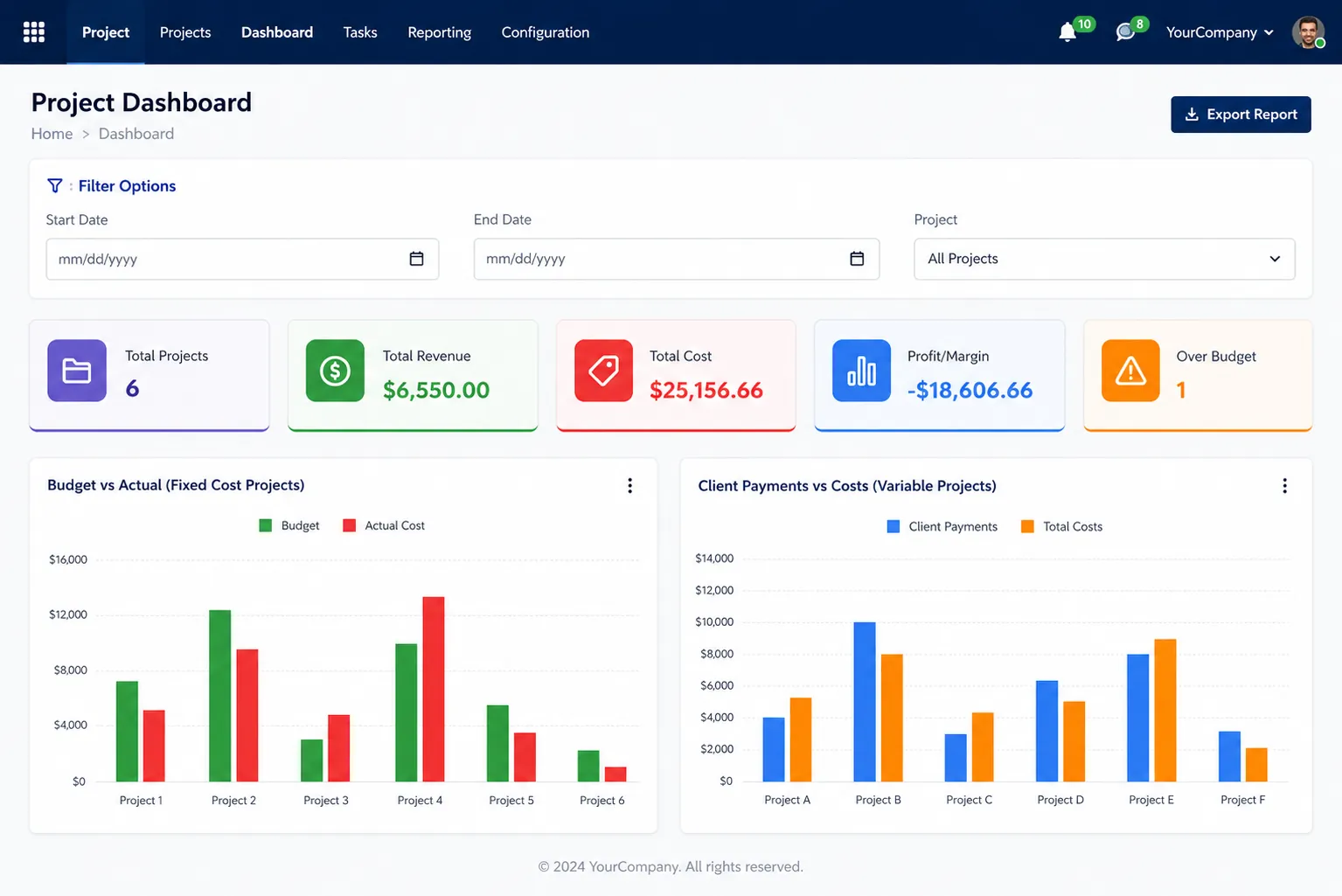
Project Snapshot
Odoo Project Cost Management at a Glance
This section gives a quick view of the client’s project setup, cost tracking challenges, key module usage, and the business goal behind using Odoo Project Cost Management.
Client and Industry Setup
The client was a project-based service business working across IT services, consulting, construction, agency, and service operations.
Platform and Product Used
The team used Odoo Project with Odoo Project Cost Management by SDLC Corp to manage project budgets, employee costs, extra expenses, payments, and margins in one workflow.
Main Cost Tracking Challenge
Project cost details were not easy to review from one place. This made budget review, employee cost checking, payment tracking, and margin analysis more time-consuming.
Core Features Used
The client used budget tracking, timesheet costing, extra cost tracking, payment tracking, and a cost dashboard to review project financial data more clearly.
Business Goal and Result Focus
The goal was to improve project cost control, speed up budget review, reduce manual cost checking, and give teams better profit margin visibility.
Focused on Better Profit Visibility
The setup helped the team bring budget usage, employee costs, additional expenses, payment records, and margin review into one Odoo workflow.
Client Background
Managing Project Financial Data Inside Odoo
The client managed multiple active projects in Odoo, but cost details were not centralized in one dashboard. This made it difficult to review budgets, employee costs, added expenses, payment records, and profit status quickly.
Managers had to check approved budgets, employee hours, additional costs, and payment records separately.
As projects increased, the team needed one clear Odoo workflow to track cost movement, payment status, budget usage, and margin performance without depending on scattered records.
Scattered Project Cost Details Slowed Review
Budget details, employee costing, added expenses, and payment records were not reviewed from one place. This made project cost tracking slower and less transparent.
Manual Cost Review Delayed Decisions
Managers had to check multiple records again and again before understanding whether a project was profitable, over budget, or safe on cost.
The Challenge
Manual Project Cost Tracking Slowed Financial Review
The team tracked project data in Odoo, but budget usage, cost details, and payment records still needed separate review. This delayed decisions, increased manual errors, and made real-time project cost status harder to understand.
No Clear Budget vs Actual View
Approved budgets were planned, but actual spending was not easy to compare quickly. This slowed cost reviews, made budget gaps harder to identify early, and increased the risk of budget leakage.
Manual Labor Cost Checking
Employee work hours were available, but the team still reviewed extra calculations to understand time-based costs. This slowed project costing and increased manual error risk.
Additional Expenses Were Hard to Review
Non-labor costs such as travel, added materials, and extra project expenses were not always linked clearly with each project. This affected final margin calculation and made cost leakage harder to catch.
Client Payment Records Were Not Clearly Connected
Teams often reviewed client payments separately from total project spending. This made income review less clear and delayed accurate profit tracking.
Profit Review Happened Too Late
Managers often reviewed profit after preparing manual reports. By that time, unclear margins, missed expenses, or budget gaps had already affected the project.
Too Much Spreadsheet Dependency
Finance and project teams used separate sheets for budget checks, cost review, and reporting. This created duplicate work, increased manual errors, and slowed financial decisions.
Overall, the team needed one connected Odoo workflow to review budget usage, employee costs, additional expenses, client payments, and project margins without repeated manual checks.
The Solution
Better Cost Control with Odoo Project Cost Management
To solve the challenge, SDLC Corp connected project budgets, timesheet-based costing, extra costs, payment records, and margin review within a single Odoo workflow. With this setup, managers reduced manual review, improved margin visibility, and made faster project cost decisions.
Budget Tracking Inside Odoo
After that, approved budgets were added inside Odoo, so managers could compare planned costs with actual spending.
Timesheet-Based Labor Costing
Employee hourly costs were linked with logged timesheet hours. This helped managers see how work hours affected total project cost and profit.
Extra Cost Tracking by Project
Additional expenses were added directly to the project record. This helped finance teams review non-labor costs without searching through separate records.
Client Payment Tracking
Client payments, installments, and payment records were tracked against each project. This helped the business compare received payments with project spending.
Financial Dashboard
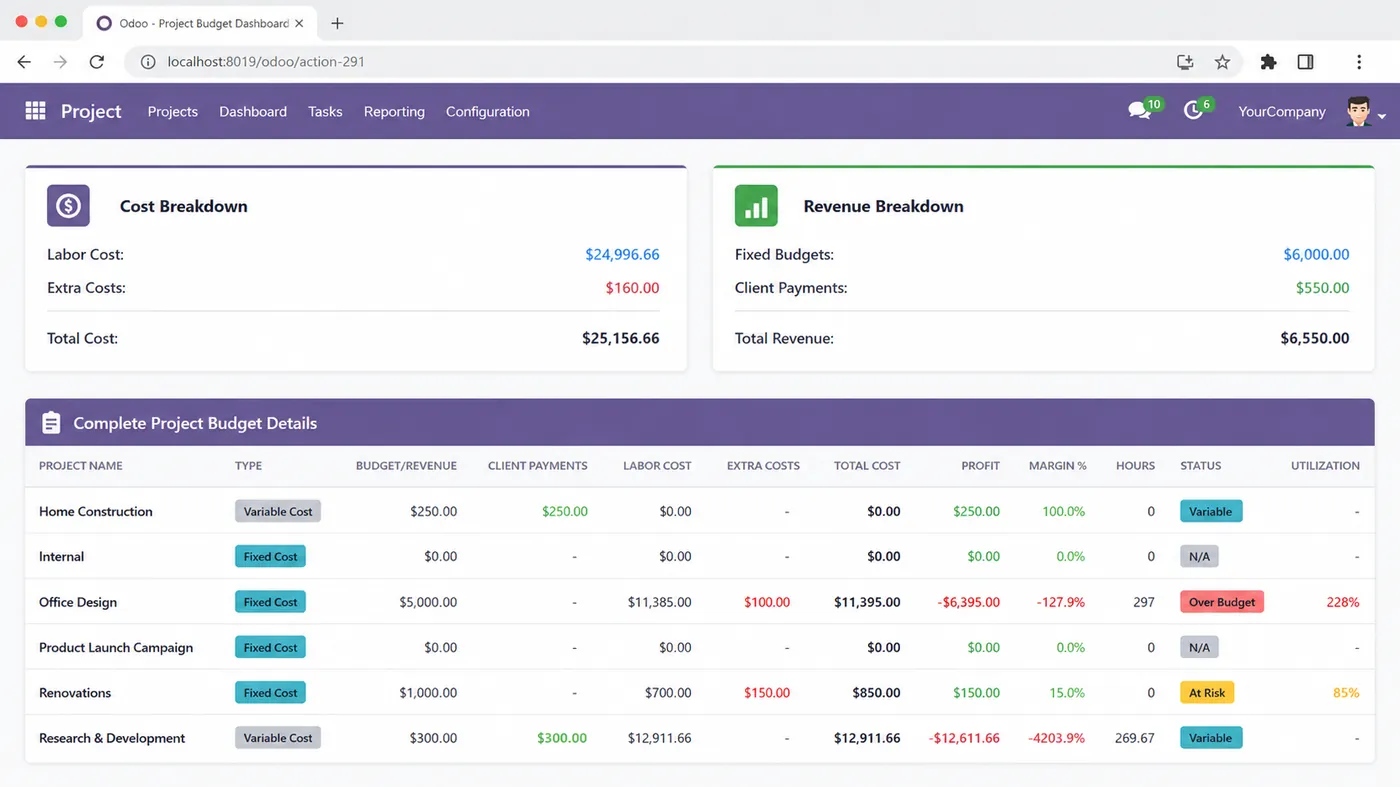
The dashboard showed important cost details in one place, including approved budget, actual cost, income, profit, margin, logged hours, and over-budget status.
Project-Wise Cost Monitoring
The team could review each project separately and understand which projects were healthy, which needed cost control, and which were moving beyond the planned budget.
This solution helped the team reduce manual cost review, improve budget control, track project margins clearly, and make faster financial decisions inside Odoo development.
Implementation Process
Implementation Process for Odoo Project Cost Management
SDLC Corp configured the module through a step-by-step setup to help the client review project costs, budgets, payments, labor costs, and margins directly from Odoo. Each step focused on improving cost visibility, reducing manual review, and making project financial tracking easier.
Odoo Project Cost Module Installation
SDLC Corp installed the Odoo Project Cost Management module in the client’s Odoo setup to start centralized project cost tracking.
Project Cost Type Setup
The team marked each project as fixed-cost or variable-cost based on the client’s working model. This created a clearer structure for budget and margin review.
Budget Configuration
The team added approved budgets for fixed-cost projects so managers could compare planned costs with actual spending and identify budget gaps earlier.
Employee Hourly Cost Setup
SDLC Corp reviewed employee hourly cost details so Odoo could calculate labor cost from timesheet hours and show clearer project cost impact.
Additional Cost and Payment Setup
The team enabled additional cost and client payment tracking inside the project workflow. This helped finance teams review expenses, payments, and margins from one place.
Cost Dashboard Review
The team reviewed KPI cards, budget charts, cost breakdowns, margin details, and over-budget alerts to support faster financial review.
Project-Wise Cost Monitoring
After setup, the client reviewed project cost, profit, budget usage, and margin directly from Odoo for better cost control and clearer financial decisions.
This implementation process helped the client improve cost visibility, reduce manual financial review, track project margins more clearly, and make faster project cost decisions inside Odoo.
Core Features
Core Features Used in the Odoo Project Cost Management Module
The client needed a practical cost tracking setup inside their existing Odoo project flow. These features helped improve cost visibility, speed up financial review, track margins clearly, and manage project profitability with better control.
Fixed-Cost and Variable-Cost Project Setup
The team marked each project as fixed-cost or variable-cost based on the project model. This helped managers review budgets, spending, and profitability more accurately.
Project Budget Tracking
Approved budgets were added for fixed-cost projects and compared with actual project spending. This helped teams identify cost gaps earlier and improve budget control.
Timesheet-Based Labor Costing
Employee costs were calculated using hourly rates and logged work hours. This helped teams understand how labor hours affected total project cost and profit margin.
Extra Cost Management
Additional expenses were recorded with project-level details, making non-labor cost review easier. This helped reduce missed expenses and improved margin clarity.
Client Payment Tracking
Client payments and payment records were added to the project, helping teams compare received income with project spending and review profitability faster.
Project Financial Dashboard
In addition, the dashboard showed budget usage, actual cost, income, profit, and margin.
Together, these features helped the client improve project cost visibility, reduce manual financial review, track profit margins clearly, and manage project profitability inside Odoo.
Technology Architecture
Technology Used Behind the Module
The module used Odoo Project, Odoo Employees, Odoo Discuss, Python ORM, PostgreSQL, timesheet data, dashboard views, and reporting logic to support accurate project costing, smoother data flow, faster cost review, and clearer margin reporting.
Odoo Project
Managed project records, project type, budgets, and cost details in one structured Odoo workflow. This helped teams review project financial data without switching between separate tools.
Odoo Employees
Stored employee details and hourly cost values to support accurate labor cost calculation. This helped connect timesheet hours with real project cost impact.
Odoo Discuss
Supported internal Odoo workflow communication and helped teams manage project-related updates more smoothly during cost review and approvals.
Python ORM
Managed cost logic, calculations, business rules, and data flow across the custom module. This helped keep project costing accurate, structured, and easier to maintain.
PostgreSQL
Stored budgets, employee costs, additional expenses, payment records, and dashboard data securely. This supported accurate reporting, faster cost review, and reliable project financial tracking.
Timesheet Data
Helped calculate labor cost from logged work hours and gave teams clearer project spending details. This improved visibility into how employee time affected margins.
Odoo Dashboard
Displayed KPIs, cost breakdowns, profit, margin, and budget status in one view. This helped managers review project performance faster and make better cost decisions.
Filters and Tables
Helped teams review project-wise and date-wise cost data through clear tables and filters. This made reporting faster and improved financial review accuracy.
Together, these technology layers helped the module deliver smoother project cost data flow, accurate labor and expense tracking, faster dashboard reporting, and clearer project profitability review inside Odoo.
Results
Results After Using Odoo Project Cost Management
The team reduced manual reporting work and gained a clearer way to review budget usage, labor costs, additional expenses, payment records, profit, and margins from one Odoo workflow.
Less Manual Reporting Work
The team reduced spreadsheet use because project cost details became available inside Odoo. This made financial review faster and easier to manage.
35% Faster Labor Cost Review
Timesheet-based costing helped the team understand how employee hours affected total spending and project margin with less manual checking.
Easier Extra Expense Tracking
Additional expenses were recorded inside project records. This reduced confusion and helped the finance team review non-labor costs more clearly.
Stronger Client Payment Review
Payment records were connected with each project. This helped the business compare received payments with total project spending more easily.
40% Faster Profit and Margin Checking
Profit, margin, total cost, and income data became easier to review from the dashboard. This helped managers check project cost health faster.
Clearer Budget vs Actual Review
Project managers could compare approved budgets with actual spending from one place through a structured Odoo implementation. This helped them identify budget gaps earlier.
Teams gained a faster and clearer way to review project budgets, labor costs, extra expenses, client payments, profit, and margins from one connected Odoo customization workflow.
Need Better Project Cost Control in Odoo?
SDLC Corp helps businesses track project budgets, labor costs, extra expenses, client payments, and margins from one clear Odoo workflow.
- Get Started
Let’s Connect Your Project Cost Tracking in Odoo
Get expert guidance on project budget tracking, labor cost review, extra expense management, payment tracking, and profit margin reporting inside Odoo.
What happens after you submit?
- Project cost tracking and reporting requirement review
- Consultation with Odoo implementation specialists
- Setup guidance for budget, cost, payment, and margin tracking
- Secure Integration
- Odoo-Ready
- Global Clients


