
BigCommerce Odoo Connector for Faster Ecommerce ERP Sync
Move your BigCommerce store data into Odoo for faster order processing, accurate inventory updates, and easier shipment tracking. BigCommerce Odoo Connector is built for teams that want fewer manual checks and better ERP control.
 Product Hunt Listed
 Trusted Software Partner
 Multiple Products Listed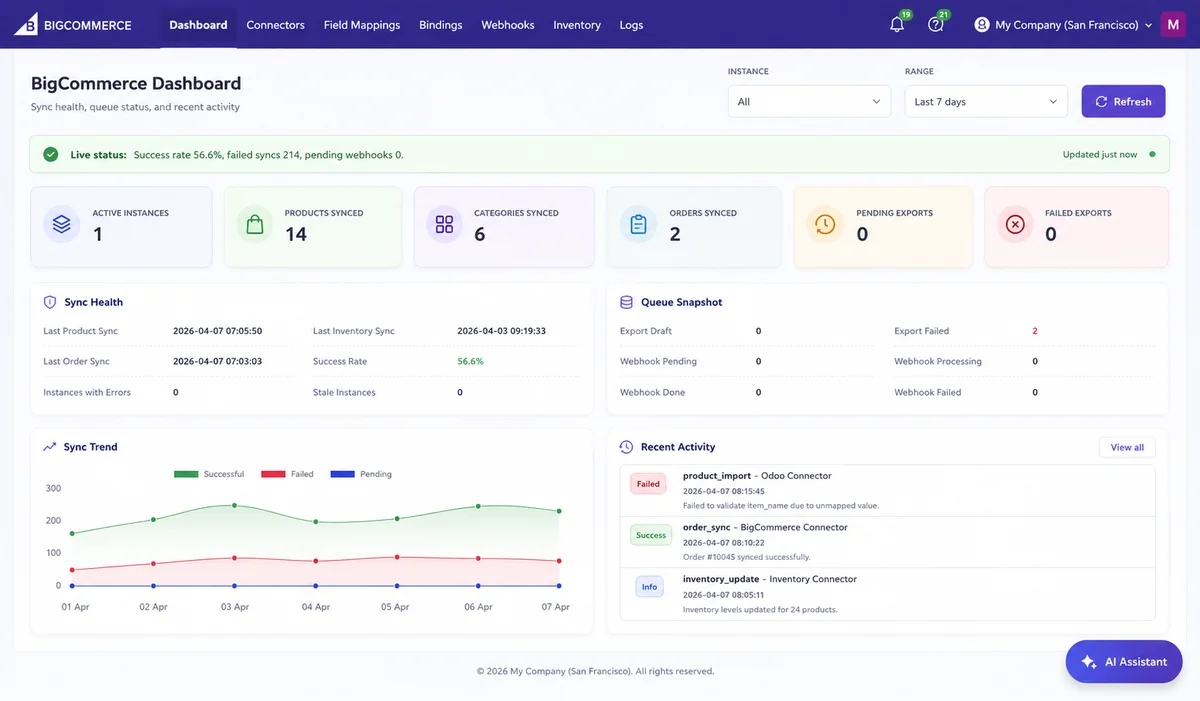
Project Snapshot
BigCommerce Odoo Connector at a Glance
A quick overview of the client type, ecommerce setup, core sync areas, business goal, and result focus behind using BigCommerce Odoo Connector.
Client Type
Ecommerce, D2C, retail, or multi-store online business
Industry Fit
Online retail, fashion, electronics, health products, home goods, B2B commerce, and marketplace-led brands
Platforms Used
BigCommerce + Odoo
Product Used
BigCommerce Odoo Connector by SDLC Corp
Main Challenge
Teams handled store and ERP data separately, which caused duplicate checks and slower updates.
Core Sync Areas
Products, orders, customers, categories, inventory, and shipments. Also included field mapping, webhooks, and sync logs for better sync control.
Business Goal
Manage BigCommerce operations inside Odoo with less manual effort
Security Focus
API-based connection, authorized access, admin-managed setup, and controlled sync activity
Business Outcome
Faster order processing, accurate inventory updates, fewer manual checks, and stronger sync visibility across BigCommerce and Odoo.
Client Background
An Ecommerce Team Needed One Clear BigCommerce and Odoo Workflow
The client managed online sales through BigCommerce and backend operations through Odoo. Their team handled product updates, customer records, stock checks, order processing, and shipment follow-ups every day.
As order volume increased, the separate workflow became harder to manage. Store teams checked BigCommerce for new orders, while warehouse teams used Odoo for stock and fulfillment.
They needed a BigCommerce Odoo Connector to reduce manual order checks, sync BigCommerce store data with Odoo, prevent inventory mismatch, avoid order delays, and improve visibility across sales, stock, and fulfillment.
Separate Store and ERP Checks
Teams had to review BigCommerce and Odoo separately for orders, stock, customer records, and fulfillment updates.
Need for One Connected Workflow
The client needed a smoother way to sync store data into Odoo and reduce repeated checks across daily ecommerce operations.
The Challenge
Operational Challenges Before Connecting BigCommerce With Odoo
Before using the BigCommerce Odoo Connector, the team managed store and ERP records in different systems. As a result, manual checks increased, order processing slowed, and inventory visibility became limited.
Product Records Needed Repeated Updates
The team updated product names, variants, prices, categories, and stock details in both BigCommerce and Odoo. Because of this, catalog work took more time.
Orders Took Longer to Process
New BigCommerce orders did not sync automatically into Odoo ERP. Therefore, the team had to check order details manually before fulfillment.
Inventory Mismatch Created Operational Risk
Stock updates were not always aligned between BigCommerce and Odoo. As a result, the team faced stock mismatch and delayed dispatch risks.
Customer Records Were Harder to Review
Customer details were not available in one place. So, sales and support teams had to check both systems for order follow-ups.
Shipment Updates Needed Manual Follow-Up
Shipment and tracking updates were not always updated automatically. Because of this, delivery queries took longer to answer.
Failed Sync Records Were Not Easy to Track
The team could not review failed syncs and missed records easily. Without clear logs, issue checking took more time.
Overall, the team needed one connected workflow to sync BigCommerce data into Odoo ERP, reduce manual checks, avoid delays, and improve inventory visibility.
The Solution
SDLC Corp Connected BigCommerce Store Data with Odoo ERP
SDLC Corp implemented the BigCommerce Odoo Connector to support smooth Odoo Integration between BigCommerce store data and Odoo ERP workflows.This gave the team one Odoo-based workflow to review store records, process orders, update stock, and track shipments with fewer repeated platform checks.
Store Data Synced into Odoo
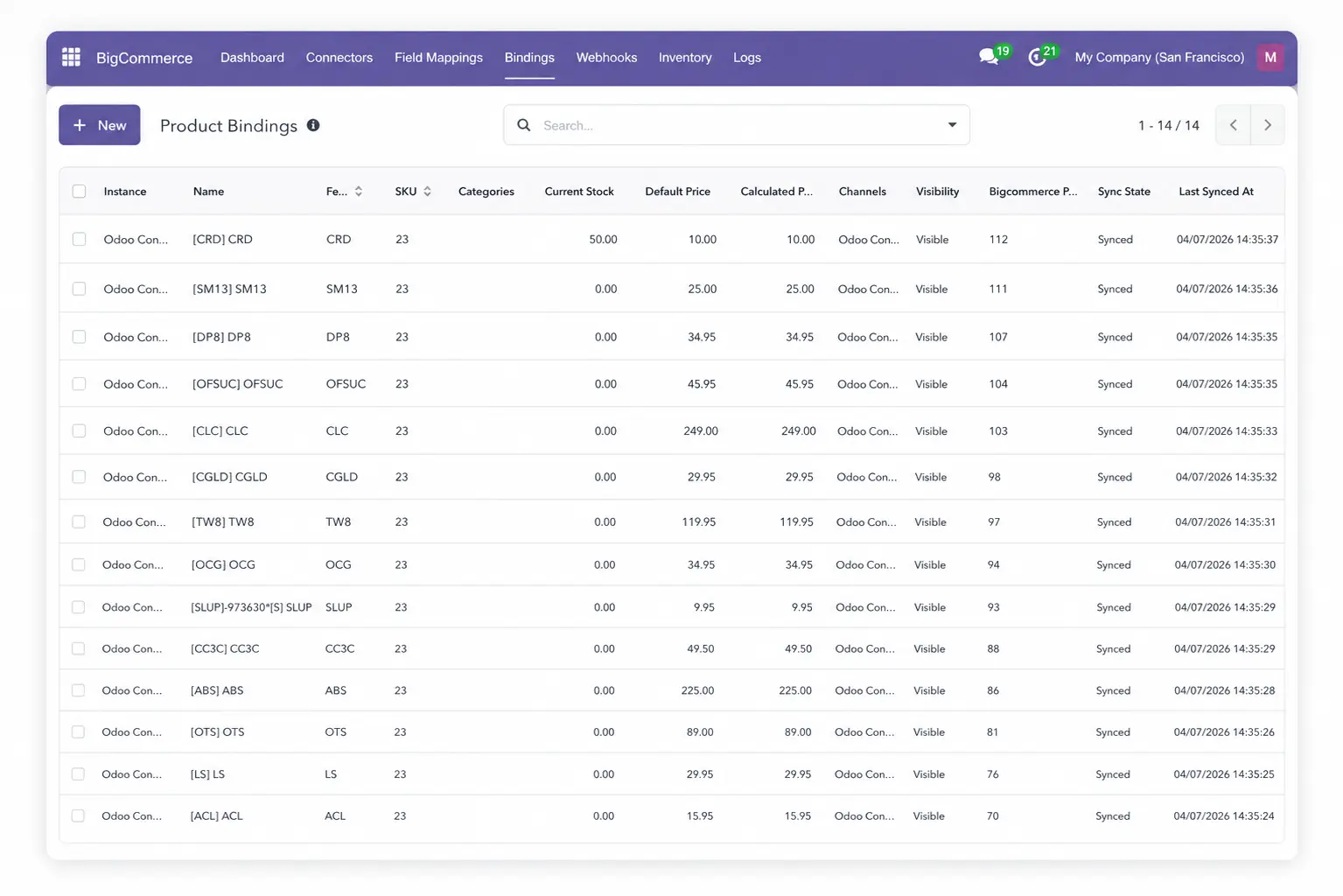
Product, customer, category, order, inventory, and shipment records were synced from BigCommerce into Odoo for easier backend review.
Orders Automatically Synced into Odoo ERP
BigCommerce orders were automatically synced into Odoo ERP with mapped customer and product details, reducing manual order checks.
Product and Category Records Became Cleaner
Product names, SKUs, variants, categories, and catalog details were easier to review inside Odoo.
Inventory Updates Became Easier to Track
Stock updates were easier to compare between BigCommerce and Odoo, reducing inventory mismatch risk.
Shipment Review Became More Organized
Shipment and delivery updates became easier to track after dispatch, helping support teams answer customer queries faster.
Sync Issues Became Faster to Review
Sync logs helped users check failed records, successful syncs, and pending updates without searching through multiple systems.
This solution helped the team manage BigCommerce operations inside Odoo with cleaner data, faster order processing, better stock accuracy, and easier sync monitoring.
Implementation Process
How the BigCommerce Odoo Connector Was Set Up
The implementation followed a clear step-by-step process. This helped the team connect BigCommerce with Odoo, test data movement, and start daily ecommerce operations with more confidence.
Install the Connector
During the Odoo Implementation process, the team installed the connector, added BigCommerce API details, configured field mapping, and tested sync activity. This created the base setup needed to connect BigCommerce store data with Odoo workflows.
Connect BigCommerce API Details
The team added the required BigCommerce API details inside Odoo. This allowed Odoo to communicate with the BigCommerce store.
Create the Store Instance
The team created a BigCommerce store instance inside Odoo. This helped manage store-specific settings and prepared the connector for daily sync activity.
Configure Field Mapping
Product, order, customer, category, and inventory fields were mapped between BigCommerce and Odoo. This helped the team match store data with the right Odoo fields.
Import Products and Categories
The team synced product and category data into Odoo. This gave backend users a more controlled workflow to manage catalog records from the ERP side.
Import Customers and Orders
The team imported BigCommerce customer and order records into Odoo. This helped sales and fulfillment teams process store orders through Odoo workflows.
Test Inventory Sync
The team tested stock updates between Odoo and BigCommerce. This helped confirm that inventory data stayed more accurate across BigCommerce and Odoo
Enable Webhook-Based Updates
Webhook support helped the team process store events faster. This reduced delays in product, order, inventory, and customer updates.
Review Sync Logs
The team reviewed sync logs and operation reports to check successful and failed records. This improved troubleshooting and gave the team better control over daily sync activity.
This implementation process helped the team connect BigCommerce with Odoo, manage store data more clearly, reduce repeated checks, and improve daily ecommerce sync control.
Core Features Used
Key Features That Improved BigCommerce and Odoo Workflows
The team used the connector’s core features to reduce repeated work and manage BigCommerce operations inside Odoo.
Product Sync
The connector synced products, SKUs, variants, categories, and pricing with Odoo ERP. As a result, catalog data stayed more accurate.
Order Sync
BigCommerce orders synced automatically into Odoo ERP. Therefore, the team processed orders faster with fewer manual checks.
Customer Sync
Customer records synced into Odoo ERP. Because of this, sales and support teams reviewed customer details faster.
Category Sync
Product categories synced between BigCommerce and Odoo ERP. This kept the catalog more organized.
Inventory Sync
Stock updates synced across both systems. As a result, the team reduced stock mismatch risk.
Shipment and Delivery Workflow
Shipment and tracking details synced into Odoo ERP. So, the team tracked fulfillment faster and answered delivery queries easily.
Multi-Instance Support
The connector supported multiple BigCommerce stores inside Odoo ERP. This helped the team manage multi-store operations better.
Field Mapping
Field mapping helped match BigCommerce fields with Odoo fields, making it useful for ecommerce businesses that need Odoo Customization.
Webhooks
Webhooks automated order, product, customer, and inventory updates. Because of this, daily data stayed updated with fewer delays.
Together, these features reduced manual entry, improved inventory accuracy, sped up fulfillment tracking, and gave the team better control inside Odoo ERP.
Technology Stack
Technology Stack Behind the BigCommerce Odoo Connector
The connector used BigCommerce APIs, Odoo Development, backend modules, field mapping, webhooks, inventory sync, and operation logs to manage ecommerce data between BigCommerce and Odoo
JavaScript
Handles Odoo interface actions, dashboard views, sync buttons, and operation reports for connector users.
Python ORM
Manages sync logic, store instances, field mapping, Odoo workflows, and BigCommerce connector records.
BigCommerce APIs
Connects BigCommerce with Odoo through API-based data exchange for products, customers, orders, categories, and inventory.
PostgreSQL
Stores synced product, customer, order, inventory, category, mapping, and log records inside the Odoo database.
Webhooks
Processes BigCommerce events and helps update product, order, inventory, and customer data faster inside Odoo.
API Authentication
Controls access between BigCommerce and Odoo using authorized API connection details and admin-managed setup.
Results
Results After Using BigCommerce Odoo Connector
After implementation, the team gained a clearer way to manage BigCommerce store activity from Odoo. The main improvements came from faster order handling, cleaner stock updates, fewer manual checks, and better sync visibility.
40% Faster Order Processing
BigCommerce orders moved into Odoo sales workflows with mapped customer and product details. This helped the team review and process BigCommerce orders inside Odoo without checking order details again and again.
Cleaner Product Management
The team managed product and category data more clearly between BigCommerce and Odoo. The team reduced repeated catalog updates and kept product records more organized.
30% Better Inventory Review
Inventory sync helped the team keep stock levels more consistent across both systems. This reduced stock mismatch risk and gave the operations team better control over product availability.
Easier Customer Record Review
Customer data from BigCommerce synced into Odoo. Sales and support teams could review customer details faster during order checks and follow-up work.
Improved Fulfillment Visibility
The team tracked shipment and delivery updates through Odoo with less manual follow-up. This helped support users check order progress faster after fulfillment.
Stronger Sync Monitoring
Sync logs helped the team review successful and failed sync activity. This improved troubleshooting and gave the team more confidence during daily ecommerce operations.
Overall, the connector helped the team manage BigCommerce operations inside Odoo with faster order handling, cleaner product records, better inventory control, improved fulfillment visibility, and stronger sync monitoring.
Need Faster BigCommerce and Odoo Data Sync?
Need expert help? Hire Odoo Developer support from SDLC Corp to connect BigCommerce with Odoo and manage product, order, inventory, and shipment sync.
- Get Started
Let’s Connect Your BigCommerce Store With Odoo
Get expert guidance on BigCommerce Odoo integration, product sync, order sync, inventory updates, shipment tracking, and ERP workflow setup.
What happens after you submit?
- BigCommerce and Odoo sync requirement review
- Consultation with Odoo integration specialists
- Setup guidance for products, orders, customers, inventory, and shipments
- Secure Integration
- Odoo-Ready
- Global Clients


