
Odoo Chatter Position Module for Flexible Chatter Layouts
Make long Odoo forms easier to review with flexible chatter placement. Odoo Chatter Position lets users set chatter on the side, bottom, or responsive view. It helps teams check records, notes, and activities with better context.
 Product Hunt Listed
 Trusted Software Partner
 Multiple Products Listed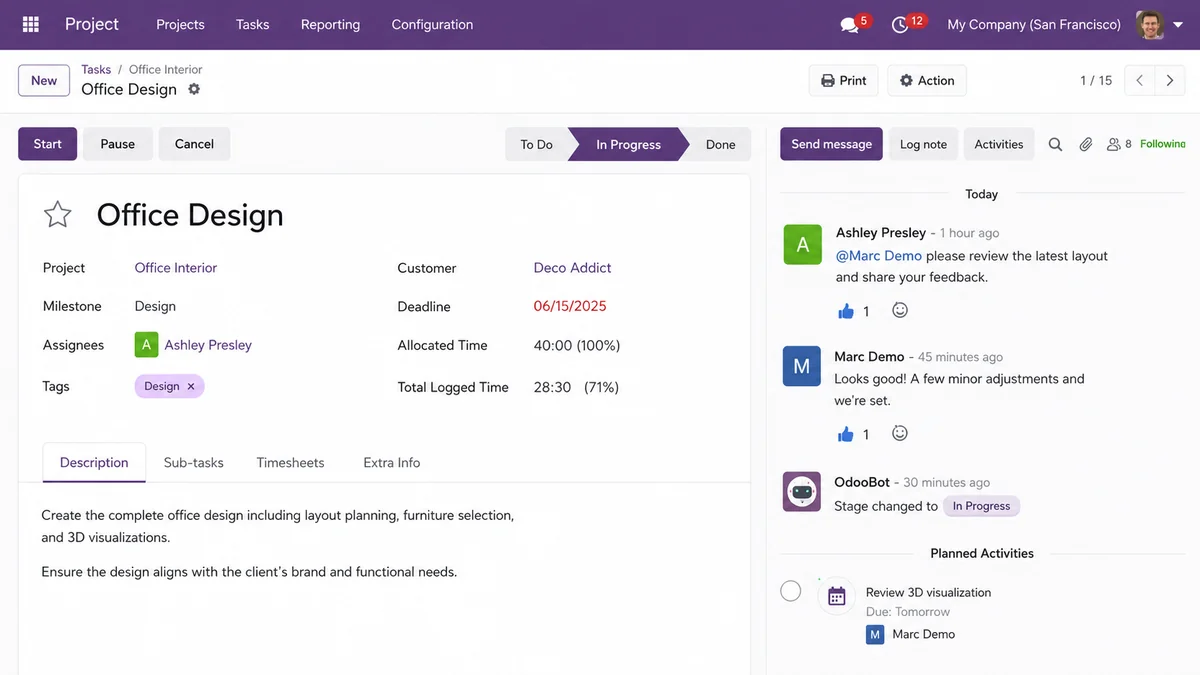
Project Snapshot
Project Snapshot for Odoo Chatter Position Module
Here is a clear snapshot of the client’s workflow issue, the module used, and the final workspace improvement.
Client Type
Odoo ERP users and internal business teams.
Platform
Odoo 18.
Product Used
Odoo Chatter Position Module.
Main Challenge
Fixed chatter placement, extra scrolling, limited screen usage, and reduced form clarity.
Core Features Used
Side chatter, bottom chatter, responsive chatter layout, user preferences, and modern chatter styling.
Business Goal
Improve Odoo form view layout and make record review easier.
Final Outcome
Users gained better control over chatter placement and improved form readability across key Odoo apps.
Client Needs
Client Needs for Better Odoo Form Visibility
The client used Odoo for daily operations across CRM, Sales, Accounting, Inventory, Purchase, and Project workflows. Their team opened long records every day, including quotations, invoices, vendor bills, tasks, stock transfers, and customer records.
Before using the module, users worked with a fixed chatter position. This made it harder to review form fields and communication history together.
Users often moved up and down the page to check details, messages, notes, and scheduled activities. The client needed a simple Odoo workspace improvement that did not change business logic.
Fixed Chatter Position Reduced Form Clarity
Users could not review form fields and chatter details comfortably in one view. This made long Odoo records harder to check during daily work.
Repeated Scrolling Slowed Record Review
Teams had to move up and down the page to check notes, activities, messages, and record details, which made review slower and less convenient.
The Challenge
Challenges Before Using Odoo Chatter Position Module
The standard chatter layout made daily work less comfortable for users who handled long Odoo forms and record-heavy workflows.
Fixed Chatter Layout Did Not Fit Every User
The same chatter position was used across different users, screens, and workflows. However, sales, accounting, inventory, and project teams did not always need the same layout.
Long Forms Needed More Scrolling
Users had to scroll between record fields and chatter updates. This became more noticeable on invoices, quotations, purchase orders, tasks, and stock transfers.
Form Data and Chatter Felt Separated
Users often needed record details and communication history at the same time. When chatter was not placed well, they lost context during review.
Wide Screens Were Not Used Properly
Some users worked on larger monitors, but the default layout did not always use that extra space well. As a result, the form still felt crowded during daily work.
Smaller Screens Needed Better Adjustment
Users also accessed Odoo from tablets and smaller screens. Therefore, the chatter position needed to adjust without making the form difficult to read.
User Layout Choices Were Limited
Different users had different work habits. Some preferred side chatter for faster review, while others needed bottom chatter for wider form space.
Overall, the team needed a flexible Odoo chatter layout that could support long forms, different screen sizes, and user-level layout preferences.
The Solution
Improving Odoo Form Reviews With Flexible Chatter Positioning
The team used the Odoo Chatter Position Module to improve chatter placement without changing existing Odoo workflows. This gave users more control over how they viewed form data and communication activity.
Side Chatter for Faster Record Review
Side chatter placed messages, notes, activities, and attachments beside the form. This helped users check record details and communication history in one view on wider screens.
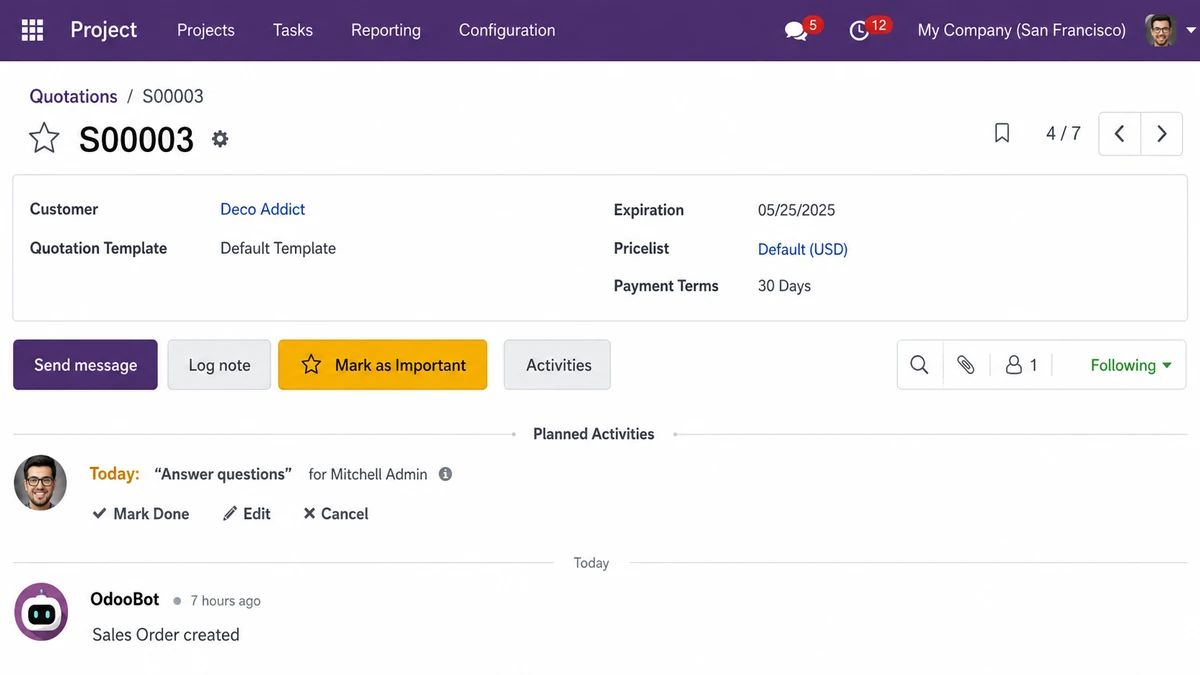
Bottom Chatter for More Form Space
Bottom chatter gave users more horizontal space for long forms, line items, and detailed fields. This worked well for invoices, quotations, purchase orders, and accounting records.
Responsive Chatter Layout for Different Screens
The responsive layout adjusted the chatter position based on screen size. On larger screens, users could use side chatter. On smaller screens, chatter moved to a more suitable position for easier reading.
User-Level Preference Control
Each user could choose a preferred chatter position from profile settings. This avoided forcing one layout across the full team and gave every user a more comfortable workspace.
Cleaner Chatter Appearance
The module improved the look and spacing of chatter areas, buttons, messages, attachments, and activities. This made the Odoo form view easier to scan during regular work.
Better Form and Activity Visibility
Users could review form fields and chatter activity with better context. This helped teams work through long Odoo records with less scrolling and better clarity.
This solution helped the team improve Odoo form visibility, reduce repeated scrolling, and create a cleaner record review experience with the Odoo Chatter Position Module.
Configuration Steps
Simple Configuration Steps for Odoo Chatter Position
The team installed, configured, and tested the module step by step to create a cleaner Odoo form workspace.
Install the Module
First, the team installed the Odoo Chatter Position Module in the Odoo environment.
Open User Preferences
Next, users opened their profile preferences from the Odoo backend.
Choose Chatter Position
Then, users selected the preferred layout: side chatter, bottom chatter, or automatic responsive chatter.
Cleaner Odoo Form Workspace
This setup gave users flexible chatter placement while keeping the existing Odoo workflow simple and easy to use.
Save the Preference
After selecting the layout, users saved their preference. The selected chatter position stayed available for future sessions.
Refresh the Workspace
Users refreshed Odoo and started working with the updated form layout.
Test Across Main Odoo Apps
Finally, the team tested the chatter position across CRM, Sales, Accounting, Inventory, Purchase, and Project forms.
Core Features
Key Features That Improved the Odoo Workspace
The module improved Odoo form usability by giving users layout control without changing existing business workflows.
Odoo Side Chatter Layout
Users could place chatter on the side of the form. This helped them view record details and chatter activity together on larger screens.
Odoo Bottom Chatter View
Users could move chatter below the form. This gave more space for wide fields, line items, tabs, and detailed records.
Automatic Responsive Chatter Layout
The automatic layout adjusted chatter placement based on screen size. This helped users work more comfortably across desktops, tablets, and smaller displays.
Per-User Chatter Preference
Each user could save their preferred chatter position. This made the module useful for teams with different roles and working styles.
Clean Odoo UI Customization
The module improved the screen experience without changing core business workflows. This helped teams get cleaner Odoo form views without heavy customization.
Better Backend Usability
By improving chatter placement, the module made backend work easier for users who review records, messages, and activities throughout the day.
For companies that need similar backend interface improvements, Odoo Development can help extend Odoo features while keeping existing workflows stable.
Technology Stack
Technology Stack Behind Odoo Chatter Position Module
These technologies support flexible chatter placement, saved user choices, responsive screen adjustment, and cleaner Odoo form views.
Frontend: JavaScript and XML
JavaScript and XML help manage chatter movement, form view behavior, and client-side screen updates.
Backend: Python and Odoo Framework
Python and the Odoo framework support module logic, user preference handling, and backend structure.
Database: PostgreSQL
PostgreSQL stores Odoo user data, records, and saved chatter preference values.
UI Styling: SCSS and CSS
SCSS and CSS control chatter spacing, layout styling, responsive adjustment, buttons, and message area design.
If the module needs to connect with other ERP tools or third-party systems, Odoo Integration can support secure and smooth data flow.
Results
Results After Using Odoo Chatter Position Module
The Odoo Chatter Position Module helped the team improve form clarity, reduce repeated scrolling, and give users more control over their workspace.
Cleaner Form Review
Users could check form fields, notes, messages, and activities in a more organized view.
Better Clarity on Long Records
Side and bottom chatter options made it easier to work with long records such as invoices, quotations, tasks, and purchase orders.
Less Back-and-Forth Scrolling
Users spent less time moving between record details and communication updates. This made record review smoother.
Improved Use of Wide Screens
The side chatter layout helped users make better use of larger monitors by placing communication beside the form.
Easier User Adoption
Users could select their preferred chatter position from profile settings. This made the module simple to use without technical help.
More Flexible Odoo Workspace
Different teams could choose different views based on their role, screen size, and working style.
Overall, the team gained a cleaner and more flexible Odoo workspace for reviewing records, notes, messages, and activities with better context.
Need a Cleaner Odoo Chatter Layout?
Need expert help with setup or form view changes? Hire Odoo developer support to configure the module and improve your Odoo workspace.
- Get Started
Connect With Our Odoo Chatter Experts
Get expert guidance to set up side chatter, bottom chatter, and responsive chatter views inside Odoo. Make long form review easier for sales, accounting, inventory, purchase, and project teams.
What happens after you submit?
- Chatter layout requirement review
- Odoo setup consultation
- Side, bottom, or responsive layout guidance
- Secure Integration
- Odoo-Ready
- Global Clients


