Case Study

Odoo POS Price Display for Faster Retail Billing

A busy retail store needed faster price checks in Odoo POS. With Odoo 19 POS Product Price Display, cashiers could view real-time prices, discounts, and savings directly on product cards. This improved the retail checkout workflow, reduced repeated checks, and helped staff answer customers faster.
Real-time product prices shown directly on Odoo POS cards
Faster discount and savings checks before checkout
Better cashier efficiency during peak billing hours
Product Hunt listed badge Product Hunt Listed
Trusted software partner badge Trusted Software Partner
Multiple products listed badge Multiple Products Listed
Odoo POS Product Price Display showing prices discounts savings and customer specific rates on retail POS product cards
POS Setup Overview

Quick View of the Odoo POS Price Display Setup

A clear overview of the Odoo 19 POS setup, product price display need, key features, and checkout improvement after rollout.

Price Visibility Built for Faster Checkout

The retail team needed prices, discounts, and customer rates visible before checkout. The module helped cashiers check prices from POS product cards and answer customers faster.

Business Goal

Speed up checkout, reduce price checks, and make billing clearer for cashiers.

Product

Odoo 19 POS Product Price Display

Odoo Version

Odoo 19

Client Type

Retail business with active POS counters

Main Need

Show real-time prices, discounts, and savings directly on POS product cards.

Key Problem

Cashiers needed extra steps to confirm prices, discounts, and customer rates during checkout.

POS Price Pill
Discount Badge
Strike-Through Pricing
Pricelist Support
Per-Shop Toggle

Final Outcome

The setup improved cashier response, reduced repeated price checks, made offer communication clearer, and gave the retail team better POS price control across active checkout counters.

CLIENT BACKGROUND

Retail POS Price Checks Were Slowing Down Checkout

The retail team needed product prices, offers, and member rates visible earlier to reduce checkout delays.

The client used Odoo POS across busy retail counters. Cashiers managed many products, variants, customer questions, and offer prices during peak billing hours.

Product prices were not visible on POS product cards. Cashiers had to open items or check order lines before confirming prices. This increased customer wait time and added extra workload during checkout.

Price Questions Delayed Checkout

Customers often asked for prices before billing. Cashiers needed a faster way to check prices from the product grid without opening each item.

Discounts Took Extra Checks

Pricelist discounts, member rates, and offer prices were not clear on product cards. Staff could confirm final prices only after selecting the product.
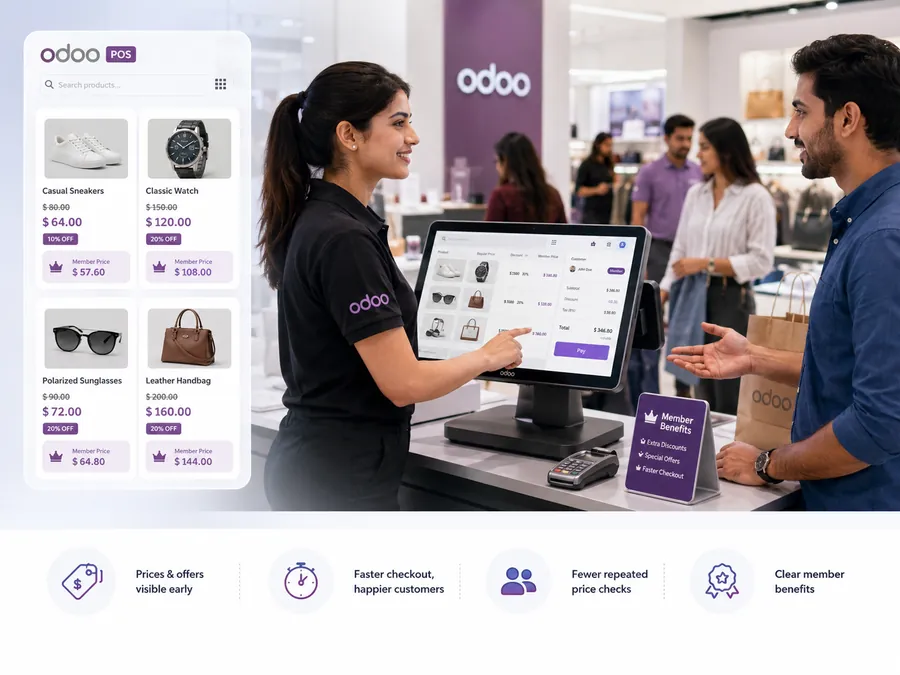
Odoo POS price display showing product prices discounts member rates and retail billing flow
Challenges

Price Visibility Gaps That Slowed POS Billing

Cashiers needed extra steps to check prices, discounts, and customer-specific pricing. This increased manual work and slowed checkout.

Product Prices Were Missing on Odoo POS Cards

Standard Odoo POS cards showed product names and images, but not the selling price. Staff had to check prices manually.

Discounted Prices Needed Manual Checks

When offers or pricelists applied, staff had to add the product first to confirm the final price.

Offers Were Not Clear Before Checkout

Original price, discounted price, and savings were not shown together, so staff had to explain offers manually.

Different Shops Needed Flexible POS Views

Some stores wanted prices visible, while others preferred image-focused cards. The business needed shop-wise control.

Safe Odoo POS Customization Was Needed

The business wanted to avoid core POS edits, update issues, and risky uninstall problems.

Solution

Clear POS Product Cards With Live Price Display

SDLC Corp used Odoo Customization to implement Odoo 19 POS Product Price Display and bring pricing into the product selection flow.

Live Price Display Before Product Selection

Staff could confirm prices from the POS grid without opening products during billing.

Discount Price Display Before Checkout

The product card showed the new price and crossed-out original price when an offer applied.

Savings Badge for Clearer Offers

A visible savings badge helped staff spot active discounts faster.

Pricelist-Aware POS Product Cards

Prices changed based on the selected customer or active pricelist, supporting member and wholesale rates.

Shop-Wise Price Display Control

Admins could show or hide prices for each POS shop based on store layout needs.

Safe Odoo POS Extension

The module avoided core POS edits, keeping testing, rollout, and uninstall safer.

The module showed prices, discounts, original price, and savings directly on product cards before checkout.

Implementation Process

POS Price Display Rollout Without Checkout Disruption

The rollout started with pricing flow review and then moved through Odoo Implementation , setup, testing, cashier training, and shop-wise enablement.

Controlled POS Pricing Setup Flow

Odoo 19 POS Product Price Display was rolled out in a safe flow. The team reviewed checkout pricing, tested product cards, checked pricelist discounts, trained cashiers, and enabled the module for selected POS shops.

Review POS Pricing Flow

First, the team checked how cashiers handled product prices, discounts, and customer-based rates during daily sales.

Install the Module in Odoo 19

Next, the team installed the module in Odoo 19 and verified it from the Apps section.

Test Active POS Sessions

After that, the team opened live POS sessions and checked how the price pill appeared on product cards.

Check Products and Variants

Then, cashiers tested regular products, categories, variants, and product options to confirm clear price display.

Test Pricelist Discounts

Next, the team applied customer pricelists and offer prices. Discounted cards showed the new price, original price, and savings badge.

Configure Shop-Wise Visibility

After testing prices, admins used the per-shop setting to choose where product card prices should appear.

Train Cashiers on Price Display

Then, cashiers learned how to read price pills, discount badges, and strike-through prices during checkout.

Enable for Daily POS Billing

Finally, the team enabled the module for selected POS shops and used it in live retail billing.

Key Features

Key POS Features That Improved Price Visibility

Each feature helped cashiers view prices faster, explain discounts clearly, and reduce manual checks during checkout.

POS Price Pill

Shows the selling price below each product name, so cashiers can confirm prices without opening products.

Pricelist-Aware Pricing

Updates prices based on selected customers or active pricelists, including member and wholesale rates.

Strike-Through Original Price

Shows the old price with the discounted price, making offers easier to explain.

Discount Savings Badge

Highlights active offers and savings, so cashiers can answer price questions faster.

Per-Shop Price Toggle

Lets admins show or hide prices for each POS shop based on checkout needs.

Variant and Combo Price Support

Shows prices for variants, combos, and product options directly on POS product cards.

Odoo OWL-Based Extension

Adds price display inside the POS screen without changing core Odoo POS files.

Clean Rollback After Uninstall

Returns POS product cards to the standard Odoo layout after uninstall.

These features helped cashiers view prices, member rates, offer prices, discounts, and product savings directly from the Odoo POS product grid.

Technology Stack

Technology Stack Behind Odoo POS Price Display

The setup connected Odoo POS customization, product data, pricelists, discounts, and shop settings to improve retail billing workflow.

Built for Live Odoo POS Billing Flow

The module connected Odoo POS frontend views, backend pricing logic, product data, and shop-level settings to display clear prices directly on product cards.

  • Tested with active POS sessions
  • Supported product variants and combos
  • Worked with customer pricelists and offers
  • Controlled visibility for each POS shop

Frontend: JavaScript and Odoo OWL

Used to show live prices, discount badges, and strike-through pricing on Odoo POS product cards.

JavaScript Odoo OWL POS UI

Backend: Python and Odoo Framework

Backend Odoo Development with Python and the Odoo Framework handled POS settings, pricelist logic, and shop-wise price visibility.

Python Odoo Framework Pricelist Logic

Database: PostgreSQL

Stored product data, customer details, pricelists, discount values, and POS shop settings.

PostgreSQL Product Data POS Settings

UI Layer: XML and SCSS

Used to place and style the price pill, savings badge, discount view, and clean product card layout.

XML SCSS Price Pill

This stack helped the retail team show POS prices, offers, member rates, and discounts clearly inside the Odoo POS product grid.

Business Results

Business Results After Using Odoo 19 POS Product Price Display

The setup helped cashiers check prices faster, reduce billing delays, and give customers clearer answers during checkout.

Faster Price Checks at Checkout

Cashiers could answer price questions from the product grid instead of opening each item during checkout.

Better Cashier Efficiency

Product prices, discount badges, and strike-through pricing reduced repeated checks during active billing.

Clearer Customer Communication

Staff could show original prices, discounted prices, and savings from the POS card itself.

Fewer Manual Billing Steps

Pricelist-aware cards made customer-specific rates easier to confirm before adding products to the order.

Improved Discount Visibility

Each shop could decide whether product card prices should appear, based on its own billing style and store layout.

Smoother Retail Billing Flow

The module avoided core POS changes, which made testing, rollout, and uninstall cleaner for the admin team.

Odoo POS Product Price Display helped the retail team speed up checkout, reduce repeated price checks, and improve the customer billing experience.

Odoo 19 POS Price Display

Ready to Add Odoo POS Price Display to Your Checkout Flow?

Need clearer prices, discounts, and customer-specific rates in Odoo POS? Hire Odoo Developer to build, test, and improve your retail billing workflow.

Visible Product Prices Discount and Offer Display Customer-Specific Rates

Let’s Talk About Your Product

Get expert guidance on scope, architecture, timelines, and delivery approach so you can move forward with confidence.

What happens next?