
A balanced plan helps teams meet performance targets without paying for idle or poorly used infrastructure.
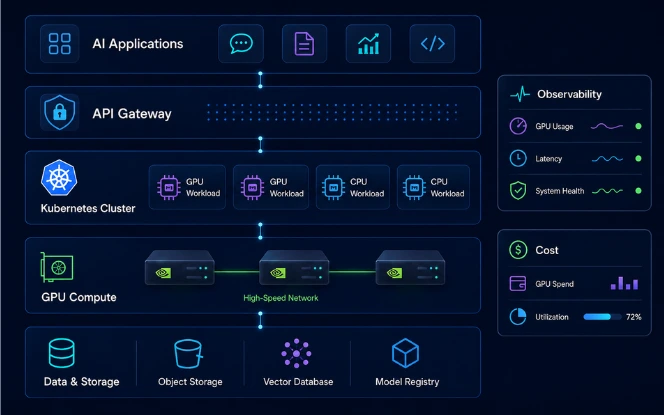
Each layer affects the next. Therefore, size infrastructure from measured workload needs rather than copying a generic reference architecture.
AI Infrastructure Planning Architecture
AI Workload Requirements and Capacity Planning
Capacity planning should begin before hardware selection. First, define what the workload must deliver. This discovery also helps teams scope broader AI development services around real production requirements.
Training, Fine-Tuning, and Inference
Training is compute-heavy and often communication-heavy. Fine-tuning may need less compute, although memory still depends on model size, precision, batch size, and method.
Real-time inference cares about response time, throughput, concurrency, and time to first token. Batch inference can accept more latency to improve throughput. Meanwhile, RAG and agent workloads may add latency through retrieval, reranking, APIs, or external tools.
| Workload | Main Infrastructure Concern | Useful Planning Metric |
|---|---|---|
| Training | GPU communication and compute | Step time or samples/second |
| Fine-tuning | GPU memory | Memory per worker |
| Real-time inference | Response latency | Time to first token and request latency |
| Batch inference | Throughput | Tokens or samples/second |
| RAG | End-to-end pipeline latency | Retrieval + generation latency |
Estimate Compute and Memory Needs
- GPU memory required
- Compute per request or training step
- Target throughput
- Acceptable latency
For inference, model weights are only part of the memory requirement. Activations, framework overhead, and the KV cache memory used to reuse attention states during generation also consume GPU memory.
Confirm capacity with the actual model and framework. Training also needs memory for gradients, optimizer states, activations, and checkpoints. Finally, plan for peak demand. Online inference needs headroom for traffic spikes, while batch jobs can often use queues instead of permanent spare capacity.
GPU Infrastructure Planning: Sizing, Utilization, and Scaling
GPU infrastructure planning should match hardware characteristics to workload behavior. Hourly price alone does not show the real value of a GPU.
Technical reference: NVIDIA GPU Operator documentation for GPU drivers, device plugins, runtime integration, discovery, and monitoring components.
Choosing GPUs for AI Workloads
Check GPU memory capacity, memory bandwidth, and model fit at the required precision.
Measure compute performance using realistic batch sizes, sequence lengths, and concurrency.
Check GPU interconnects, drivers, framework compatibility, power, cooling, and availability.
GPU Utilization and Scaling
GPU utilization alone does not prove efficiency. A busy device can still deliver poor throughput. Track compute utilization, memory use, bandwidth pressure, power, throttling, scheduler wait time, and useful output.
Use one GPU when the model and service target fit on one device. Move to multiple GPUs when memory, training time, or throughput requires it. At that point, communication overhead becomes part of the architecture.
Cloud vs Dedicated GPU Infrastructure
Cloud GPUs suit variable demand and fast experimentation. Dedicated or bare-metal systems offer more control and may improve economics at sustained usage. Teams evaluating migration or hybrid deployment can align these choices with a broader cloud transformation strategy .
| Factor | Cloud GPUs | Dedicated / Bare Metal |
|---|---|---|
| Initial capital | Lower | Higher |
| Deployment speed | Faster | Slower |
| Capacity flexibility | High | Hardware-dependent |
| Hardware control | Limited | High |
| Hardware operations burden | Usually lower | Higher |
| Best fit | Variable demand | Stable demand |
Hybrid models can combine both. For example, steady inference can use dedicated capacity while training bursts use cloud GPUs.
Kubernetes AI Infrastructure for GPU Workloads
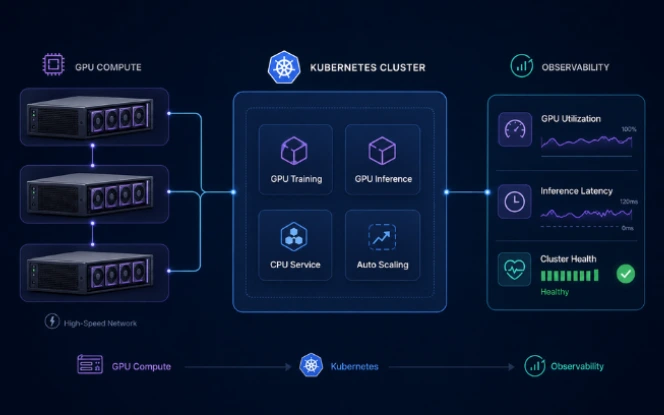
Kubernetes provides a consistent control plane for AI workloads. However, GPU clusters need device-aware scheduling and stronger resource controls than standard application clusters.
GPU Scheduling and Resource Allocation
Scheduling should consider GPU type, topology, memory needs, workload priority, and available capacity.
- Node labels for GPU type
- Taints and tolerations for accelerator nodes
- Node affinity for placement
- Resource quotas for teams
- Priority and preemption
- Queue-based admission for batch jobs
- Topology-aware scheduling
Kubernetes supports Dynamic Resource Allocation (DRA) for more flexible device allocation. Kueue can manage workload admission, accelerator quotas, and fair sharing across teams.
Kubernetes Device Plugins documentation for advertising accelerator resources, and the CNCF Annual Cloud Native Survey for broader production cloud-native and AI infrastructure context.
Autoscaling and Multi-Tenancy
CPU usage often makes a weak scaling signal for GPU inference. Instead, teams can scale from queue depth, latency, concurrency, tokens per second, or GPU saturation.
Shared clusters also need isolation. Namespaces, quotas, workload identity, and admission policies help separate teams and control access.
Lets multiple workloads share GPU time. It improves access but does not provide the same isolation as hardware partitioning.
Multi-Instance GPU partitions supported GPUs into isolated GPU instances with stronger resource separation.
AI Infrastructure Architecture and Planning Checklist
Across the stack, apply observability, security, recovery, and cost management.
- Define training or inference requirements.
- Set latency, throughput, and concurrency targets.
- Measure real GPU memory needs.
- Benchmark the target model and framework.
- Define GPU placement, quotas, and priority rules.
- Plan autoscaling and multi-tenancy.
- Test network bandwidth, latency, and storage throughput.
- Connect GPU, Kubernetes, and application telemetry.
- Add workload-level cost allocation and budget guardrails.
- Apply least-privilege workload identity and secrets management.
- Define network isolation and model/data access controls.
- Plan retries, checkpoints, node-failure handling, and workload recovery.
Networking for AI Infrastructure
Networking becomes critical when workloads span GPUs or nodes. A fast accelerator cannot compensate for slow data movement.
Bandwidth and Latency Requirements
Distributed training repeatedly exchanges gradients, activations, and other tensors. Network delay can leave GPUs waiting at synchronization points.
Bandwidth measures how much data the network can move. Latency measures how quickly each communication step completes. Therefore, test effective throughput, packet loss, congestion, oversubscription, and topology under realistic load.
GPU-to-GPU Communication
Supported systems can use high-bandwidth GPU interconnects for fast communication between accelerators.
Clusters may use InfiniBand or Ethernet with Remote Direct Memory Access (RDMA). RoCE carries RDMA over converged Ethernet.
Direct GPU-to-network data paths can reduce CPU involvement in supported designs. Still, performance depends on switch topology, NIC placement, congestion control, collective libraries, and the workload's parallelism model.
Storage also matters. Slow dataset reads or checkpoint writes can delay GPU work, so test storage throughput with the real workload.
AI Infrastructure Observability and GPU Monitoring
AI infrastructure observability should connect hardware health with workload performance. Monitoring only APIs or pod status leaves major blind spots.
GPU and Kubernetes Metrics
Compute utilization, memory, power, temperature, throttling, and hardware errors.
Pending pods, scheduling failures, node status, queue depth, and GPU allocation.
Latency, throughput, error rate, queue time, batch size, and time to first token.
GPU management operators can automate driver and device software deployment, while GPU telemetry exporters can collect accelerator metrics. Meanwhile, OpenTelemetry can collect application and Kubernetes telemetry such as traces, metrics, and logs.
Connect Infrastructure to Model Performance
Track application signals such as request rate, errors, end-to-end latency, time to first token, throughput, batch size, and queue time. For training, track step time, checkpoint duration, samples per second, and job completion rate.
This creates a shared view across infrastructure, ML, and FinOps teams. For organizations extending monitoring into the model lifecycle, machine learning consulting can also cover data, model, and production operating requirements.
AI Infrastructure Cost Optimization and FinOps
AI infrastructure cost optimization starts with attribution. A monthly cloud total does not show which model, team, or workload created the spend.
FinOps reference: FinOps Framework by the FinOps Foundation for technology cost accountability, optimization, forecasting, and business-value practices.
Main Cost Drivers
- GPU runtime
- CPU and memory
- Storage
- Network transfer
- Platform services
- Observability data
- Reserved capacity
- Failed workloads
The lowest GPU price does not always produce the lowest workload cost. A faster GPU may finish work sooner, while a poorly matched GPU can waste capacity.
Measure Cost Against Useful Output
Cost per training run, cost per experiment, and cost per successful workload.
Cost per 1,000 requests, cost per million tokens, and cost per model or product.
Always pair cost with performance and quality. A lower unit cost has little value if latency or model quality misses the target.
AI Infrastructure Cost Estimator
This calculator provides a planning estimate. Actual costs can vary with utilization, discounts, storage, network transfer, reserved capacity, and platform overhead.
FinOps Controls for AI
Label spend by team, environment, workload, model, and product. Then compare cost with useful output.
- Right-size GPU requests
- Shut down unused endpoints
- Batch compatible inference traffic
- Queue non-urgent training jobs
- Use committed capacity for steady workloads when the economics support it
AI Infrastructure Architecture and Planning Checklist
A practical architecture follows this path:
Across the stack, apply observability, security, recovery, and cost management .

Common AI Infrastructure Planning Mistakes
Buying GPUs before benchmarking. Capacity decisions should follow measured compute and memory needs.
Focusing only on GPU count. Networking, storage, scheduling, and software can still limit performance.
Ignoring network bottlenecks. Distributed workloads can lose time while workers exchange data.
Using CPU-centric Kubernetes policies. GPU clusters need device-aware placement, quotas, queues, and topology controls.
Monitoring only applications. Hardware and scheduler telemetry are needed to explain infrastructure bottlenecks.
Tracking total spend without attribution. Cost should map back to workloads, models, teams, or products.
Conclusion
Effective AI infrastructure planning balances compute, GPU infrastructure, Kubernetes, networking, AI infrastructure observability, and cost around the actual workload.
Start with measurable service requirements. Then size GPU capacity, design Kubernetes for AI workloads and networking, connect GPU monitoring and application telemetry, and track unit cost. This gives engineering and finance a clearer basis for scaling, AI infrastructure cost optimization and FinOps decisions.
Planning a production AI environment? SDLC Corp's AI consultants can help with workload sizing, GPU architecture, Kubernetes, observability, and infrastructure cost.
FAQs About AI Infrastructure Planning
These questions cover the practical decisions teams face when planning GPU capacity, Kubernetes, networking, observability, and AI infrastructure cost.
What is AI infrastructure planning?
AI infrastructure planning defines the compute, GPU capacity, orchestration, networking, storage, observability, security, and cost controls needed to run AI workloads reliably. The plan should start with measurable training or inference requirements rather than a generic reference architecture.
How do you size GPU infrastructure for AI workloads?
Start with model size, precision, GPU memory, batch size, concurrency, throughput, and latency targets. Then benchmark the real model and framework. GPU infrastructure sizing should also account for activations, KV cache, optimizer states, checkpointing, and peak-demand headroom where relevant.
Why is Kubernetes useful for AI infrastructure?
Kubernetes for AI provides scheduling, workload isolation, quotas, autoscaling, and a consistent control plane. GPU clusters also need device-aware placement, topology controls, accelerator quotas, queueing, and policies that reflect GPU type and workload priority.
Which metrics matter for AI infrastructure observability?
AI infrastructure observability should connect GPU monitoring with Kubernetes and application performance. Useful metrics include GPU utilization, GPU memory, temperature, throttling, scheduler wait time, pending pods, latency, throughput, queue depth, time to first token, and workload completion rate.
How can teams reduce AI infrastructure cost?
AI infrastructure cost optimization starts with workload-level attribution. Track spend by model, team, environment, and product, then compare cost with useful output. FinOps controls can include right-sizing GPUs, shutting down idle endpoints, batching compatible inference traffic, queueing non-urgent jobs, and using committed capacity for stable demand.
What usually causes bottlenecks in production AI infrastructure?
Common bottlenecks include insufficient GPU memory, poor GPU utilization, slow storage, network congestion, weak Kubernetes scheduling, queue delays, and missing telemetry. Because these layers interact, teams should test the full workload path instead of optimizing GPU count alone.