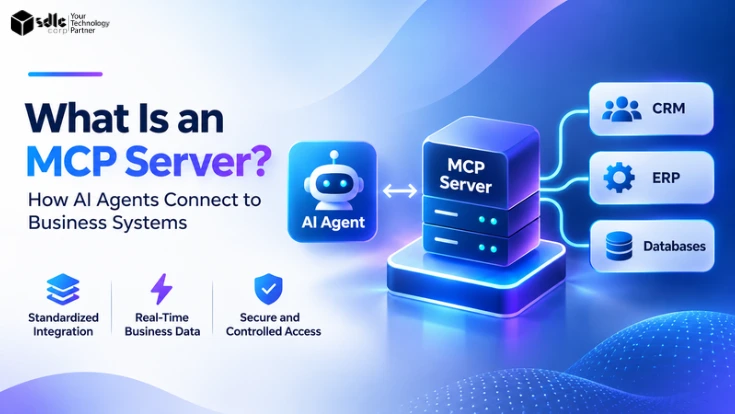
AI agents can analyze information and automate routine tasks, yet they stay limited without access to your business applications. An MCP server closes that gap for one system at a time, such as Salesforce, SAP or Odoo.
As a result, teams stop building a new connector for every assistant. Instead, each server gives every compatible agent the same controlled access, with permissions and audit logging kept in one place.
Quick answer: An MCP server is the layer that lets an AI agent use a business system safely. It lists what the agent may do, checks each request and calls the system on the agent's behalf.
Key Takeaways
- One MCP server per system, such as Salesforce or Odoo, gives every compatible AI application the same controlled access.
- Since December 2025, the Linux Foundation's Agentic AI Foundation has hosted MCP as a vendor-neutral project.
- MCP servers expose tools, resources and reusable prompts to compatible AI applications.
- MCP usually runs on top of existing APIs, so it complements them rather than replacing them.
- Secure deployment depends on access controls, monitoring and human approval for sensitive actions.
What Is an MCP Server?
In practice, each MCP server wraps one system and publishes the operations an agent may call. For example, a sales assistant linked to a Salesforce server can review open opportunities, but only within its assigned permissions.
What Is Model Context Protocol (MCP)?
Model Context Protocol (MCP) is built on JSON-RPC 2.0 and splits into two layers. The data layer defines the messages for tools, resources and prompts, while the transport layer carries those messages between client and server.
Capability discovery is what sets it apart from a fixed integration. Instead of hard-coding endpoints, the client asks the server at runtime what it offers, so a new tool reaches every agent without a code change on the AI side.
Anthropic introduced MCP in November 2024. In December 2025, Anthropic donated MCP to the Agentic AI Foundation, a directed fund under the Linux Foundation. Consequently, no single vendor controls the standard, while its existing maintainers still guide technical decisions.
Why Do AI Agents Need External Connectivity?
Large language models work from their training data and whatever information arrives during a conversation. Without external connectivity, they cannot check today's Salesforce pipeline or yesterday's Odoo deliveries, let alone act inside those systems.
MCP gives agents one consistent way to reach those capabilities, so they can support workflows that depend on current data. Still, a direct API integration may be enough when only one application needs one fixed connection.
MCP Architecture and Core Components
The MCP architecture follows a client-server model. An AI application, called the host, manages one or more MCP clients. Each client keeps a dedicated connection to a single MCP server.
| Component | Function | Example |
|---|---|---|
| MCP Host | Coordinates the AI application and its MCP clients | Enterprise AI assistant |
| MCP Client | Manages the connection to one MCP server | Client inside the AI application |
| MCP Server | Exposes supported tools, resources and prompts | CRM integration service |
| Transport Layer | Carries protocol messages between client and server | Standard input/output (stdio) for local servers or Streamable HTTP for remote servers |
Local stdio servers run as a child process of the host, which suits one developer or desktop assistant. Streamable HTTP servers, by contrast, run once on the network for many users, so they rely on the OAuth 2.1 authorization flow.
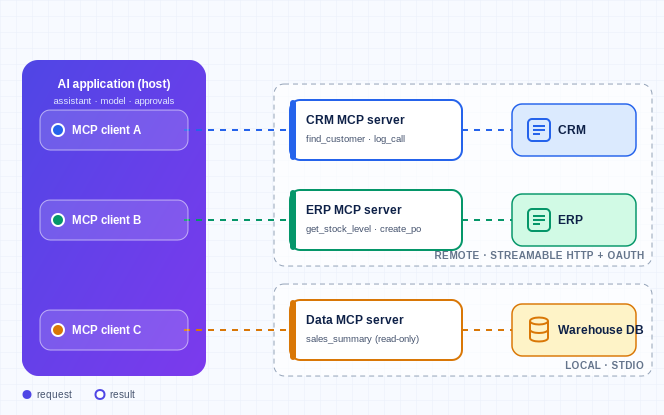
Because each client connects to its own server, teams can add integrations one at a time. For instance, a procurement assistant can read supplier data from one server and inventory records from another, with no redesign.
How Does an MCP Server Work?
An MCP server makes external capabilities available to an MCP client. The AI application then discovers those capabilities, picks a suitable operation and uses the result to finish the task.
Establish Communication
First, the client connects over stdio or Streamable HTTP and sends an initialize request. Both sides then agree on a protocol version and on the capabilities each supports, such as tools, resources or sampling.
Discover Available Capabilities
The client then calls
tools/listto see what the server offers. In response, a Salesforce server might return find_account, list_open_opportunities and create_task, each with its own input schema.Process the Request
Based on the user's request, the AI application picks a tool and sends a
tools/callrequest. The server validates the input, checks the user's permissions and then calls the Salesforce REST API on the agent's behalf.Return the Results
Finally, the server returns the result, such as three accounts with overdue follow-ups. The AI application then uses it to write a response, ask a follow-up question or continue the workflow.
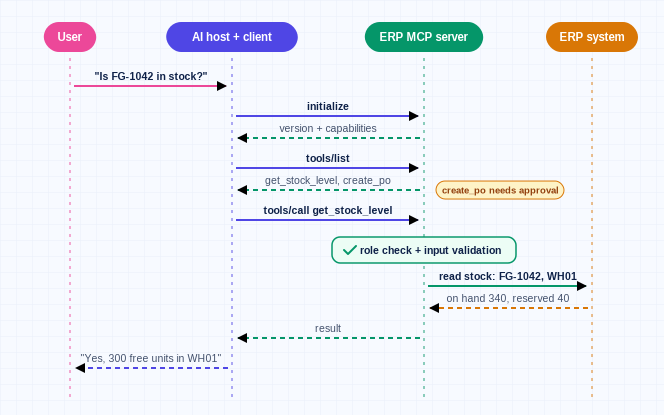
Because every step runs against live Salesforce data, the answer reflects the pipeline as it stands right now. The same four steps apply unchanged when the server fronts SAP, Odoo or a PostgreSQL database instead.
Example: A Read-Only Inventory Tool for an ERP System
To make this concrete, here is how a stock lookup tool for an ERP system such as Odoo could look. The definition tells the AI application what the tool does, which inputs it needs and whether it changes data.
{
  "name": "get_stock_level",
  "title": "Get Stock Level",
  "description": "Returns on-hand and reserved quantity for one product SKU in one warehouse.",
  "inputSchema": {
    "type": "object",
    "properties": {
      "sku": { "type": "string", "description": "Product SKU, for example FG-1042" },
      "warehouse": { "type": "string", "description": "Warehouse code, for example WH01" }
    },
    "required": ["sku"]
  },
  "annotations": {
    "readOnlyHint": true,
    "openWorldHint": false
  }
}
When a user asks whether FG-1042 is in stock, the AI application sends a tools/call request. The request names the tool and passes the arguments. The server then answers with the result in the same JSON-RPC exchange.
{
  "jsonrpc": "2.0",
  "id": 7,
  "method": "tools/call",
  "params": {
    "name": "get_stock_level",
    "arguments": { "sku": "FG-1042", "warehouse": "WH01" }
  }
}
Three design choices matter here. First, the tool reads data but never writes it, so a wrong call cannot change stock. Second, the server, not the model, decides which warehouses each user may query.
Third, write actions such as creating a purchase order belong in a separate tool. That tool sets readOnlyHint to false and goes through human approval, so read access never quietly turns into write access.
Core Capabilities: Tools, Resources and Prompts
MCP servers offer three core capabilities: tools, resources and prompts. Each one supports a different kind of interaction between an AI application and the systems behind the server.
| Capability | Purpose | Business Example |
|---|---|---|
| Tools | Run functions and supported operations | Check inventory or create a support ticket |
| Resources | Provide context to the model | Share product documentation or company policies |
| Prompts | Offer reusable interaction templates | Prepare a standard weekly sales report |
Tools
Tools let an AI application request specific operations, such as searching a database, fetching order details or updating a customer record. Because tools can change data, businesses should limit them by user role and task.
Resources
Resources give the AI application context without changing the underlying data. Typical examples include internal documents, product catalogs, configuration files and read-only business records that help the model answer accurately.
Prompts
Prompts are reusable templates for common tasks. For instance, a team can define one prompt for reviewing customer feedback and another for monthly sales summaries. That way, every user gets consistent output.
Client Features: Sampling, Elicitation and Roots
The protocol also works in the other direction. With sampling, a server can ask the host's model for a completion. Elicitation, in turn, lets a server request missing details from the user mid-task.
Roots, meanwhile, tell a server which files or folders it may work within. In each case, the host and the user can review or decline the request, so control stays on the application side.
Types of MCP Servers
Organizations can run MCP servers in several environments. The right choice depends on data sensitivity, security rules and how many applications need the same integration.
| Server Type | Description | Suitable For |
|---|---|---|
| Local MCP Server | Runs on the same machine as the AI application | Development and individual workflows |
| Remote MCP Server | Runs as a network-accessible service | Shared enterprise AI applications |
| Managed MCP Server | Operated by an external service provider | Teams that want less infrastructure upkeep |
| Self-Hosted MCP Server | Runs inside company-controlled infrastructure | Organizations that need full infrastructure control |
These categories can overlap. For example, a remote server can run on a provider's platform or inside your own cloud. Therefore, choose based on data sensitivity, maintenance capacity and your internal security policies.
How AI Agents Connect to Business Systems Using MCP
MCP lets AI agents work with existing enterprise applications through one standard interface. Businesses expose only selected functions and data, so the agent never gets unrestricted access to the system behind the server.
| Business Area | Connected Systems | What the AI Agent Can Do |
|---|---|---|
| Customer Support | CRM and helpdesk | Retrieve order details, shipment status and past interactions |
| Sales | CRM platforms such as Salesforce or HubSpot | Review opportunities and create follow-up tasks |
| Supply Chain | ERP platforms such as SAP, Odoo or Dynamics 365 | Check inventory, flag shortages and draft reorder requests |
| Finance | Accounting and reporting platforms | Retrieve invoices and summarize expenses |
| Human Resources | HR software and knowledge bases | Answer employee policy questions |
| IT Operations | Monitoring, ticketing and code repositories | Investigate alerts and prepare incident reports |
CRM and Customer Support
In platforms such as Salesforce and HubSpot, an agent can read customer profiles, order history and open deals. With the right permissions, it can also log calls and create follow-up tasks, so teams stop switching between screens.
ERP and Supply Chain
In ERP platforms such as SAP, Odoo and Dynamics 365, an MCP server can expose suppliers, purchase orders and stock. An agent can then flag likely shortages and draft reorder requests for a buyer to approve.
Databases and Data Warehouses
Teams can also build MCP servers for PostgreSQL and Snowflake. A safer design exposes approved, parameterized queries instead of free-form SQL, and data engineering services prepare those governed views before an agent reads them.
Legacy Systems
Older software rarely has an AI-ready interface. However, a custom MCP server can wrap its existing APIs or middleware. That way, businesses add AI capabilities without replacing systems that still do their job well.
When several systems are involved, AI integration and implementation services help assess compatibility, build connectors and set up secure data access. This groundwork matters most before the first agent touches production data.
Key Benefits for Businesses
Beyond simple connectivity, MCP changes how teams organize integration work across Salesforce, SAP and Odoo. Three benefits most often justify adding it to an architecture that already has working APIs.
Build Once, Reuse Across AI Applications
Once a Salesforce or Odoo connector sits behind an MCP server, every compatible AI application can use it. Consequently, teams avoid rebuilding it for each new assistant, although they still maintain the server itself.
Answers Based on Current Business Data
Connected agents read records at the moment of the request. Therefore, answers reflect today's Odoo stock levels, open Salesforce opportunities and unpaid SAP invoices, not static training data.
Room to Expand Workflow Automation
Teams can add servers one at a time as needs grow. For example, a sales assistant that starts with Salesforce can later reach Dynamics 365 inventory and Snowflake reporting views without a redesign.
MCP vs Traditional APIs: Key Differences
Traditional APIs connect one piece of software to another. In contrast, MCP gives AI applications a standard way to discover and use external capabilities. Often, it calls those same APIs underneath.
| Comparison Factor | MCP | Traditional APIs |
|---|---|---|
| Primary Purpose | Connect AI applications with external capabilities | Enable software-to-software communication |
| Interface | Standard AI-facing protocol | Application-specific interface or API standard |
| Capability Discovery | Built-in requests such as tools/list | Documentation or predefined contracts |
| Reusability | Across compatible MCP clients | Depends on API design and implementation |
| Typical Applications | AI agents and tool-enabled assistants | General application integration |
| Security | Needs authorization and governance at the server | Needs API-level security controls |
| Integration | Often runs on top of existing APIs | Provides direct access to application functions and data |
So MCP does not replace REST, GraphQL or other integration methods. Instead, businesses with a mature API layer can add MCP on top of it wherever AI applications need shared, discoverable access.
Security Risks and Governance Considerations
Connecting agents to enterprise systems creates new risks around sensitive data, unintended operations and third-party code. For that reason, controls must exist both in the AI application and in every MCP server it uses.
Authentication and Authorization
Verify user and service identities before exposing any protected capability. Issue OAuth 2.1 tokens per user rather than one shared service account, and scope each token to the tools that role actually needs.
Data Privacy and Access Control
An agent should see only the data its task requires. Role-based permissions, parameterized queries and data masking all limit exposure, especially when the same server supports several teams with different access rights.
Prompt Injection and Tool Misuse
Malicious instructions hidden in documents, emails or tool descriptions can push an agent toward actions the user never asked for. In fact, OWASP lists tool misuse and exploitation among the top risks for agentic applications.
Tool annotations help, but only partly. A readOnlyHint or destructiveHint describes how a tool behaves. Yet the specification tells clients to treat these hints as untrusted unless the server is trusted.
Human Approval and Audit Logging
The MCP specification recommends keeping a human in the loop who can deny tool calls. In particular, deleting records, changing financial data and approving transactions should always require explicit sign-off from an authorized person.
In addition, log every tool request, executed operation and approval decision. Keep these logs useful for audits, but avoid storing sensitive payloads that the review process does not actually need.
Enterprise MCP Security Checklist
- Apply least-privilege access controls.
- Separate read and write tools.
- Validate tool inputs and outputs.
- Review third-party servers before deployment.
- Protect credentials and access tokens.
- Monitor integration activity and failures.
- Require approval for high-impact operations.
- Test for prompt injection and unauthorized access.
Remember that MCP is a communication standard, not a full security framework. Real protection comes from the controls you build into your servers, your hosts and the business workflows around them.
How to Implement MCP in Your Business
A structured rollout keeps risk low and results measurable. Larger programs often run it alongside enterprise AI development services, so MCP work follows the same release and security process as other AI systems.
Identify Business Requirements
List the workflows where an agent needs outside data or must act, such as order status lookups in Odoo. If the use case is still unclear, AI consulting services can rank the options before any build starts.
Evaluate Existing Systems
Next, review the APIs those workflows depend on, such as the Salesforce REST API or Odoo's XML-RPC interface. Note gaps like missing endpoints or weak access controls, because they decide how much custom server work you need.
Select or Build an MCP Server
Check existing servers for features, maintenance activity and security posture before adopting them. If none fits, build a custom server with an official SDK for Python, TypeScript, Java or another supported language.
Connect Agents and Configure Permissions
Connect the MCP client to your AI application, then define which tools each role may call. Also set input validation rules and approval steps for any tool that writes data, deletes records or moves money.
Test, Deploy and Monitor
Before launch, test tool reliability, response times and permission boundaries, including prompt injection attempts. After launch, track the metrics below in the same monitoring stack your MLOps services already run for models:
- Successful tool execution rate
- Average task completion time
- Incorrect or unauthorized action attempts
- Human intervention rate
- Integration and maintenance costs
Starting with one controlled use case lets you measure both value and risk. Once the numbers hold steady, you can extend the same server pattern to the next workflow on your list.
When Should Businesses Adopt MCP?
MCP pays off when AI applications need reusable access to several systems, for example when a support assistant and a sales assistant both read Salesforce and Odoo. On the other hand, a single fixed connection rarely justifies another layer.
| Business Requirement | Recommended Approach |
|---|---|
| AI agents need access to multiple business systems | Evaluate MCP integration |
| Multiple AI applications need shared external tools | Reusable MCP servers |
| A single application needs one fixed integration | Direct API integration |
| An AI assistant answers questions from documents | Retrieval-augmented generation (RAG) |
| Existing integrations meet business requirements | Keep the current architecture |
| Complex workflows need external data and controlled actions | MCP with workflow orchestration |
For instance, a chatbot that answers HR policy questions from a fixed document library is a job for RAG development services, not MCP. By contrast, an agent that reads Salesforce accounts and checks SAP stock benefits from one standard layer.
For workflows with several steps, agentic AI development services combine data retrieval, reasoning and controlled tool calls across multiple connected servers. Approval gates then sit only where an action carries real risk.
Conclusion
MCP servers give AI agents a standard, reusable way to reach enterprise data, tools and applications. That live access also underpins agentic analytics, where agents act on business data instead of only reporting it.
However, success still depends on reliable connectors, sound security controls and a clear architecture. Start with one well-chosen use case, prove its value and then extend the same pattern across your other systems.
Connect Your AI Agents to Enterprise Business Systems
Linking AI agents to CRM, ERP, databases and legacy applications takes dependable connectors and strict access controls. It also needs an architecture that fits how your business runs.
SDLC Corp provides AI development services to help businesses plan custom MCP integrations, build connected AI applications and automate workflows. Share your current systems and goals with our AI engineering team.
Frequently Asked Questions
Teams use it to let AI agents act on live business systems, such as checking an Odoo order, updating a Salesforce record or reading an approved Snowflake view. It pays off most when several AI applications need the same access.
An MCP client lives inside the AI application and manages one connection. The server sits on the other side of that connection and exposes the tools, resources and prompts the client can use.
Anthropic created MCP and donated it to the Agentic AI Foundation, a directed fund under the Linux Foundation, in December 2025. The project's maintainers continue to guide its technical direction through an open community process.
Yes. MCP is an open-source protocol, and its specification and official SDKs are free to use. However, you still pay for hosting servers, maintaining connectors and any AI models or business software involved.
Function calling is a model feature that lets an LLM request a function defined by one application. MCP, by contrast, standardizes how those functions are discovered and served, so many applications can share the same tools.
MCP standardizes how AI applications reach external tools and data. Retrieval-augmented generation (RAG), on the other hand, retrieves relevant content to ground a model's answer. Many applications use both, with RAG for documents and MCP for live systems.
They can be, provided you add authentication, authorization, restricted permissions, monitoring and human approval for sensitive actions. The protocol itself does not guarantee security, so each server needs its own review before deployment.
Yes. Developers can build custom servers with official SDKs for languages such as Python, TypeScript and Java. Custom builds make sense when existing servers miss specific business, integration or security requirements.