Almost every software vendor now promotes AI features, yet few products change how the work itself gets done. The real difference usually comes down to one design choice: where the model sits in the product.
For enterprise teams, the question is practical. Which systems should be rebuilt around AI, which should stay as they are, and how can you move between the two without disrupting daily operations?
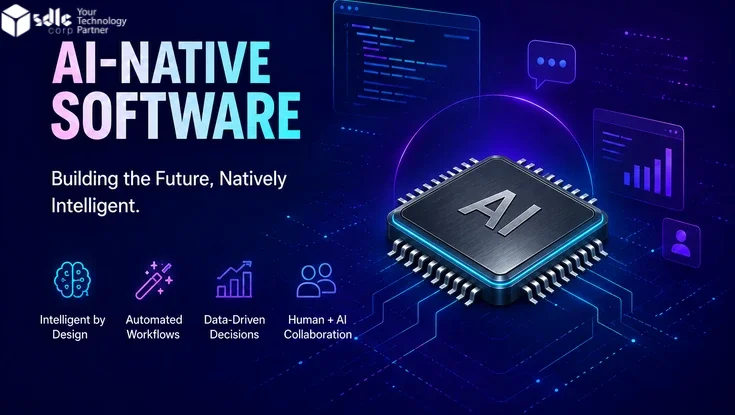
Quick answer: AI-native software is an application built with AI as its core decision layer, not as a feature added later. Its data, workflows and interface assume a model will read context and act, so the product stops working without it.
That choice matters because most enterprise AI still sits on top of older systems. Teams add a chatbot to an existing screen, while the rules and data underneath stay the same. As a result, many projects stall after the pilot.
The difference is architectural, not cosmetic. It decides how data moves, who approves each action and how the system keeps improving after launch.
Key Takeaways
- An AI-native product cannot do its core job without the model, while an AI-enabled tool only loses a feature.
- Most AI-native architectures share six layers, from data and context through models, retrieval, agents and guardrails to evaluation.
- Feedback loops make accuracy improve with use, because each correction updates prompts, retrieval data or training sets.
- Governance belongs in the first release, since permissions, audit trails and human review decide whether people trust the system.
- Legacy systems can move gradually, one decision-heavy workflow at a time, behind APIs and against a measured baseline.
What Is AI-Native Software?
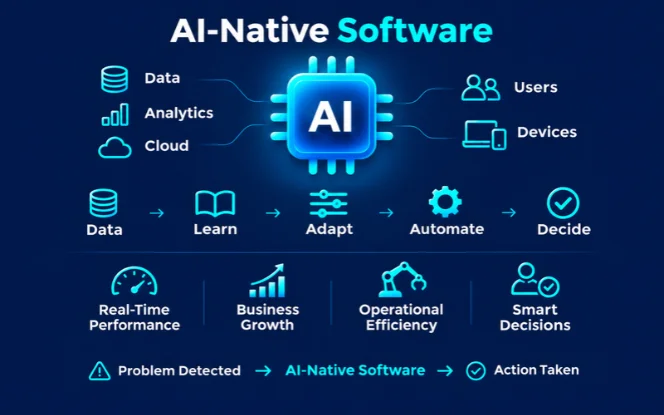
In simple terms, AI-native software treats a model the way traditional software treats its database. It is a required part of the system, not an optional plugin. Remove it, and the core job cannot be done.
For example, an AI code editor cannot complete code without its model. Similarly, an AI call intake agent cannot answer callers without speech and language models. In both cases, the AI is the product, while the interface simply exposes it.
How AI-Native Software Works
Traditional software runs on fixed rules. A developer writes if-then logic, and the same input always returns the same output. That works well for payroll or tax calculations, where the rules rarely change.
AI-native software, however, decides based on probability. A model reads the request and its context, estimates the best answer and then picks an action. Since outputs can vary, the system needs checks, limits and a handoff to people.
The third trait is learning from outcomes. Each decision leaves a trace: what the model saw, what it did and whether a person corrected it. Teams then use those traces to improve prompts, retrieval and models over time.
Where the Term Came From
The term borrows from cloud-native. When cloud computing took off, teams learned that moving old applications to the cloud did not make them cloud-native. Real gains came from software designed for containers, microservices and elastic scaling from the start.
AI-native software follows the same logic. Adding a model to legacy code gives you a smart feature, but the old structure still limits it. In contrast, designing around the model from day one changes data flows, interfaces and team roles together.
The phrase also appears in software engineering, where it means using AI agents across the delivery process. That meaning covers how teams write code, whereas the focus here is on what the finished product is and how it runs.
How AI-Native Software Differs From Traditional Software
The difference shows up in almost every layer of a product. The table below compares both models across six points that matter when you assess a system or plan a new build.
| Point | Traditional Software | AI-Native Software |
|---|---|---|
| Decision logic | Fixed rules written by developers | Models that weigh context and choose an action |
| Data flow | Batch updates and stored records | Live events, documents and conversations feeding the model |
| Role of AI | Optional feature, such as search or summaries | Core decision layer the product depends on |
| Learning over time | Changes only through new code releases | Improves through feedback, evals and retraining |
| New or unusual cases | Fails or goes to a manual queue | Reasons about the case, then escalates when unsure |
| If the AI is removed | The product still works | The main job can no longer be done |
Many products sit between these two columns. AI-enabled tools add models to an existing workflow without rebuilding the workflow around them. That middle ground is useful, but it differs from a native design.
A Quick Test for Truly AI-Native Software
Vendors use the label freely, so a short test helps. If you answer no to most of these questions, the product is likely AI-enabled rather than AI-native.
Does the core workflow fail without the model, or does it only lose a feature?
Does the system act, such as updating records or routing work, instead of only suggesting?
Are model decisions logged with their inputs, so your team can audit each one?
Do user corrections flow back into prompts, retrieval or training data?
Can the system switch between models and fall back when one fails?
Planning an AI-Native Product or Rebuild?
Our engineers can review your current system and show where AI belongs in its core, not just in its interface.
AI-Native Software Architecture: The Core Layers
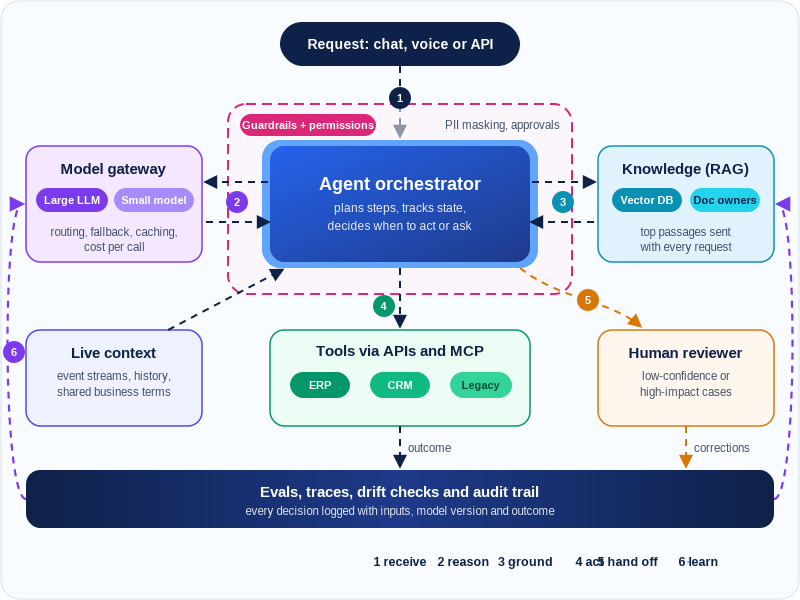
An AI-native software architecture usually has six layers, whatever the industry. Each layer has a clear job, and together they turn a request into a checked, logged action. The diagram shows how a request moves through them.
Data and Context Layer
This layer collects what the model needs to know right now. It pulls events from business systems, recent records and user history into one place. In practice, it often uses event streams, such as Kafka, and a context store.
A shared semantic layer matters just as much. It defines terms such as customer, order or margin once, so every agent reads the business the same way and reports stay consistent.
Model Layer and Model Gateway
AI-native software rarely depends on one model. Instead, a model gateway routes each task to the best fit. A large language model handles complex reasoning, while a smaller model handles fast, cheap classification.
The gateway also handles fallbacks, rate limits, caching and cost tracking. As a result, a team can swap providers or add an open-source model without rewriting the application.
Knowledge and Retrieval Layer
Models do not know a company's policies, prices or contracts. Retrieval-augmented generation (RAG) closes that gap. The system splits documents into chunks, stores them as embeddings in a vector database and sends the best passages with each request.
However, retrieval is only as good as its sources. Each document set needs an owner, an update schedule and clear rules for retiring outdated content.
Agent Orchestration and Tools Layer
Agents turn answers into actions. An orchestration layer plans the steps, calls tools and tracks state. For example, one task might check an invoice, query the ERP and then draft an approval.
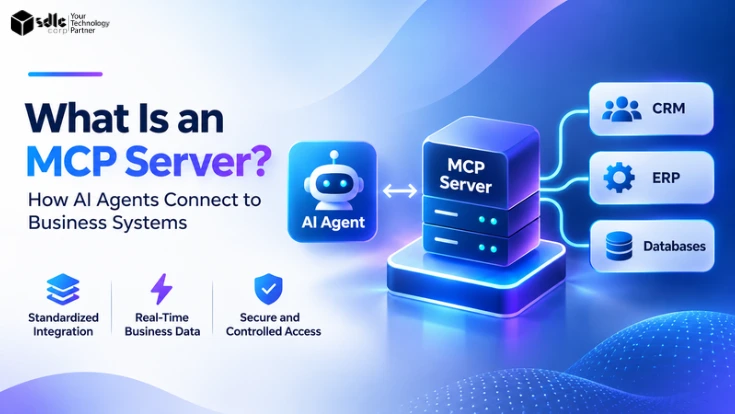
Tools are usually APIs into existing systems. Standards such as the Model Context Protocol (MCP) give agents one consistent way to reach databases, CRMs and internal services. That way, legacy systems can stay in place.
Guardrails and Governance Layer
This layer decides what the AI may see and do. It enforces role-based permissions, masks personal data and blocks unsafe inputs or outputs before they reach users.
Sensitive actions, such as payments or account changes, pass through approval steps. Meanwhile, an audit trail records every decision with its inputs, model version and outcome.
Evaluation, Observability and Feedback Loop
Because outputs vary, teams test them the way they test code. Evaluation suites score answers for accuracy, grounding and safety before each release. In production, tracing tools record prompts, tool calls, latency and token cost.
Drift checks then flag when accuracy drops or inputs change. Finally, user corrections and reviewed cases flow back into prompts, retrieval data or fine-tuning, which closes the loop.
In real projects, linking these layers to ERP, CRM and data platforms often takes the most effort. Our AI Integration & Implementation Services focus on exactly that work.
Benefits of AI-Native Software for Enterprises
The benefits come from design, not from the model alone. When AI sits at the core, gains build on each other instead of staying inside one feature.
- Faster decisions: the system reads live data and acts in seconds, instead of waiting for a report or a review queue.
- Less manual work: routine steps such as data entry, matching and triage run automatically, so staff can focus on exceptions.
- Accuracy that improves with use: feedback loops turn every correction into better prompts, retrieval or training data.
- Scale without matching headcount: higher volumes of documents, calls or tickets do not need the same rise in staff.
- More consistent service: every customer gets answers from the same approved knowledge, in any channel and at any hour.
- Faster change: teams update prompts, rules or knowledge in days, whereas rule-based systems often wait for a full release cycle.
Examples of AI-Native Software
AI-native products already exist in most software categories. The examples below share one trait: each one would lose its main purpose without its models.
- AI code editors: Cursor builds code completion, multi-file edits and agent tasks into the editor itself, rather than adding a plugin to an older tool.
- Enterprise search assistants: Glean indexes company apps and documents, then answers questions with sources while respecting each user's access rights.
- Answer engines: Perplexity replaces a list of links with a cited answer, generated from live search results for each question.
- Legal AI platforms: Harvey drafts, reviews and researches legal documents, with workflows designed around language models from the start.
- Customer service agents: Sierra and similar platforms run conversations end to end, take actions in back-end systems and escalate to people when needed.
Each of these products started with the model and then built the workflow around it. By contrast, older vendors in the same categories often added similar features later, which is the AI-enabled path.
Enterprise Use Cases of AI-Native Software
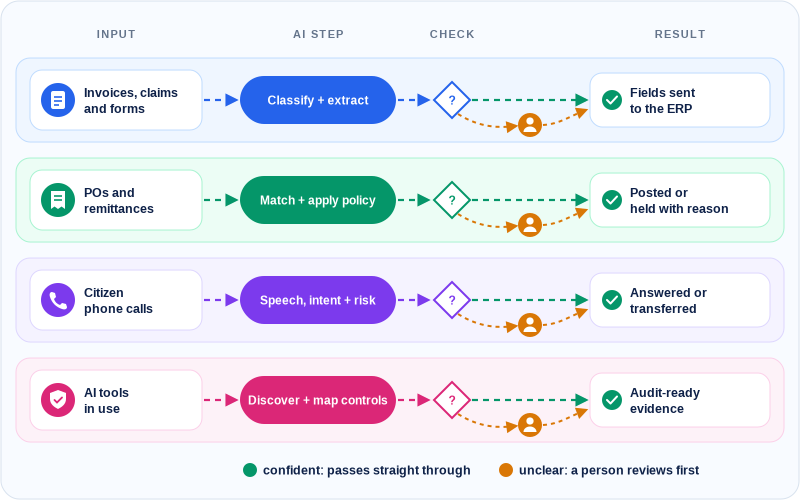
Enterprise use cases follow one pattern: a high-volume workflow full of documents, decisions or conversations. The four below come from products SDLC Corp has built, so they show the architecture layers in working systems.
Document Processing and Data Extraction
Invoices, claims, contracts and forms still arrive as PDFs, scans and emails. An AI-native document pipeline classifies each file, extracts fields with models and checks them against business rules and master data.
Low-confidence fields go to a reviewer instead of passing through silently. SDLC Corp built Data AI Ninja on this pattern. For one 12-person finance team, document processing became 60% faster, with 80% fewer manual entry errors.
Accounts Payable and Receivable Automation
Finance teams often match invoices, purchase orders and remittances by hand when formats vary. An AI-native approach reads each document, matches it to ERP records and applies a policy engine before posting.
Our Cleardue platform works this way. It matches invoice lines within price and quantity tolerances you set. Its audit trail then shows what the AI read, how sure it was and which rule it applied.
Call Intake and Customer Service
Voice agents combine speech-to-text, retrieval, a language model and text-to-speech in one loop. While the call runs, the system also tracks caller intent and risk. Our guide to AI voice agent implementation covers how these rollouts run.
Pulastya AI uses this design for non-emergency citizen call intake in Boone County, Missouri. Depending on its escalation policy, it continues the call, escalates it or transfers it to a human agent.
AI Governance, Risk and Compliance
As AI spreads across teams, companies need a record of every model, agent and data source in use. Governance software maps each AI system to its risks, controls and owners, then gathers evidence for audits.
Custos, SDLC Corp's AI governance, risk and compliance platform, scans browsers, endpoints, SaaS and cloud accounts for AI in use. It then maps one control set across frameworks such as NIST AI RMF and ISO/IEC 42001.
All four workflows depend on reading language accurately, from invoice lines to caller requests. That is why most of them start with the models covered by our Natural Language Processing Services.
Have a High-Volume Workflow in Mind?
Share the process with us. We will map which steps can run on AI, where people stay in the loop and what to build first.
Challenges and Risks of AI-Native Software
AI-native software brings real gains, but it also brings risks that rule-based software does not. Planning for them early costs far less than fixing them after launch.
The NIST AI Risk Management Framework offers a useful structure for that planning. It groups the work into four functions: Govern, Map, Measure and Manage.
Inference cost. Every request uses tokens and compute, so costs grow with usage. Routing simple tasks to small models, caching answers and setting budgets per workflow keep spending predictable.
Wrong or invented answers. Models can produce confident but false outputs. Grounding answers in retrieved sources, scoring them with evals and requiring review for high-impact actions all reduce this risk.
Data readiness. Scattered, duplicated or outdated data weakens every layer above it. For this reason, most projects need data cleanup, clear ownership and access rules before the first model goes live.
Security and privacy. Prompt injection, data leaks and broad tool access open new attack paths. Therefore, least-privilege permissions, input filtering and personal data masking belong in the design from day one.
Compliance. The EU AI Act sets duties by risk level, including documentation, logging and human oversight for high-risk systems. Fines for the most serious breaches reach €35 million or 7% of global annual turnover, whichever is higher.
Skills gaps. These systems need skills many teams lack, such as eval design, LLMOps and agent testing. Pairing in-house staff with experienced engineers speeds up the first release and builds skills that last.
Moving Legacy Systems Toward AI-Native Software
Few enterprises can rebuild core systems from scratch. Fortunately, they do not need to. A step-by-step path keeps existing systems running while AI takes over decision-heavy work, one module at a time.
Pick one workflow full of decisions, such as invoice exceptions or ticket triage, and record its current cost, speed and error rate.
Fix data and context first: clean the key records, define shared terms and give the workflow access to live data.
Wrap legacy systems with APIs, so agents can read and update them without changes to their core code.
Add a model gateway and guardrails, including permissions, logging and spending limits, before any model reaches users.
Build the AI into the workflow with clear handoff rules, so people review low-confidence or high-impact cases.
Run evals against the baseline, then move to the next module once the numbers hold.
To run this as a managed program, use the ISO/IEC 42001 standard. Published in 2023, it is the first international standard for an AI management system, covering policies, roles and regular reviews.
Once models reach production, they also need monitoring, retraining and version control over many months. Our MLOps Services cover that ongoing work.
For larger programs, our Enterprise AI Development Services cover architecture, integration and rollout across all six layers. Work starts with one workflow and a measured baseline.
Conclusion: Building Software Around AI
AI-native software puts the model at the center of the product, so teams design data, workflows and controls around it. That is the real line between a native system and an app with an AI feature added on top.
The shift also changes how teams work. Engineers spend more time on data, evals and guardrails, while business owners set the policies and thresholds the AI must follow.
Meanwhile, governance cannot wait for a later phase. Permissions, audit trails and human review belong in the first release, because they decide whether people trust the system enough to use it every day.

Ready to Build Your First AI-Native Workflow?
Our 400+ AI specialists are part of SDLC Corp's 1,200+ engineering team. Together, they have completed 300+ AI deployments and 120+ enterprise AI integrations.
FAQs on AI-Native Software
AI-native means a team designed a product, process or company with AI as a core component from the start. The AI is not an add-on.
For software, it means models make or support the main decisions, so the product cannot do its core job without them. The term mirrors cloud-native, which describes software built for the cloud rather than moved there later.
Usually not. A chatbot added to an existing app is an AI-enabled feature. The rules, data and workflows underneath stay the same, and the app still works without it.
It becomes AI-native only when models drive the core workflow, take actions in connected systems and learn from outcomes through feedback loops.
Yes, but gradually. Most companies wrap legacy systems with APIs, add a data and context layer, then move one decision-heavy workflow at a time onto AI agents.
The old system stays the record keeper, while AI handles reading, matching and routing. Over time, more logic moves into the AI layer and the legacy core shrinks.
No. It handles routine, high-volume decisions and passes the rest to people. Good designs set confidence thresholds and approval steps, so humans review unclear or high-impact cases.
In regulated areas, the EU AI Act also requires human oversight for high-risk systems. In practice, people shift from repetitive checks to handling exceptions and improving the system.
It can be, because each request uses model inference, which providers charge per token or per call. However, total cost often falls, since automation removes manual steps.
Teams control spending by routing simple tasks to smaller models, caching repeated answers, setting budgets per workflow and tracking cost per transaction from the first release.
It depends on data quality and system complexity. A proof of concept on one workflow often takes 4 to 8 weeks, while a production pilot usually takes 8 to 16 weeks.
A wider move across several modules runs for many months, because each module needs its own baseline, integration, testing and rollout plan.