Causeway NGO ERP: From Funding to Impact

Causeway NGO ERP connects grants, spending, and programme results in one workflow. This nonprofit ERP case study shows how teams can track funding through to delivery and reporting.
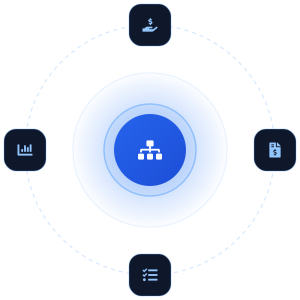
  • Funding
  • Financial Work
  • Programme Work
  • Reporting
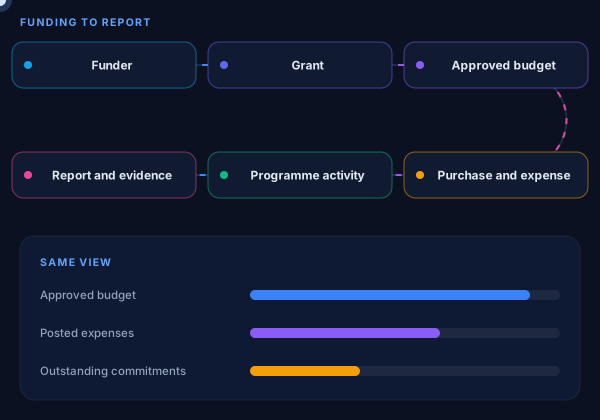
Causeway NGO ERP flow from funder, grant and approved budget to purchase and expense, programme activity, and report and evidence
Project Snapshot

Causeway at a Glance

Causeway brings finance, grants, donors, programmes, procurement, and people into a connected NGO operating platform. However, the scope of each implementation depends on the nonprofit’s work and existing systems.

FundingDonors, grants, funds, and approved budgets
Financial WorkPurchases, commitments, expenses, and approvals
Programme DeliveryProjects, activities, and delivery records
ReportingFinancial figures and programme evidence
Industry Nonprofit & NGO Operations

Project type: NGO ERP

Shashank Jaiswal, Co-founder and CIO at SDLC Corp
Co-founder & CIO Shashank Jaiswal

Enterprise ERP, CRM, Integration & Process Automation

The Challenge

Challenges in Nonprofit Funding and Reporting

Teams tracked grant money, spending, and programme work in separate places. As a result, answering a funder’s question took more time than it should.
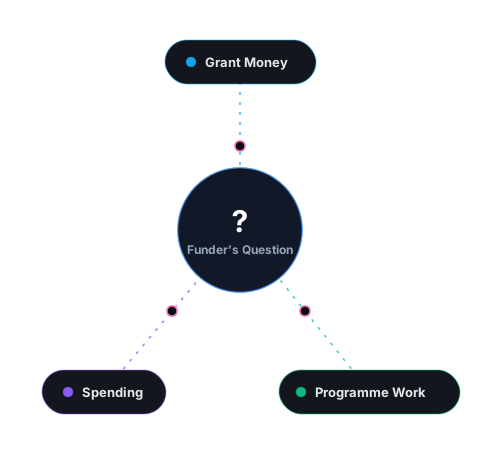
Grant money, spending and programme work tracked in separate places, with no shared link to answer a funder’s question
  • No Shared View of a Grant

    Finance could see payments, but not always pending purchases. Grant teams also had to check funding rules. Therefore, staff could not confirm the available balance from one record.

  • Programme Evidence Sat Elsewhere

    Programme teams recorded activities and attendance, while finance tracked costs. Because the records were separate, staff had to match them to explain what each grant funded.

  • Reports Required Manual Assembly

    Funder reports needed both spending figures and proof of delivery. Staff gathered those records from different teams, then checked and resolved any differences by hand.

Our Solution

How Causeway Connects Nonprofit Operations

Causeway links grants, budgets, spending, and programme records through shared funds and projects. Each team can then work with the information it needs.

01 / 05
Finance

Finance and Grants

Track budgets, spending, and pending purchases by grant. With fund accounting for NGOs, approvers check available funds and grant rules before accepting each request.

Budgets and spending linked to each grant.
Programmes

Programme Delivery

Record activities against each project. Through NGO monitoring and evaluation, teams compare delivery evidence with programme costs to understand what each grant supported.

Programme activities linked to project costs.
Donors

Donors and Funding

Keep donor contributions and giving history together. When a gift supports a fund or project, teams can trace its use and include clear evidence in later reports.

Donor contributions traced into funding reports.
Governance

Approvals and Access

Keep approval records aligned with NGO procurement controls. Meanwhile, role-based access helps teams protect sensitive information and gives each user the access needed for their work.

Clear approval records and controlled access.
Delivery

Implementation

First, agree workflows, record owners, and migration scope. Then configure Causeway, test imports, and check balances. Before launch, train users and confirm approvals, integrations, and support responsibilities.

Configuration, migration, testing, and user training.
Workflow

How Causeway Connects Funding to Results

Causeway links each funding decision to spending and programme work. The steps below show how a grant moves from award to report.

FunderGrantBudgetProgrammeSpendingActivityReport
  1. Step 01

    Record the Grant

    The grant team records the award and its spending rules. Finance then assigns an approved budget to the programme.

  2. Step 02

    Check the Purchase

    A programme manager requests supplies. Before approval, the reviewer checks the grant rules, available budget, and pending purchases.

  3. Step 03

    Record Cost and Activity

    Finance posts the expense to the fund and project. Meanwhile, programme staff record the activity and keep proof that it took place.

  4. Step 04

    Prepare the Report

    The reporting team brings the spending and activity records together in BI dashboards. As a result, the funder can see what the money paid for and what the programme delivered.

Technology

Technology Stack & Architecture

Causeway connects grant, finance, and programme records through a shared data model. Its integration, access, and cloud deployment options support different NGO operating needs.

  • Data and Integration: REST APIs, Webhooks, Bank Reconciliation, Payment Gateways, BI Connectors, Email and Notifications, Bulk Import and Export, Biometric Devices
  • Security and Access: Role-Based Access, Separation of Duties, MFA, SSO and LDAP, Encryption in Transit, Encryption at Rest, Audit Logs, Full Data Export
  • Deployment and Operations: Cloud Service, Sandbox, Test and Live, Backup and Recovery, Offline Field App, Queued Sync, Multi-Currency, Shared Data Model, Dashboards
Comparison

Before and After Causeway

The change is easiest to see in routine tasks. Instead of asking several teams to rebuild a grant’s status, staff can examine the related records within the same workflow.

Routine nonprofit tasks with separate records compared with connected Causeway records
TaskWith Separate RecordsWith Connected Causeway Records
Check Funds AvailableCompare budget sheets, ledger entries, and pending purchasesReview the budget, spending, and commitments together
Approve a PurchaseFind grant rules and earlier decisions across filesCheck the request against its funding and approval context
Explain Programme CostMatch activity records to expenses laterReview delivery alongside the project’s financial records
Prepare a Funder ReportCollect and reconcile information from several teamsDraw on related finance and programme records
Review a DecisionSearch messages for who approved itFollow its recorded approval history

The exact before-and-after change depends on an organisation’s starting systems and implementation scope. Causeway’s product documentation describes the connected records and controls shown here.

Results

Results Across Causeway Implementations

Published results from separate nonprofits show changes in finance, programme reporting, and HR. Each figure belongs to a different implementation.

Month-End Close

4days

was 12 days

A national elder-care organisation reported a faster month-end close with Causeway. See the steps in an accounts payable month-end close.

Programme Reporting

Weekly

was quarterly

A health and community programme reported programme results within the same week.

Payroll Queries

⅔fewer

about two-thirds fewer

A separate multi-state nonprofit reported fewer payroll-related questions from staff.

FAQ

Frequently Asked Questions

Buyers often need to know how the records connect and what an implementation involves. These answers address the operating questions raised by the case study.

How Does Causeway Connect Grants, Finance, and Programmes?

Causeway relates funding and budgets to project costs and programme activity. As a result, teams can review financial and delivery records within the same project context.

Can We Keep an Existing Specialist System?

That depends on the system and the work it performs. First, define which application owns each record. Then assess the API integration, error handling, and reconciliation work needed to keep the figures aligned.

What Should We Check During Data Migration?

Check record ownership, grant and project identifiers, opening balances, and incomplete entries. Before launch, compare migrated figures with the organisation’s approved closing records.

Does Causeway Guarantee Compliance?

No software can replace an organisation’s legal review and filing responsibilities. However, teams can configure records, permissions, approvals, and reporting controls for their operating requirements. For relevant US federal awards, review 2 CFR 200, including award identification and expenditure tracking. For US GAAP nonprofit financial statements, consider FASB ASU 2016-14 when planning net asset presentation. Where required, reconcile the information used for Form 990 before filing. These requirements apply according to the organisation’s jurisdiction, funding, and reporting obligations.

Are the Results From One Nonprofit?

No. SDLC Corp’s published examples describe different nonprofit implementations. Therefore, the results appear separately rather than as one client’s combined achievement.

Get Started

See How Causeway Fits Your NGO Operations

Bring a grant or programme report your team finds difficult to produce. SDLC Corp will show where Causeway NGO ERP fits and what your implementation would need.

Causeway NGO ERP connects funding, finance, programme tasks and reporting

Let’s Talk About Your NGO Operations

Get expert guidance on scope, architecture, timelines, and delivery approach so you can move forward with confidence.

What happens next?