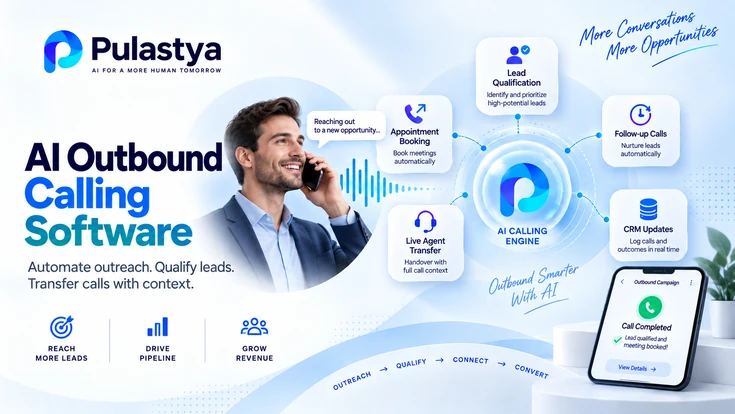
AI outbound calling software places calls from a defined contact list, holds a spoken conversation with each contact, records the outcome, and transfers the call to a person when needed.
It is for sales and service teams that run follow-ups, reminders, renewals or qualification calls at a volume their staff cannot cover manually.
- Rules before calls Calling hours, retry limits, opt-outs and transfer destinations should be configured and tested before the first call is placed.
- An outcome per call Every call should end with a disposition, transcript or summary that the team can review and act on.
- People for judgment Qualified, sensitive or disputed conversations should transfer to a person with the captured context attached.
The business outcome is consistent contact coverage: every eligible contact is called within approved hours, each call ends with a recorded outcome, and people spend their phone time on conversations that need judgment instead of dialing and leaving voicemails. Managers also get a campaign-level view of who was reached and what happened next.
Outbound software is a set of controls around the conversation, not only a voice. Each control can be tested separately in a trial, and the linked outbound guides explain the mechanics of each one.
What AI Outbound Calling Software Does
AI outbound calling software automates the calling side of a campaign: it selects who to call, places the call within allowed hours, speaks with the contact through a configured AI agent, and records what happened. Unlike a traditional auto-dialer, it does not need a free human agent before the conversation can start.
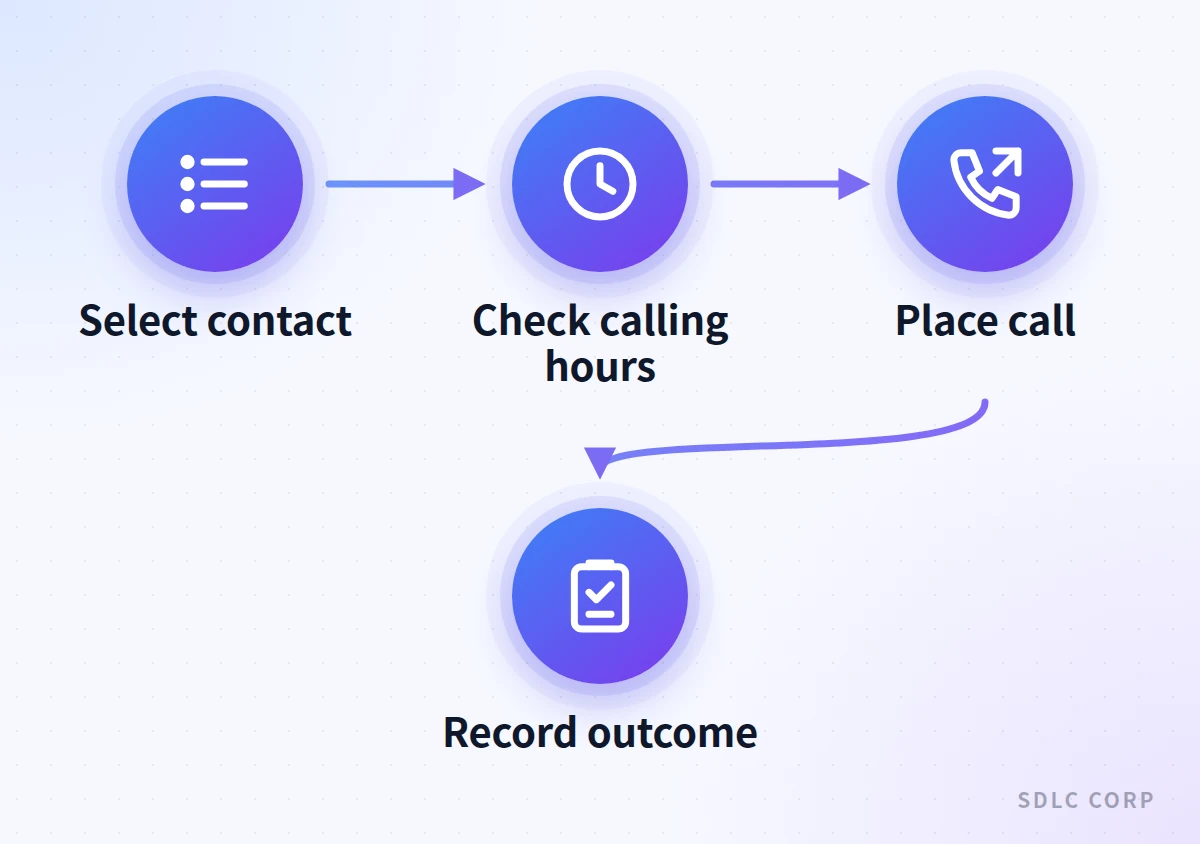
The components and call flow are explained in the guide to what an AI dialer is, and pacing differences are compared in AI vs predictive vs power dialers. For a buyer, the more useful question is which controls surround each call.
Group contacts by purpose, assign a configured agent and apply one set of rules per campaign.
Calling windows, time zones, attempt limits and stop conditions decide when a contact is called again.
The AI agent states the call purpose, asks approved questions and records answers in structured fields.
Qualified or sensitive calls move to an available person, with the conversation context passed along.
Every call gets a disposition, and campaign reports show progress, transfers and exceptions.
Consent records, opt-out handling, suppression lists and disclosure wording are enforced by the software.
How it works
How an Outbound AI Campaign Call Runs
- Contact listValidated contacts with consent status
- Campaign rulesCalling window, attempts and suppression
- AI outbound callAgent identifies business and purpose
- Conversation and captureApproved questions, answers recorded
- Record outcomeDisposition, transcript and summary saved
Possible outcomes
- Transfer to personQualified or sensitive, context passed
- Retry laterWithin attempt limits and hours
- Stop callingOpt-out, wrong number or goal met
Campaign rules run before the call and outcomes are recorded after it, so every contact ends in a transfer, a permitted retry or a stop.
The complete path from lead list to analytics is described in how AI dialers automate outbound calling campaigns.
Campaigns, Lead Lists and Agent Configuration
A campaign is the unit of control in outbound calling software: it ties a contact list to a purpose, a configured agent, calling rules and a transfer destination. Keeping those settings together stops a renewal campaign from inheriting the questions or retry rules of a sales follow-up.
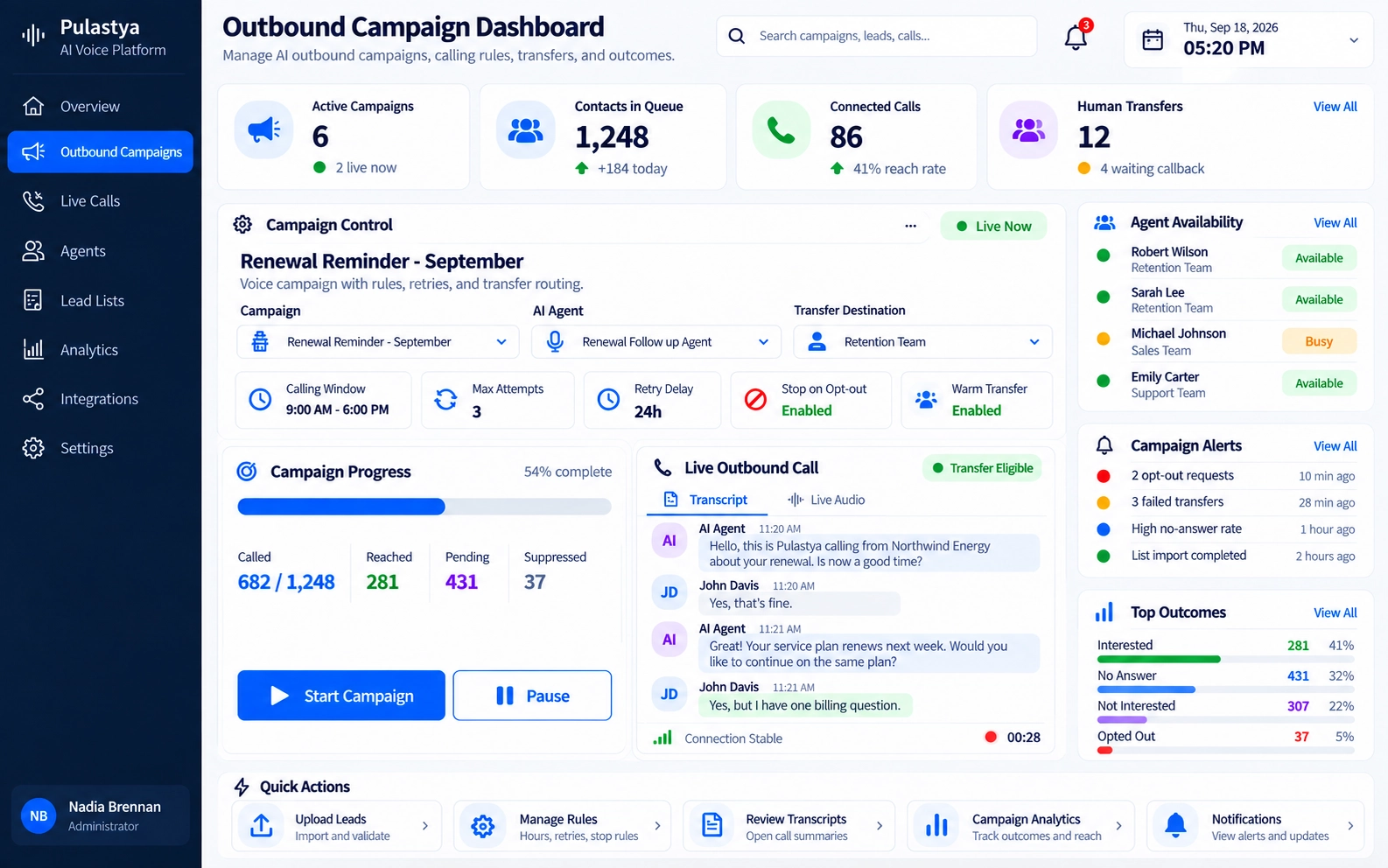
Schedules, agent assignment and destinations are covered in AI dialer campaign management. Two setup areas deserve attention before the first call, because mistakes in either one repeat on every contact in the list.
Lead Lists
The quality of the list sets the ceiling for the campaign. Software should validate phone numbers, flag duplicates, carry existing opt-outs forward and track each contact's status over time. The guide to uploading and managing leads for AI calling campaigns covers validation, duplicates and disposition fields.
Agent Assignment and Configuration
Each campaign should use an agent configured for that call type, including its greeting, disclosure wording, questions, objection responses and transfer triggers. Safe practice is covered in configuring prompts, persona and behavior, and multilingual campaigns are covered in language, voice and persona settings for calling agents.
Calling Hours, Retry Logic and Stop Rules
Calling rules decide when a contact may be called and when the software must stop trying. They protect contacts from unwanted repeat calls and protect the business from calling outside permitted windows, so treat them as required settings rather than optional tuning.
- Calling windows per campaign, evaluated in the contact's local time zone rather than the caller's.
- Holiday and blackout dates, plus defined behavior when a window closes mid-campaign.
- A maximum number of attempts per contact and a minimum delay between attempts.
- Retry eligibility by outcome, since no answer, a busy line and a voicemail may need different rules.
- Immediate stop conditions, such as an opt-out request, a wrong number or a completed goal.
Time-zone handling and closed-window behavior are explained in calling hours and time-zone rules for AI dialer campaigns. Attempt limits, retry delays and stop conditions are covered in AI dialer retry logic.
A retry rule without a matching stop rule creates a calling loop. In any trial, confirm that an opt-out or a wrong number ends future attempts across every campaign, not only the one that placed the call.
Outbound Call Types for Sales and Service Teams
AI outbound calls work best when the goal is narrow and the next step is clear: qualify, confirm, remind, renew or book. Each call type needs its own script boundaries, captured fields and transfer triggers, so treat the table below as a starting point rather than a template.
| Call type | Typical goal | Handle with care |
|---|---|---|
| Lead follow-up and qualification | Confirm interest, needs and timing | Consent to call and clear identification of the business |
| Appointment calls | Confirm, reschedule or capture a booking request | Booking depends on access to the scheduling system |
| Reminders | Remind about a visit, deadline or payment date | Keep sensitive details out of voicemail messages |
| Renewals | Start a renewal conversation and capture intent | Changed terms or pricing go to a person |
| Collections | Deliver approved wording and offer a transfer | Regulated in many jurisdictions; legal review required |
Sales Qualification and Follow-Up
For sales teams, the AI agent confirms interest, asks a short set of qualifying questions, and transfers or captures a meeting request for contacts who are ready. The detailed workflow sits in the guide to the AI lead qualification agent, and the broader sales use case is covered in AI voice agents for sales calls and follow-up.
Reminders, Renewals and Appointment Calls
Service calls usually confirm something the customer already expects. The agent should state the purpose early, capture the response in a consistent field, and hand off anything involving changed terms, complaints or disputes. Feedback calls follow the same shape with a different instrument; see customer surveys on outbound calls. Identity checks should follow the organization's approved process, not improvised questions.
Collections Calls
Collections calls carry the highest regulatory and reputational risk of the common outbound call types. Treat them as a legal review item before automating anything, use only approved wording, and route disputes, hardship conversations and payment arrangements to trained staff.
Human Transfer and Call Outcomes
Outbound software should transfer a call to a person when the contact qualifies, asks for a human, raises something sensitive or goes beyond the script. Calls that do not transfer still need a recorded outcome, because both paths decide whether a campaign produces results the team can use.
Transfer is harder in outbound calling because a person must be available at the moment the contact is ready. The article on AI-to-human transfer in outbound calling campaigns covers availability checks, warm transfer and fallback when nobody answers.
- Distribution: how eligible transfers are shared among available people, explained in round robin, random and simultaneous call distribution.
- Context: what the receiving person sees about the lead and the conversation, covered in passing lead and conversation context to a human agent.
- Fallback: what happens when nobody is free, such as a callback request saved with the captured details.
- Dispositions: a consistent outcome on every call, such as qualified, callback requested, not interested, wrong number or opted out.
Campaign Analytics, Reporting and Notifications
Campaign analytics show whether outbound calling is reaching the right people and producing the intended outcome. Useful software reports contact progress, outcomes, transfers and exceptions at campaign level, and lets a manager open an individual transcript or summary when a number looks wrong.
- Contact coverage: which contacts were reached, are still pending, have exhausted attempts or were suppressed.
- Outcome mix: dispositions by campaign, list segment and agent configuration.
- Transfer health: attempted, connected and failed transfers, with the reason for each failure.
- Exceptions: invalid numbers, opt-outs and calls that ended unexpectedly.
Choosing metrics is a design task of its own. The guide to what to measure in AI dialer campaigns explains operational metrics and their interpretation, while campaign dashboards and live call tracking covers what belongs on a live view.
Reports and alerts matter most when campaigns run unattended overnight or across time zones. See campaign reporting and completion notifications for report contents, exception summaries and the notification triggers teams typically configure.
Compliance Considerations for Automated Outbound Calls
Automated outbound calls face stricter rules than inbound calls in many countries, so compliance controls belong in the software evaluation rather than after launch. Which rules apply depends on the jurisdiction, the call purpose and the relationship with the contact, and they should be confirmed with qualified legal counsel.
- Consent: a record of whether and how each contact agreed to be called, stored with the lead.
- Calling windows: permitted hours enforced in each contact's local time.
- Opt-outs: a spoken request to stop calls honored immediately and across campaigns.
- Suppression: lists checked against internal and applicable do-not-call lists before dialing.
- Disclosure: clear identification of the business and, where required, that the caller is an AI system.
- Recording: consent notices for recorded calls where local rules require them.
Confirm consent, disclosure and calling-hour obligations for your campaigns with your legal or compliance team before launch. The controls are described in more detail in AI dialer compliance for consent, opt-outs and do-not-call rules.
How to Evaluate AI Outbound Calling Software
Evaluate AI outbound calling software by running a realistic trial campaign, not by comparing feature lists. Use your own contact scenarios, calling rules and transfer destinations, and check that each rule holds when something goes wrong, such as an opt-out mid-call or a transfer nobody answers.
- Can calling windows, attempt limits and stop rules be set per campaign and verified in a test run?
- Does a spoken opt-out stop future calls across all campaigns?
- Can the agent's questions, disclosures and transfer triggers be reviewed and approved before launch?
- What does the receiving person see when a call transfers, and what happens if nobody answers?
- Are transcripts, summaries and dispositions available for every call and exportable to your systems?
- Which telephony and AI model costs are billed separately from the software itself?
Decision guide
Outbound Calling Software Evaluation Framework
| Capability | What to verify in a trial | Why it matters |
|---|---|---|
| Campaign and list controls | Separate agent, list and rules per campaign | Settings do not leak between call types |
| Calling hours | Contact local time enforced in tests | Avoids calls outside permitted windows |
| Retry and stop rules | Attempt limits and cross-campaign opt-outs | Prevents repeat calls and calling loops |
| Human transfer | Availability check, context and fallback | Ready contacts reach a person |
| Outcomes and analytics | Disposition and summary on every call | Campaign results can be reviewed |
| Compliance records | Consent, suppression and disclosure logs | Supports legal and compliance review |
Testing each control in a realistic trial campaign shows whether outbound software enforces its rules when calls do not go to plan.
Outbound controls are only part of the decision. Voice quality, interruption handling, knowledge grounding, security and vendor support also matter, and the AI voice agent software evaluation checklist covers those broader criteria in detail.
What to Confirm Before You Commit to an Outbound Platform
By the time you reach a vendor conversation, your campaign rules, transfer destinations and compliance checklist should already be written down. The evaluation then becomes a matching exercise rather than a demo: which of your requirements does the platform meet today, which need configuration work by someone, and which sit outside its scope entirely.
Ask about current scope rather than roadmap, because an outbound program that depends on an unreleased control is an outbound program that cannot launch.
Campaign controls are the part buyers most often assume and least often test. Ask a vendor to run your own list through a trial campaign and show each control working: list validation, calling windows, attempt caps, suppression, pacing, dispositions, answering-machine handling and number management.
A feature table is not evidence that a business team can configure any of them without engineering help.
Platforms differ widely on which of these a business team can configure alone, which need engineering help, and which do not exist at all, so treat each as a question to answer in a trial run rather than a box to tick on a feature list.
Consent records and local call-recording obligations stay with your business whichever platform places the calls.
The conversation layer is a separate set of questions, and it is the easiest part to check quickly because you can hear the answers in a test call. Pulastya, the voice agent platform SDLC Corp builds and supports, places outbound calls as well as answering inbound ones, and it transcribes and summarizes both.
Its answers are grounded in the documents an organization provides, such as pricing sheets and policy notes, rather than in model recall, which is what keeps a quoted figure or a stated term defensible after the call.
When a contact asks something the agent cannot answer from that material, it says so and offers a transfer instead of guessing, which is the behavior to insist on in any platform you shortlist.
Two behaviors decide whether an outbound call sounds like a conversation or a recording. The first is interruption handling: a contact who cuts in to ask who is calling should be heard immediately rather than talked over, which needs barge-in and end-of-speech detection rather than fixed turn timers.
The second is the handoff: a transfer should carry the conversation context and a call summary to the person receiving it, and there should be a defined failover to a human line when the agent cannot continue at all.
The platform supports both, and a browser test call before launch lets the team hear how the agent sounds, how it recovers from an interruption and what the receiving person is handed.
Records close the loop. Transcripts, call summaries and a dashboard showing each call's status, duration and outcome give a manager something concrete to open when a campaign number looks wrong, and a setup aimed at business teams rather than developers decides whether the people who own the campaign can change it without filing a ticket.
Set your own rules, destinations and compliance checklist against the current scope of this inbound and outbound voice agent platform, and if you would rather see the dashboard, transcripts and transfer settings first, walk through the call dashboard and transfer settings.
Conclusion
AI outbound calling software is most effective when campaign controls, conversation quality and human handoffs work together. A reliable setup validates lead lists, respects local calling hours, limits retries, honors opt-outs and records a clear outcome for every call. These safeguards make automated follow-ups, reminders and qualification calls easier to manage without sacrificing oversight.
Before selecting a platform, test it with your own call scenarios rather than relying on a feature list. Check consent and suppression rules, interruption handling, knowledge-grounded responses, live transfers, fallback behavior and reporting. Choose software your team can configure and audit, and confirm applicable legal obligations before launching campaigns at scale.
Frequently Asked Questions
Yes. Most AI outbound calling software can transfer a call when the contact qualifies, asks for a person or raises something outside the script. A transfer only works if someone is available, so check how the software handles fallback, such as saving a callback request with the details already captured.
A predictive dialer places calls and connects answered calls to waiting human agents. AI outbound calling software has an AI agent hold the first conversation, capture answers and decide whether to transfer, so people join only the calls that need them. Calling rules and compliance controls matter for both.
Look for consent records, calling windows enforced in the contact's time zone, immediate opt-out handling across campaigns, do-not-call suppression, disclosure wording and recording notices. Which rules apply depends on your jurisdiction and call purpose, so confirm your obligations with legal counsel before launch.
Yes. It handles outbound calls as well as inbound ones, so it can place calls such as follow-ups with warm leads, and it transcribes and summarizes each call. Campaign-level controls are a separate requirement set from the conversation itself: list what your program needs, such as lead list upload, calling windows, retry limits, do-not-call suppression, pacing and dispositions, and verify each one in a trial run before you build a campaign around any platform.