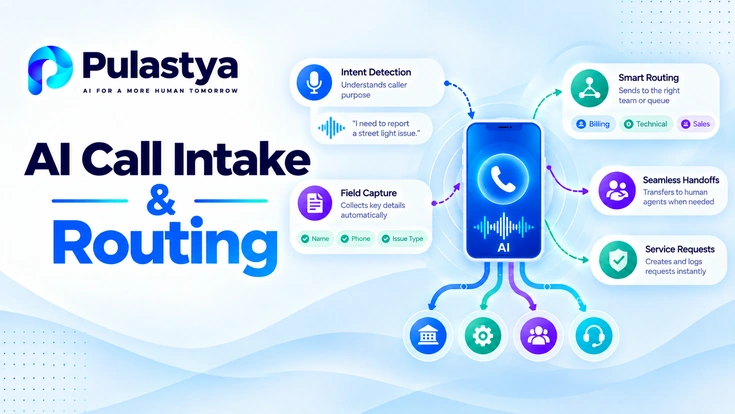
AI call automation improves intake when it can classify why the person called, collect only the missing details, and direct the request toward the safest useful outcome instead of pushing every caller through the same queue.
- Operational focus Good intake automation improves both caller experience and downstream agent readiness.
- Control layer Classification, field capture, routing rules, and escalation should work as one workflow.
- Measurement Resolution, routing accuracy, transfer rate, and handling time reveal whether automation is actually helping.
That matters because traditional intake wastes time in two places at once: callers repeat the same information, while operations teams spend live agent capacity on triage that could have been structured earlier. The goal is not just faster routing. It is cleaner intake, better downstream context, and fewer avoidable handoffs.
Why Traditional Call Intake Creates Queues and Repetitive Triage
Traditional call intake usually begins with generic menus or a live agent who has to diagnose the request from scratch. That creates a queueing problem and a context problem at the same time. Even when the final resolution is straightforward, the business pays for repeated explanation, repeated authentication, and repeated transfers.
The friction shows up in small moments: callers do not know which option fits, live agents gather the same standard fields over and over, and downstream teams receive only fragments of what was already said. Automation is valuable when it shortens that repetitive front-end work without losing control over exceptions.
A useful target state is not "remove every human." It is to automate the predictable intake steps so human attention is preserved for judgment-heavy, high-risk, or emotionally sensitive calls.
Step 1: Capture the Call and Establish Basic Context
The first step is deciding what the system can know immediately from the channel. Telephony metadata, language, caller history, business hours, queue state, and previously known account context can all shape the first follow-up question before the AI starts collecting new details.
That initial context reduces avoidable friction. If the system already knows the location, likely service line, or returning-caller status, it can skip generic prompts and focus on what is missing instead of forcing the caller through a one-size-fits-all opening script.
Basic context is also a control input. After-hours behavior, emergency routing, and preferred queues often depend on channel and account metadata before the content of the request is fully classified. Whether the request belongs on a call at all is a separate question, taken up in choosing between a spoken and a typed channel.
Step 2: Classify Intent and Determine the Requested Outcome
Once the call is live, the system needs to identify both the immediate request and the likely outcome the caller wants. That is where voice AI intent classification becomes operationally useful: the platform is not only naming the intent, it is deciding whether the call points toward information, a service request, a routing decision, or a human exception path.
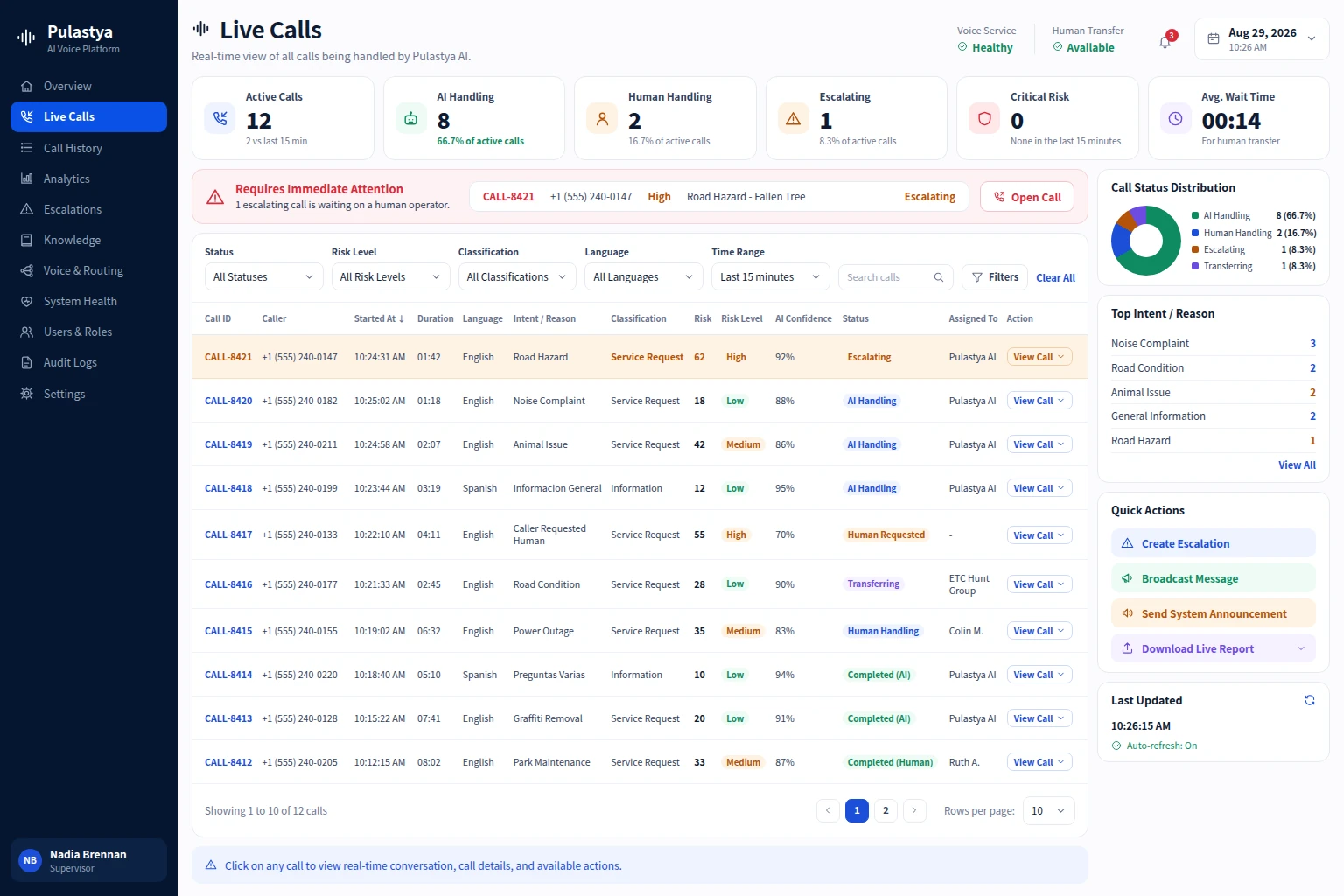
This stage should support ambiguity. Callers often start with a symptom rather than a precise request, or they mix several intents together in one sentence. The classifier therefore needs confidence handling and reclassification, not just a single label chosen from a static list.
Outcome detection matters because two callers can describe similar issues but need different next steps. One wants an answer. Another wants a case opened. A third needs to reach a licensed or specialized team immediately.
Step 3: Retrieve Approved Knowledge or Collect Required Fields
After the intent is known, the system should decide whether it already has enough information to help. Some calls can be answered from approved knowledge. Others need a short intake form completed through conversation so the next workflow or agent receives a structured payload instead of a loose transcript.
This is also where the system should be disciplined about source selection. Pull governed information from approved knowledge, but gather or confirm the required fields before trying to create a workflow or hand the request to another queue. That keeps the conversation efficient without pretending the system knows facts it has not verified.
The highest-quality experiences feel selective. The agent asks only the questions that matter for the current path and does not bury the caller in unnecessary field collection.
- Answer directly when the request is factual and the source is approved.
- Collect only the fields required for the next operational step.
- Record the structured payload so the next queue does not repeat discovery.
Step 4: Apply Routing, Availability and Escalation Rules
This is the control layer that turns classification into an operational outcome. AI call routing is not just matching keywords to queues. It combines intent, availability, priority, business hours, risk triggers, language needs, and exception rules to decide whether the call stays with AI, moves to a team, or pauses for a different fallback path.
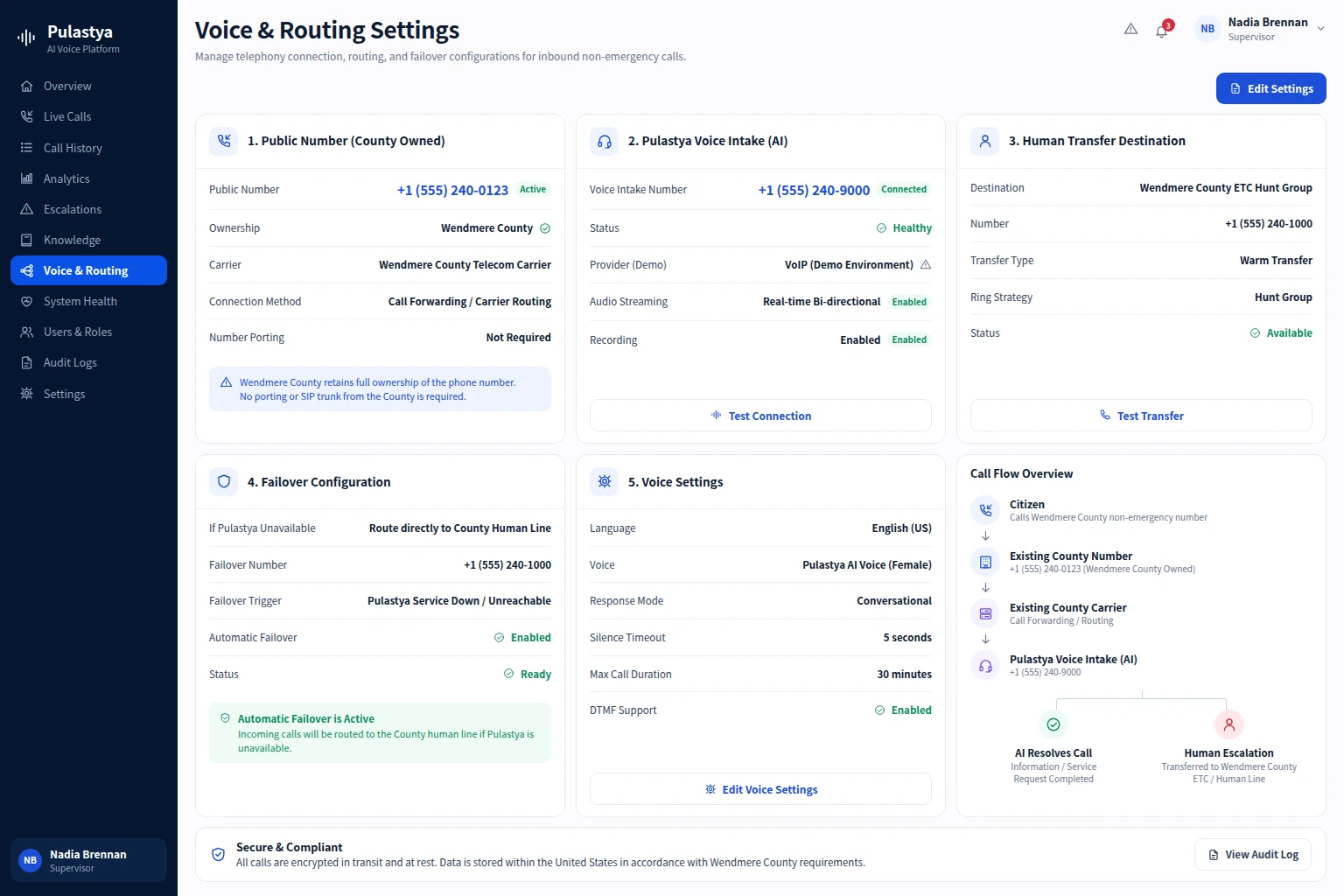
Routing rules should stay deterministic even when the upstream understanding is probabilistic. If a request involves a regulated topic, a vulnerable caller, or an unavailable team, the system should follow the configured rule path rather than improvising from conversational confidence alone.
Availability is often the difference between a useful automation and a frustrating one. When the destination queue is closed, overloaded, or role-restricted, the AI should know whether to schedule a callback, open a case, capture a promise-to-contact window, or present another safe path.
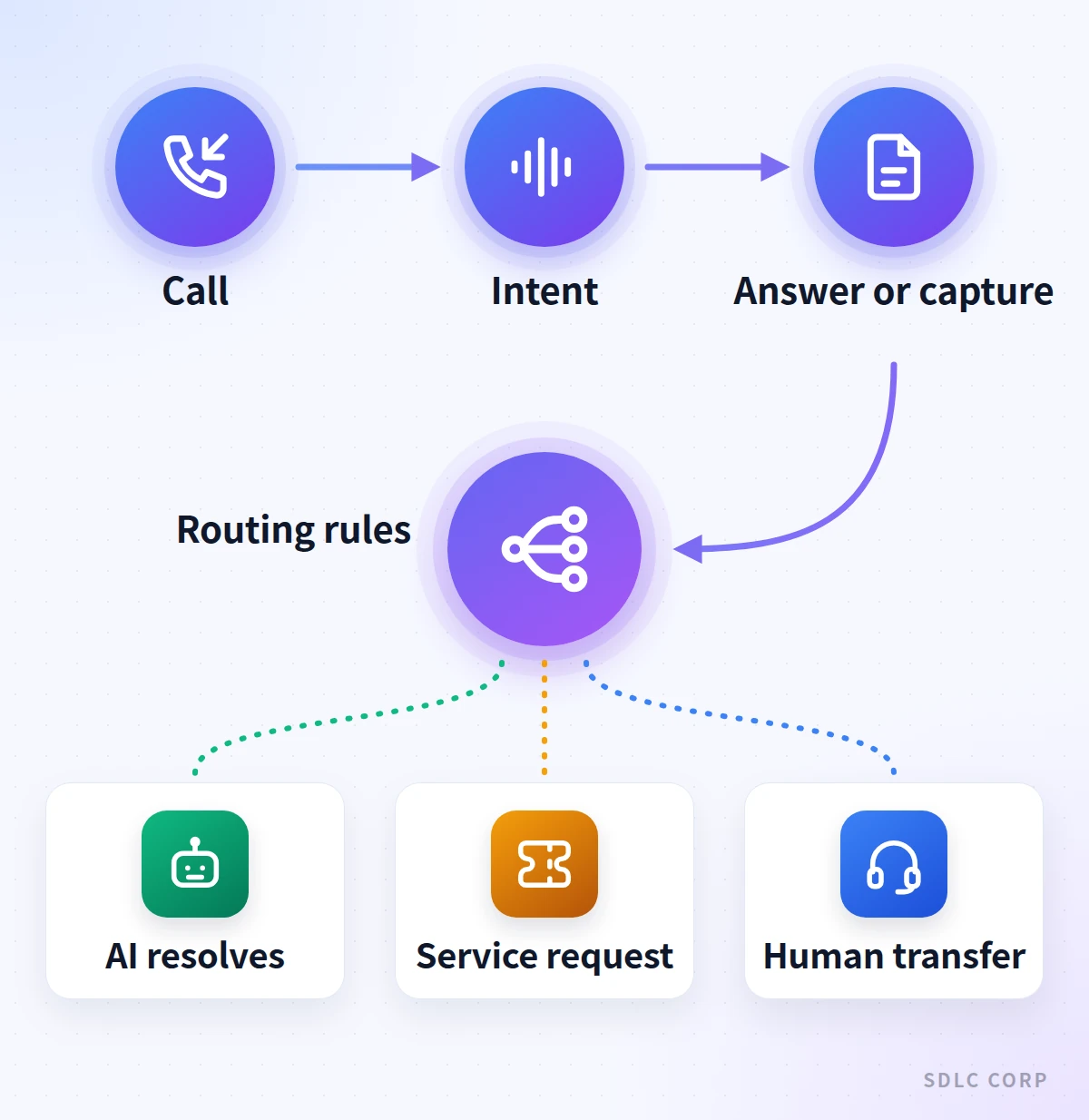
Intake to outcome
How Automated Intake Turns a Call Into the Right Next Step
- Capture the call and contextChannel metadata, language, hours and known caller details shape the opening
- Classify intent and outcomeName the request and the outcome wanted; clarify when confidence is low
- Answer or capture fieldsUse approved knowledge, or collect only the fields the next step needs
- Apply routing rulesIntent, availability, priority, hours, risk and language decide the path
Possible outcomes
- Resolve with AIGrounded answer or a low-risk action completed in the call
- Create a service requestStructured record sent to the team that acts next
- Transfer with contextIntent, summary and captured fields passed to a person
Notice that field capture and routing rules come before the outcome, so a request or transfer arrives with the details the next team needs.
Step 5: Resolve With AI, Create a Service Request or Transfer
Once the route is known, the final action should match the level of certainty and authority available in the call. Some requests can be resolved immediately. Others need a workflow created and handed to an internal team.
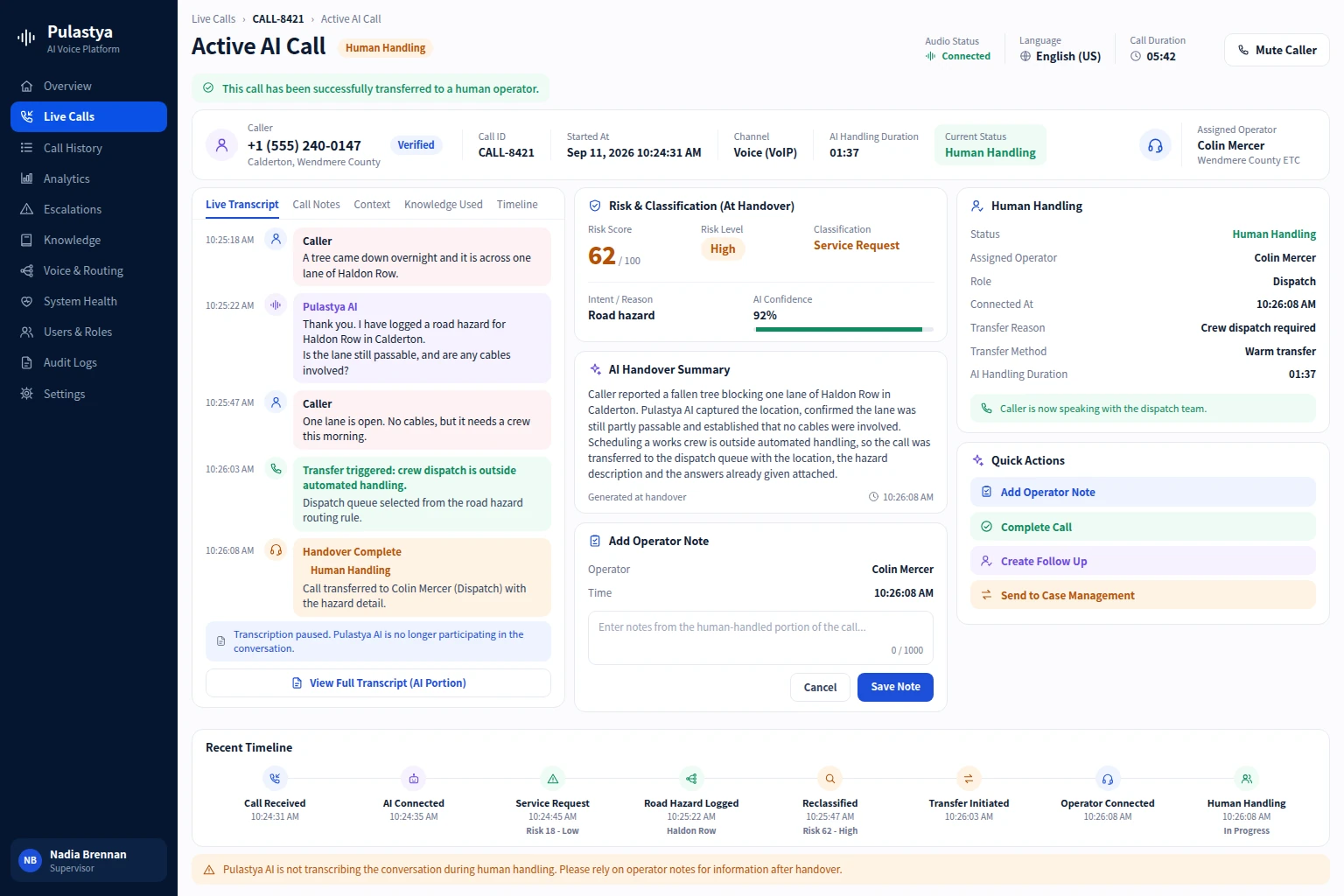
That is where AI service request automation becomes more than an integration detail. It turns a call into an operational record with the right fields already captured.
Transfers should only happen when they are the best next step, not because the system ran out of conversational confidence without a fallback. If a handoff is necessary, the AI should pass intent, summary, caller details, and any captured evidence so the receiving team can act instead of starting discovery again.
This stage is where automation earns trust. A platform that can close simple requests, package actionable requests cleanly, and escalate complex ones with context usually outperforms a front-end system that only pretends to automate.
Use AI when the answer is grounded and the action is safe to complete in-call.
Open the right workflow when the next team can act asynchronously on structured data.
Escalate with summary and captured fields when judgment or approval is required.
How Summaries and Metadata Improve Downstream Handling
A short summary and clean metadata often matter more downstream than the transcript alone. Teams need the reason for the call, the requested outcome, the current status, the missing items, and what has already been attempted. Without that packaging, automation only moves work rather than removing it.
Summaries also improve accountability. Supervisors can review whether the AI framed the issue correctly, whether the right route was chosen, and whether any escalation trigger or risk note was missed before the next team acted on the request.
Metadata should stay operationally useful. Record fields that change the next decision, not a bloated export of everything the model could possibly infer from the conversation.
Metrics to Track: Resolution, Routing Accuracy, Transfer Rate and Handling Time
The simplest scorecard starts with four metrics: how many calls are resolved without human help, whether the route chosen was correct, how often transfers still happen, and how much handling time was removed from the front end of the process.
Those numbers only become meaningful when paired with qualitative review. A low transfer rate can hide bad outcomes if callers are being trapped in the wrong branch. A fast handling time can still be poor if the downstream team receives unusable notes or incomplete field capture.
The better question is whether intake got cleaner. If the data is structured, the path is controlled, and the caller reaches the right outcome with less repeated explanation, the automation is doing its job.
The Pulastya call-routing case study shows how classification, routing, and escalation remain connected across the intake process.
Conclusion
AI call automation works when intake, intent classification, selective field capture, routing rules, and human handoffs operate as one connected workflow. Instead of forcing every caller through the same queue, it helps resolve straightforward requests, creates structured service records, and transfers complex calls with the right context. Track resolution, routing accuracy, transfer rate, and handling time to confirm that automation reduces repetitive work without sacrificing caller experience.
SDLC Corp applies this approach through Pulastya, connecting defined call types with controlled routing, approved knowledge, service-request details, and context-rich escalation. The Pulastya voice automation platform brings voice intake, transcripts, routing controls, and human transfer together. For the broader picture, explore inbound AI voice agents, including knowledge answers, after-hours coverage, and downstream workflows.
Frequently Asked Questions
Routing is one stage in the broader workflow. Call automation also includes intake, intent classification, field capture, resolution, workflow creation, and the context passed into any transfer.
Because downstream teams need structured details, not only a transcript. Good field capture lets the next workflow or agent act immediately instead of repeating discovery.
No. Some calls are better answered by AI, while others should create a request or transfer quickly. The right outcome depends on risk, authority, caller need, and available evidence.
Routing accuracy is often the earliest signal. If the call reaches the wrong queue or creates the wrong request, the automation may look fast while still increasing operational rework.